1. Киришүү
This manual provides essential information for the safe and efficient operation of your TOPTRO Quadra Projector. Please read this manual thoroughly before using the projector and retain it for future reference. The TOPTRO Quadra Projector is designed to deliver a high-quality visual and audio experience with its advanced features and smart capabilities.
2. Коопсуздук маалыматы
- Вентиляция тешиктерин жаппаңыз. Ашыкча ысып кетүүнүн алдын алуу үчүн проектордун айланасында адекваттуу аба агымын камсыз кылыңыз.
- Электр тогуна урунбоо же өрттөн сактануу үчүн проекторду жамгырдын же нымдуулуктун таасирине дуушар кылбаңыз.
- Проектор менен келген кубат адаптерин гана колдонуңуз.
- l болгондо проектордун объективине түз кароодон качыңызamp күйүп турат, анткени жаркыраган жарык көзгө зыян келтириши мүмкүн.
- Проектор кулап калбашы үчүн аны туруктуу, түз жерге коюңуз.
- Проекторду өз алдынча бөлүүгө же оңдоого аракет кылбаңыз. Бардык тейлөөлөрдү квалификациялуу кызматкерлерге тапшырыңыз.
3. Пакеттин мазмуну
Пакетте бардык буюмдар бар экенин текшериңиз:
- 1 x TOPTRO Quadra Projector
- 1 x HDMI кабели
- 1 x User Manual
- 1 x Алыстан башкаруу
4. Продукт бүтүп калдыview
Familiarize yourself with the main components and interfaces of your TOPTRO Quadra Projector.
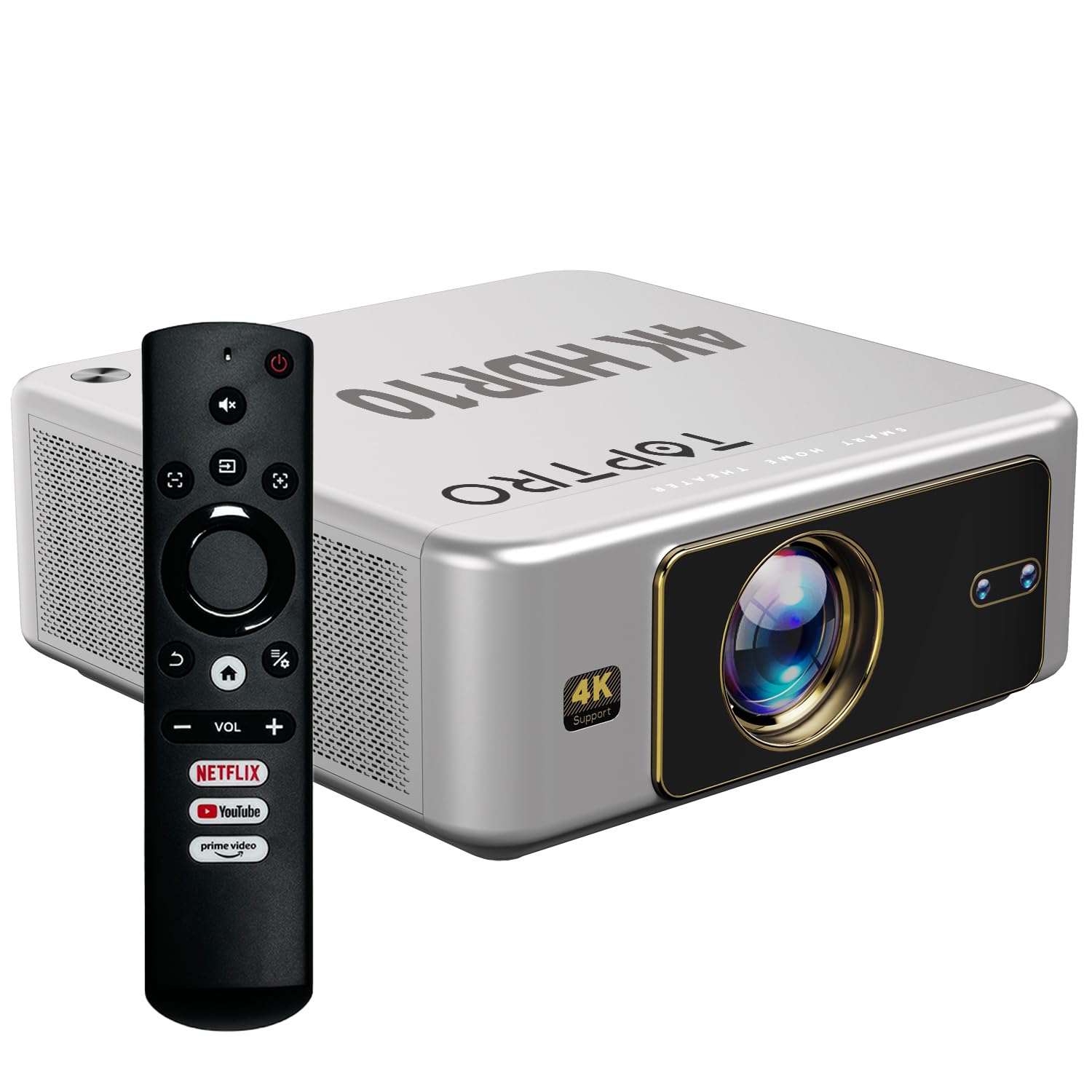
Сүрөт 4.1: Алдыңкы view of the TOPTRO Quadra Projector with included remote control.

Figure 4.2: Rear panel of the projector displaying the power input, audio jack, HDMI ports, and USB ports.
5. Орнотуу
5.1 Жайгаштыруу жана проекциянын өлчөмү
Position the projector on a stable surface. The TOPTRO Quadra Projector supports a maximum screen size of 300 inches. Adjust the distance from the wall or screen to achieve your desired image size.

5.1-сүрөт: Ар кандай экран өлчөмдөрү үчүн сунушталган проекция аралыктары.
5.2 Кубат туташтыруу
- Электр кабелин проектордун кубат киргизүү портуна туташтырыңыз.
- Электр кабелинин экинчи учун ылайыктуу электр розеткасына сайыңыз.
5.3 Баштапкы күйгүзүү жана негизги орнотуулар
- Аны күйгүзүү үчүн проектордун же пульттун кубат баскычын басыңыз.
- Upon first use, the projector may guide you through initial setup steps, including language selection and network connection.
5.4 Фокустоо жана Keystone коррекциясы
The TOPTRO Quadra Projector features AI-powered automatic focus and keystone correction. This system automatically adjusts the image for optimal clarity and shape.
- Auto Focus: The projector will automatically adjust the image sharpness.
- Auto Keystone: The projector will automatically correct trapezoidal distortion to ensure a rectangular image.
- Auto Obstacle Avoidance & Screen Fit: The projector can detect obstacles and adjust the image to fit the screen area.
If automatic adjustments are not satisfactory, manual adjustments can be made through the settings menu. Navigate to the 'Display & Sound' settings to access these options.

Figure 5.2: Automatic image correction features.
6. Операция
6.1 Колдонуучунун интерфейси жана навигациясы
The TOPTRO Quadra Projector runs on a Net-Flix Certified Linux OS, providing a user-friendly interface. Use the remote control to navigate through menus and select applications.

Figure 6.1: Home screen with pre-installed streaming applications.
6.2 Байланыш
The projector offers various connectivity options for external devices.
- HDMI: Connect your laptop, MacBook, Blu-ray player, TV sticks, TV boxes, or gaming consoles (e.g., PS4) using the dual HDMI ports. The projector supports HDMI CEC and HDMI EARC for enhanced audio return channel functionality.
- USB: Two USB ports are available for connecting pendrives or hard disks to play media fileтүздөн-түз с.
- 3.5 мм аудио чыгышы: Connect external headphones or speakers for a personalized audio experience.
- Wi-Fi: Utilize the 6th Gen Dual Band Wi-Fi (2.4 GHz + 5 GHz) for internet access and streaming.
- Bluetooth 5.2: Connect Bluetooth speakers, headphones, or other compatible audio devices. The projector also supports two-way Bluetooth, allowing it to function as a Bluetooth speaker.
- Miracast: Wirelessly mirror your screen from compatible devices.

Figure 6.2: Connectivity options for external devices.
6.3 Дисплей орнотуулары
Adjust image quality and display features through the 'Display & Sound' menu.
- Сүрөт режими: Select from various preset picture modes (e.g., Vivid) or customize settings like brightness, contrast, and color.
- 4K HDR10+ Support: The projector plays true 4K resolution HDR10+ videos, offering enhanced contrast and color depth.
- MEMC (Motion Estimation, Motion Compensation): This technology improves video smoothness and clarity, especially for fast-moving scenes, by interpolating frames.

Figure 6.3: MEMC technology for smoother visuals.
6.4 Аудио орнотуулары
Manage audio output and formats via the 'Display & Sound' menu.
- Dolby Atmos жана Dolby Digital Plus: The projector supports these advanced audio technologies for immersive sound.
- eARC режими: Enable eARC for high-quality audio return from compatible devices.
- Чыгуу форматы: Select the appropriate audio output format (e.g., Auto, PCM, Passthrough, Dolby Digital, Dolby Digital Plus) based on your connected audio system.

Figure 6.4: Immersive audio with Dolby Atmos support.
7. Техникалык тейлөө
Туура тейлөө проекторуңуздун узак иштөөсүн жана оптималдуу иштешин камсыз кылат.
- Линзаны тазалоо: Проектордун линзасын оптикалык беттер үчүн атайын жасалган жумшак, мамыксыз чүпүрөк менен акырын сүртүңүз. Абразивдүү материалдардан же катуу химиялык заттардан алыс болуңуз.
- Тышкы тазалоо: Use a soft, dry cloth to clean the exterior of the projector.
- Чаңдын алдын алуу: The TOPTRO Quadra Projector features a fully sealed optical engine, which helps prevent dust, dirt, and moisture from entering the light path. This design reduces the need for frequent internal cleaning and maintains consistent image quality.
8. Кыйынчылыктарды
Проекторуңузда көйгөйлөргө туш болсоңуз, төмөнкү жалпы көйгөйлөрдү жана чечимдерди караңыз:
| Көйгөй | Мүмкүн себеп | Чечим |
|---|---|---|
| Сүрөт көрсөтүлгөн жок | Incorrect input source selected; loose HDMI/USB connection; power issue. | Verify input source in settings; check cable connections; ensure projector is powered on. |
| Үн жок | Volume too low or muted; incorrect audio output setting; external audio device not connected properly. | Adjust volume; check 'Sound output' settings; ensure external speakers are connected and powered. |
| Сүрөт бүдөмүк же бурмаланган | Focus or keystone correction issues; projector not placed correctly. | Allow auto-focus/keystone to complete. If issues persist, manually adjust focus and keystone in 'Display & Sound' settings. Ensure the projector is perpendicular to the screen. |
| Пульт иштебей жатат | Batteries are low or depleted; remote not pointed at IR receiver; obstruction. | Replace batteries; ensure clear line of sight to the projector's IR receiver. |
| Вентилятордун үнү байкалып турат | Normal operation; projector is working hard; ventilation blocked. | Ensure adequate ventilation around the projector. Fan noise is a normal part of projector operation, especially during high-performance tasks. |
9. Техникалык шарттар
Key technical specifications of the TOPTRO Quadra Projector:
| Өзгөчөлүк | Деталь |
|---|---|
| Бренд | TOPTRO |
| Модель аты | TOPTRO Quadra Projector 4K HDR10+ Dolby |
| Продукциянын өлчөмдөрү | 24 x 20 x 10 см |
| Элемент Салмагы | 2 кг |
| Аппараттык интерфейс | 3.5mm Audio, Bluetooth 5.2, Dual HDMI (CEC, EARC), Dual USB |
| Шайкеш түзмөктөр | Gaming Console, Laptop, Smartphone, Speaker, Television |
| Өзгөчөлүктөр | Dolby Atmos - Dolby Digital Plus, 4K HDR 10+/HLG, Net-Flix Certified Linux OS, 2GB RAM, 32GB ROM, Auto Focus & Keystone, Native 1080p Full HD & True 4K Support, 32000 Lumens Brightness (2600 ANSI), 15W Big Speakers, HDMI ARC, Dual HDMI, Built-in Apps, Dual 5G & 2.4G WiFi 6, Bluetooth, WiFi Display, Electronic Focus & 6D Electronic correction, Fully Sealed Optical Engine, MEMC |
| Дисплей технологиясы | LCD |
| Сүрөттүн жарыктыгы | 32000 люмен (2600 ANSI) |
| Сүрөттүн карама-катышы | 22000:1 |
| Аспект катышы | 16:9 |
| Native Screen Resolution | 1920 x 1080 (Full HD) |
| Колдоого алынган резолюция | Up to 3840 x 2160 Pixels (4K) |
| Жаңыртуу ылдамдыгы | 60 Гц |
| Lamp Жашоо | 50000 саат |
| Форма фактору | Portable |
| Монтаж түрү | Шыпка орнотуу |
| Келип чыккан өлкө | Кытай |
10. Кепилдик жана колдоо
For warranty information, technical support, or service inquiries, please contact TOPTRO Projectors India using the details below:
- Электрондук почта: support@toptro.in or sreeprojectors@gmail.com
- Whatsapp: 8341888860
- Webсайт: toptro.in
Please have your product model number (Quadra 4K HDR10+ Dolby) and purchase details ready when contacting support.


