1. Киришүү
Thank you for choosing the EQCOTWEA TJ-180L Series Electric Meat Cutting Machine. This commercial-grade meat slicer is designed for efficient and precise cutting of various non-frozen meats. This manual provides essential information for the safe and effective operation, maintenance, and care of your machine. Please read it thoroughly before initial use and retain it for future reference.
2. Коопсуздук нускамалары
To prevent injury or damage to the machine, always observe the following safety precautions:
- Машинаны иштетүүдөн мурун бардык нускамаларды окуп чыгыңыз.
- Ensure the power supply matches the machine's requirements (110V, 1100W).
- Тазалоодон, тейлөөдөн мурун же колдонулбай турганда ар дайым машинаны розеткадан ажыратыңыз.
- Keep hands and foreign objects away from moving blades and the feeding port during operation.
- Бузулган шнурлар же сайгычтар менен машинаны иштетпеңиз.
- Use the machine only for its intended purpose: cutting non-frozen meats.
- Never attempt to cut bones or frozen meat, as this can damage the blades and motor.
- Машина туруктуу, түз бетке коюлганын текшериңиз.
- Балдарды жана уруксаты жок адамдарды машинадан алыс кармаңыз.
- Wear appropriate protective gear, such as cut-resistant gloves, when handling blades.
3. Продукт бүтүп калдыview жана компоненттер
The EQCOTWEA TJ-180L Series meat cutting machine features a robust stainless steel construction and an efficient design for commercial use.
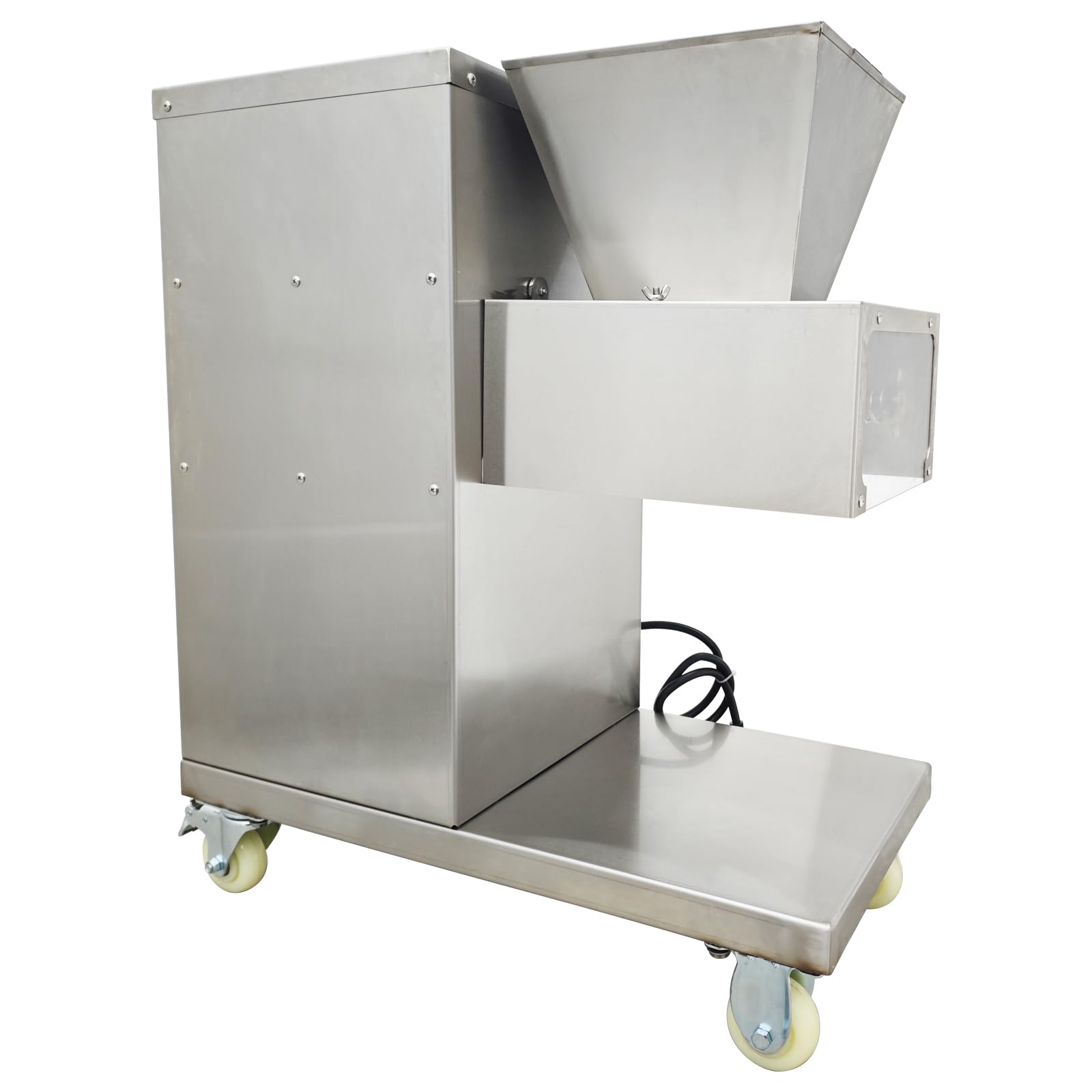
3.1-сүрөт: Жалпысынан view of the EQCOTWEA TJ-180L Series Electric Meat Cutting Machine.

3.2-сүрөт: Каптал view showing the control panel with power and emergency stop buttons.
Негизги өзгөчөлүктөрү:
- Күчтүү мотор: 1100W motor capable of processing up to 800KG of meat per hour.
- Туруктуу бычактар: Special stainless steel blades, 4mm thickness, designed for longevity.
- Replaceable Blade Sets: Knife sets ranging from 2.5mm to 25mm can be replaced to meet various cutting requirements.
- Тазалоо оңой дизайн: External cantilever design for easy disassembly and cleaning of cutting tools.
- Мобилдүүлүк: Equipped with rotatable wheels for easy movement.
- Feeding Port: Approximately 10.63 x 10 inches, suitable for various meat sizes.

Figure 3.3: Illustration of blade selectivity and the dimensions of the feeding port.

Figure 3.4: Detailed product dimensions (26"L x 13.8"W x 30.7"H).
4. Орнотуу
- Пакеттен чыгаруу: Машинаны таңгагынан кылдаттык менен чыгарыңыз. Ар кандай жеткирүү зыянын текшериңиз.
- Жайгашкан жери: Position the meat cutting machine on a stable, level, and clean surface. Ensure adequate space around the machine for operation and ventilation. The rotatable wheels allow for easy positioning.
- Кубат туташуу: Connect the power cord to a grounded 110V electrical outlet. Ensure the machine's power switch is in the "OFF" position before plugging it in.
- Алгачкы тазалоо: Before first use, clean all parts that will come into contact with food according to the "Maintenance and Cleaning" section.
5. Иштөө нускамалары
Follow these steps for safe and effective operation of your meat cutting machine:
- Даярдоо: Ensure the machine is clean and properly assembled. Verify that the blade set is securely in place.
- Этти даярдоо: Use only non-frozen meats such as beef, chicken, pork, or fish. Cut the meat into pieces that fit comfortably into the feeding port (approximately 10.63 x 10 inches). Remove any bones or excessively tough connective tissue.
- Күйгүзүү: Press the green "ON" button to start the machine. The blades will begin to rotate.
- Feeding Meat: Carefully feed the prepared meat into the feeding port. Do not force the meat. Allow the machine to pull the meat through the blades. Keep hands clear of the feeding port.
- Кесүү процесси: The vertical meat slicer with a single-layer knife will slice the meat once, shred it twice, and then cut it into small minces, depending on the blade set installed.
- Өчүрүү: Once cutting is complete, press the red "OFF" or emergency stop button to turn off the machine. Wait for all moving parts to come to a complete stop before proceeding.
- Ажыратыңыз: Always unplug the machine from the power outlet after use.

Сүрөт 5.1: Алдыңкы view of the machine, illustrating the feeding mechanism and blade area.
6. Техникалык тейлөө жана тазалоо
Regular cleaning and maintenance are crucial for the longevity and hygienic operation of your meat cutting machine.
- Биринчи коопсуздук: Always unplug the machine from the power outlet before cleaning or performing any maintenance.
- Blade Set Cleaning:
- For light cleaning, pull water to the entrance of the cover to flush the blade area.
- For thorough cleaning, remove the blade set. The cutting tool features an external cantilever design, making it easy to disassemble.
- Once removed, place the blade set in water for cleaning. Hand wash only.
- After cleaning, ensure the blades are completely dry before reassembly or storage.
- For optimal blade preservation, store the cleaned blades in a refrigerator bottle at temperatures under 0°C.
- Machine Body Cleaning: Дат баспас болоттон жасалган корпусту жарнама менен сүртүңүзamp cloth and mild detergent. Avoid using abrasive cleaners or scouring pads that could scratch the surface.
- Майлоо: The wheel gear and oil tank should be lubricated with appropriate food-grade oil on a regular schedule to ensure smooth operation.
- Бычакты курчутуу: Blunt blades should be sharpened using a grinding wheel. Consult a professional if you are unsure how to sharpen the blades safely.
- Кайра чогултуу: Reassemble all parts securely after cleaning and maintenance.

Figure 6.1: The external cantilever design facilitates easy disassembly and cleaning of the blade set.
7. Кыйынчылыктарды
If you encounter issues with your EQCOTWEA meat cutting machine, please refer to the following common troubleshooting tips:
- Машина башталбайт:
- Check if the power cord is securely plugged into a functional 110V outlet.
- Кубат өчүргүчтүн "ON" абалында экенин текшериңиз.
- Шашылыш токтотуу баскычы иштебегенин текшериңиз.
- Meat Not Cutting Properly:
- Ensure the meat is non-frozen and free of bones or hard gristle.
- Check if the blades are clean and sharp. Refer to the "Maintenance and Cleaning" section for blade sharpening.
- Verify that the blade set is correctly installed.
- Өзгөчө ызы-чуу же титирөө:
- Immediately turn off and unplug the machine.
- Inspect for any foreign objects caught in the blades or mechanism.
- Check if all components are securely fastened.
- Машинанын туруктуу бетинде экенин текшериңиз.
If the problem persists after attempting these solutions, please contact EQCOTWEA customer support for assistance.
8. Техникалык шарттар
| Өзгөчөлүк | Спецификация |
|---|---|
| Бренд | EQCOTWEA |
| Модел | TJ-180L Series (4mm blade) |
| Күч | 1100 Вт |
| Тtage | 110V |
| Материал | Дат баспаган болот |
| Түс | Silver |
| Продукциянын өлчөмдөрү (L x W x Y) | 26" x 13.8" x 30.7" (66см x 35см x 78см) |
| Элемент Салмагы | 184.1 фунт (83.5 кг) |
| Бычактын материалы | Дат баспаган болот |
| Кайра иштетүү кубаттуулугу | Up to 800kg/H |
| Feeding Port Dimensions | Болжол менен 10.63" x 10" |
| UPC | 198462177139 |
9. Кепилдик жана колдоо
For warranty information, technical support, or replacement parts, please contact your retailer or the manufacturer, EQCOTWEA, directly. Please have your model number (TJ-180L) and purchase date available when contacting support.
Manufacturer: EQCOTWEA


