Introduction
Thank you for choosing the Bigben Karaoke Microphone. This all-in-one portable karaoke system combines a stereo microphone with a powerful 15W Bluetooth speaker and dynamic light effects, designed to enhance your singing and music listening experience. This manual provides essential information for safe and optimal use of your device.
Коопсуздук маалыматы
- Аппаратты колдонуудан мурун бардык нускамаларды окуп чыгыңыз.
- Аппаратты суудан жана нымдан алыс кармаңыз.
- Ашыкча температурага же түз күндүн нуруна дуушар кылбаңыз.
- Аппаратты өз алдынча бөлүүгө же оңдоого аракет кылбаңыз. Квалификациялуу тейлөө кызматкерлерине кайрылыңыз.
- Белгиленген кубаттоо аксессуарларын гана колдонуңуз.
- Балдар жетпеген жерде сактаңыз.
Пакеттин мазмуну
Пакетте бардык буюмдар бар экенин текшериңиз:
- Bigben Karaoke Microphone (Model PARTYBTMIC2WH)
- Заряддоо кабели (USB)
- Колдонуучунун Колдонмосу (бул документ)
- Front Glass (as an included component, likely pre-installed or a protective cover)

Сүрөт 1: The Bigben Karaoke Microphone shown in its retail packaging. The packaging highlights features such as Bluetooth connectivity, 4 vocal effects, and wireless speaker functionality.
Продукт бүттүview
The Bigben Karaoke Microphone features an integrated speaker and various controls for an interactive experience.
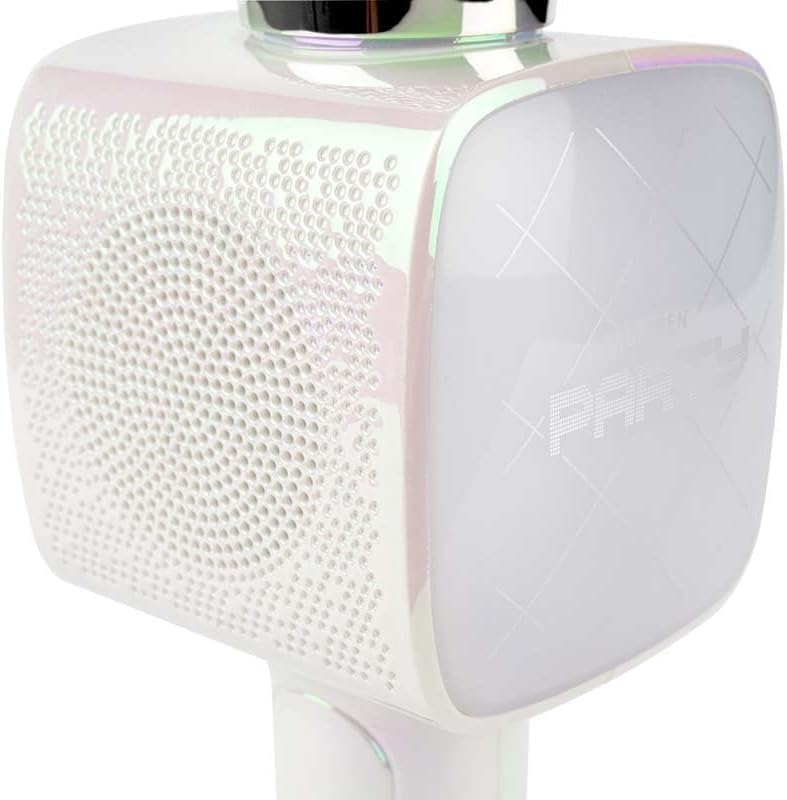
Сүрөт 2: Жакын план view of the Bigben Karaoke Microphone, focusing on the speaker grille and the light-up panel. The panel displays "PARTY" and shows dynamic light effects.
Негизги өзгөчөлүктөрү:
- Bluetooth 5.0: For stable wireless connection to your devices.
- Интегралдык спикер: 15W output for clear and powerful sound.
- Жарык эффекттери: Dynamic lighting to enhance the karaoke experience.
- Үн эффекттери: 4 different vocal effects and an echo effect.
- Бир нече киргизүү: USB, Micro SD, and 3.5mm headphone jack.
Жайгашуу
1. Микрофонду заряддоо
- Connect the provided USB charging cable to the microphone's charging port.
- USB кабелинин экинчи учун туура келген USB кубат адаптерине (кошумча эмес) же компьютердин USB портуна туташтырыңыз.
- Заряддоо индикаторунун жарыгы күйөт. Толук заряддалгандан кийин жарыктын түсү өзгөрүшү же өчүшү мүмкүн.
2. Күйгүзүү / Өчүрүү
- To power on, press and hold the Power button for a few seconds until the indicator light illuminates and you hear an audible prompt.
- Өчүрүү үчүн, индикатор жарыгы өчмөйүнчө Кубат баскычын кайра басып, кармап туруңуз.
3. Bluetooth Жупташтыруу
- Ensure the microphone is powered on and in Bluetooth pairing mode (usually indicated by a flashing light).
- Смартфонуңузда, планшетиңизде же башка Bluetooth иштетилген түзмөгүңүздө Bluetooth жөндөөлөрүнө өтүңүз.
- Издөө available devices and select "Bigben Karaoke Mic" (or similar name) from the list.
- Жупташтырылгандан кийин, сиз ырастоо үнүн угасыз жана индикатор жарыгы күйүп-өчүп токтойт.
Иштөө нускамалары
1. Музыка ойноо
- Bluetooth аркылуу: After successful pairing, play music from your connected device. The sound will output through the microphone's speaker.
- Via USB/Micro SD: Insert a USB drive or Micro SD card (with music files) into the respective port. The microphone will automatically detect and play music.
- Via 3.5mm Audio Cable: Connect an external audio source using a 3.5mm audio cable (not included) to the headphone input.
2. Микрофонду колдонуу
- Speak or sing directly into the microphone grille.
- Adjust the microphone volume using the dedicated controls on the device.
3. Үн эффекттери
- Үн эффекттери: The microphone offers 4 different vocal effects. Press the "Effect" button (or similar labeled button) to cycle through these effects.
- Эхо эффектиси: Activate or adjust the echo effect using its dedicated control.
4. Жарык эффекттери
The microphone features dynamic light effects. These lights typically activate automatically when the device is on and can often be toggled or changed using a dedicated light button, if available.
Техникалык тейлөө
- Тазалоо: Микрофонду жумшак, кургак чүпүрөк менен сүртүңүз. Абразивдүү тазалоочу каражаттарды же эриткичтерди колдонбоңуз.
- Сактагыч: Аппаратты колдонбогондо күн тийбеген, салкын, кургак жерде сактаңыз.
- Батареяга кам көрүү: For optimal battery life, charge the device regularly, even if not used frequently.
Проблемаларды чечүү
| Көйгөй | Мүмкүн себеп | Чечим |
|---|---|---|
| Күч жок | Батарея түгөнүп калды. | Микрофонду толугу менен кубаттаңыз. |
| Динамиктен үн жок | Volume is too low; device not connected; incorrect input mode. | Increase volume; ensure Bluetooth is paired or cable is connected; check USB/Micro SD insertion. |
| Микрофон иштебей жатат | Microphone volume is too low; microphone function is off. | Increase microphone volume; ensure microphone is active. |
| Bluetooth байланышы туруксуз | Device is too far from the microphone; interference. | Move devices closer; avoid obstacles; disconnect and re-pair. |
Техникалык шарттар
| Өзгөчөлүк | Деталь |
|---|---|
| Бренд | Bigben |
| Модель номери | PARTYBTMIC2WH |
| Байланыш | Bluetooth 5.0, USB, Micro SD, 3.5mm Headphone Jack |
| Speaker Output | 15 Вт |
| Үн эффекттери | 4 Vocal Effects, Echo Effect |
| Продукциянын өлчөмдөрү (LxWxH) | 20 x 15 x 10 см |
| Элемент Салмагы | 300 грамм |
| Түс | Ак |
| Каналдардын саны | 2 |
| Батареялар талап кылынат | Yes (type unknown, likely integrated rechargeable) |
Кепилдик жана колдоо
For warranty information and customer support, please refer to the documentation provided with your purchase or visit the official Bigben webсайт. Кепилдик дооматтар үчүн сатып алганыңыздын далилин сактаңыз.
For technical assistance or further inquiries, please contact Bigben customer service through their official channels.


