1. Киришүү
Thank you for choosing the SGIN C10 10.1-inch Kids Tablet. This device is designed to provide an engaging and safe digital experience for children, featuring parental controls and educational content. This manual will guide you through the setup, operation, and maintenance of your tablet to ensure optimal performance and user safety.
2. Продукт бүтүп калдыview
2.1 Пакеттин мазмуну
Таңгактан чыгарганда, төмөндө көрсөтүлгөн бардык буюмдардын бар экенине ынаныңыз:
- SGIN C10 10.1-inch Tablet
- Коргоочу кап
- Заряддагыч
- USB кабели
- Instruction Manual

Image: Diagram showing the tablet's ports and buttons, along with the included accessories: tablet, protective case, charger, USB cable, and instruction manual.
2.2 Планшеттин компоненттери
Familiarize yourself with the physical components of your SGIN C10 tablet:
- Кубат баскычы: Located on the side, used to turn the tablet on/off or put it to sleep.
- Үн баскычтары: Аудио чыгаруу деңгээлин тууралаңыз.
- Гарнитура уячасы: Зымдуу кулакчындарды туташтыруу үчүн.
- USB порт: Заряддоо жана маалыматтарды өткөрүү үчүн.
- TF карта уячасы: For expanding storage with a microSD card.
- Алдыңкы камера: Видео чалуулар жана селфи үчүн.
- Арткы камера: Сүрөт жана видео тартуу үчүн.
- Баяндамачылар: Аудио чыгаруу үчүн.
- 10.1 дюймдук HD IPS сенсордук экраны: Өз ара аракеттенүү үчүн негизги дисплей.
- Protective Case with Stand: Provides protection and allows for hands-free viewing.
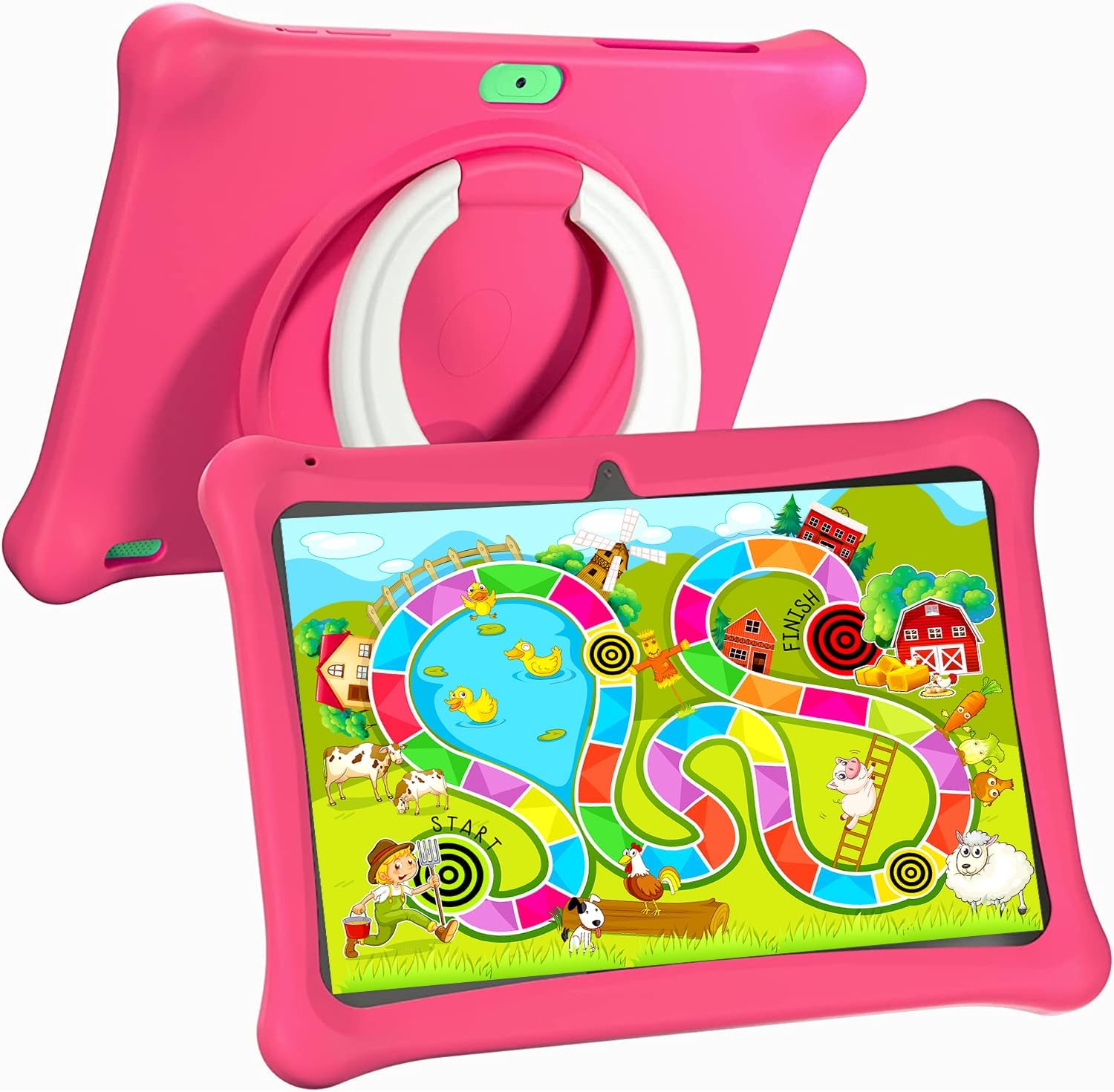
Image: The SGIN C10 tablet in its pink protective case, displaying a colorful educational game on its screen. The rear of the tablet shows the integrated stand.
2.3 Негизги өзгөчөлүктөрү
- Жогорку аткаруу: Equipped with a 1.6GHz quad-core processor, 2GB RAM, and 32GB ROM (expandable up to 32GB via TF card).
- Kid-Proof Case: Durable pink case designed to protect against dust, bumps, and drops, with heat dissipation features.
- Pre-installed iWawa Kid's Software: Offers a safe and entertaining environment with thousands of free educational games and apps.
- Parental Control System: Allows parents to manage screen time, content, and user accounts.
- Батареянын узак иштөө мөөнөтү: 5000mAh lithium battery provides 6-8 hours of usage.
- Eye Protection Screen: 1280*800 HD IPS touch screen for vibrant colors and comfortable viewing.
- Кош камера: 2MP front camera and 5MP rear camera for photos and videos.

Image: Icons representing key features of the SGIN C10 tablet: Android 12, Quad-core processor, Dual Camera, 5000mAh battery, WiFi, HD Display, 2GB RAM + 32GB storage, 10 Inch screen, and Parental Control.

Image: Visual representation of the tablet's 2GB RAM and 32GB ROM (expandable via TF card), alongside a diagram of the 1.6 GHz Quad-core Processor.

Image: The 10-inch HD display showing vibrant content, and a close-up of the protective case's rotatable stand.

Image: A child using the tablet, highlighting the 5000mAh Lithium Battery, and a close-up of the tablet's dual camera system.
3. Орнотуу
3.1 Алгачкы заряддоо
- Connect the USB cable to the tablet's USB port.
- Connect the other end of the USB cable to the provided charger.
- Заряддоо түзүлүштү розеткага сайыңыз.
- Планшетті биринчи жолу колдонуудан мурун толук заряддаңыз. Экрандагы батареянын индикатору заряддоо абалын көрсөтөт.
3.2 Күйгүзүү/өчүрүү
- Күйгүзүү үчүн: Press and hold the Power Button until the SGIN logo appears on the screen.
- Өчүрүү үчүн: Press and hold the Power Button until a menu appears. Select "Power off" and confirm.
- Уйку/ойгонуу үчүн: Briefly press the Power Button to put the tablet to sleep or wake it up.
3.3 Wi-Fiга туташуу
- Башкы экрандан, Тез жөндөөлөр панелин ачуу үчүн жогорудан ылдый серпиңиз.
- Wi-Fi жөндөөлөрүн ачуу үчүн Wi-Fi сүрөтчөсүн басып, кармап туруңуз.
- Wi-Fi өчүк болсо күйгүзүңүз.
- Тизмеден каалаган Wi-Fi тармагын тандаңыз.
- Эгер суралса, тармак сырсөзүн киргизиңиз, андан кийин "Туташуу" баскычын басыңыз.
3.4 Initial iWawa Setup
The SGIN C10 tablet comes with iWawa Kid's software pre-installed. Follow the on-screen prompts to set up the child-friendly environment and parental controls during the first launch.
4. Иштөө нускамалары
4.1 Негизги навигация
- тийүү: Аны тандоо үчүн сүрөтчөнү же опцияны басыңыз.
- Серпүү: Барактарды же тизмелерди жылдыруу үчүн манжаңызды экрандын үстүнөн сүйрөңүз.
- Чымчуу: Сүрөттөрдү чоңойтуу же кичирейтүү үчүн эки манжаңызды колдонуңуз же web барактар.
- Үй баскычы: Returns you to the home screen.
- Артка баскычы: Мурунку экранга кайтып келет.
- Акыркы колдонмолор баскычы: Жакында колдонулган тиркемелерди көрсөтөт.
4.2 Камераны колдонуу
- Үй экранынан же колдонмо суурмасынан Камера колдонмосун ачыңыз.
- Алдыңкы жана арткы камералардын ортосунда которулуу үчүн камераны которуштуруу сүрөтчөсүн таптаңыз.
- Сүрөткө тартуу үчүн жапкычты басыңыз.
- Tap the video icon to switch to video recording mode, then tap the record button to start/stop recording.
4.3 Installing/Uninstalling Apps
- Колдонмолорду орнотуу: Within the iWawa environment, access the Kids Store to download free games and educational applications. Parents can also approve apps from the Google Play Store via parental controls.
- Колдонмолорду орнотуудан чыгаруу: From the parental control interface, select the app management option to uninstall unwanted applications.
4.4 Орнотууларды тууралоо
- Көлөмү: Use the physical Volume Buttons on the side of the tablet.
- Жарыктык: Swipe down from the top of the screen to access Quick Settings and adjust the brightness slider. More detailed display settings are available in the main Settings app.
- Башка орнотуулар: Access the main Settings app for Wi-Fi, Bluetooth, display, sound, storage, and other system configurations.
5. Ата-энелик көзөмөл
The SGIN C10 tablet features a robust parental control system integrated with the iWawa Kid's software, allowing you to create a safe and customized environment for your child.
5.1 Ата-эненин көзөмөлүнө кирүү
To access parental control settings, you will typically need to exit the iWawa Kid's interface and enter a password-protected parent mode. Follow the on-screen instructions within the iWawa app to set up and manage this access.
5.2 Key Parental Control Features
- Сырсөздөрдү коюу: Establish a secure password to prevent children from exiting the iWawa environment or altering settings.
- Экран убактысынын чектөөлөрү: Define daily usage limits and specific time periods when the tablet can be used.
- Мазмунду башкаруу: Control access to apps, games, videos, and websites. You can whitelist appropriate websites and block unwanted content.
- App Approval: Manage which applications your child can access, including those downloaded from the Kids Store or Google Play Store.
- Бир нече колдонуучу аккаунттары: Өзүнчө адис түзүүfiles for each child, allowing personalized settings and content for individual users.
- Ad Elimination: The system helps eliminate unwanted advertisements within the child's environment.
6. Техникалык тейлөө
6.1 Аппаратты тазалоо
- Always power off the tablet before cleaning.
- Экранды жана корпусту сүртүү үчүн жумшак, түксүз чүпүрөктү колдонуңуз.
- өжөр тактар үчүн, бир аз гampчүпүрөккө суу же экранды тазалоочу каражат. Катуу химиялык заттардан алыс болуңуз.
- Ensure no moisture enters ports or openings.
6.2 Батареяга кам көрүү
- Батареяны бат-баттан толук кубаттап калуудан алыс болуңуз.
- Планшетти экстремалдык температурага тийгизбеңиз.
- Берилген заряддагычты жана кабелди гана колдонуңуз.
6.3 Программалык камсыздоо жаңыртуулары
Periodically check for system updates in the tablet's Settings menu under "System" or "About tablet." Keeping your software updated ensures optimal performance and security.
6.4 Сактагычты башкаруу
To manage storage, you can:
- Delete unused apps and files.
- Move photos and videos to a computer or cloud storage.
- Insert a TF (microSD) card into the designated slot to expand storage capacity up to 32GB.
7. Кыйынчылыктарды
| Көйгөй | Мүмкүн чечим |
|---|---|
| Планшет күйбөйт. | Батарея заряддалганын текшериңиз. Заряддагычты туташтырыңыз жана кайра күйгүзүү аракетинен мурун бир нече мүнөт күтүңүз. |
| Экран жооп бербей жатат. | Restart the tablet by holding the Power Button for about 10 seconds until it powers off, then power it on again. |
| Wi-Fi'га туташпай жатат. | Check if Wi-Fi is enabled. Ensure the password is correct. Restart your Wi-Fi router. |
| Колдонмолор бузулуп же жай иштеп жатат. | Фондогу колдонмолорду жабыңыз. Колдонмонун кэшин тазалаңыз (Орнотуулар > Колдонмолор > [Колдонмонун аталышы] > Сактагыч > Кэшти тазалоо). Жетиштүү сактагыч орун бар экенин текшериңиз. |
| Parental controls are not working as expected. | Re-enter the parental control settings and verify all configurations (time limits, content filters, app approvals). Ensure the correct child profile активдүү. |
8. Техникалык шарттар
| Өзгөчөлүк | Спецификация |
|---|---|
| Бренд | SGIN |
| Модель аты | C10 |
| Операция системасы | Android |
| Screen Size | 10 дюйм |
| Max Screen Resolution | 1280 пиксел |
| Процессор | 1.6GHz Quad-core (Intel Processor Brand) |
| RAM | 2 ГБ |
| Ички сактагыч (ROM) | 32 ГБ |
| Кеңейтүүчү сактагыч | TF картасы 32 ГБ чейин |
| Алдыңкы камера | 2MP |
| Арткы камера | 5MP |
| Батарея сыйымдуулугу | 5000mAh |
| Байланыш | WiFi, Bluetooth |
| Элемент Салмагы | 2.35 фунт |
| Продукциянын өлчөмдөрү | 1 x 1 x 1 дюйм |
9. Кепилдик жана колдоо
For warranty information and technical support, please refer to the documentation included with your purchase or visit the official SGIN website. If you encounter issues not covered in this manual, please contact SGIN customer service for assistance.


