1. Киришүү
This manual provides essential information for the safe and efficient use of your OPPO Reno 14F 5G smartphone. Please read this guide thoroughly before operating the device to ensure proper functionality and to understand its features. Keep this manual for future reference.
2. Пакеттин мазмуну
Продукцияңыздын таңгагында төмөнкү элементтер бар экенин текшериңиз:
- OPPO Reno 14F 5G Smartphone
- Гарнитура
- SIM лоток чыгаруучу
- USB кабели (Type-C)
If any items are missing or damaged, please contact your retailer or OPPO customer support.
3. Түзмөк бүттүview
Familiarize yourself with the physical components of your OPPO Reno 14F 5G.

Сүрөт 3.1: Алдыңкы View. This image displays the front of the OPPO Reno 14F 5G smartphone, highlighting the display screen and the front-facing camera located at the top center.

3.2-сүрөт: Артка View. This image shows the rear of the OPPO Reno 14F 5G smartphone in Luminous Green, featuring the dual camera module and the OPPO branding.
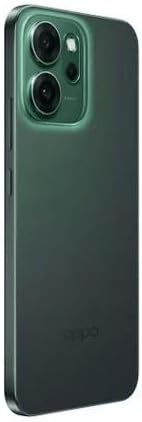
3.3-сүрөт: Каптал View. Бул сүрөт каптал профессионалды көрсөтөтfile of the OPPO Reno 14F 5G, indicating the location of the volume buttons, power button, and SIM card tray.
3.1. Баскычтар жана порттор
- Кубат баскычы: Located on the right side. Press and hold to power on/off or restart. Press briefly to lock/unlock the screen.
- Үн баскычтары: Located on the left side. Press to adjust media volume, call volume, or notification volume.
- USB Type-C порту: Located at the bottom. Used for charging, data transfer, and connecting the included headset.
- SIM карта салгычы: Located on the side. Use the provided SIM ejector tool to open.
- Камералар: Front-facing camera for selfies and video calls. Rear dual-camera system for high-quality photos and videos.
4. Орнотуу
4.1. Аппаратты заряддоо
Before first use, fully charge your OPPO Reno 14F 5G. Connect the USB cable to the USB Type-C port on the phone and the other end to a compatible power adapter. Plug the adapter into a power outlet.
4.2. SIM картаны салуу
- Аппаратты өчүрүңүз.
- Locate the SIM card tray on the side of the phone (refer to Figure 3.3).
- Insert the SIM ejector tool into the small hole on the SIM tray and press gently until the tray pops out.
- Nano-SIM картаңызды(ларыңызды) алтын түстөгү контакттары ылдый каратып салгычка салыңыз. туура багытты камсыз кылуу.
- Табаны телефондун ичине кылдаттык менен түртүңүз, ал чыкылдагыча.
4.3. Баштапкы күйгүзүү жана орнотуу чебери
Press and hold the Power button until the OPPO logo appears. Follow the on-screen instructions to complete the initial setup, which includes:
- Тил тандоо
- Wi-Fi тармагына туташууда
- Setting up your Google account
- Configuring security features (fingerprint, face unlock, PIN/pattern)
- Transferring data from an old device (optional)
5. Аппаратты иштетүү
5.1. Негизги навигация
Your OPPO Reno 14F 5G runs on Android 14 and supports gesture navigation or traditional navigation buttons. You can configure your preferred navigation method in the Settings menu.
- Өйдө серпүү: Башкы экранга өтүңүз.
- Өйдө сүрүп, кармап туруңуз: Акыркы колдонмолорду ачыңыз.
- Swipe from Left/Right Edge: Артка кайрыл.
5.2. Чалууларды жасоо жана билдирүүлөрдү жөнөтүү
Чалууларды жасоо үчүн Телефон колдонмосун, ал эми SMS/MMS билдирүүлөрүн жөнөтүү жана алуу үчүн Билдирүүлөр колдонмосун колдонуңуз. SIM картаңыз активдүү экенин жана тармактын камтуу аймагы бар экенин текшериңиз.
5.3. Камераны колдонуу
Open the Camera app to capture photos and videos. The rear camera system offers various modes for different scenarios, while the front camera is ideal for selfies and video calls. Tap the shutter button to take a photo or record a video.
5.4. Байланыш
- Wi-Fi: Интернетке кирүү үчүн зымсыз тармактарга туташыңыз.
- Bluetooth: Pair with wireless headphones, speakers, or other Bluetooth-enabled devices.
- 5G: Utilize high-speed mobile data networks where available.
- GPS: Жайгашкан жерди аныктоо кызматтары жана навигация үчүн.
6. Техникалык тейлөө
6.1. Аспапты тазалоо
Use a soft, lint-free cloth to clean the screen and body of your phone. Avoid using harsh chemicals or abrasive materials, as these can damage the device's finish.
6.2. Батареяга кам көрүү
Батареянын иштөө мөөнөтүн узартуу үчүн:
- Ашыкча температурадан сактаныңыз.
- Түпнуска заряддагычты жана кабелди колдонуңуз.
- Телефон толгондон кийин аны көпкө чейин кубаттап турбаңыз.
6.3. Программалык камсыздоону жаңыртуу
Түзмөгүңүздө эң акыркы функциялар, коопсуздук жаңыртуулары жана иштеши жакшыртылганын текшерүү үчүн программалык камсыздоо жаңыртууларын дайыма текшерип, орнотуп алыңыз. барыңыз Орнотуулар > Түзмөк жөнүндө > Акыркы жаңыртууларды текшерүү үчүн.
6.4. Маалыматтын резервдик көчүрмөсү
Regularly back up your important data (photos, contacts, documents) to a cloud service or a computer to prevent data loss.
7. Кыйынчылыктарды
Эгерде сиз түзмөгүңүздө көйгөйлөргө туш болсоңуз, төмөнкү кеңири таралган чечимдерди караңыз:
| Маселе | Чечим |
|---|---|
| Түзмөк күйбөй жатат | Батарея заряддалганын текшериңиз. Өчүрүп күйгүзүүгө мажбурлоо үчүн Кубат баскычын жок дегенде 10 секунд басып туруңуз. |
| Экран жооп бербейт | Force restart the device. If the issue persists, contact support. |
| Тармакка туташуу маселелери | Check if Airplane Mode is off. Restart the device. Reinsert the SIM card. Reset network settings (Settings > System settings > Back up and reset > Reset phone > Reset network settings). |
| Колдонмолор бузулуп же катып калууда | Clear the app's cache and data (Settings > Apps > App management > [App Name] > Storage usage). Update the app. Uninstall and reinstall the app. |
| Батарея тез түгөнүп жатат | Check battery usage in Settings to identify power-hungry apps. Reduce screen brightness. Disable unnecessary features like GPS, Bluetooth, or Wi-Fi when not in use. |
| Ашыкча ысып кетүү | Close background apps. Avoid using the phone while charging or in direct sunlight. If overheating persists, power off the device and allow it to cool. |
7.1. Заводдук абалга кайтаруу
As a last resort for persistent software issues, you may perform a factory reset. This will erase all data on your phone. Back up your data before proceeding. Go to Орнотуулар > Тутум орнотуулары > Камдык көчүрмөнү сактоо жана баштапкы абалга келтирүү > Телефонду баштапкы абалга келтирүү > Бардык маалыматтарды өчүрүү.
8. Техникалык шарттар
Detailed technical specifications for the OPPO Reno 14F 5G smartphone:
| Өзгөчөлүк | Деталь |
|---|---|
| Операция системасы | Android 14 |
| Орнотулган RAM эс тутуму | 12 ГБ |
| Эстутум сактоо сыйымдуулугу | 256 ГБ |
| Байланыш технологиясы | 5G |
| Уюлдук технология | 5G |
| Зымсыз камсыздоочу | Бардык операторлор үчүн кулпусу ачылды |
| Батарея кубаттуулугунун рейтинги | 6000 мАч |
| Элемент Салмагы | 187 г |
| Пакеттин өлчөмдөрү | 18.3 x 9.9 x 5.9 см |
| Аудио Jack | USB түрү C |
| Түс | Luminous Green |
| Модель аты | Reno 5G |
| Элемент моделинин номери | 6932169376945 |
9. Кепилдик жана колдоо
Your OPPO Reno 14F 5G smartphone is covered by a limited warranty. For detailed warranty terms and conditions, please refer to the warranty card included in your package or visit the official OPPO website. For technical support, service, or further assistance, please contact OPPO customer service through their official channels.


