Introduction
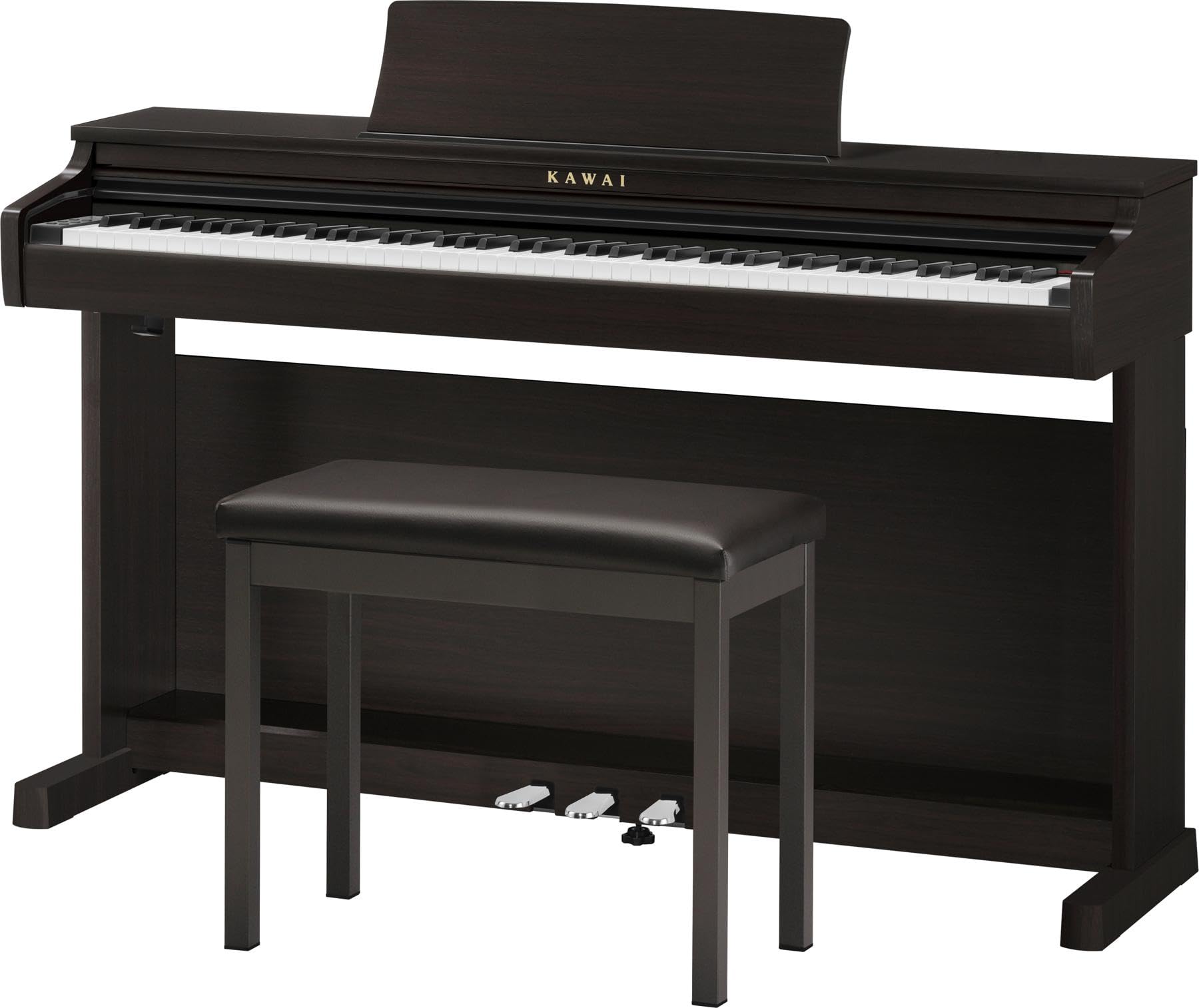
The Kawai CX202 is a sophisticated digital home piano designed for both new and experienced players. It features an 88-key Responsive Hammer Compact II (RHCII) action with a triple-sensor system, upgraded key cushioning, and a fully graded range for an authentic acoustic piano feel. The Harmonic Imaging (HI) sound system captures the expressiveness and nuance of the prestigious Shigeru Kawai SK-EX concert grand piano. The CX202 offers 17 total sounds, including electric piano and string ensemble, along with practice features like a 3-song recorder with playback, compatibility with popular lesson apps, and dual headphone outputs for private practice.
Коопсуздук маалыматы
Please read and understand all safety instructions before operating your Kawai CX202 Digital Piano. Keep this manual for future reference.
- Электр камсыздоо: Белгиленген кубат адаптерин гана колдонуңуз. Voltage matches your local power supply. Do not overload power outlets.
- Суюктук таасири: Keep the instrument away from water or other liquids. Do not place objects containing liquids on the piano.
- Вентиляция: Ensure adequate ventilation around the instrument. Do not block ventilation openings.
- Жайгашкан жери: Place the piano on a stable, level surface. Avoid placing it in direct sunlight, near heat sources, or in areas with high humidity or excessive dust.
- Оор нерсе: The Kawai CX202 weighs approximately 116.8 pounds (53 kg). Always use proper lifting techniques and seek assistance when moving the instrument to prevent injury.
Пакеттен чыгаруу жана чогултуу
Пакеттен чыгаруу
Due to the weight of the Kawai CX202 Digital Piano, it is strongly recommended that two or more people handle the unpacking and assembly process. Carefully remove all components from the packaging, checking against the packing list to ensure all parts are present and undamaged.
Чогултуу кадамдары
- Attach the side panels to the crossbar using the provided screws. Ensure all connections are secure and stable.
- Connect the pedal unit to the main stand assembly.
- Carefully place the main piano unit onto the assembled stand, aligning the mounting points. Secure the piano unit to the stand using the designated screws.
- Insert the music rest into its designated slot on the top panel of the piano.
- Connect the power adapter to the DC input on the rear of the piano and plug it into a suitable power outlet.
- Connect the pedal cable from the pedal unit to the corresponding input on the underside of the piano.
Note: Refer to the included assembly diagram for detailed visual instructions.
Башкаруу жана функциялар
Бүттүview Controls
The control panel is intuitively designed and located above the keyboard for easy access to all functions.
- Кубат баскычы: Press to turn the instrument on or off.
- Үн баскычы: Үнүн жогорулатуу үчүн сааттын жебеси боюнча, азайтуу үчүн сааттын жебесине каршы буруңуз.
- Функция баскычы: Accesses various settings and parameters for advanced control.
- Метроном баскычы: Activates and deactivates the built-in metronome for practice.
- Бөлүү баскычы: Divides the keyboard into two sections, allowing different sounds to be played simultaneously by each hand.
- Sound Selection Buttons (Piano, E.Piano, Rock Organ, Strings, Bass): Quickly select from 17 common instrument sounds.
- Демо баскычы: Plays pre-recorded demonstration songs.
- Жаздыруу/Ойнотуу баскычтары: Controls the built-in 3-song recorder, allowing you to record and playback your performances.
- Навигация баскычтары (Өйдө/Төмөн, Солго/Оңго): Used to navigate through menus and adjust specific settings.
Негизги өзгөчөлүктөрү
- Responsive Hammer Compact II (RHCII) Action: Experience an authentic acoustic piano touch with graded hammers and triple-sensor key detection for expressive playing.
- Harmonic Imaging (HI) Sound Technology: Delivers rich, detailed piano sounds sampled from the renowned Shigeru Kawai SK-EX concert grand.
- 192-ноталуу полифония: Ensures that even complex musical passages can be played without notes dropping out.
- Bluetooth байланышы: Allows wireless connection to smart devices for app integration and audio streaming.
- Кош режим: Layer two different sounds across the entire keyboard for richer textures.
- Бөлүнүү режими: Divide the keyboard into two sections, each with a different sound, for versatile performance.
- Four Hands Mode: Divides the keyboard into two identical 44-key sections, ideal for teacher-student lessons or duets.
- Камтылган динамиктер: Integrated stereo speaker system for clear and resonant sound reproduction.
- Наушник уячалары: Two 1/4" stereo headphone jacks are provided for private practice sessions.
Техникалык тейлөө
Тазалоо
- Use a soft, dry, lint-free cloth to gently wipe the surface of the piano.
- Абразивдүү тазалоочу каражаттарды, момдорду же эриткичтерди колдонуудан алыс болуңуз, анткени алар жасалгасына зыян келтириши мүмкүн.
- For keys, a slightly damp cloth with a small amount of mild soap can be used, but ensure to wipe them dry immediately.
- Never allow liquids to spill onto the instrument, especially into the keys or control panel.
Сактагыч
- Store the piano in a stable environment, away from direct sunlight, extreme temperatures, and areas with high humidity or excessive dust.
- Cover the keyboard with a dust cover (sold separately) when not in use to protect it from dust and debris.
Проблемаларды чечүү
Жалпы маселелер жана чечимдер
| Көйгөй | Мүмкүн себеп | Чечим |
|---|---|---|
| Үн жок | Volume too low; Headphones connected; Power issue. | Increase the master volume; Disconnect headphones; Check power adapter connection and wall outlet. |
| Ачкычтар жооп бербейт | Function setting (e.g., local control off); Damaged key. | Check split/dual mode settings or other function parameters; If keys are physically damaged, contact customer support. |
| Distorted Sound | Volume too high; Speaker/headphone issue; External audio interference. | Lower the volume; Test with different headphones or external speakers; Ensure no other electronic devices are causing interference. |
| Bluetooth туташуусу ишке ашпай жатат | Түзмөк жупташтыруу режиминде эмес; байланыш диапазонунан тышкары; тоскоолдук. | Ensure your smart device's Bluetooth is enabled and in pairing mode; Move closer to the piano; Reduce interference from other wireless devices. |
For persistent issues or problems not listed here, please refer to the comprehensive troubleshooting guide in the full product manual or contact Kawai customer support.
Техникалык шарттар
Техникалык маалыматтар
- Элемент Салмагы: 116.8 фунт (53 кг)
- Продукциянын өлчөмдөрү: 62.5 x 25.2 x 15.4 дюйм (158.75 x 64.01 x 39.12 см)
- Бренд: Kawai
- Модель аты: CX202
- Түсү: Rosewood
- Keyboard Action: Responsive Hammer Compact II (RHCII) Graded Action
- Ачкычтардын саны: 88
- Үндөр: 17 built-in instrument sounds
- Полифония: 192-note maximum polyphony
- Байланыш: Bluetooth, USB to Device, Sustain Pedal Input, Aux Out, Dual 1/4" Headphone Jacks
- Баяндамачылар: Integrated stereo speaker system
- жаздыргыч: 3-song recorder with playback functionality
Кепилдик жана колдоо
Кепилдик маалымат
The Kawai CX202 Digital Piano is covered by a manufacturer's warranty. Please refer to the warranty card included with your product for specific terms, conditions, and duration of coverage. Retain your proof of purchase for warranty claims.
Кардарларды колдоо
For assistance with your product, including technical support, service inquiries, or questions about features, please contact Kawai customer support. You can typically find contact information on the official Kawai webсайтында же продукт документациясында.
- Коргоо пландары: Additional protection plans, such as a 4-Year Protection Plan or Complete Protect monthly plans, may be available for purchase from authorized retailers.
- Кайтаруулар: This product may be eligible for 30-day easy returns. Please check the retailer's specific return policy for details and conditions.


