1. Киришүү
This manual provides essential information for the safe and efficient use of your DOOGEE U13 Android 16 Tablet. Please read this manual thoroughly before operating the device and retain it for future reference.
The DOOGEE U13 is a high-performance tablet designed for various tasks, from productivity to entertainment, featuring a large display, powerful processor, and extended battery life.

Image 1.1: DOOGEE U13 Tablet highlighting its main features.
2. Пакеттин мазмуну
Пакетти ачкандан кийин, бардык буюмдар бар экенин жана жакшы абалда экендигин текшериңиз:
- DOOGEE U13 Планшет
- USB-C заряддоо кабели
- Кубаттуу адаптер
- SIM Eject Tool (if applicable)
- Quick Start Guide
- Кепилдик картасы
3. Түзмөктүн жайгашуусу
Familiarize yourself with the physical components of your DOOGEE U13 tablet.

Сүрөт 3.1: Бүттүview of DOOGEE U13 Tablet features and design.
3.1 Порттор жана баскычтар
- Кубат баскычы: Капталында жайгашкан, аппаратты күйгүзүү/өчүрүү же ойготуу/уктатуу үчүн колдонулат.
- Үн баскычтары: Adjust media and notification volume.
- USB-C порту: Заряддоо жана маалыматтарды өткөрүү үчүн.
- 3.5 мм гарнитура уячасы: Зымдуу аудио чыгаруу үчүн.
- MicroSD картасынын уячасы: For expandable storage (up to 2TB).
3.2 Камералар
- Арткы камера: 13MP main camera for capturing photos and videos.
- Алдыңкы камера: Видео чалуулар жана селфилер үчүн 5 МП камера.
4. Орнотуу
4.1 Баштапкы күйгүзүү
- Press and hold the Power Button until the DOOGEE logo appears.
- Тилди, аймакты тандоо жана Wi-Fi тармагына туташуу үчүн экрандагы көрсөтмөлөрдү аткарыңыз.
- Google Play Дүкөнүнө жана башка кызматтарга кирүү үчүн Google аккаунтуңуз менен кириңиз же жаңысын түзүңүз.
4.2 Батареяны заряддоо
Before first use, fully charge the tablet. Connect the USB-C cable to the tablet's charging port and the power adapter to a wall outlet. The charging indicator will show the battery status.

Image 4.1: Battery specifications and charging capabilities.
4.3 MicroSD картасын салуу
- Планшеттин капталындагы картанын уячасын табыңыз.
- Use the provided SIM eject tool to open the tray.
- Place the MicroSD card into the designated slot on the tray.
- Таблетканы кылдаттык менен кайра салыңыз.
5. Иштөө нускамалары
5.1 Негизги навигация
- тийүү: Колдонмону ачуу же нерсени тандоо үчүн сөлөкөтүн таптаңыз.
- Серпүү: Move your finger across the screen to scroll through content or switch screens.
- Чымчып-кичирейтүү: Сүрөттөрдү чоңойтуу же кичирейтүү үчүн эки манжаңызды колдонуңуз жана web барактар.
5.2 Дисплей орнотуулары
Your tablet features a 13-inch FHD+ 90Hz display for a smooth visual experience.
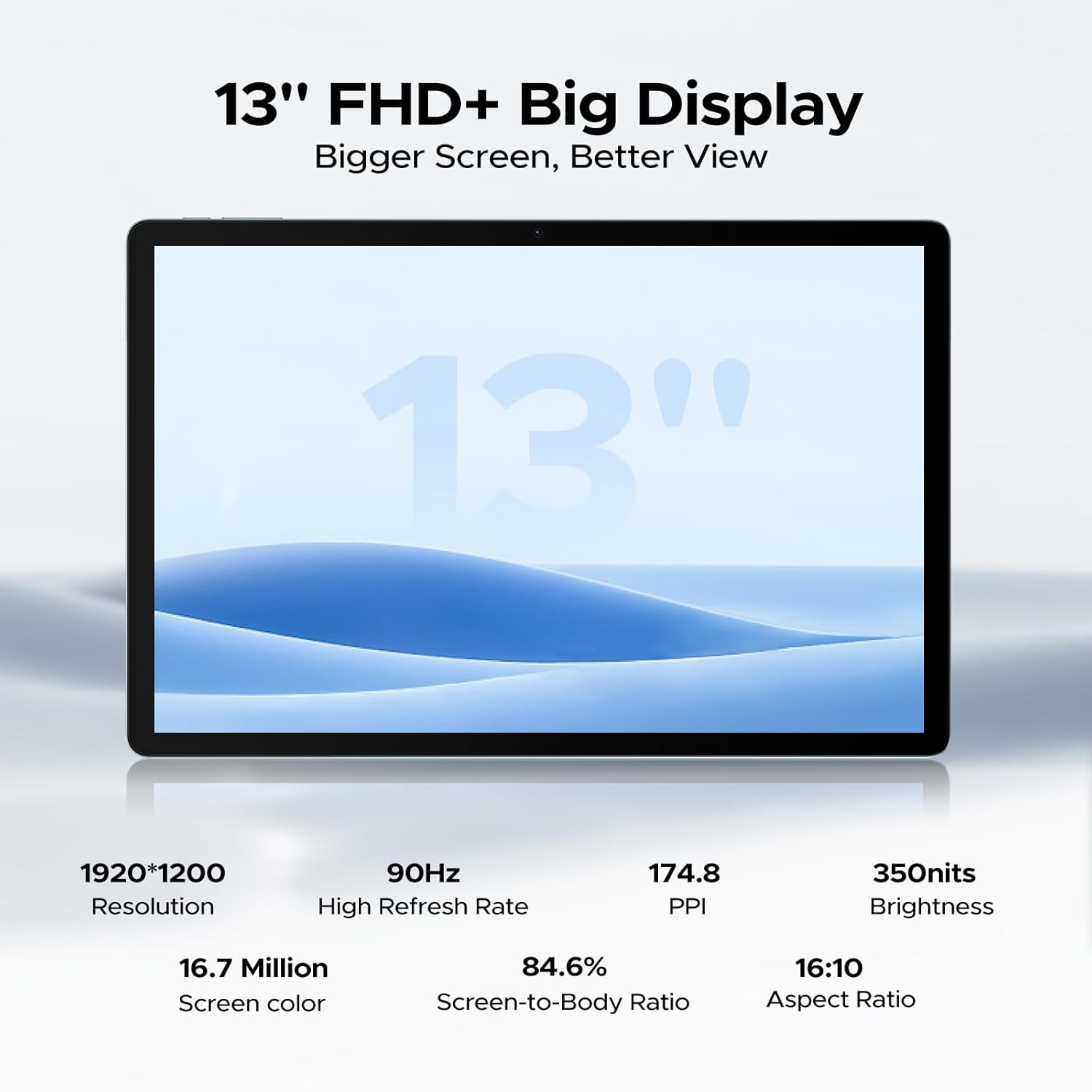
Image 5.1: Detailed specifications of the tablet's display.
Access display settings via Орнотуулар > Дисплей to adjust brightness, dark mode, eye comfort mode, and refresh rate.
5.3 аудио
The tablet is equipped with quad speakers for immersive sound and supports a 3.5mm headphone jack.
5.4 Камераны колдонуу
Open the Camera app to capture photos and videos. The 13MP main camera offers various modes, while the 5MP front camera is ideal for video calls.

Image 5.2: Features of the 13MP main camera.

Image 5.3: The 5MP front camera in use for video calls.
5.5 Android 16 жана Gemini AI
The DOOGEE U13 runs on Android 16, offering enhanced features and security. It integrates Gemini AI for intelligent task optimization and improved performance.

Image 5.4: Android 16 OS interface.

Image 5.5: Diverse Android 16 OS functions.

Image 5.6: Gemini AI capabilities.
6. Батареяны башкаруу
The DOOGEE U13 is equipped with an 11000mAh battery. To maximize battery life:
- Экран жарыктыгын ыңгайлуу деңгээлге тууралаңыз.
- Фондо иштеп жаткан колдонулбаган колдонмолорду жабуу.
- Колдонулбаган учурда Wi-Fi, Bluetooth жана GPSти өчүрүңүз.
- Android жөндөөлөрүндө жеткиликтүү батареяны үнөмдөө режимдерин колдонуңуз.
The tablet supports 18W fast charging and 5W reverse charging.
7. Сактагычты башкаруу
Your tablet comes with 256GB of internal storage and 32GB of RAM (6GB base + 26GB expansion). Storage can be expanded up to 2TB using a MicroSD card (purchased separately).

Image 7.1: RAM and ROM specifications.
To manage storage, go to Орнотуулар > Сактагыч. Бул жерде болот view storage usage, free up space, and format your MicroSD card.
8. Байланыш
8.1 Wi-Fi
The tablet supports 2.4G/5G dual-band Wi-Fi for fast and stable internet connections. To connect, go to Орнотуулар > Тармак жана интернет > Wi-Fi, тармагыңызды тандап, сырсөздү киргизиңиз.
Bluetooth 8.2
Bluetooth'ду иштетүү Орнотуулар > Туташкан түзмөктөр > Bluetooth to pair with wireless headphones, speakers, or other Bluetooth accessories.
8.3 Экранды чагылдыруу
Use the wireless screen mirroring feature to cast your tablet's display to compatible larger screens. This option is typically found in Орнотуулар > Туташкан түзмөктөр > Туташуу артыкчылыктары > Тышкы экранга чыгаруу.
9. Коопсуздук өзгөчөлүктөрү
9.1 Жүзүнөн ачуу
The DOOGEE U13 supports face unlock for quick and secure access to your device. Set up face unlock in Орнотуулар > Коопсуздук жана купуялык > Түзмөктүн кулпусун ачуу > Жүз менен ачуу.

Image 9.1: Security and connectivity features.
10. Техникалык тейлөө
10.1 Тазалоо
Планшеттин экранын жана корпусун тазалоо үчүн жумшак, түксүз чүпүрөктү колдонуңуз. Катуу химиялык заттарды же абразивдүү материалдарды колдонуудан алыс болуңуз.
10.2 Программалык камсыздоо жаңыртуулары
Планшетиңизде эң акыркы функциялар, коопсуздук жаңыртуулары жана майнаптуулугу жакшыртылганын текшерүү үчүн программалык камсыздоо жаңыртууларын дайыма текшерип, орнотуп алыңыз. барыңыз Орнотуулар > Система > Системаны жаңыртуу.
11. Кыйынчылыктарды
- Планшет күйбөй жатат: Батарея заряддалганын текшериңиз. Кайра күйгүзүүдөн мурун заряддагычка кеминде 30 мүнөт туташыңыз.
- Экран жооп бербейт: Try restarting the tablet by holding the Power Button for about 10-15 seconds.
- Wi-Fi туташуу көйгөйлөрү: Restart your Wi-Fi router and the tablet. Forget the network in Wi-Fi settings and reconnect.
- Колдонмолор бузулуп жатат: Көйгөйлүү колдонмонун кэшин тазалоо (Орнотуулар > Колдонмолор > [Колдонмонун аты] > Сактагыч жана кэш > Кэшти тазалоо). If the issue persists, reinstall the app.
- Жай аткаруу: Close unnecessary background apps, clear cache, and ensure sufficient storage space. Consider a factory reset as a last resort (back up your data first).
12. Техникалык шарттар
Below are the key technical specifications for the DOOGEE U13 Tablet:
| Өзгөчөлүк | Спецификация |
|---|---|
| Модел | U13 |
| Операция системасы | Android 16 |
| Процессор | UNISOC T7280 Octa-Core (up to 2.2GHz) |
| GPU | Мали-G57 |
| RAM | 32 ГБ (6 ГБ физикалык + 26 ГБ виртуалдык) |
| Ички сактагыч | 256 ГБ |
| Кеңейтүүчү сактагыч | MicroSD картасы аркылуу 2 ТБ чейин |
| Дисплей өлчөмү | 13 дюйм |
| Дисплей түрү | FHD+ IPS |
| Резолюция | 1920 x 1200 пиксель |
| Жаңыртуу ылдамдыгы | 90Hz |
| Жарыктык | 350 нит |
| Арткы камера | 13MP |
| Алдыңкы камера | 5MP |
| Батарея сыйымдуулугу | 11000mAh |
| Заряддоо | 18W USB-PD Fast Charging, 5W Reverse Charging |
| Байланыш | Wi-Fi 5 (802.11ac), Bluetooth 5.0 |
| Навигация | A-GPS, GPS, BeiDou, GLONASS, Galileo |
| Өлчөмдөр | 11.88 x 7.76 x 0.29 inches (7.5mm ultra-thin) |
| Салмагы | 1.48 фунт (670 г) |

Image 12.1: DOOGEE U-series tablet comparison, highlighting U13 specifications.
13. Кепилдик жана колдоо
Your DOOGEE U13 Tablet comes with a standard warranty. Please refer to the included warranty card for specific terms and conditions.
For technical support, troubleshooting assistance, or warranty claims, please contact DOOGEE customer service through their official webсайт же продукт таңгагында көрсөтүлгөн байланыш маалыматы.

Image 13.1: DOOGEE customer service and warranty information.


