1. Киришүү
This manual provides detailed instructions for the proper setup, operation, and maintenance of your Facmogu AK-50 Bluetooth Stereo Audio Amplifier. Please read this manual thoroughly before using the device to ensure optimal performance and safety. The AK-50 is designed to deliver clear, powerful stereo sound with versatile connectivity options for various audio sources.
2. Коопсуздук нускамалары
- электр менен жабдууну камсыз кылуу voltage бирдикте көрсөтүлгөн талаптарга дал келет.
- Аппаратты жамгырга, нымдуулукка же экстремалдык температурага дуушар кылбаңыз.
- Аппаратты жылуулук булактарынын жанына же тике күн нуруна коюудан алыс болуңуз.
- в ачпагылаasing; бардык тейлөөлөрдү квалификациялуу кызматкерлерге тапшырыңыз.
- Агрегатты балдардан алыс кармаңыз.
- Чагылган бороондордо же көпкө колдонулбаганда электр энергиясын өчүрүңүз.
3. Пакеттин мазмуну
Пакетте бардык буюмдар бар экенин текшериңиз:
- AK50 Audio Ampкөтөргүч x1
- Алыстан башкаруу x1
- FM антенна x1
- Колдонуучунун колдонмосу x1
- Power Cord (1 Meter) x1
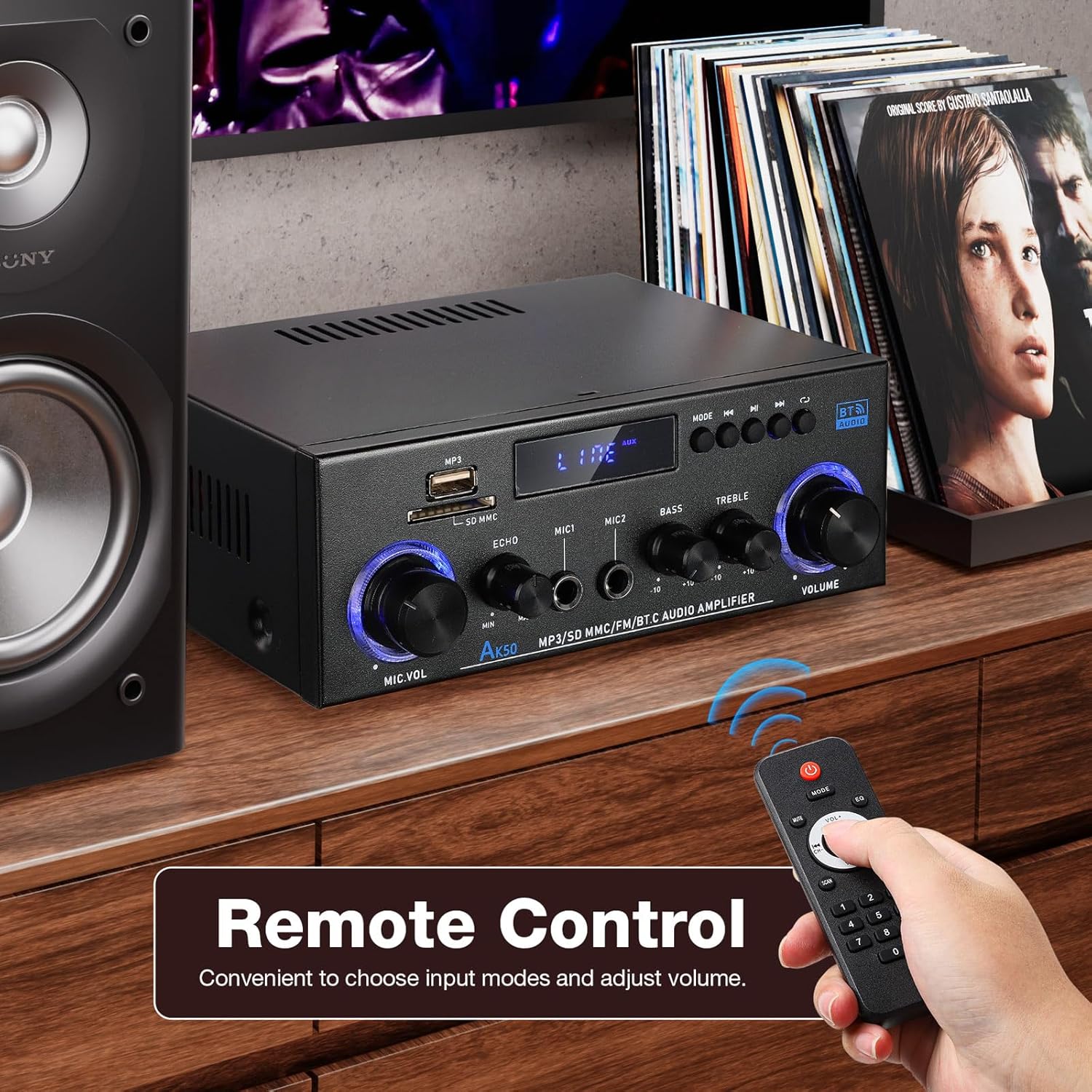
Figure 3.1: Package contents of the AK-50 ampөмүрлүү.
4. Продукт бүтүп калдыview
4.1 алдыңкы панели

Figure 4.1: Front Panel Controls and Inputs.
- USB порт: USB дискти ойнотуу үчүн.
- SD/MMC карта слоту: For SD/MMC card playback.
- Function Display Window: Учурдагы режимди жана орнотууларды көрсөтөт.
- MP3/FM Control Buttons: Play/Pause, Next/Previous Track, Mode selection.
- MIC VOL (Microphone Volume): Туташкан микрофондордун үнүн тууралайт.
- ЭХО: Микрофондор үчүн жаңырык эффектин тууралайт.
- MIC1/MIC2 киргизүү: Микрофондор үчүн 6.35 мм уяча киргизүүлөрү.
- Бас: Төмөн жыштыктагы аудио чыгарууну тууралайт.
- ҮЧТҮҮ: Жогорку жыштыктагы аудио чыгарууну тууралайт.
- Көлөмү: Main volume control for all audio output.
4.2 Арткы панель

4.2-сүрөт: Арткы панелдин туташуулары.
- AUX Audio Input (RCA L/R): Connect external audio devices via RCA cables.
- Line Audio Signal Output (RCA L/R): Output audio signal to another ampөмүр же жаздыруучу түзмөк.
- FM ANT: FM антеннасын туташтыруу.
- Speaker System 4Ω-16Ω (Left/Right Channel Output): Connect passive speakers using speaker wire. Observe polarity.
- DC Input 12V/5A: Power input for 12V DC power supply.
- AC кубаттуулугун киргизүү: Connect the AC power cord (90-240V, 50-60Hz).
- Кубат которгучу: бурат ampкөтөргүч ON/OFF.
5. Орнотуу
5.1 Динамиктин туташуусу
- камсыз кылуу ampкөтөргүч өчүрүлгөн.
- Connect your passive speakers to the "Speaker System 4Ω-16Ω" terminals on the rear panel.
- Match the positive (+) terminal of the amplifier to the positive (+) terminal of the speaker, and the negative (-) to the negative (-). Use appropriate speaker wire.
5.2 Кубат туташтыруу
- Connect the supplied AC power cord to the "AC Power Input" on the rear panel.
- Электр шнурунун экинчи учун ылайыктуу розеткага сайыңыз.
5.3 FM антеннасынын туташуусу
- Connect the FM antenna to the "FM ANT" port on the rear panel.
- Жакшыраак кабыл алуу үчүн антеннаны узартыңыз.
5.4 Audio Source Connection (AUX)
- To connect an external audio device (e.g., CD player, TV, computer) via RCA, use an RCA cable.
- Connect one end of the RCA cable to the audio output of your device and the other end to the "AUX Audio Input" (L/R) on the ampкөтөргүчтүн арткы панели.
6. Иштөө нускамалары
6.1 Күйгүзүү/өчүрүү
Flip the "POWER ON/I" switch on the rear panel to turn the amplifier on or off. The front display will illuminate when powered on.
6.2 Volume, Bass, and Treble Control
- Көлөмү: Rotate the large knob on the right of the front panel to adjust the master volume.
- Бас: Rotate the "BASS" knob to increase or decrease low-frequency sounds.
- ҮЧТҮҮ: Rotate the "TREBLE" knob to increase or decrease high-frequency sounds.
6.3 Киргизүүнү тандоо
Press the "MODE" button on the front panel or the remote control to cycle through available input sources: Bluetooth (BT), USB, SD, FM, and AUX.
7. Байланыш
7.1 Bluetooth байланышы
- которуштуруу amplifier to Bluetooth mode using the "MODE" button. The display will show "BT".
- Мобилдик түзмөгүңүздө Bluetooth иштетип, жеткиликтүү түзмөктөрдү издеңиз.
- Select "AK-50" from the list of devices to pair.
- Жупташтырылгандан кийин, сиз аудиону түзмөгүңүздөн агымга агылта аласыз ampөмүрлүү.

Figure 7.1: Bluetooth connectivity with a smartphone. Maintain a distance of 16.4ft/5m without obstructions for optimal connection.
Video 7.1: A demonstration of the Facmogu AK-50 Bluetooth Stereo Audio Ampкөтөргүч, көрсөтүүчүasing анын дизайны жана өзгөчөлүктөрү.
7.2 USB/SD картаны ойнотуу
- Insert a USB drive or SD/MMC card into the respective slot on the front panel.
- которуштуруу amplifier to USB or SD mode using the "MODE" button. The ampкөтөргүч аудиону автоматтык түрдө аныктап жана ойнотот files.
- Use the MP3/FM control buttons to navigate tracks (Next/Previous) and Play/Pause.
7.3 AUX киргизүү
After connecting an external audio source to the rear AUX input (as described in Section 5.4), switch the amplifier to AUX mode using the "MODE" button. Play audio from your connected device.
7.4 FM радиосу
- FM антеннасынын туура туташтырылганын текшериңиз.
- которуштуруу amplifier to FM mode using the "MODE" button.
- Use the MP3/FM control buttons to scan for and select radio stations.
8. Караоке функциясы
The AK-50 amplifier features two microphone inputs for karaoke use.
- Connect up to two microphones to the MIC1 and MIC2 inputs on the front panel.
- Микрофондун үнүн "MIC VOL" баскычын колдонуп тууралаңыз.
- Use the "ECHO" knob to add a reverberation effect to the microphone audio.

Сүрөт 8.1: колдонуу amplifier for karaoke with dual microphone inputs.
9. Алыстан башкаруу
Киргизилген алыстан башкаруу пульту ыңгайлуу иштөөгө мүмкүндүк берет ampалыстан көтөргүч.
- Күч: бурат ampкөтөргүч күйгүзүү/өчүрүү.
- Режим: Cycles through input sources (BT, USB, SD, FM, AUX).
- Көлөм +/-: Негизги үндү тууралайт.
- Play/Pause, Next/Previous: Controls media playback in USB/SD/Bluetooth modes.
- EQ: Selects equalizer presets (if available).
- Сандык такта: Direct track selection for USB/SD.

Figure 9.1: Remote control for the AK-50 ampөмүрлүү.
10. Кыйынчылыктарды
| Көйгөй | Мүмкүн себеп | Чечим |
|---|---|---|
| Күч жок | Power cord not connected; Power switch off; Outlet malfunction. | Электр шнурунун туташуусун текшериңиз; кубат которгучун күйгүзүңүз; розетканы башка түзмөк менен текшериңиз. |
| Үн чыгышы жок | Incorrect input selected; Volume too low; Speaker wires loose/incorrectly connected; Faulty audio source. | Select correct input mode; Increase volume; Check speaker wire connections and polarity; Test with a different audio source. |
| Bluetooth туташпай жатат | Amplifier not in BT mode; Device Bluetooth off; Device too far; Interference. | Которуу amplifier to BT mode; Enable Bluetooth on your device; Move device closer to amplifier (within 5m); Reduce interference. |
| USB/SD карта ойнотулбай жатат | Туура эмес режим; Колдоого алынбайт file форматтоо; Бузулган медиа; Карта/диск туура эмес салынган. | Switch to USB/SD mode; Ensure files are MP3 or supported format; Try a different USB/SD card; Reinsert media. |
| FM кабыл алуу начар | Антенна туташкан эмес же узартылган эмес; Алсыз сигнал. | Connect and extend FM antenna; Reposition antenna for better signal. |
11. Техникалык шарттар
| Өзгөчөлүк | Спецификация |
|---|---|
| Модель номери | A50803-MG-US |
| Бренд | Facmogu |
| Байланыш технологиясы | Bluetooth |
| Зымсыз байланыш | Bluetooth |
| Аудио чыгаруу режими | Стерео |
| Динамик импедансы | 4-16Ω |
| Power Input | AC 90-240V, 50-60Hz / DC 12V/5A |
| Материал | Металл |
| Элемент Салмагы | 1.98 фунт (0.9 кг) |
| Пакеттин өлчөмдөрү | 8.5 x 8.11 x 3.82 дюйм (21.6 x 20.6 x 9.7 см) |
| Камтылган компоненттер | AK50 Audio Ampөмүрлүү |
| Монтаж түрү | Столдун үстү |
12. Техникалык тейлөө
- Тазалоо: Сыртын тазалоо үчүн жумшак, кургак чүпүрөктү колдонуңуз ampкөтөргүч. Суюк тазалагычтарды же аэрозолдорду колдонбоңуз.
- Сактагыч: Узак мөөнөткө колдонулбаганда, сактаңыз amplifier in a cool, dry place, away from direct sunlight and moisture.
- Вентиляция: Ensure proper ventilation around the unit to prevent overheating. Do not block the ventilation openings.
13. Кепилдик жана колдоо
For warranty information or technical support, please refer to the contact details provided with your purchase or visit the official Facmogu webсайт. Сатып алуу квитанциясын кепилдик дооматтары үчүн сатып алуунун далили катары сактаңыз.


