1. Киришүү
Thank you for choosing the Facmogu ST-839 2.1CH Stereo Amplifier. This compact yet powerful amplifier is designed to enhance your audio experience, providing clear sound for various applications including home audio, car systems, and portable setups. It features multiple input options and adjustable audio controls for personalized listening.
2. Коопсуздук маалыматы
- Электр камсыздоо: Бул amplifier requires a DC 12V power adapter (not included). Ensure the power adapter meets the specified voltage and current requirements to prevent damage.
- Вентиляция: Вентиляция тешиктерин жаап албаңыз. Ашыкча ысып кетүүнүн алдын алуу үчүн аппараттын айланасында адекваттуу аба агымын камсыз кылыңыз.
- Нымдуулук: сактаңыз amplifier away from water, moisture, and high humidity environments.
- Жайгашкан жери: Түзмөктү туруктуу, тегиз бетке коюңуз. Аны күн нуру түз тийген жерге же жылуулук булактарына жакын койбоңуз.
- Тазалоо: Тазалоодон мурун электрди өчүрүңүз. Жумшак, кургак чүпүрөктү колдонуңуз. Суюк тазалагычтарды же аэрозолдорду колдонбоңуз.
3. Пакеттин мазмуну
Пакетиңизде бардык буюмдар бар экенин текшериңиз:
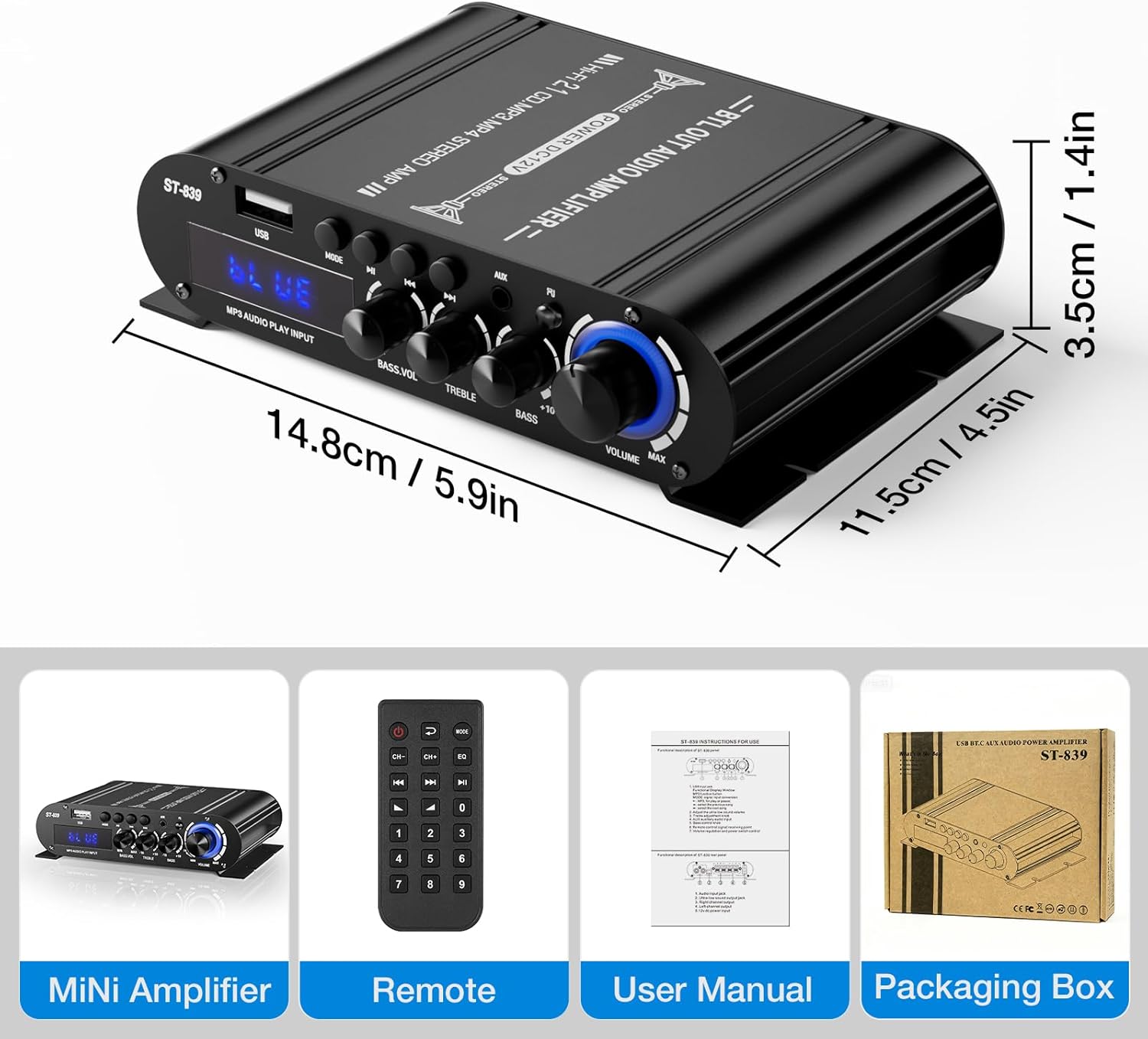
- ST-839 Audio Ampөмүрлүү
- Алыстан башкаруу
- Колдонуучунун Колдонмосу (бул документ)

4. Продукциянын өзгөчөлүктөрү
- Compact Yet Powerful Performance: Delivers RMS 25W×2 (stereo) + 40W (passive subwoofer) output, suitable for bookshelf, car, marine, or outdoor passive speakers.
- Flexible Audio Controls: Features adjustable master volume, bass, treble, and dedicated subwoofer volume knobs for sound customization.
- Бир нече киргизүү параметрлери: Supports Bluetooth for wireless streaming, USB for media playback, and auxiliary (AUX) and RCA inputs for wired connections.
- Sleek & Space-Saving Design: Compact size with a durable matte black finish, suitable for various environments.
- Жеңил операция: Bright digital LED display and remote control for convenient setting adjustments.
5. Продукт бүтүп калдыview
5.1 алдыңкы панели

- USB киргизүү: Аудио ойнотуу үчүн USB флэш-дисктерди туташтыруу үчүн.
- MODE баскычы: Switches between input modes (Bluetooth, USB, AUX).
- Ойнотуу/тындыруу баскычы: Controls playback for USB and Bluetooth modes.
- Мурунку/Кийинки ыр баскычтары: Navigates tracks for USB and Bluetooth modes.
- AUX киргизүү: Тышкы аудио түзмөктөр үчүн 3.5 мм стерео киргизүү.
- Индикатор жарыгы: Displays current status or mode.
- BASS.VOL Knob: Adjusts the volume level of the passive subwoofer output.
- TREBLE баскычы: Жогорку жыштыктагы жоопту тууралайт.
- BASS баскычы: Adjusts the low-frequency response for main speakers.
- VOLUME баскычы: Master volume control for all outputs.
5.2 Арткы панель

- АУДО КИРГИЗҮҮ (RCA): Stereo RCA inputs for connecting audio sources like DVD players or TVs.
- SUPER BASS (Passive Subwoofer Output): Connects to a passive subwoofer.
- SPEAKER IMPEDANCE 4-8Ω (Left/Right Channel Output): Connects to passive stereo speakers.
- DC 12V 3A Power Input: Connects to a DC 12V power adapter (not included).
6. Орнотуу нускамалары
6.1 Динамиктерди бириктирүү
- камсыз кылуу ampкөтөргүч өчүрүлгөн.
- Connect your passive stereo speakers to the SPEAKER IMPEDANCE 4-8Ω terminals on the rear panel. Match the positive (+) and negative (-) terminals correctly for each speaker (Left and Right).
- If using a passive subwoofer, connect it to the СУПЕР БАСС терминалдар.
6.2 Аудио булактарын туташтыруу
Аудио булагын туташтыруу үчүн төмөнкү ыкмалардын бирин тандаңыз:
- RCA киргизүү: Connect your audio device (e.g., TV, DVD player) to the AUDIO INPUT (RCA) jacks on the rear panel using an RCA cable.
- AUX киргизүү: Connect your audio device (e.g., smartphone, laptop) to the AUX киргизүү (3.5mm) jack on the front panel using a 3.5mm audio cable.
- USB киргизүү: Аудио камтыган USB флэш-дискти салыңыз fileс ичине USB киргизүү алдыңкы панелдеги порт.

6.3 Кубатты туташтыруу
- Connect a DC 12V power adapter (not included) to the DC 12V 3A Power Input арткы панелде.
- Кубат адаптерин ылайыктуу розеткага сайыңыз.
7. Иштөө нускамалары
7.1 Күйгүзүү/өчүрүү
бургула VOLUME knob clockwise until it clicks to power on the amplifier. Turn it counter-clockwise until it clicks to power off.
7.2 Киргизүүнү тандоо
басыңыз РЕЖИМ button on the front panel or the remote control to cycle through available input sources: Bluetooth, USB, and AUX/RCA.
7.3 Bluetooth жупташтыруу
- которуштуруу ampколдонуп, Bluetooth режимине көтөргүчтү РЕЖИМ button. The display will show "BLUE".
- On your smartphone or Bluetooth-enabled device, search for "ST-839" in the Bluetooth settings.
- Select "ST-839" to pair. Once connected, the ampкөтөргүч ийгиликтүү туташууну көрсөтөт.
7.4 USB ойнотуу
- USB флэш-дискти салыңыз USB киргизүү порт.
- которуштуруу amplifier to USB mode using the РЕЖИМ баскычы. The amplifier will automatically begin playing audio files USB дискинен.
- колдонуу Ойнотуу/Тыныгуу, Мурунку ыр, жана Кийинки ыр ойнотууну башкаруу үчүн алдыңкы панелдеги же пульттагы баскычтар.
7.5 Аудио жөндөө
- Көлөмү: Rotate the master VOLUME жалпы үн деңгээлин тууралоо үчүн баскычты басыңыз.
- Бас: айлантыңыз БАС knob to increase or decrease low frequencies for your main speakers.
- ҮЧТҮҮ: айлантыңыз ҮЧЧҮ knob to increase or decrease high frequencies.
- BASS.VOL: айлантыңыз BASS.VOL knob to adjust the output level of the passive subwoofer.

8. Техникалык тейлөө
- Тазалоо: Use a soft, dry cloth to wipe the surface of the ampкөтөргүч. Абразивдүү тазалагычтардан же эриткичтерден качыңыз.
- Сактагыч: Эгерде түзмөк көпкө колдонулбаса, аны кубат адаптеринен сууруп, салкын, кургак жерде сактаңыз.
- Вентиляция: Regularly check that the ventilation slots are free from dust and obstructions.
9. Кыйынчылыктарды
- Үн жок:
- камсыз кылуу ampкөтөргүч күйгүзүлүп, үнү көтөрүлөт.
- Check all cable connections (speakers, audio source, power).
- Verify the correct input source is selected (Bluetooth, USB, AUX/RCA).
- Test with a different audio source or speakers to isolate the issue.
- Бурмаланган үн:
- Экөөнүн тең үнүн азайтыңыз ampкүчөткүч жана аудио булагы.
- Check speaker impedance compatibility (4-8Ω).
- Динамик зымдары туура туташтырылганын жана кыска туташуу болбогонун текшериңиз.
- Adjust Bass and Treble controls to a neutral position.
- Bluetooth туташуу маселелери:
- камсыз кылуу amplifier is in Bluetooth pairing mode ("BLUE" displayed).
- Түзмөгүңүздүн Bluetooth функциясы күйгүзүлгөнүн жана анын жеткиликтүүлүк аралыгында экенин текшериңиз.
- Forget "ST-839" from your device's Bluetooth list and try pairing again.
- USB ойнотуу иштебей жатат:
- Ensure the USB drive is formatted correctly and contains compatible audio files.
- Башка USB дискти колдонуп көрүңүз.
10. Техникалык шарттар
| Өзгөчөлүк | Спецификация |
|---|---|
| Модель номери | ST-839 (A50801-MG-US) |
| Чыгуу күчү | RMS 25W x 2 (Stereo) + 40W (Passive Subwoofer) |
| Каналдардын саны | 2.1 |
| Киргизүү көлөмүtage | DC 12V (Minimum 12V, Maximum 12V) |
| Динамик импедансы | 4-8 Ом |
| Материал | Алюминий эритмеси |
| Монтаж түрү | бурун |
| Элемент Салмагы | 3.2 унция |
| Пакеттин өлчөмдөрү | 3 x 2 x 1 дюйм |
11. Кепилдик жана колдоо
Facmogu products are designed for reliability and performance. For any questions, technical support, or warranty inquiries, please refer to the contact information provided with your purchase or visit the official Facmogu webсайт. Кепилдик дооматтары үчүн сатып алганыңыздын далилин сактап коюңуз.


