1. Киришүү
Welcome to the user manual for your new Lava A1 Music keypad mobile phone. This guide provides essential information on setting up, operating, maintaining, and troubleshooting your device. Please read this manual carefully to ensure proper use and to maximize the performance of your phone.
The Lava A1 Music is designed for reliable communication with features such as clear sound, long battery life, and user-friendly operation.
2. Коопсуздук маалыматы
- Батареянын коопсуздугу: Түпнуска же бекитилген батарейкаларды жана заряддоо түзүлүштөрдү гана колдонуңуз. Батареяны кыска туташтырбаңыз, тешип албаңыз же өтө жогорку температурага дуушар кылбаңыз. Батареяларды туура жок кылыңыз.
- Айдоо коопсуздугу: Do not use your phone while driving. If necessary, use a hands-free accessory.
- Медициналык аппараттар: Maintain a safe distance between your phone and medical devices like pacemakers. Consult your physician and medical device manufacturer for specific guidelines.
- Учак: Turn off your phone when on an aircraft.
- Жарылуучу чөйрөлөр: Жардыруу коркунучу бар жерлерде, мисалы, май куюучу жайларда же химиялык заводдордо телефонуңузду өчүрүп коюңуз.
- Суу каршылык: Бул аппарат суу өткөрбөйт. Суюктуктардын таасиринен алыс болуңуз.
- Балдар: Keep the phone and its accessories out of reach of small children.
3. Пакеттин мазмуну
Пакетти ачкандан кийин, бардык буюмдар бар экенин жана жакшы абалда экендигин текшериңиз:
- Lava A1 Music Mobile Phone
- Батарея
- Адаптер (заряддагыч)
- Колдонуучунун колдонмосу (бул документ)
4. Түзмөк бүттүview
Familiarize yourself with the physical components of your Lava A1 Music phone.

Сүрөт 4.1: Алдыңкы жана арткы view of the Lava A1 Music mobile phone, showcasing its compact design and keypad.
The phone features a durable build with a comfortable keypad for easy dialing and navigation. The rear panel includes the speaker grille and the A1 Music branding.
Баскычтоптун жайгашуусу

Сүрөт 4.2: Деталдаштырылган view of the Lava A1 Music keypad, highlighting the numerical and function keys.
- Чабыттоо ачкычы: Менюда навигация жана тандоо үчүн колдонулат.
- Чалуу ачкычы: Чалууларды баштайт же жооп берет.
- Аяктоо/Кубат баскычы: Ends calls, returns to standby, or powers the phone on/off.
- Жумшак баскычтар: Context-sensitive keys for menu options.
- Numerical Keys: Номерлерди терүү жана текст киргизүү үчүн.
5. Орнотуу
5.1 Inserting SIM Card(s) and Battery
- Арткы капкакты алып салуу: Gently pry open the back cover of the phone from the designated notch.
- SIM-карталарды салыңыз: Locate the SIM card slot(s). Insert your SIM card(s) into the slot(s) with the gold contacts facing down, ensuring they are correctly seated. This phone supports Dual SIM functionality.
- Батарея салыңыз: Place the battery into the battery compartment, aligning the gold contacts on the battery with those in the phone.
- Арткы капкакты алмаштыруу: Carefully align and press the back cover until it clicks securely into place.
5.2 Батареяны заряддоо
Биринчи колдонуудан мурун, батареяны толук заряддоо сунушталат.
- Connect the charger adapter to a power outlet.
- Connect the other end of the charger to the phone's charging port.
- Экрандагы батарейканын көрсөткүчү заряддоо абалын көрсөтөт.
- Толук заряддалгандан кийин заряддагычты ажыратыңыз.
The Lava A1 Music features a 1000mAh battery, providing up to 5 days of standby time under optimal conditions.
5.3 Күйгүзүү/өчүрүү
- Күйгүзүү үчүн: басып, кармап туруңуз Аяктоо/кубат баскычы экран күйгүчө.
- Өчүрүү үчүн: басып, кармап туруңуз Аяктоо/кубат баскычы until the power-off options appear, then select "Power Off".
6. Иштөө нускамалары
6.1 Чалууларды жасоо
- From the standby screen, enter the phone number using the keypad.
- басыңыз Чалуу ачкычы чакырууну баштоо.
- Чакырууну аяктоо үчүн басыңыз Аяктоо/кубат баскычы.
6.2 Sending SMS Messages
- барыңыз Меню > Кабарлар > Кабар жазуу.
- Ариптакта аркылуу билдирүүңүздү киргизиңиз.
- Алуучунун телефон номерин киргизиңиз же байланыштардан тандаңыз.
- Тандоо Жөнөтүү.
6.3 Bluetooth байланышы
The Lava A1 Music supports Bluetooth for wireless connectivity with compatible devices.
- барыңыз Меню > Орнотуулар > Байланыш > Bluetooth.
- Bluetooth'ду күйгүзүңүз On.
- Тандоо Жупташтырылган шаймандар or Издөө жаңы шайман туташтыруу.
6.4 Музыкалык ойноткуч
Enjoy your favorite music with the phone's built-in music player and clear sound output.

Сүрөт 6.1: Illustration of the powerful sound feature, indicating high-quality audio output for music and calls.
- барыңыз Меню > Мультимедиа > Музыка ойноткуч.
- Select a song from your storage to play.
- Ойнотууну башкаруу үчүн навигация баскычтарын колдонуңуз (ойнотуу, тындыруу, өткөрүп жиберүү).
6.5 Torch Function
The phone includes an instant torch feature for convenience.
- To turn on the torch, press and hold the designated torch key (refer to your phone's keypad for exact key, often the '0' or a dedicated side button).
- Repeat the action to turn it off.
6.6 Auto Call Recording
The Lava A1 Music supports automatic call recording.
- барыңыз Меню > Орнотуулар > Чалуу жөндөөлөрү.
- Locate and enable the Чалууларды автоматтык түрдө жазуу параметр.
- Recorded calls will be saved in the phone's memory or on an inserted memory card.
6.7 Тилди колдоо
The device supports 22 Indian languages, allowing you to operate the phone in your preferred language.
- барыңыз Меню > Орнотуулар > Телефон орнотуулары > Тил.
- Select your desired language from the list.
6.8 Super Battery Mode
Activate Super Battery Mode to extend your phone's battery life when power is low.
- This mode typically optimizes background processes and display settings to conserve power.
- Access this feature through Меню > Орнотуулар > Power Management or a similar path.
6.9 Display and Contact Photo Icons
The phone features a 2-inch display for clear viewing and supports contact photo icons for easy call verification.

Сүрөт 6.2: The 2-inch display of the Lava A1 Music, showing clear visuals.
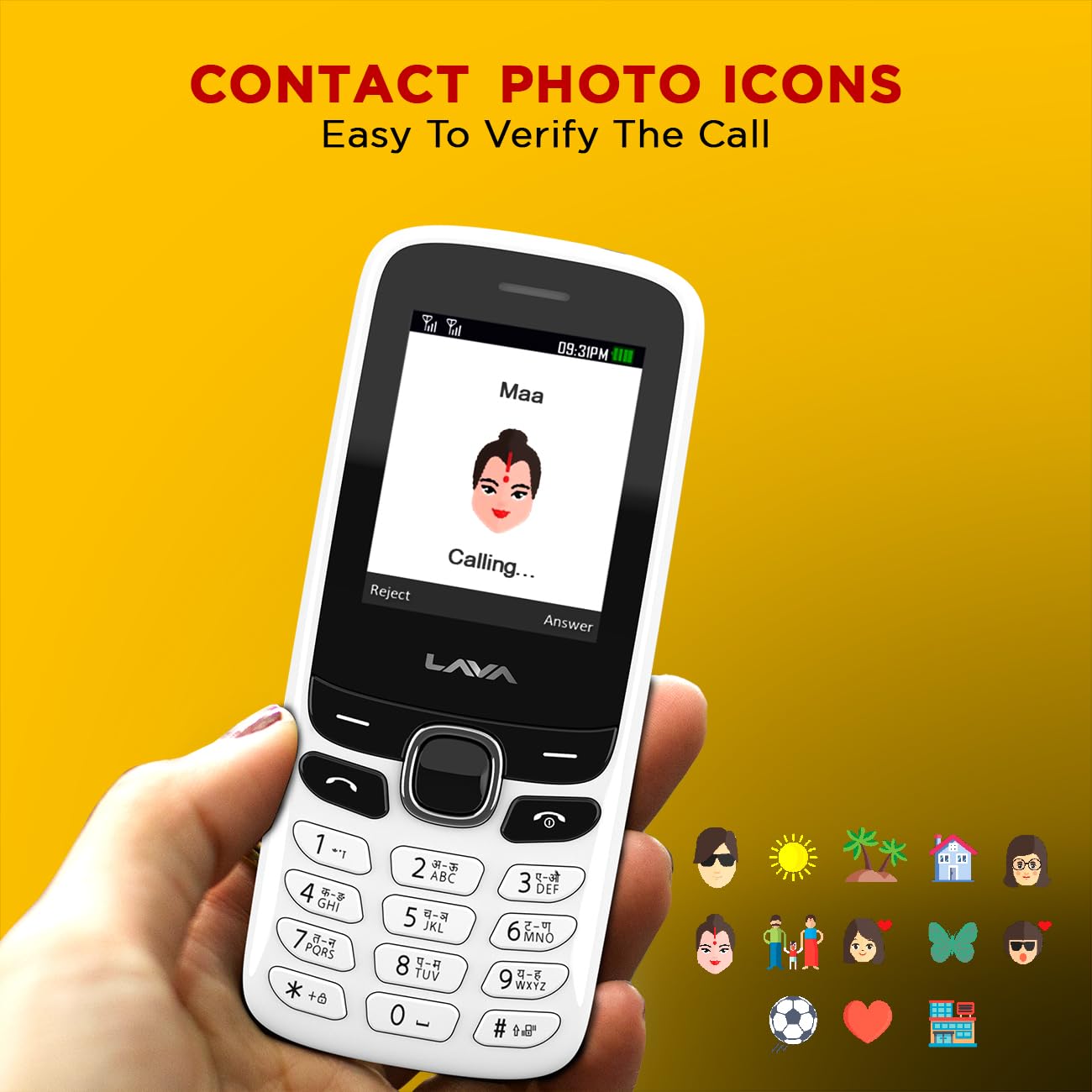
Сүрөт 6.3: Example of contact photo icons on the Lava A1 Music, aiding in quick identification of callers.
7. Техникалык тейлөө
7.1 Батареяга кам көрүү
- Батареяны бат-баттан ашыкча заряддоодон же толугу менен жарактан чыгаруудан алыс болуңуз.
- Батареяны өтө ысыкка же суукка дуушар кылбаңыз.
- If the phone will not be used for an extended period, charge the battery to about 50% before storing.
7.2 Аппаратты тазалоо
- Телефондун бетин тазалоо үчүн жумшак, кургак чүпүрөктү колдонуңуз.
- Катуу химиялык заттарды, тазалоочу эриткичтерди же күчтүү жуучу каражаттарды колдонуудан алыс болуңуз.
- Keep the charging port and audio jack free from dust and debris.
7.3 Сактоо
Телефонду түз күн нурунан жана экстремалдык температурадан алыс салкын, кургак жерде сактаңыз.
8. Кыйынчылыктарды
This section addresses common issues you might encounter with your Lava A1 Music phone.
| Көйгөй | Мүмкүн чечим |
|---|---|
| Телефон күйбөйт | Батарея заряддалганын текшериңиз. Батарея туура салынганын текшериңиз. |
| Тармак сигналы жок | SIM карта туура салынганын текшериңиз. Тармактык камтуусу жакшыраак аймакка көчүңүз. Кызмат көрсөтүүчүңүзгө кайрылыңыз. |
| Чалууларды кабыл алуу же жасоо мүмкүн эмес | Check network signal. Ensure your SIM card is active. Verify call barring settings. |
| Батарея бат эле түгөнөт | Reduce screen brightness. Close unused applications. Activate Super Battery Mode. |
| Баскычтоп жооп бербейт | Restart the phone. Ensure no physical obstruction on the keys. |
If the issue persists after trying these solutions, please contact customer support.
9. Техникалык шарттар
Detailed technical specifications for the Lava A1 Music mobile phone:
| Бренд | Лава |
| Модель номери | A1 Music |
| Операция системасы | Android 10.0 |
| Screen Size | 2 дюйм (5.08 см) |
| Резолюция | 240 x 320 пиксель |
| Батарея сыйымдуулугу | 1000 миллионampere Саат (мАч) |
| Телефон менен сүйлөшүү убактысы | 96 саатка чейин |
| Connectivity Technologies | USB, Bluetooth |
| Өзгөчөлүктөр | Dual SIM, Auto Call Recording, Instant Torch, 22 Indian Language Support, Super Battery Mode |
| Аудио Jack | 3.5 мм |
| Форма фактору | Бар |
| Продукциянын өлчөмдөрү | 11.25 x 4.8 x 1.47 см |
| Элемент Салмагы | 70 г |
| Келип чыккан өлкө | Индия |
| Кутуда эмне бар | Адаптер |
10. Кепилдик жана колдоо
10.1 Кепилдик маалыматы
Your Lava A1 Music mobile phone comes with a 1 жылдык алмаштыруу кепилдик from the date of purchase. This warranty covers manufacturing defects and ensures a replacement device in case of eligible issues. Please retain your purchase receipt as proof of purchase for warranty claims.
The warranty does not cover damages caused by misuse, accidents, unauthorized repairs, or normal wear and tear.
10.2 Кардарларды колдоо
For any technical assistance, warranty claims, or further inquiries, please contact Lava customer support. Refer to the official Lava website or your product packaging for the most current contact details, including phone numbers and service center locations.
Сиз ошондой эле расмий бара аласыз Lava Store on Amazon көбүрөөк продукт маалымат жана колдоо ресурстар үчүн.


