1. Киришүү
This manual provides detailed instructions for the safe and efficient use of your DOOGEE U12 Android 16 Tablet. Please read this manual thoroughly before operating the device to ensure optimal performance and longevity. Keep this manual for future reference.
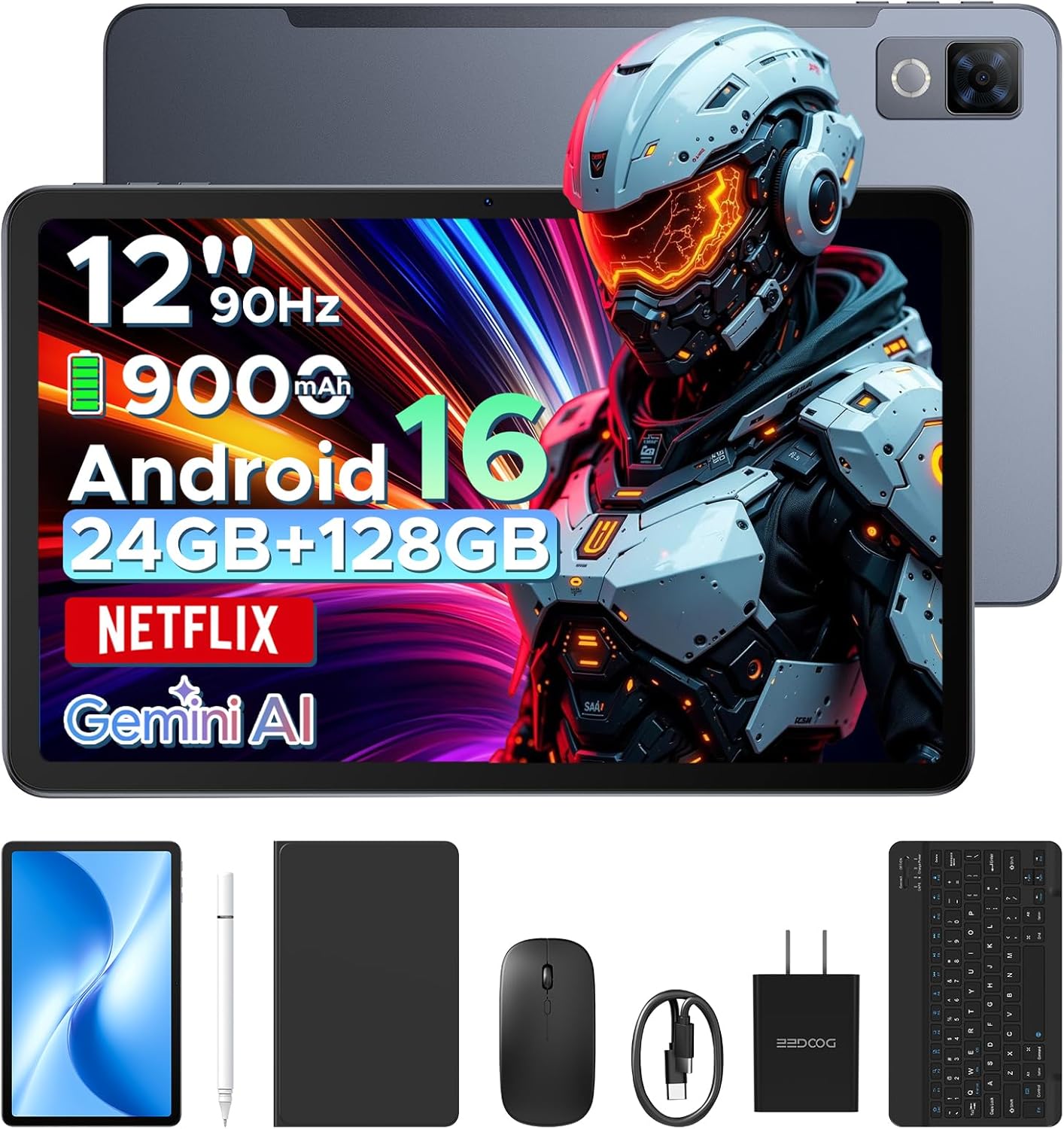
Image: The DOOGEE U12 tablet shown with its accompanying accessories, including a keyboard, mouse, and stylus.
2. Пакеттин мазмуну
Пакетиңизде бардык буюмдар бар экенин текшериңиз:
- DOOGEE U12 Планшет
- Bluetooth баскычтоп
- Чычкан
- Стилус калеми
- Screen Protector
- Коргоочу кап
- Кубаттоочу түзүлүш (кубат адаптери)
- Type-C USB кабели
- Колдонуучунун Колдонмосу (бул документ)
- Кызмат картасы

Image: An organized display of all items included in the DOOGEE U12 tablet package.
3. Орнотуу колдонмосу
3.1 Алгачкы заряддоо
Before first use, fully charge the tablet using the provided charger and USB Type-C cable. Connect the cable to the tablet's charging port and the adapter to a power outlet. The charging indicator will show the charging status.
3.2 Күйгүзүү/өчүрүү
- Күйгүзүү үчүн: Экранда DOOGEE логотиби пайда болгонго чейин Кубат баскычын басып, кармап туруңуз.
- Өчүрүү үчүн: Press and hold the Power button, then select 'Power off' from the options displayed on the screen.
- Кайра баштоо үчүн: Кубат баскычын басып, кармап туруңуз, андан кийин параметрлерден "Кайра баштоо" тандаңыз.
3.3 Баштапкы конфигурация
Биринчи жолу күйгүзүлгөндө, планшетиңизди орнотуу үчүн экрандагы көрсөтмөлөрдү аткарыңыз. Буга тилиңизди тандоо, Wi-Fi тармагына туташуу жана Google аккаунтуңуз менен кирүү кирет.
3.4 Аксессуарларды туташтыруу
- Bluetooth клавиатурасы/чычканы: Turn on the keyboard/mouse and enable Bluetooth on your tablet (Settings > Connected devices > Bluetooth). Select the accessory from the list of available devices to pair.
- Стилус калеми: The stylus pen is generally passive and does not require pairing. Simply use it directly on the screen.
- Коргоочу корпус: Install the tablet into the protective case for enhanced protection and to use it as a stand.
4. Иштөө нускамалары
4.1 Дисплейдин өзгөчөлүктөрү
The DOOGEE U12 features a 12-inch FHD+ IPS display with a resolution of 2000x1200 pixels and a 90Hz refresh rate. This provides clear visuals and smooth interaction.
- Widevine L1 колдоосу: Stream high-definition content from platforms like Netflix, YouTube, and Amazon Prime Video.
- Көздү коргоо: Utilize Eye Comfort Mode, Dark Mode, and Auto Brightness Adjustment for reduced eye strain.
- Бөлүнгөн экранда көп тапшырмалуулук: Run two applications simultaneously by using the split-screen feature.

Image: The 12-inch 2K Ultra-Clear Big Display of the DOOGEE U12, highlighting its visual clarity.

Image: The tablet's eye protection display features, including Eye Comfort Mode, Dark Mode, and Auto Brightness Adjustment.
4.2 Аткаруу жана сактоо
The tablet is powered by an Unisoc T7255 Octa-Core processor, ensuring smooth operation for various tasks.
- RAM: 24GB (6GB physical + 18GB virtual) for efficient multitasking.
- Ички сактагыч (ROM): 128GB for applications and files.
- Кеңейтүүчү сактагыч: Supports up to 2TB via TF (microSD) card (sold separately).

Image: A visual representation of the powerful Unisoc T7255 Octa-Core Processor.

Image: Details on the tablet's memory configuration, including 24GB RAM and 128GB ROM with expansion capabilities.
4.3 Батареяны башкаруу
The DOOGEE U12 is equipped with a 9000mAh high-capacity battery.
- Тез кубаттоо: Supports 18W fast charging for quick power replenishment.
- Тескери заряддоо: Features 5W reverse charging, allowing the tablet to charge other compatible devices via OTG.

Image: An illustration of the tablet's 9000mAh battery and its charging capabilities.
4.4 Камералар
Capture photos and videos with the integrated cameras:
- Арткы камера: 13 мегапиксел
- Алдыңкы камера: 8 мегапиксел

Сүрөт: деталдуу view of the tablet's camera modules, indicating the 13MP main camera and 8MP front camera.
4.5 Байланыш
- Wi-Fi: Dual-band (2.4G/5G) for stable internet connection.
- Bluetooth: Version 5.0 for wireless accessory pairing.
- Навигация: Supports GPS, BDS, GLONASS, and Galileo for accurate positioning.
- Аудио Jack: Стандарттык 3.5 мм кулакчын уячасы.

Сүрөт: An overview of additional features including facial recognition, navigation system, Widevine L1, and WiFi 5.
4.6 Android 16 OS and Gemini AI
The tablet runs on the Android 16 operating system, offering enhanced performance and features.
- Gemini AI: Integrated AI for tasks such as summarizing documents, setting meetings, and providing intelligent tips.
- Көп колдонуучулуу система: Өзүнчө колдонуучу адисин түзүңүзfileар кандай адамдар үчүн с.
- Ата-энелик көзөмөл: Manage and restrict access for children's profiles.
- Уйку режими: Schedule screen time and notifications for better sleep.
- Live Subtitles: Real-time captioning for audio content.
- Digital Health Tools: Monitor and manage your digital well-being.
- WPS кеңсеси: Pre-installed office suite for productivity tasks.

Сүрөт: An overview of the built-in Gemini AI features designed to enhance work and daily life.

Image: Various functions of the Android 16 operating system, including user management and digital well-being tools.
4.7 аудио
The tablet is equipped with dual speakers for clear audio output.

Image: The tablet's audio capabilities, featuring premium dual speakers and a 3.5mm audio jack.
4.8 Физикалык дизайн
The DOOGEE U12 features a sleek 7.8mm ultra-thin metal body, balancing portability with durability.

Image: The ultra-thin 7.8mm metal-integrated body of the DOOGEE U12 tablet.
5. Техникалык тейлөө
- Тазалоо: Экранды жана денени тазалоо үчүн жумшак, түксүз чүпүрөктү колдонуңуз. Абразивдүү материалдардан же катуу химиялык заттардан алыс болуңуз.
- Сактагыч: Планшетти күн нурунан жана экстремалдык температурадан алыс салкын, кургак жерде сактаңыз.
- Коргоо: Use the provided protective case and screen protector to guard against drops and scratches.
- Программалык камсыздоо жаңыртуулары: Оптималдуу аткарууну жана коопсуздукту камсыз кылуу үчүн системанын жаңыртууларын дайыма текшерип, орнотуңуз.
6. Кыйынчылыктарды
6.1 Планшет күйбөй жатат
- Батарея заряддалганын текшериңиз. Заряддагычты туташтырыңыз жана кайра күйгүзүү аракетинен мурун бир нече мүнөт күтүңүз.
- Өчүрүп күйгүзүүгө мажбурлоо үчүн Кубат баскычын жок дегенде 10-15 секунд басып, кармап туруңуз.
6.2 Экран жооп бербей жатат
- Планшетти кайра иштетиңиз.
- Экран таза жана таштандылардан таза экенин текшериңиз.
- If a screen protector is installed, ensure it is properly applied and not interfering with touch sensitivity.
6.3 Wi-Fi туташуу маселелери
- Жөндөөлөрдөн Wi-Fi'ды өчүрүп жана күйгүзүңүз.
- Wi-Fi роутериңизди өчүрүп күйгүзүңүз.
- Forget the network and reconnect (Settings > Network & internet > Internet > Saved networks).
- Планшет Wi-Fi сигналынын диапазонунда экенин текшериңиз.
6.4 Кошумча жабдуулар туташпай жатат
- Ensure the accessory is powered on and in pairing mode (if applicable).
- Verify Bluetooth is enabled on the tablet.
- Remove any previously paired instances of the accessory from the tablet's Bluetooth settings and attempt to re-pair.
- Check the accessory's battery level.
7. Техникалык шарттар
| Өзгөчөлүк | Деталь |
|---|---|
| Модел | DOOGEE U12 |
| Операция системасы | Android 16 |
| Дисплей өлчөмү | 12 дюйм |
| Display Resolution | 2000x1200 пиксел |
| Жаңыртуу ылдамдыгы | 90Hz |
| Процессор | Unisoc T7255 сегиз ядролуу |
| RAM | 24 ГБ (6 ГБ физикалык + 18 ГБ виртуалдык) |
| Ички сактагыч (ROM) | 128 ГБ |
| Кеңейтүүчү сактагыч | 2 ТБ чейин (TF карта) |
| Батарея сыйымдуулугу | 9000mAh |
| Тез заряддоо | 18 Вт |
| Тескери заряддоо | 5W |
| Арткы камера | 13 мегапиксел |
| Алдыңкы камера | 8 мегапиксел |
| Wi-Fi | Dual-band (2.4G/5G) |
| Bluetooth | Версия 5.0 |
| Навигация | GPS/BDS/GLONASS/Galileo |
| Аудио Jack | 3.5мм |
| Өлчөмдөрү (LxWxH) | 11.11 x 7 x 0.31 дюйм |
| Салмагы | 1.48 фунт |
| Дене материалы | Металл |
| Түс | Боз |
8. Кепилдик жана колдоо
Your DOOGEE U12 tablet comes with comprehensive support:
- Кепилдик: A two-year limited warranty covers manufacturing defects.
- Техникалык колдоо: Өмүр бою техникалык колдоо көрсөтүлөт.
- Кардарларды тейлөө: Expect 24-hour responses to your inquiries for worry-free use.
- For support, please refer to the contact information on the included Service Card or visit the official DOOGEE webсайт.


