Introduction
This manual provides detailed instructions for the DIERYA DK81E 75% Mechanical Gaming Keyboard. Please read this manual thoroughly before using the product to ensure proper setup and operation. Retain this manual for future reference.
The DIERYA DK81E is a compact 75% layout mechanical keyboard designed for gaming and productivity. It features hot-swappable switches, a gasket-mount design with multi-layer sound dampening, customizable RGB backlighting, a dedicated volume knob, and a powerful web-based driver for advanced customization.
Пакеттин мазмуну
- DIERYA DK81E Mechanical Keyboard x 1
- USB-C - USB-A кабели x 1
- Баскыч капкагын тарткыч x 1
- Которуу Тарткыч x 1
- Колдонуучунун колдонмосу x 1

Жайгашуу
- Баскычтопту таңгактан чыгаруу: Carefully remove the DIERYA DK81E keyboard and all accessories from the packaging.
- USB кабелин туташтыруу: Insert the USB-C end of the provided cable into the port on the back of the keyboard. Connect the USB-A end to an available USB port on your computer or gaming console.
- Системаны таануу: Your operating system (Windows, macOS, Linux) should automatically detect and install the necessary drivers. No additional software installation is required for basic functionality.
- Баскычтоп буттарын тууралоо: The keyboard features two-stage adjustable feet. Flip them out to achieve your preferred typing angle. The anti-slip rubber pads on the bottom ensure stability.


Иштөө нускамалары
Негизги баскычтоп функциялары
The DIERYA DK81E operates as a standard 75% layout keyboard. All keys function as labeled. For keys that are typically present on a full-size keyboard but not on a 75% layout (e.g., F-keys, Page Up/Down, Home, End, Delete), they are accessible via the Function (Fn) key combinations. Refer to the keycap legends for specific Fn key functions.
Multimedia Volume Knob
The dedicated metal knob located on the top right of the keyboard provides convenient control over audio and media playback.
- Саат жебеси боюнча айлантуу: Үнүн жогорулатуу.
- Сааттын жебесине каршы айландыруу: Үнүн азайтуу.
- Төмөн басыңыз: Медиа ойнотуу/тындыруу.

RGB арткы жарыкты башкаруу
The keyboard features vibrant RGB backlighting with 16.8 million colors and over 15 preset lighting effects. Specific key combinations (often involving the Fn key) are used to cycle through effects, adjust brightness, and change colors. Consult the included quick start guide or the web driver for detailed instructions on RGB customization.

Web-Based Driver for Customization
The DIERYA DK81E utilizes a browser-based driver for advanced customization, eliminating the need for software installation and ensuring zero memory footprint. This driver allows for:
- Key remapping
- Макро жазуу
- Quick shortcuts
- In-depth RGB personalization
кирүү үчүн web driver, open a web browser and navigate to the address provided in the quick start guide or on the manufacturer's website. The driver is compatible with Windows, macOS, and Linux operating systems.

Негизги өзгөчөлүктөрү
- Ыкчам алмаштыруучу которгучтар: The DK81E features universal hot-swappable sockets compatible with 3-pin and 5-pin mechanical switches. This allows users to easily change switches without soldering, enabling personalized typing feel and sound.
- Gasket-Mount Design with 6-Layer DampКөбүктү жылтыратуу: The advanced gasket-mount structure, combined with six layers of sound-absorbing foam, provides a flexible typing experience and a deeper, more satisfying acoustic profile.
- Алдын ала майланган сызыктуу өчүргүчтөр: The keyboard comes equipped with factory pre-lubricated linear switches, ensuring a smooth and consistent keystroke experience right out of the box. These switches are rated for 50 million keystrokes.
- Double Shot Keycaps: The keycaps are manufactured using a double-shot injection molding process, which ensures legends will not fade or wear off over time, maintaining a pristine look and feel.
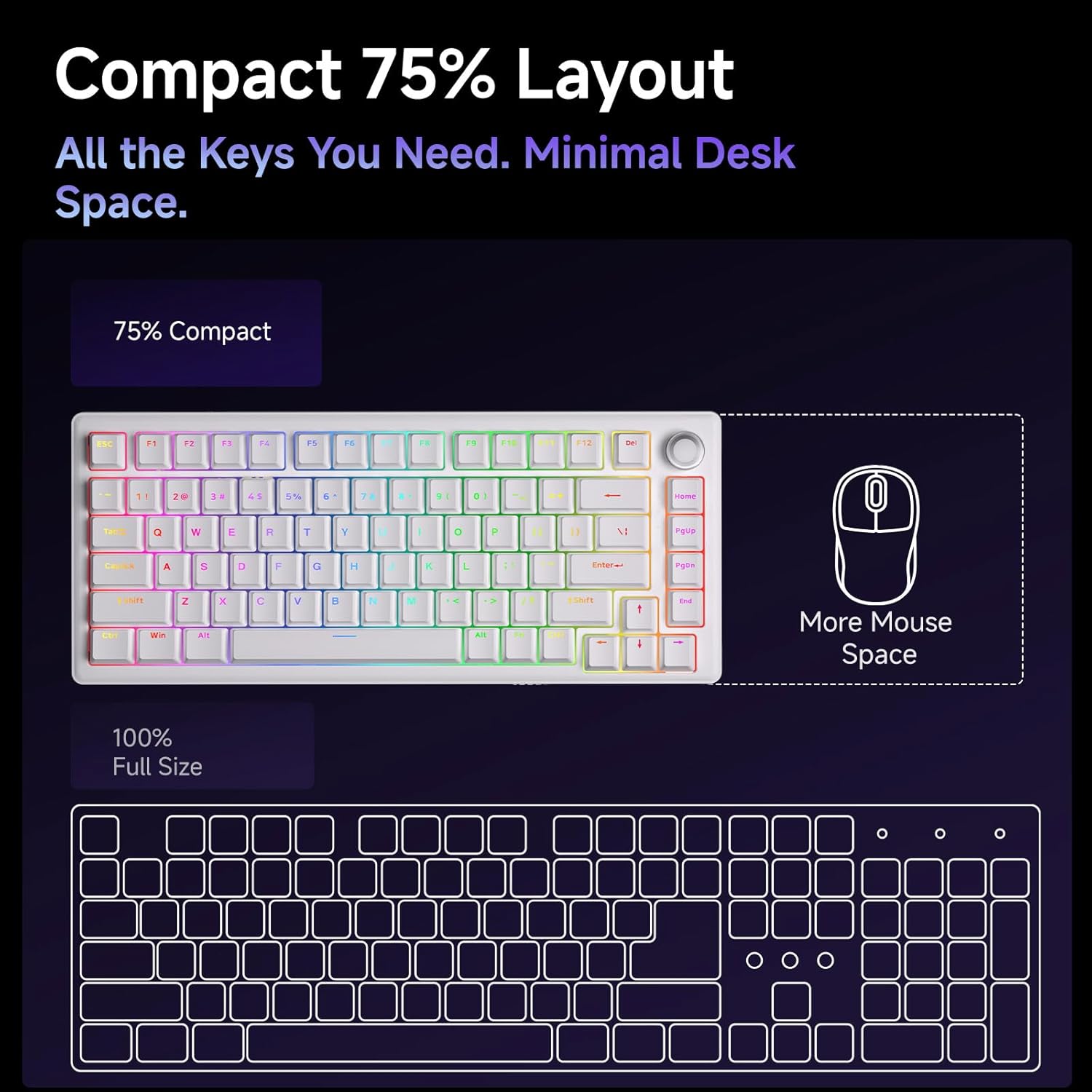
- Компакт 75% Макет: The 75% layout provides all essential keys while minimizing desk space, offering more room for mouse movement.



Техникалык тейлөө
Баскычтопту тазалоо
Үзгүлтүксүз тазалоо клавиатуранын иштешин жана көрүнүшүн сактоого жардам берет.
- Чаңды тазалоо: Баскыч капкактарынын ортосундагы чаңды жана калдыктарды үйлөө үчүн кысылган аба банкасын колдонуңуз.
- Клавиатураны тазалоо: Gently remove keycaps using the provided keycap puller. Clean them with a soft cloth dampened with a mild cleaning solution (e.g., isopropyl alcohol diluted with water). Ensure keycaps are completely dry before reattaching.
- Бетти тазалоо: Клавиатуранын бетин жумшак, түксүз чүпүрөк менен сүртүңүз. Катуу химиялык заттарды же абразивдүү материалдарды колдонбоңуз.
Которуу жана клавиатура алмаштыруу
The hot-swappable design allows for easy replacement of switches and keycaps.
- Баскыч капкактарын алып салуу: Use the keycap puller to carefully grip and lift keycaps straight up.
- Которгучтарды алып салуу: Use the switch puller to gently clamp the top and bottom clips of the switch, then pull the switch straight up from the PCB.
- Которгучтарды орнотуу: Жаңы өчүргүчтүн төөнөгүчтөрүн платадагы тешиктер менен тегиздеңиз. Өчүргүч ордуна чыкылдаганча бекем басыңыз. Төөнөгүчтөрдүн ийилбегенин текшериңиз.
- Баскыч капкактарын орнотуу: Align the keycap stem with the switch stem and press down gently until it is securely seated.
Проблемаларды чечүү
- Баскычтоп жооп бербейт:
- USB-C кабели клавиатурага жана компьютерге бекем туташып турганын текшериңиз.
- Баскычтопту компьютериңиздин башка USB портуна туташтырууга аракет кылыңыз.
- Системага тиешелүү маселелерди жокко чыгаруу үчүн баскычтопту башка компьютерде сынап көрүңүз.
- RGB Lights Not Working/Incorrect:
- Check the RGB control key combinations (refer to the quick start guide) to ensure brightness is not set to zero or an incorrect mode is selected.
- кирүү web driver to verify RGB settings and apply changes.
- Катталбаган ачкычтар:
- If a specific key is not working, carefully remove its keycap and switch. Inspect the switch pins for any bends or damage. Straighten bent pins or replace the switch if damaged.
- Коммутатордун платага толугу менен орнотулганын текшериңиз.
- Volume Knob Not Functioning:
- Verify that the keyboard is properly connected and recognized by the system.
- Test media playback in different applications.
Техникалык шарттар
| Өзгөчөлүк | Деталь |
|---|---|
| Модель аты | DK81E |
| Бренд | ДИЕРЯ |
| Макет | 75% |
| Которуу түрү | Mechanical (Pre-lubed Creamy Linear Switch) |
| Ыкчам алмаштырылуучу | Ооба (3-пин/5-пин менен шайкеш келет) |
| Монтаждоо стили | Gasket-Mount |
| Dampэning | 6-Layer Sound-Absorbing Foam |
| Арткы жарыктандыруу | RGB (16.8 Million Colors, 15+ Effects) |
| Баскыч капкактары | Double-Shot Injection Molded |
| Байланыш | Wired USB-C (Detachable Cable) |
| Добуш берүү көрсөткүчү | 1000Hz |
| Өзгөчөлүктөр | Volume Knob, Programmable Web Айдоочу |
| Шайкеш түзмөктөр | Оюн консолу, компьютер |
| Операциялык системалар | Windows, macOS, Linux |
| Элемент Салмагы | 1.96 фунт |
| Пакеттин өлчөмдөрү | 15.31 x 5.79 x 1.85 дюйм |
Кепилдик жана колдоо
Specific warranty information for the DIERYA DK81E keyboard is not provided in this manual. For detailed warranty terms, technical support, or further assistance, please visit the official DIERYA webсайтка же түздөн-түз кардарларды тейлөөгө кайрылыңыз.
Official DIERYA Webсайт: DIERYA Store on Amazon


