1. Киришүү
This manual provides detailed instructions for the operation and maintenance of your HIFI WALKER H2 Touch 64GB Hi Res MP3 Player. Please read this manual thoroughly before using the device to ensure proper functionality and to maximize your audio experience.
2. Продукциянын өзгөчөлүктөрү
- Hi-Res Lossless Audio Performance: Equipped with an ESS9219Q DAC chip, supporting FLAC, APE, WAV, ALAC, AIFF, and native DSD64/128 up to 32-bit/384 kHz.
- Bluetooth 5.2: Bi-directional (TX/RX) with aptX-HD and LDAC support for high-fidelity wireless audio.
- Dual Control Interface: 2.4-inch full-touch 480x360 display combined with six physical buttons for intuitive navigation.
- Premium Build & Outputs: CNC-machined aluminum alloy body with 3.5 mm headphone out and line-out ports.
- Ар тараптуу байланыш: Functions as a USB DAC, offers SPDIF output via Type-C port.
- Кеңейтүүчү сактагыч: Includes a pre-inserted 64 GB micro SD card, expandable up to 512 GB via micro SD or USB OTG.
- Жогорку тактыктагы жаздыруу: Digital stereo MIC for 48 kHz high-fidelity recording.
- Батареянын узак иштөө мөөнөтү: 1500 mAh lithium battery provides up to 10 hours of playback.
- Кошумча функциялар: E-book reading, background music playback, multiple EQ presets.
3. Кутуда эмне бар
- HIFI WALKER H2 Touch MP3 Player
- Заряддоо кабели
- 64GB Micro SD Card (pre-inserted)
- User Manual
4. Продукт бүтүп калдыview
4.1 Түзмөктүн жайгашуусу
The HIFI WALKER H2 Touch features a compact design with a 2.4-inch display and strategically placed physical controls.
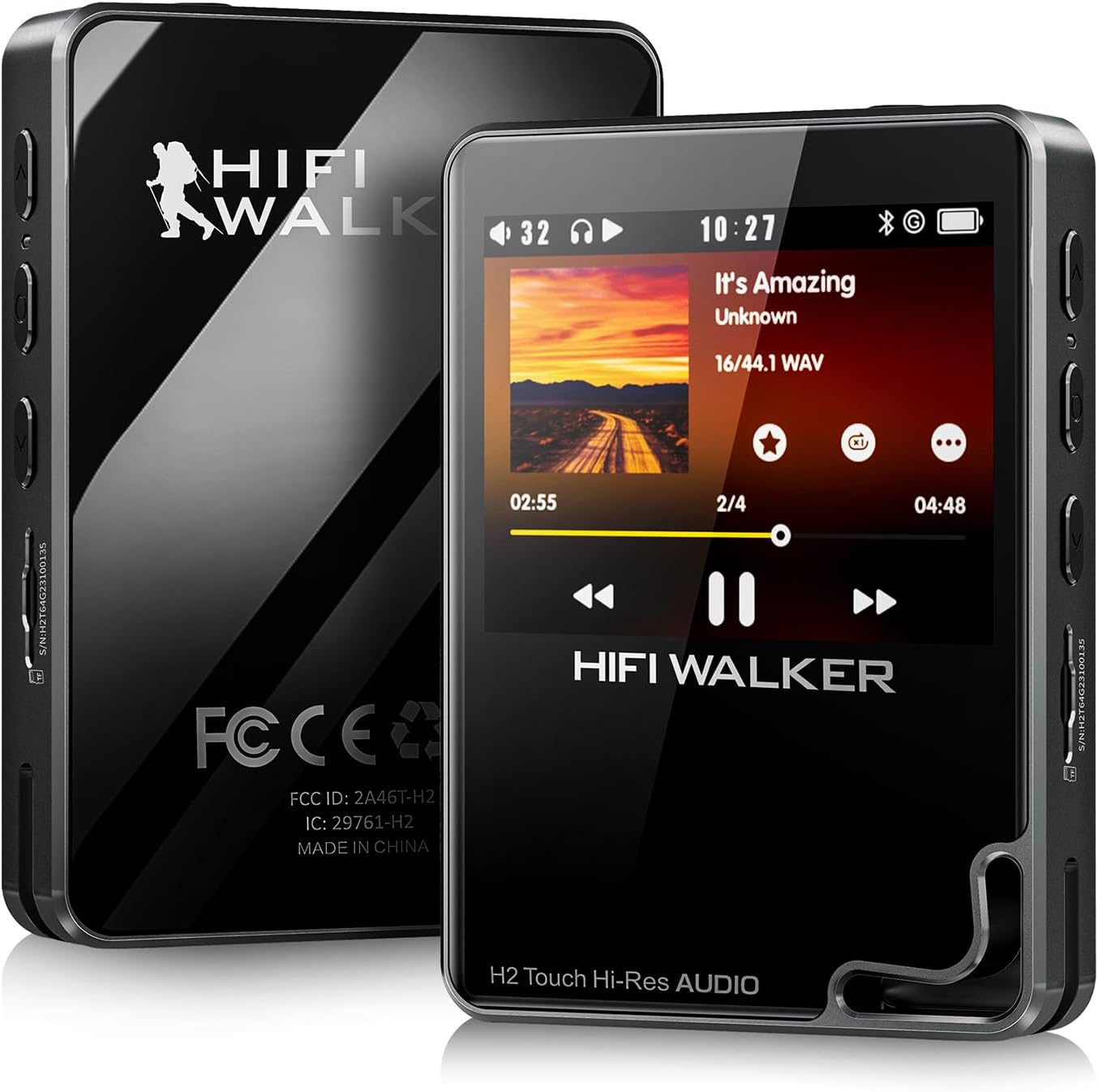
Сүрөт 1: Алдыңкы жана арткы view of the HIFI WALKER H2 Touch MP3 Player.
4.2 Физикалык баскычтар жана порттор
The device combines a touch screen with tactile buttons for ease of use.

Figure 2: Close-up of the H2 Touch screen and physical control buttons.
- Кубат баскычы: Located on the top edge. Press and hold to power on/off.
- Үн баскычтары: Located on the side, marked '+' and '-'.
- Микро SD карта слоту: Located on the side, for memory expansion.
- 3.5mm Headphone Out: Standard audio output port.
- Line-Out Port: Тышкы туташуу үчүн ampкөтөргүчтөр же унаанын аудио системалары.
- USB Type-C порту: For charging, data transfer, and USB DAC/SPDIF output.
- Чабыттоо баскычтары: Play/Pause, Previous/Rewind, Next/Fast-forward, Back, and Menu buttons are located on the front panel.

3-сүрөт: Детальдуу view of the device's ports.
5. Орнотуу
5.1 Баштапкы төлөм
Before first use, fully charge the device using the provided USB Type-C cable connected to a computer or a compatible USB power adapter. A full charge typically takes about 3 hours.
5.2 Inserting/Expanding Storage
Your device comes with a 64GB micro SD card pre-inserted. To expand storage, power off the device, gently insert a micro SD card (up to 512GB) into the designated slot until it clicks. The device also supports USB OTG for additional storage.
5.3 Музыканы өткөрүп берүү
Connect the H2 Touch to your computer using the USB Type-C cable. The device will appear as a removable drive. Simply drag and drop your music files into the device's storage or the inserted micro SD card. The player supports various formats including FLAC, APE, WAV, ALAC, AIFF, DSD64/128, and MP3.
Video 1: Demonstrates connecting the H2 Touch to a computer and transferring music files.
6. Иштөө нускамалары
6.1 Күйгүзүү/өчүрүү
Press and hold the Power button on the top edge for a few seconds to turn the device on or off.
6.2 Негизги навигация
Navigate the menu using the 2.4-inch touch screen or the physical buttons on the front panel. The scroll wheel allows for quick browsing through lists, while the Play/Pause, Next/Fast-forward, Previous/Rewind, Back, and Menu buttons provide direct control.
6.3 Музыканы ойнотуу
From the main menu, select 'Music' to browse your library by song, artist, album, or genre. Select a track to begin playback. Use the physical buttons or on-screen controls to play, pause, skip tracks, or adjust volume.
6.4 Bluetooth байланышы
Bluetooth кулакчындарды же динамиктерди туташтыруу үчүн:
- Go to 'System Settings' from the main menu.
- Select 'Bluetooth Settings'.
- Ensure Bluetooth is 'On'.
- Select 'Bluetooth Scan' to find available devices.
- Choose your desired device from the list to pair.
The H2 Touch supports bi-directional Bluetooth 5.2, allowing it to transmit audio to headphones/speakers or receive audio from another device (e.g., a smartphone) to act as a Bluetooth DAC.
Video 2: Demonstrates Bluetooth pairing and UI navigation on the H2 Touch.
6.5 USB DAC режими
Connect the H2 Touch to a computer or compatible smartphone via the USB Type-C cable. In the device's settings, select 'USB Mode' and choose 'DAC'. This allows the player to function as an external sound card, enhancing the audio quality of your connected device.
6.6 Эквалайзердин жөндөөлөрү
Customize your sound experience by accessing the 'Equalizer' settings. Choose from various presets (Rock, Jazz, Classical, Pop, etc.) or create a custom EQ profile сиздин каалоолоруңузга ылайыктуу.

Figure 4: Custom Equalizer modes for personalized audio.
6.7 Жазуу функциясы
The H2 Touch features a digital stereo MIC for high-fidelity recording. Access the 'Record' function from the main menu to start, pause, and save recordings.
7. Техникалык шарттар
| Модель аты | H2 Touch |
| Бренд | HIFI УОЛКЕР |
| Эстутум сактоо сыйымдуулугу | 64 ГБ (512 ГБ чейин кеңейтилет) |
| Screen Size | 2.4 дюйм |
| Байланыш технологиясы | Bluetooth 5.2 (bi-directional) |
| Өзгөчө өзгөчөлүк | Hi-Res Audio, USB DAC, SPDIF Output, Recording |
| DAC чип | ESS9219Q |
| Колдоого алынган аудио форматтары | FLAC, APE, WAV, ALAC, AIFF, native DSD64/128, MP3 |
| Батарея | 1500 mAh Lithium Polymer (up to 10 hours playback) |
| Элемент Салмагы | 10.5 унция |
| Өлчөмдөр | 5.91 x 3.78 x 2.24 дюйм |
8. Кыйынчылыктарды
- Түзмөк күйбөй жатат: Ensure the device is fully charged. If the battery is completely drained, it may take a few minutes of charging before it can power on.
- Үн жок: Check headphone connection, volume level, and ensure the correct output mode (headphone out/line-out) is selected. Verify Bluetooth connection if using wireless audio.
- Музыка files not recognized: камсыз кылуу files are in a supported format and correctly transferred to the device's internal storage or micro SD card. Try updating the music library from the settings.
- Bluetooth байланышы көйгөйлөрү: Ensure the H2 Touch and the target Bluetooth device are in pairing mode and within range. Try restarting both devices.
- Түзмөк жооп бербей жатат: Press and hold the power button for 10-15 seconds to force a restart. If issues persist, consider performing a factory reset (note: this will erase all user data).
9. Техникалык тейлөө
- Аппаратты кургак жана экстремалдуу температурадан алыс кармаңыз.
- Clean the screen and body with a soft, dry cloth. Avoid using harsh chemicals.
- Аппаратты жерге түшүрүүдөн же катуу таасирлерден сактаныңыз.
- Музыкаңыздын камдык көчүрмөсүн дайыма сактаңыз fileмаалыматтарды жоготууга жол бербөө үчүн.
10. Кепилдик жана колдоо
For warranty information and technical support, please refer to the official HIFI WALKER webсайтка же түздөн-түз кардарларды тейлөөгө кайрылыңыз. Кепилдик дооматтар үчүн сатып алганыңыздын далилин сактаңыз.


