1. Продукт бүтүп калдыview
The ULANZI TT59 is a versatile photography tripod designed for various shooting angles, including horizontal, vertical, and overhead perspectives. It features a robust aluminum construction, a professional-grade ball head with quick-release functionality, and a compact, travel-ready design. This manual provides detailed instructions for setting up, operating, and maintaining your TT59 tripod.

Figure 1: ULANZI TT59 Tripod showcasing its versatile configurations.
2. Кутуда эмне бар
- Штатив x 1
- Ачкыч x 2
- Сактагыч x 1

Figure 2: Included items with the ULANZI TT59 Tripod.
3. Орнотуу жана чогултуу
3.1 Штативдин буттарын жайып салуу
- Place the folded tripod on a flat surface.
- Release the leg angle adjustment locks located at the top of each leg.
- Extend each leg section by flipping open the quick-release levers. Adjust to desired height and secure the levers.
- Adjust the leg angles to achieve stability on various terrains. The tripod offers multiple leg angle stops.
3.2 Attaching the Ball Head and Quick Release Plate
- Ensure the ball head is securely screwed onto the tripod's center column.
- Locate the Uka Quick-Release plate. Attach it to the bottom of your camera, phone holder, or camcorder using the 1/4" or 3/8" dual-thread screw.
- Slide the quick-release plate with your device into the ball head's receiver until it clicks into place. Engage the safety lock for added security.
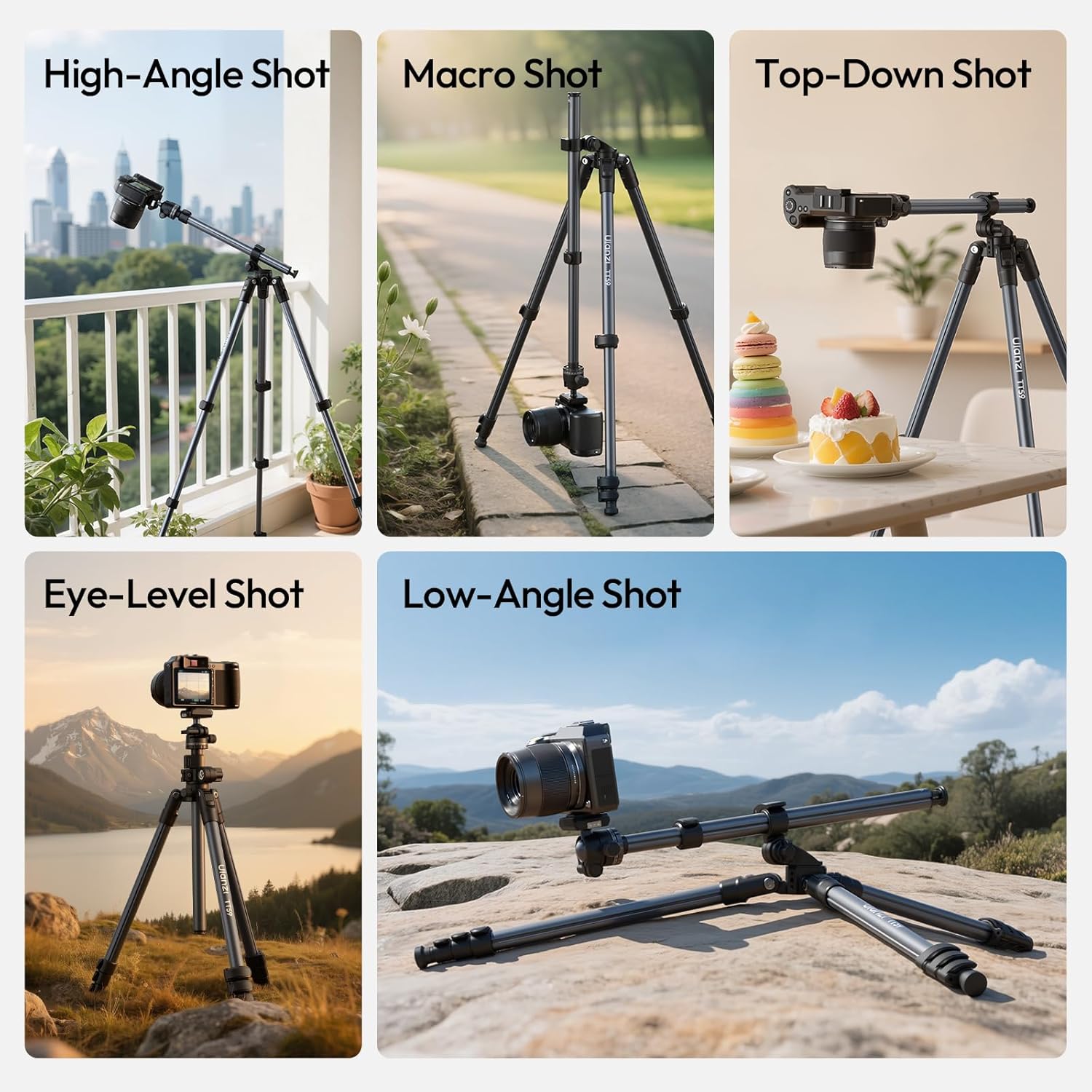
Figure 3: Demonstrating various shooting angles achievable with the TT59 tripod.
4. Иштөө нускамалары
4.1 Штативдин бийиктигин тууралоо
The TT59 tripod features four leg sections and a two-stage center column, allowing it to extend up to 1.75m (68.9 inches). To adjust the height:
- Loosen the quick-release levers on each leg section and extend the legs to the desired length. Secure the levers.
- To extend the center column, loosen the locking knob at the base of the column and pull it upwards. Tighten the knob to secure.

Figure 4: ULANZI TT59 Tripod fully extended for maximum height.
4.2 Horizontal/Overhead Photography Setup
The TT59 allows for quick conversion to horizontal or overhead shooting modes:
- Lift the center column to its maximum height.
- Locate the pivot point at the base of the center column. Release the locking mechanism.
- Rotate the center column 90 degrees to a horizontal position.
- Adjust the angle and extension of the horizontal arm as needed and secure all locking knobs.

Figure 5: Steps for horizontal setup.
4.3 Шар башынын иштеши
The panoramic ball head offers smooth 360° pan and 90° tilt movements:
- Loosen the main locking knob on the ball head to adjust the camera's angle.
- Use the panoramic base knob for 360° rotation.
- Tighten all knobs firmly once the desired position is achieved.

Figure 6: Ball head multi-angle control.
4.4 Enhancing Stability
For increased stability, especially in horizontal or extended setups, utilize the bottom hook on the center column to hang counterweights (e.g., a camera bag).
4.5 Monopod Functionality
One of the tripod legs can be detached and combined with the center column to form a monopod for quick, portable shooting.
4.6 Кошумча жабдууларды орнотуу
The tripod features standard 1/4" and 3/8" screw mounts for attaching various accessories like external monitors, microphones, or lighting.
5. Техникалык тейлөө жана кам көрүү
- Regularly clean the tripod legs and locking mechanisms with a soft, dry cloth to prevent dust and debris buildup.
- Штативди өтө жогорку температурага же катуу химиялык заттарга дуушар кылбаңыз.
- Store the tripod in its provided storage bag when not in use to protect it from scratches and impacts.
- Periodically check all screws and joints for tightness. Use the provided wrenches for any adjustments.
6. Кыйынчылыктарды
6.1 Tripod Instability
- Ensure all leg sections and the center column are fully extended and their locking mechanisms are securely tightened.
- Verify that the leg angles are appropriately set for the terrain.
- Utilize the bottom hook to add counterweights for enhanced stability.
6.2 Stiff Ball Head Movement
- Loosen the main locking knob on the ball head sufficiently.
- Clean any dust or debris from the ball head mechanism.
7. Техникалык шарттар
| Өзгөчөлүк | Деталь |
|---|---|
| Бренд | УЛАНЗИ |
| Модел | TT59 |
| Материал | Алюминий |
| Катталган өлчөмү | 43 x 10.7 x 9.5 см (16.9 x 4.2 x 3.7 дюйм) |
| Максималдуу бийиктик (борбордук мамыча узартылган) | 175 см (68.9 дюйм) |
| Maximum Height (with center column unextended) | 126 см |
| Horizontal Center Column Length | 56 см |
| Элемент Салмагы | 1.25 кг (2.75 фунт) |
| Ball Head Load Capacity | 3 кг (6.6 фунт) |
| Legs Load Capacity | 10 кг (22 фунт) |
| Шайкеш түзмөктөр | Cameras (Sony, Canon, Nikon, Fujifilm, Olympus, Panasonic), DSLR, SLR, digital cinema cameras, spotting scopes, projectors, compact camcorders, binoculars. |

Figure 7: ULANZI TT59 Tripod specifications.
8. Расмий продукт Videos
ULANZI TT59 Horizontal Overhead Photography Tripod Overview
Видео 1: Аткаминер бүттүview of the ULANZI TT59 tripod, demonstrating its key features and versatility in various shooting scenarios.
ULANZI 360 Rotation Ball Head Ombra 2 Camera Tripod
Video 2: This video highlights the 360-degree rotation ball head, a feature also present in the TT59, showcasing its flexibility for camera positioning.
9. Кепилдик жана колдоо
For warranty information, product support, or to purchase additional accessories, please visit the official ULANZI webсайтка же кардарларды тейлөөгө кайрылыңыз. Кепилдик дооматтар үчүн сатып алуу дүмүрчөгүңүздү сактаңыз.
Сиз сатып алууну да ойлонушуңуз мүмкүнasing an extended protection plan for your product. Details on available plans can be found on the product's purchase page.


