1. Коопсуздук нускамалары
Please read these safety instructions carefully before using the device and keep them for future reference. Incorrect use may result in reduced performance, damage to the product, or danger.
- Do not expose the speaker to water, moisture, or rain.
- Динамикти радиаторлор, жылуулук регистрлери, мештер же башка аппараттар (анын ичинде) сыяктуу жылуулук булактарынан алыс кармаңыз. ampкөтөргүчтөр) жылуулукту пайда кылуучу.
- Өндүрүүчү белгилеген тиркемелерди/аксессуарларды гана колдонуңуз.
- Чагылган бороондо же көпкө колдонулбаганда динамикти электр розеткасынан ажыратыңыз.
- Эч кандай желдетүүчү тешиктерди жаап албаңыз. Өндүрүүчүнүн көрсөтмөлөрүнө ылайык орнотуу.
- Электр шнурунун басылып кетүүсүнөн же кысып калуудан сактаңыз, өзгөчө сайгычтарда, розеткаларда жана алар аппараттан чыга турган жеринде.
2. Пакеттин мазмуну
Төмөндө тизмеленген нерселердин баары пакетиңизде бар экенин текшериңиз:
- InnoVibe Party Speaker
- Зымдуу микрофон
- USB Type-C кубаттоочу кабель
- AUX кабели
- Колдонуучунун Колдонмосу (бул документ)

Image: The InnoVibe Party Speaker shown with its included wired microphone, USB-C charging cable, and AUX cable, highlighting its features like LED color modes, LCD screen, mic port, AUX-in, FM radio, and RGB LED lights.
3. Продукт бүтүп калдыview
The InnoVibe Party Speaker is a portable audio system designed for various entertainment needs. It features a 20W output, dual 4-inch drivers, and multiple connectivity options.
Негизги өзгөчөлүктөрү:
- 20 Вт аудио чыгышы: Тунук жана күчтүү үн берет.
- Зымдуу микрофон: For karaoke, announcements, or public speaking.
- Бир нече киргизүү параметрлери: Bluetooth, USB, TF card, AUX, and FM Radio.
- Кайра заряддалуучу батарея: Provides 1 to 3 hours of wireless playtime.
- Динамикалык LED жарыктары: Integrated RGB LED lighting that pulses with music.
- Портативдик дизайн: Lightweight with a shoulder strap for easy transport.
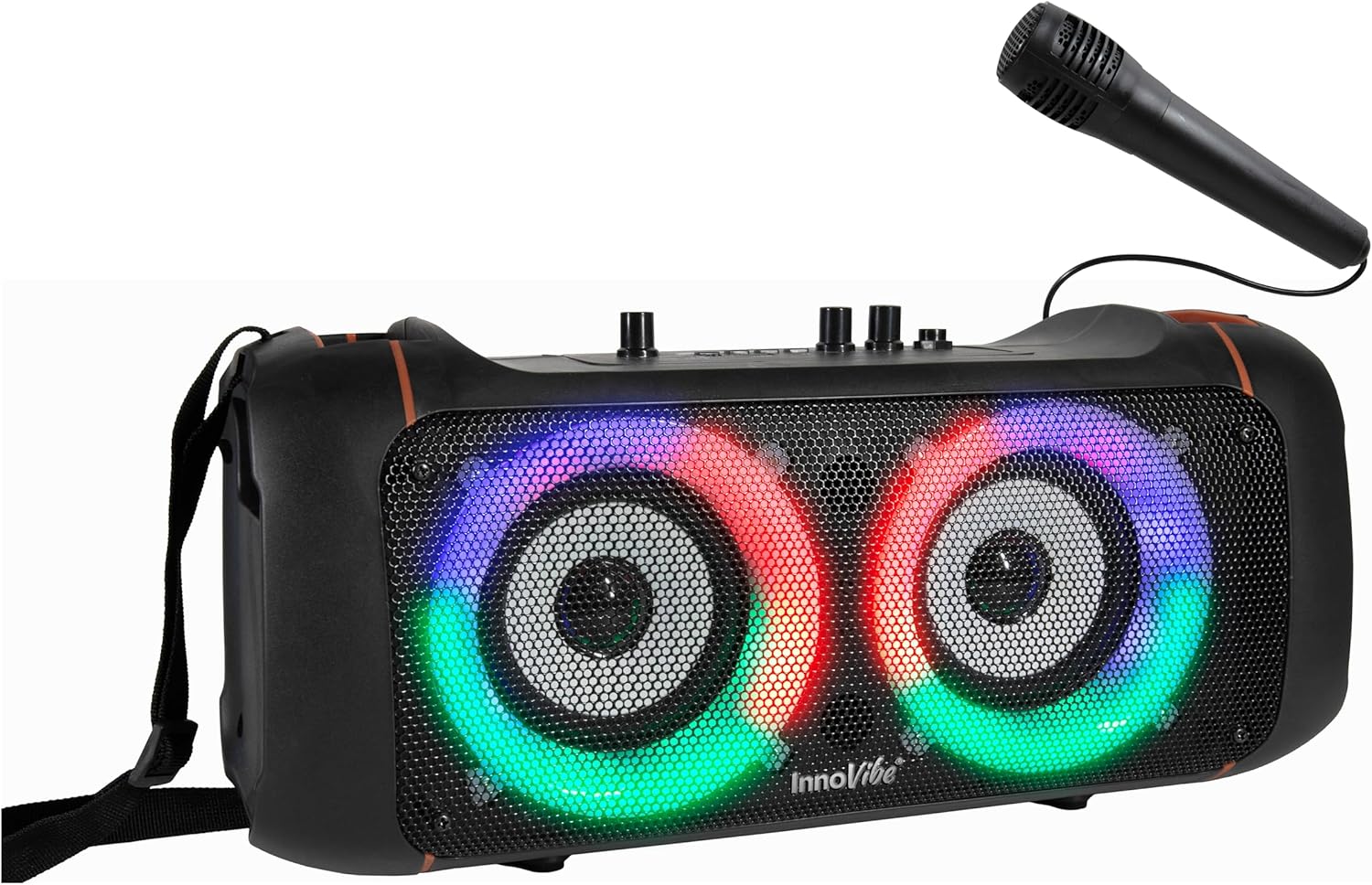
Сүрөт: фронт view of the InnoVibe Party Speaker, showcasing its dual speaker grilles with active colorful LED lights and the connected wired microphone.
4. Орнотуу
4.1 Динамикти заряддоо
- Locate the USB Type-C charging port on the speaker.
- Берилген USB Type-C кабелинин бир учун динамиктин заряддоо портуна туташтырыңыз.
- USB кабелинин экинчи учун туура келген USB кубат адаптерине (кошумча эмес) же компьютердин USB портуна туташтырыңыз.
- Заряддоо индикаторунун жарыгы күйөт. Толук кубаттоо, адатта, болжол менен 2 саатты талап кылат.
- Толук заряддалгандан кийин, заряддоо кабелин ажыратыңыз.
4.2 Күйгүзүү/өчүрүү
- To power on the speaker, locate the Power knob on the control panel and turn it clockwise.
- To power off the speaker, turn the Power knob counter-clockwise until it clicks off.
4.3 Микрофонду туташтыруу
- Locate the Microphone Input port on the speaker's control panel.
- Insert the plug of the wired microphone firmly into the Microphone Input port.
- Ensure the speaker is powered on before using the microphone.
5. Иштөө нускамалары
5.1 Bluetooth жупташтыруу
- Power on the speaker. It will automatically enter Bluetooth pairing mode, indicated by a flashing LED or an audible prompt.
- Мобилдик түзмөгүңүздө (смартфон, планшет ж.б.) Bluetooth иштетип, жеткиликтүү түзмөктөрдү издеңиз.
- Select "InnoVibe Speaker" from the list of devices.
- Once paired, the speaker will indicate a successful connection, and the LED may stop flashing.
- Эми сиз түзмөгүңүздөн аудиону динамик аркылуу ойной аласыз.

Image: A person holding a smartphone displaying a music player interface, with the InnoVibe Party Speaker visible in the foreground, illustrating Bluetooth connectivity.
5.2 FM радио режими
- Динамикти иштетүү.
- Press the 'Mode' button (if available, or cycle through modes) until 'FM' is displayed on the screen or announced.
- Press and hold the 'Play/Pause' button to automatically scan and save available FM radio stations.
- Сакталган станциялардын ортосунда чабыттоо үчүн "Мурунку/Кийинки" баскычтарын колдонуңуз.
5.3 USB/TF картасын ойнотуу
- Insert a USB flash drive or a TF (MicroSD) card with MP3 audio files динамиктеги тиешелүү портко.
- The speaker should automatically switch to USB/TF card mode and begin playing audio. If not, press the 'Mode' button to select the correct input.
- Ойноону башкаруу үчүн "Ойнотуу/Тыным" жана "Мурунку/Кийинки" баскычтарын колдонуңуз.
5.4 AUX киргизүү
- Connect one end of the provided AUX cable to the AUX-in port on the speaker.
- Connect the other end of the AUX cable to the audio output jack of your external device (e.g., MP3 player, laptop).
- 'AUX' киргизүүсүн тандоо үчүн 'Режим' баскычын басыңыз.
- Тышкы түзмөгүңүздөн ойнотууну жана үнүн башкарыңыз.
5.5 Microphone Usage and Controls
- Ensure the microphone is connected as described in Section 4.3.
- Микрофондун үнү: Use the 'MIC VOL' knob on the control panel to adjust the microphone's volume level.
- Эхо эффектиси: Use the 'ECHO' knob to add or reduce the echo effect to your voice.
- Adjust the main volume knob for overall sound output.

Image: A woman singing into a wired microphone, with the InnoVibe Party Speaker visible, demonstrating the use of the microphone feature.
5.6 LED жарыгын башкаруу
The speaker features dynamic RGB LED lights. Specific controls for changing light modes or turning them off may vary. Refer to the control panel for a dedicated light button or a combination of buttons that might cycle through light patterns or disable them.

Image: The InnoVibe Party Speaker displaying its colorful RGB LED lights, positioned on a reflective surface to highlight the light effects.
6. Техникалык тейлөө
6.1 Тазалоо
- Тазалоодон мурун, динамиктин өчүрүлгөнүн жана розеткадан суурулганын текшериңиз.
- Динамиктин сырткы беттерин сүртүү үчүн жумшак, кургак, түксүз чүпүрөктү колдонуңуз.
- Абразивдүү тазалагычтарды, момдорду же эриткичтерди колдонбоңуз, анткени алар финишке зыян келтириши мүмкүн.
- Ар кандай тешиктерге ным кирүүдөн сактаңыз.
6.2 Сактоо
- Динамикти түз күн нурунан жана өтө температурадан алыс салкын, кургак жерде сактаңыз.
- Узак мөөнөткө сактасаңыз, батарейканын ден соолугун сактоо үчүн бир нече ай сайын батареяны болжол менен 50% га чейин заряддаңыз.
7. Кыйынчылыктарды
| Көйгөй | Мүмкүн себеп | Чечим |
|---|---|---|
| Динамик күйбөйт. | Battery is depleted. Power knob is off. | Charge the speaker. Turn the Power knob clockwise. |
| Динамиктен үн жок. | Үн өтө төмөн. Киргизүү режими туура эмес. Түзмөк туташкан эмес. | Increase speaker and source device volume. Select correct input mode (Bluetooth, AUX, etc.). Ensure device is properly connected/paired. |
| Bluetooth туташпай жатат. | Динамик жупташтыруу режиминде эмес. Түзмөк өтө алыс. Интерференция. | Ensure speaker is in Bluetooth mode and discoverable. Move device closer to speaker. Avoid obstacles. Try restarting both devices. |
| Microphone sound is poor or has feedback. | Microphone volume too high. Echo setting too high. Microphone too close to speaker. | Adjust 'MIC VOL' and 'ECHO' knobs. Ensure microphone is not pointed directly at the speaker. |
| FM радиосун кабыл алуу начар. | Алсыз сигнал. Интерференция. | Relocate the speaker to an area with better reception. Extend any external antenna if available. |
8. Техникалык шарттар
| Өзгөчөлүк | Деталь |
|---|---|
| Бренд | InnoVibe |
| Модел | B0FMFHN9J |
| Чыгуу күчү | 20 Вт |
| Байланыш | Bluetooth, AUX, USB, TF картасы, FM радио |
| Power Source | Батарея менен иштейт (кайра заряддалуучу) |
| Батарея сыйымдуулугу | 1500 мАч (болжолдуу) |
| Заряддоо убактысы | Болжол менен 2 саат |
| Оюн убактысы | 1 to 3 hours (depending on volume and features used) |
| Туташтыргыч түрү | USB Type-C (charging) |
| Элемент Салмагы | 4.55 фунт |
| Пакеттин өлчөмдөрү | 15.74 x 7.28 x 6.49 дюйм |
| UPC | 810182220949 |
9. Кепилдик жана колдоо
InnoVibe products are designed and manufactured to the highest quality standards. For information regarding warranty coverage, please refer to the warranty card included with your purchase or contact InnoVibe customer support.
For technical assistance or customer service inquiries, please visit the official InnoVibe webсайтка же сатуучуга кайрылыңыз.
