1. Продукт бүтүп калдыview
The Kaiser KSB-4008 is a versatile portable Bluetooth speaker designed for powerful audio output and dynamic lighting effects. It features an 8-inch woofer, 2.5-inch tweeter, and mid-range drivers, delivering 40W RMS of balanced sound. Integrated RGB LED lighting enhances the atmosphere for various events. With KSR-Link technology, you can wirelessly connect another compatible speaker for an expanded sound experience. The speaker includes a rechargeable battery, Bluetooth connectivity, and supports USB and Micro SD inputs for diverse music playback options. Its robust and portable design makes it suitable for both indoor and outdoor use.
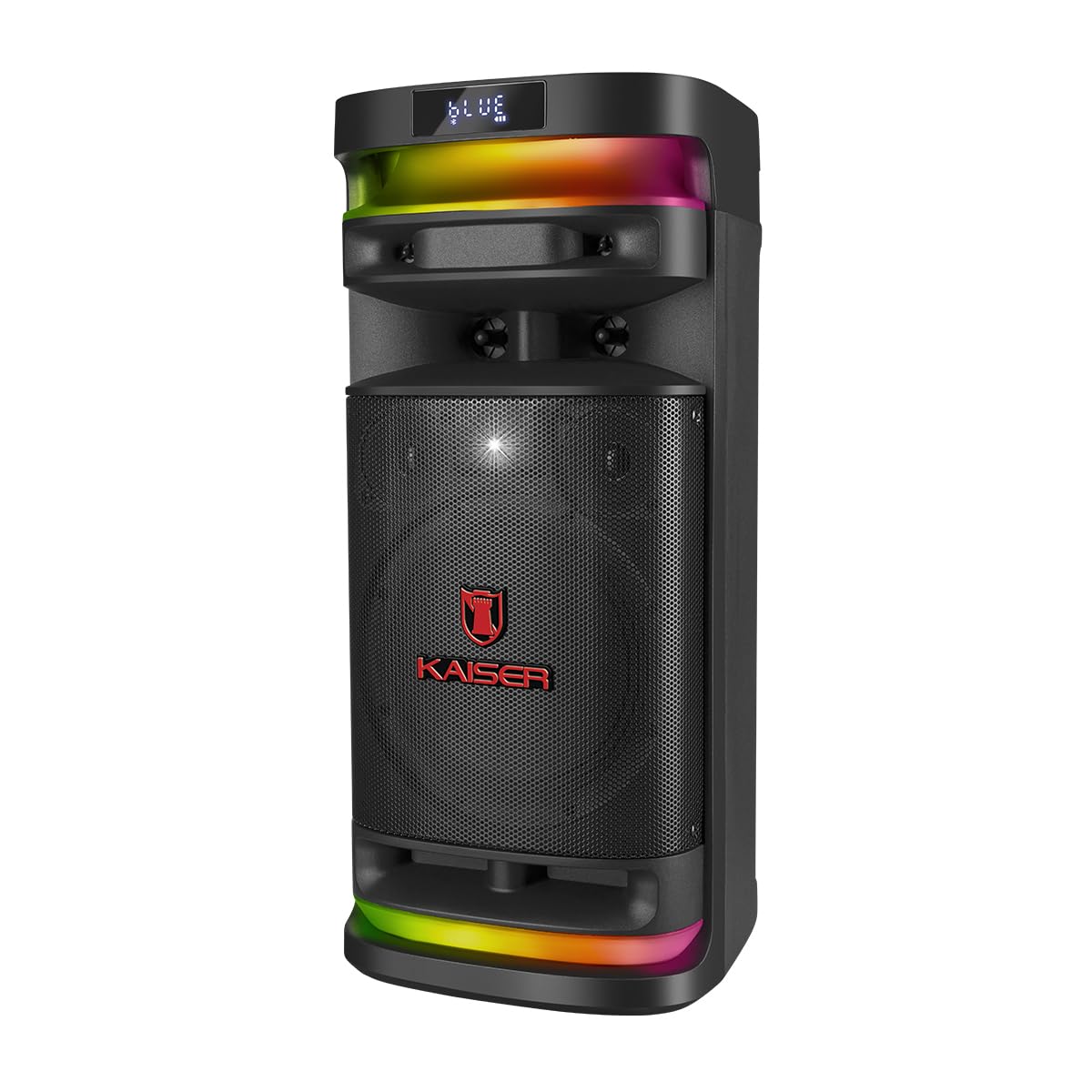
1.1-сүрөт: Фронт view of the Kaiser KSB-4008 Portable Bluetooth Speaker, showcasing its speaker grille and RGB LED light strips.
Негизги өзгөчөлүктөрү:
- 40W RMS Power: Provides powerful and balanced audio output.
- Full Speaker Configuration: Includes an 8-inch woofer, 2.5-inch tweeter, and mid-range for comprehensive sound reproduction.
- RGB LED Light Effect: Multi-color lighting creates a vibrant atmosphere.
- KSR-Link Technology: Allows wireless connection to another compatible speaker for ampжандуу үн.
- Ар тараптуу байланыш: Supports Bluetooth, USB, and Micro SD for various audio sources.
- Кайра заряддалуучу батарея: Enables extended use without constant power connection.
- Portable and Sturdy Design: Easy to transport for indoor or outdoor events.
2. Пакеттин мазмуну
Сураныч, төмөнкү нерселер үчүн кутучаны белгилеңиз:
- Kaiser KSB-4008 Portable Bluetooth Speaker
- Зымсыз микрофон
- Charging Cable (for microphone)
- Колдонуучунун Колдонмосу (бул документ)

2.1-сүрөт: Included wireless microphone and its USB charging cable.
3. Коопсуздук нускамалары
To ensure safe operation and prevent damage, please read and follow these safety guidelines:
- Динамикти сууга, нымдуулукка же экстремалдык температурага дуушар кылбаңыз.
- Avoid placing the speaker near heat sources or in direct sunlight for extended periods.
- туура желдетүүнү камсыз кылуу; вентиляция тешиктерин жаап салбаңыз.
- Көрсөтүлгөн кубаттоочу кабелдерди жана кубат адаптерлерин гана колдонуңуз.
- Do not attempt to open, modify, or repair the speaker yourself. Refer all servicing to qualified personnel.
- Динамикти балдардан жана үй жаныбарларынан алыс кармаңыз.
- Operate the speaker within its specified voltage жана учурдагы чектөөлөр.
- Угуунун начарлашына жол бербөө үчүн, узак убакыт бою өтө катуу үн менен угуудан алыс болуңуз.
4. Продукциянын компоненттери жана башкаруу элементтери
Familiarize yourself with the various parts and controls of your KSB-4008 speaker.
4.1-сүрөт: Top Control Panel Layout.
Башкаруу панелинин функциялары:
- POWER которуштуруу: Динамикти КҮЙГҮЗҮҮ/ӨЧҮРҮҮ.
- CARGA (Charge) Indicator: Заряддоодо күйөт.
- AUX киргизүү: тышкы аудио түзмөктөр үчүн 3.5 мм уячасы.
- USB порт: USB флеш дисктер үчүн.
- Micro SD оюгу: Micro SD карталары үчүн.
- MIC киргизүү: 6.35mm jack for wired microphone (if used).
- GUIT Input: 6.35mm jack for guitar (if used).
- VOL MIC (Microphone Volume): Adjusts the volume of the microphone.
- VOLUMEN (Master Volume): Adjusts the overall speaker volume.
- LED баскычы: Controls the RGB LED light effects.
- GRAB Button: For recording audio (functionality may vary).
- MIC PRIO (Microphone Priority): Музыкага караганда микрофондун үнүн артык көрөт.
- REPETIR (Repeat) Button: Учурдагы тректи же ойнотмо тизмесин кайталайт.
- Previous Track / Rewind Button: Skips to previous track or rewinds.
- Ойнотуу/тындыруу баскычы: Аудиону ойнотот же тындырат.
- Next Track / Fast Forward Button: Skips to next track or fast forwards.
- MODO BT (Mode/Bluetooth) Button: Switches between input modes (Bluetooth, USB, Micro SD, AUX) and initiates Bluetooth pairing.
5. Орнотуу жана алгачкы колдонуу
5.1 Динамикти заряддоо
- Connect the speaker to a power outlet using a compatible charging cable (not explicitly listed but implied).
- The 'CARGA' indicator light on the control panel will illuminate during charging.
- Толук заряддалгандан кийин, индикатордун түсү өзгөрүшү же өчүшү мүмкүн. Динамикти кубат булагынан ажыратыңыз.
5.2 Күйгүзүү/өчүрүү
- To turn ON the speaker, toggle the КҮЧ "ON" абалына которуңуз.
- To turn OFF the speaker, toggle the КҮЧ 'OFF' абалына которуу.
5.3 Зымсыз микрофонду орнотуу
- Ensure the wireless microphone is charged. Use the provided USB charging cable if necessary.
- Turn on the microphone using its power button.
- The microphone should automatically pair with the speaker. If not, refer to the microphone's specific instructions for pairing.
- жардамы менен микрофондун үнүн тууралаңыз VOL MIC knob on the speaker's control panel.
6. Иштөө нускамалары
6.1 Bluetooth байланышы
- Динамикти күйгүзүңүз.
- басыңыз MODO BT button repeatedly until 'BLUE' or 'BT' appears on the display, indicating Bluetooth mode. The speaker will enter pairing mode.
- Мобилдик түзмөгүңүздө Bluetooth иштетип, жеткиликтүү түзмөктөрдү издеңиз.
- Select 'Kaiser KSB-4008' (or similar name) from the list.
- Once connected, the speaker will confirm with an audible prompt, and the display will show a stable Bluetooth icon.
6.2 USB / Micro SD ойнотуу
- Insert a USB flash drive or Micro SD card into the respective port/slot.
- The speaker should automatically switch to USB or Micro SD mode and begin playing audio fileс. Болбосо, басыңыз MODO BT button to select the correct input mode.
- Ойноону көзөмөлдөө үчүн Ойнотуу/Тыным, Мурунку трек жана Кийинки трек баскычтарын колдонуңуз.
6.3 AUX киргизүү
- Тышкы аудио аспапты (мисалы, смартфон, MP3 ойноткуч) туташтырыңыз AUX input using a 3.5mm audio cable.
- басыңыз MODO BT button to select AUX input mode.
- Туташкан түзмөгүңүздөн ойнотууну көзөмөлдөө.
6.4 KSR-Link Technology (True Wireless Stereo)
KSR-Link allows you to connect two KSB-4008 speakers wirelessly for a stereo sound experience.
- Ensure both KSB-4008 speakers are powered on and in Bluetooth mode, but not connected to any device.
- Динамиктердин биринде (бул негизги динамик болот) баскычын басып кармап туруңуз MODO BT button for a few seconds until you hear a confirmation tone, indicating KSR-Link pairing mode.
- Эки динамик автоматтык түрдө бири-бирине туташат. Туташтырылгандан кийин, сиз дагы бир ырастоо сигналын угасыз.
- Эми мобилдик түзмөгүңүздү 6.1-бөлүмдө сүрөттөлгөндөй Bluetooth аркылуу негизги динамикке туташтырыңыз.
- Аудио эми эки динамиктен тең стерео режиминде ойнотулат.
6.5 RGB LED Light Control
- басыңыз LED button on the control panel to cycle through different light modes or to turn the lights off.
6.6 Үндү тууралоо
- Adjust the overall speaker volume using the ТОМ баскыч.
- Adjust the wireless microphone volume using the VOL MIC баскыч.
7. Техникалык тейлөө
7.1 Тазалоо
- Always turn off the speaker and disconnect it from power before cleaning.
- Сырткы беттерди сүртүү үчүн жумшак, кургак чүпүрөктү колдонуңуз.
- Абразивдүү тазалагычтарды, момдорду же эриткичтерди колдонбоңуз, анткени алар финишке зыян келтириши мүмкүн.
- Ар кандай тешиктерге ным кирүүдөн сактаңыз.
7.2 Сактоо
- Динамикти түз күн нурунан жана өтө температурадан алыс салкын, кургак жерде сактаңыз.
- Узак мөөнөткө сактасаңыз, батарейканын ден соолугун сактоо үчүн бир нече ай сайын батареяны болжол менен 50% га чейин заряддаңыз.
8. Кыйынчылыктарды
If you encounter issues with your KSB-4008 speaker, refer to the following common problems and solutions:
| Көйгөй | Мүмкүн себеп | Чечим |
|---|---|---|
| Динамик күйбөйт. | Батарея түгөндү. Кубат өчүргүч өчүк. | Динамикти кубаттаңыз. POWER которгучу "ON" абалында экенин текшериңиз. |
| Үн чыгышы жок. | Үн өтө төмөн. Киргизүү режими туура эмес. Түзмөк туура туташкан эмес. | көбөйтүү ТОМ баскычын басыңыз. MODO BT to select the correct input. Reconnect your audio source. |
| Bluetooth түзмөгү жупташа албайт. | Динамик жупташтыруу режиминде эмес. Түзмөк өтө алыс. Интерференция. | Ensure speaker is in Bluetooth pairing mode (display shows 'BLUE' or 'BT'). Move device closer to speaker. Turn off other Bluetooth devices. |
| Зымсыз микрофон иштебейт. | Microphone battery low. Microphone not turned on. VOL MIC is low. | Charge the microphone. Turn on the microphone. Increase the VOL MIC баскыч. |
| KSR-Link connection fails. | Speakers already connected to a device. Incorrect pairing procedure. | Ensure both speakers are not connected to any Bluetooth device. Follow KSR-Link pairing steps carefully. |
9. Техникалык шарттар
Technical specifications for the Kaiser KSB-4008 Portable Bluetooth Speaker:

9.1-сүрөт: Kaiser KSB-4008 Speaker Dimensions.
| Өзгөчөлүк | Спецификация |
|---|---|
| Бренд | Кайзер |
| Модел | КСБ-4008 |
| Динамик түрү | Атмосфералык |
| Peak Power Handling (RMS) | 40 Ватт |
| Вуфердин өлчөмү | 8 дюйм |
| Tweeter өлчөмү | 2.5 дюйм |
| Байланыш | Bluetooth, USB, Micro SD, AUX |
| Өзгөчөлүктөр | RGB LED Light, KSR-Link Technology, Rechargeable Battery |
| Продукциянын өлчөмдөрү (LxWxH) | 37.4 x 36.2 x 80 cm (Note: Image shows 56.7 x 26.5 x 25 cm, please verify actual dimensions) |
| Элемент Салмагы | 500 г |
| Камтылган компоненттер | Зымсыз микрофон |
Note: Product dimensions from specifications (37.4 x 36.2 x 80 cm) differ from the provided image (56.7 x 26.5 x 25 cm). Please refer to the product packaging for the most accurate dimensions.
10. Кепилдик жана колдоо
For warranty information and technical support, please refer to the warranty card included with your product or visit the official Kaiser webсайт. Сатып алуу квитанциясын кепилдик дооматтары үчүн сатып алуунун далили катары сактаңыз.


