1. Киришүү
Бул колдонмодо EasySMX X05Pro зымсыз компьютер контроллериңизди орнотуу, иштетүү жана тейлөө боюнча кеңири көрсөтмөлөр берилген. Оптималдуу иштешин жана узак мөөнөттүү иштешин камсыз кылуу үчүн, продуктуну колдонуудан мурун бул колдонмону кылдаттык менен окуп чыгыңыз.
2. Продукт бүтүп калдыview
EasySMX X05Pro – бул компьютер, Nintendo Switch, Android жана iOS түзмөктөрү менен колдонуу үчүн иштелип чыккан ар тараптуу зымсыз оюн контроллери. Ал оюн тажрыйбасын жакшыртуу үчүн өркүндөтүлгөн компоненттерге ээ.

1-сүрөт: EasySMX X05Pro зымсыз компьютер контроллери жана 2.4G USB адаптери.
Негизги өзгөчөлүктөрү:
- Тынч басуу баскычтары: Силикон менен кайра жасалганampиштөө учурунда ызы-чууну азайтуу үчүн.
- Дуал-Сtage Импульстук триггерлер: Тактильдик кайтарым байланыш үчүн орнотулган 2+2 күркүрөгөн мотору менен жөнгө салынуучу триггердин жүрүшү (тез атуу үчүн 3 мм, так жарыш үчүн 9 мм).
- Программалануучу баскычтар: Кокустан активдешип калбашы үчүн контроллердин үстүндө жайгашкан эки ыңгайлаштырылуучу баскыч (M1, M2).
- Холл эффектисинин джойстиктери: Так башкаруу жана бышыктык үчүн жогорку тактыктагы, дрейфсиз 11-биттик сенсорлор.
- 1000Гц добуш берүү ылдамдыгы: Өтө тез жооп берүү үчүн зымдуу жана 2.4G зымсыз режимдеринде жеткиликтүү. Bluetooth режими 125 Гц жыштыкта иштейт.
- Эргономикалык териге окшош кармоо: Жумшак тийүүчү силикон каптамасы терге туруктуу, тайгаланбаган кармоону камсыз кылат.
- Жаңыртылган 8 тараптуу D-Pad: Жылмакай диагоналдык киргизүү жана так 8 багыттуу башкаруу үчүн куполдук которгучтар жана оюк бурулуш менен жабдылган.
- Батареянын узак иштөө мөөнөтү: Интегралдык 1000 мАч кайра заряддалуучу батарея.
- Көп платформа шайкештиги: Windows PC, Nintendo Switch, Android жана iOS колдойт. Xbox же PlayStation консолдору менен шайкеш келбейт.
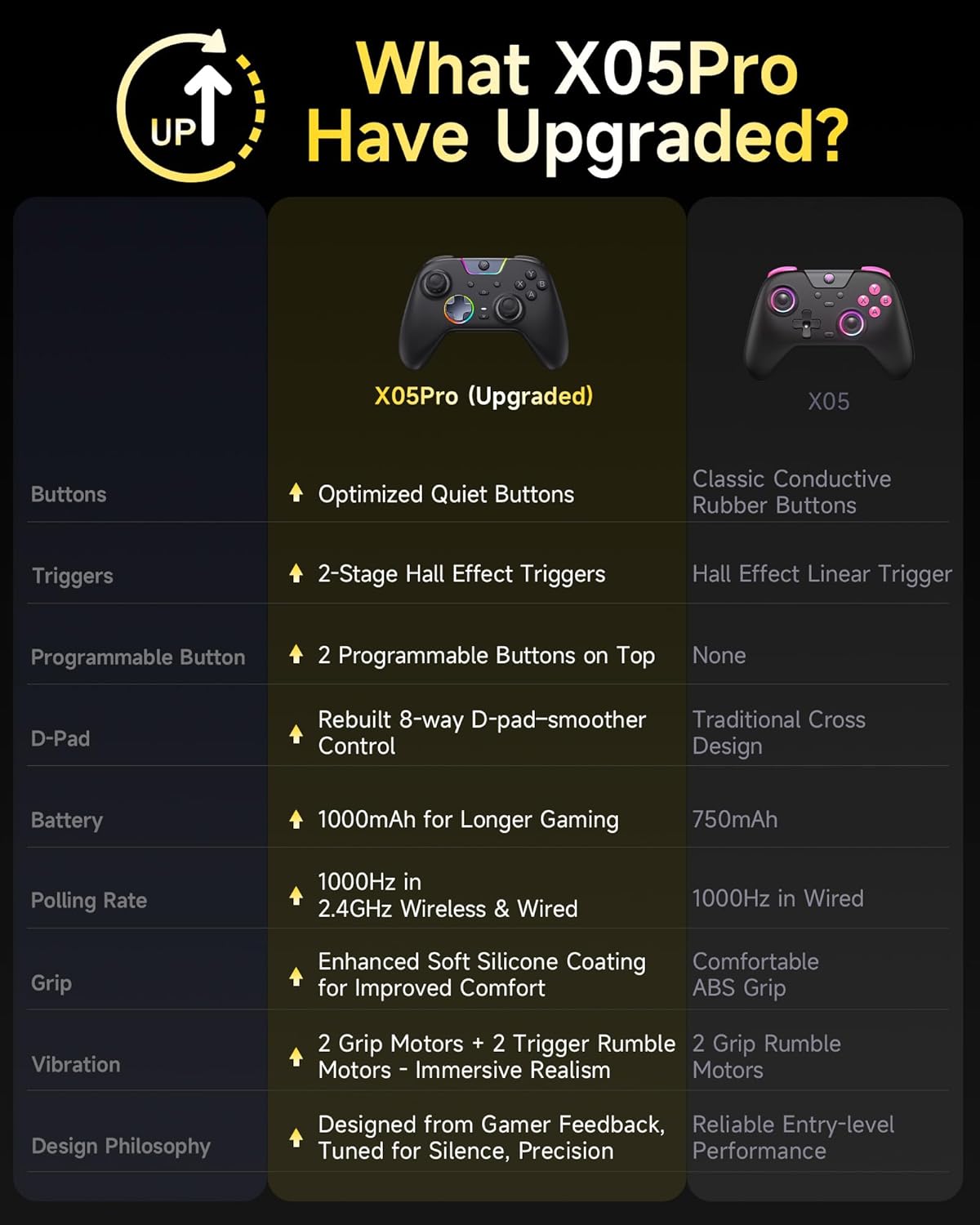
2-сүрөт: X05Pro жана X05 моделдеринин өзгөчөлүктөрүн салыштыруу.
3. Орнотуу жана туташуу
3.1 Контроллерди заряддоо
Биринчи жолу колдонуудан мурун, берилген USB-C кабелин колдонуп, контроллерди толугу менен кубаттаңыз. Кабелди контроллердин USB-C портуна жана кубат булагына (мисалы, компьютердин USB портуна, USB дубал адаптерине) туташтырыңыз. LED индикаторлору кубаттоо абалын көрсөтөт. Контроллерде орнотулган 1000 мАч кайра заряддалуучу батарея бар.
3.2 Туташуу режимдери
EasySMX X05Pro бир нече туташуу ыкмаларын колдойт. Контроллердин арткы бетиндеги режим которгучу каалаган туташуу түрүңүз үчүн туура коюлганын текшериңиз.

3-сүрөт: Колдоого алынган туташуу режимдери жана платформалары.
3.2.1 Зымдуу туташуу (PC)
- USB-C кабелин контроллерге, ал эми экинчи учун компьютериңиздеги USB портуна туташтырыңыз.
- Контроллер компьютериңиз тарабынан автоматтык түрдө таанылат.
- Бул режим 1000 Гц жыштыктагы сурамжылоону колдойт.
3.2.2 2.4G зымсыз байланыш (PC)
- 2.4G USB донглди компьютериңиздеги жеткиликтүү USB портуна сайыңыз.
- Контроллерди күйгүзүңүз. Ал автоматтык түрдө донгл менен жупташышы керек.
- Бул режим 1000 Гц жыштыктагы сурамжылоону колдойт.
3.2.3 Bluetooth байланышы (PC, Android, iOS)
- Контроллер күйгүзүлгөнүн текшериңиз.
- Түзмөгүңүздө (PC, Android, iOS) Bluetooth жөндөөлөрүнө өтүп, жаңы түзмөктөрдү издеңиз.
- Жупташтыруу үчүн жеткиликтүү түзмөктөрдүн тизмесинен "EasySMX X05Pro" тандаңыз.
- Бул режим 125 Гц жыштыкта иштейт, мобилдик же күнүмдүк оюндар үчүн ылайыктуу.
3.2.4 Nintendo Switch туташуусу
- Nintendo Switch түзмөгүңүздө Система жөндөөлөрү > Контроллерлер жана сенсорлор > Pro контроллеринин зымдуу байланыш бөлүмүнө өтүңүз (анын күйүк экенин текшериңиз).
- Контроллерди USB-C кабели аркылуу Switch док станциясына туташтырыңыз.
- Же болбосо, зымсыз жупташтыруу үчүн, контроллердин которуу режиминде экенин текшерип, Bluetooth туташуу кадамдарын аткарыңыз (эгер тиешелүү болсо, арткы беттеги которуу же баскычтардын айкалышы аркылуу).
Маанилүү эскертүү: EasySMX X05Pro Xbox же PlayStation консолдору менен шайкеш келбейт.
4. Иштөө нускамалары
4.1 Баскычтын жайгашуусу жана функциялары
Контроллерде стандарттуу оюн баскычтары, джойстиктер жана 8 тараптуу D-pad бар.

4-сүрөт: Детальдуу view контроллердин компоненттеринин.
- A/B/X/Y баскычтары: Стандарттык аракет баскычтары.
- Сол/Оң Джойстиктер: Кыймылды жана камераны башкаруу үчүн.
- D-Pad: Так башкаруу үчүн 8 багыттуу киргизүү.
- LB/RB (Ийин баскычтары): Үстүнө орнотулган баскычтар.
- LT/RT (Триггерлер): Кош баскычтуу басымга сезгич триггерлерtage функция.
- M баскычы: Режим/Меню баскычы.
- Программалануучу баскычтар (M1, M2): Контроллердин үстүнкү бөлүгүндө, ийин баскычтарынын жанында жайгашкан.
4.2 Программалануучу баскычтар (M1, M2)
M1 жана M2 баскычтарын башка баскычтардын киргизүүлөрүн кайталоо үчүн программалоого болот.

5-сүрөт: M1 жана M2 баскычтарынын жайгашкан жери жана программалоо параметрлери.
- басып, кармап туруңуз M баскычын, андан кийин кайсынысын болбосун басыңыз M1 or M2.
- M1/M2ге байланыштыргыңыз келген баскычты (мисалы, A, B, X, Y, LB, RB, LT, RT, L3, R3) басыңыз.
- басыңыз M картаны сактоо үчүн баскычты кайрадан басыңыз.
4.3 Dual-Stage Импульстук триггерлер
LT жана RT триггерлери ар кандай оюн муктаждыктары үчүн жөнгө салынуучу жүрүү аралыгын сунуштайт.

6-сүрөт: Кош столдорtagАр кандай оюн ойноо үчүн электрондук триггер функциясы.
- Кыска аралык (3 мм): FPS оюндарында атуу сыяктуу тез аракеттер үчүн идеалдуу.
- Узак аралык (9 мм): Жарыш оюндарындагы ылдамдануу сыяктуу так башкаруу үчүн ылайыктуу.
Триггерлер ошондой эле импульстук титирөө кайтарым байланышын камсыз кылып, колдоого алынган оюндарга тереңирээк чумкууну күчөтөт.

7-сүрөт: Импульстук триггердин термелүү режимдери.
4.4 RGB жарык эффекттери
Башкаргычта джойстиктердин жана борбордук аймактын айланасында ыңгайлаштырылуучу RGB жарыктандыруу бар.

8-сүрөт: Контроллерге RGB жарыктандыруу эффекттери.
Толук продукттун колдонмосун караңыз (эгерде өндүрүүчүдөн алса болот) webсайты) түстөрдү жана жарыктандыруу режимдерин өзгөртүү боюнча конкреттүү көрсөтмөлөр үчүн (Жарыктык, Дем алуу, Түркүн түстүү, Өчүрүү).
4.5 Турбо функциясы
Контроллер баскычтарды тез, кайталап басуу үчүн Turbo функциясын камтыйт. Активдештирүү жана дайындоо жөнүндө толук маалымат алуу үчүн толук колдонмону караңыз.
5. Техникалык тейлөө
- Башкаргычты кургак, жумшак чүпүрөк менен сүртүп, таза кармаңыз.
- Контроллерди экстремалдык температурага, нымдуулукка же тике күн нуруна кабылуудан сактаңыз.
- Контроллерди бөлүп алууга аракет кылбаңыз, анткени бул кепилдикти жокко чыгарып, зыян келтириши мүмкүн.
- Физикалык зыяндын алдын алуу үчүн, колдонулбай турган учурда контроллерди коопсуз жерде сактаңыз.
6. Кыйынчылыктарды
6.1 Байланыш маселелери
- Контроллер USB аркылуу туташпай жатат: USB-C кабелинин контроллерге да, компьютерге да бекем туташтырылганын текшериңиз. Башка USB портун же кабелин колдонуп көрүңүз.
- 2.4G зымсыз байланышы туруксуз: USB ачкычы толугу менен сайылып, байланыш аралыгынын ичинде экенин текшериңиз. Контроллер менен ачкычтын ортосундагы тоскоолдуктардан алыс болуңуз.
- Bluetooth жупташуусунда ката кетти: Контроллер жупташтыруу режиминде экенин текшериңиз. Түзмөгүңүздө түзмөктү унутуп, кайра жупташтырып көрүңүз. Башка Bluetooth түзмөктөрү тоскоолдук жаратпай турганын текшериңиз.
- Коммутатордун туташуу көйгөйлөрү: Switch жөндөөлөрүндө "Pro Controller Wired Communication" функциясы иштетилгенин текшериңиз. Зымсыз байланыш үчүн, контроллер Switch үчүн туура режимде экенин текшериңиз.
6.2 Киргизүүнүн кечигиши же жооп бербөө
- Зымсыз байланыштын кечигүүсү: Оптималдуу иштөө үчүн, айрыкча атаандаштык оюндарында, зымдуу же 2.4G зымсыз режимин колдонуңуз (1000Гц сурамжылоо ылдамдыгы). Bluetooth режиминде (125Гц) кечигүү жогору болушу мүмкүн.
- Дрейф: Hall Effect джойстиктери дрейфтин алдын алуу үчүн иштелип чыккан. Эгерде сиз дрейфке туш болсоңуз, контроллердин микропрограммасы жаңыртылганын текшериңиз (EasySMX расмий сайтынан караңыз). webсайт).
6.3 Батареянын иштөө мөөнөтү
- Эгерде батареянын иштөө мөөнөтү күтүлгөндөн кыскараак сезилсе, колдонуудан мурун контроллер толук заряддалганын текшериңиз.
- Батареяны үнөмдөө үчүн RGB жарыктын жарыктыгын азайтыңыз же өчүрүңүз.
- Батареянын иштөөсү кайталануучу кубаттоо циклдери менен убакыттын өтүшү менен начарлашы мүмкүн.
7. Техникалык шарттар
| Өзгөчөлүк | Деталь |
|---|---|
| Модель номери | X05Pro |
| Байланыш | Зымдуу (USB-C), 2.4G зымсыз (USB Dongle), Bluetooth |
| Добуш берүү көрсөткүчү | 1000Гц (зымдуу жана 2.4G), 125Гц (Bluetooth) |
| Батарея сыйымдуулугу | 1000mAh (кайра заряддалуучу) |
| Джойстиктер | Холл эффектиси, 11-биттик тактык |
| Триггерлер | Дуал-Сtage Импульстук триггерлер |
| Программалануучу баскычтар | 2 (M1, M2) |
| D-Pad | Ойдуңку бурулуш менен жаңыртылган 8 тараптуу |
| Вибрация | 4-аймактык (2 кармоочу мотор + 2 триггердик күркүрөгөн мотор) |
| Шайкештик | Windows компьютери, Nintendo Switch, Android, iOS |
| Келишпестик | Xbox, PlayStation консолдору |
| Өлчөмдөр | 7.05 x 5.75 x 2.91 дюйм |
| Салмагы | 13.7 унция |
8. Кепилдик жана колдоо
Кепилдик жөнүндө маалымат жана техникалык колдоо алуу үчүн, расмий EasySMX сайтына кайрылыңыз webсайтка же түздөн-түз кардарларды тейлөөгө кайрылыңыз.
Өндүрүүчү: EasySMX
Webсайт: www.eaysmx.com (Эскертүү: Бул толтургуч URLТуура колдоо алуу үчүн продуктуңуздун таңгагын же расмий документтерин караңыз. webсайт.)


