1. Киришүү
This manual provides detailed instructions for the installation, operation, and maintenance of your Anweller MD168 Keyless Entry Door Lock and Handle Set. Please read this manual thoroughly before installation and use to ensure proper functionality and safety. The Anweller MD168 offers multiple convenient unlocking methods and advanced security features for your home.
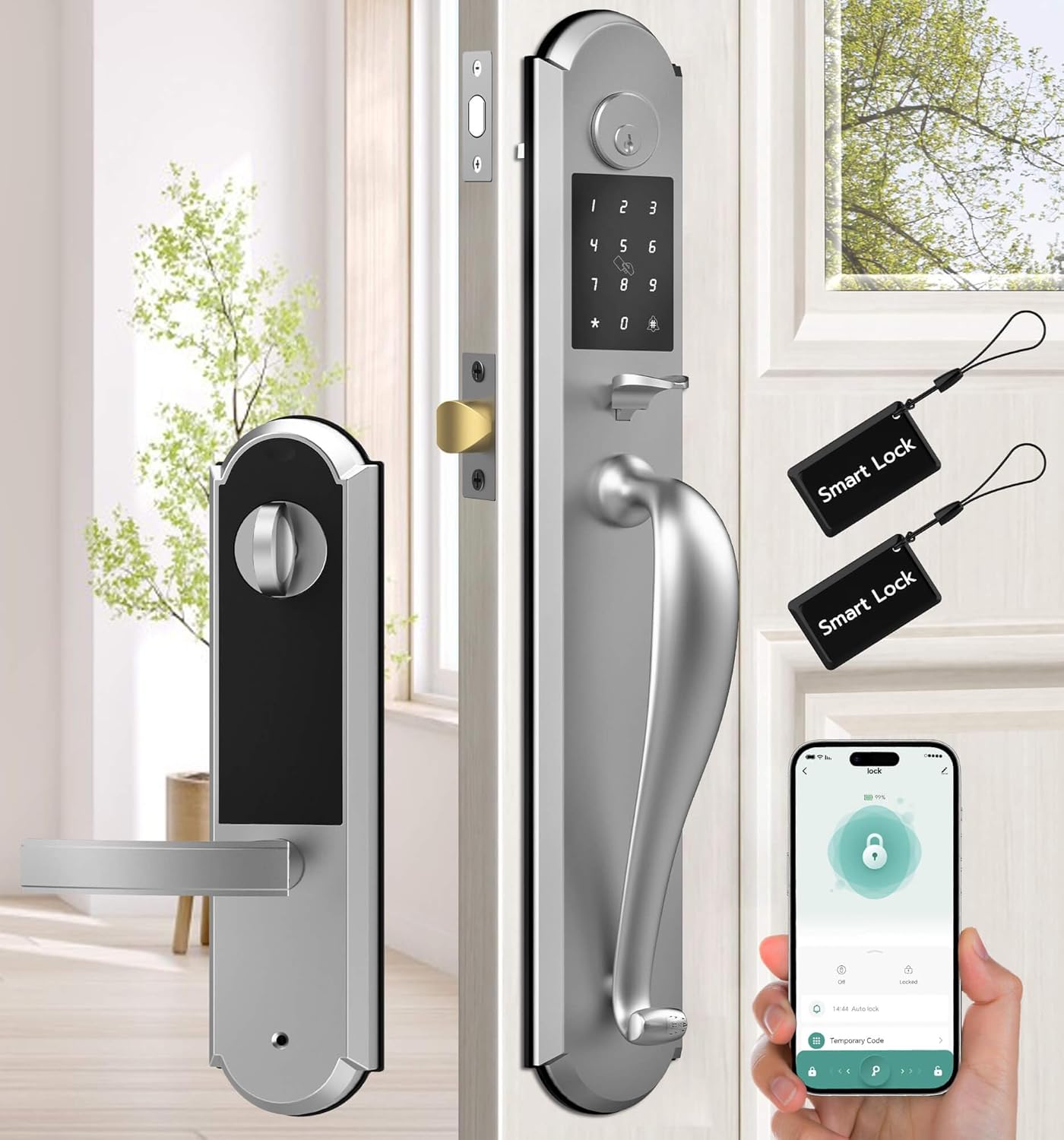
Figure 1: Anweller MD168 Keyless Entry Door Lock and Handle Set with mobile app interface.
2. Продукт бүтүп калдыview жана компоненттер
The Anweller MD168 is an integrated smart deadbolt and knob set designed for front doors. It features a robust construction and multiple access options. Below are the components included in your package:
- 1 x Deadbolt Lock and Knob Handle Set (All Parts)
- 1 x User Manual
- 2 x Механикалык ачкычтар
- 2 x RFID карталары

Figure 2: Integrated design of the Anweller MD168, showcasing its zinc alloy material and oil-rubbed finish.
3. Орнотуу боюнча колдонмо
Before beginning installation, ensure your door meets the compatibility requirements. The distance between the two door holes must be 5-1/2 inches (140mm). Door thickness should be between 1-3/8 inches to 2-1/8 inches (35mm to 55mm). The hole diameter should be greater than 1-17/20 inches (47mm).
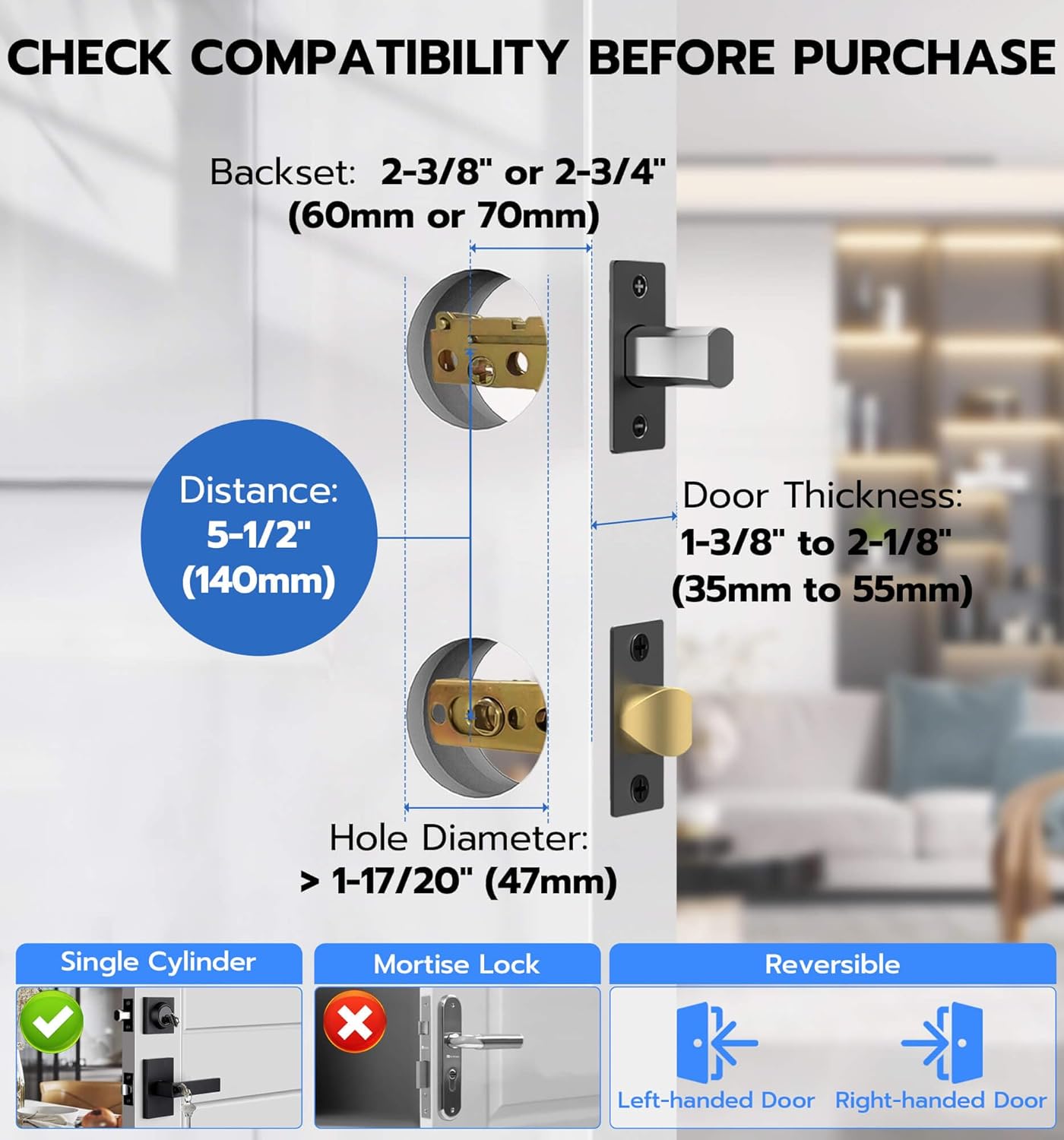
Figure 3: Door compatibility measurements for Anweller MD168 installation.
Step-by-Step Installation Video
Визуалдык колдонмо үчүн төмөнкү расмий орнотуу видеосун караңыз:
Video 1: Official Anweller MD168 Installation Guide. This video provides a comprehensive walkthrough of the installation process, from unpacking to final testing.
Key Installation Steps (Refer to Video 1 for details):
- Компоненттерди таңгактан чыгаруу жана аныктоо: (Video 0:07-0:20) Verify all parts listed in Section 2 are present.
- Install Closed Bolt and Latch Bolt: (Video 0:21-1:13) Insert the closed bolt and latch bolt into the door edge, ensuring correct orientation and securing with screws.
- Install Front Panel Studs: (Video 1:14-1:27) Attach the studs to the front panel of the lock.
- Алдыңкы панелди орнотуу: (Video 1:28-1:45) Pass the power cord through the door hole and align the front panel with the lock ruler and square rod, then buckle them up.
- Install Rear Base Plate: (Video 1:46-2:15) Secure the rubber gasket and rear base plate, passing the power cord through the chassis.
- Adjust Front and Rear Panels: (Video 2:16-2:28) Ensure proper alignment of the front and rear panels and tighten all screws.
- Install Square Pole: (Video 2:29-2:40) Insert the spring into the square rod and then place the square rod into the latch bolt core hole.
- Remove Rear Lock Battery Box Cover: (Video 2:41-2:49) Press the groove on the top of the rear panel to remove the battery cover.
- Test Lock Sensitivity: (Video 2:50-2:58) Use pliers to test the lock ruler's rotation for smooth operation (right to lock, left to unlock).
- Арткы панелди орнотуу: (Video 2:59-3:16) Connect the front lock power cord (ensure correct orientation) and align the lock ruler and square rod before installing the rear panel. Tighten the fixing screws.
- Батареяны орнотуу: (Video 3:17-3:26) Insert 4 AA batteries into the battery compartment and close the cover.
- Install Meson: (Video 3:27-3:36) Install the meson and tighten its screws.
4. Операция
Кулпуну ачуу ыкмалары
The Anweller MD168 offers four distinct ways to unlock your door:
- Өткөрүүчү код: Enter a personalized code on the keypad.
- Мобилдик колдонмо: Use the dedicated smartphone application for remote unlocking.
- RFID картасы: Tap a programmed RFID card to the lock.
- Запастык ачкыч: Utilize traditional mechanical keys as a backup.

Figure 4: The four convenient unlocking methods available for the Anweller MD168.
Мобилдик колдонмону башкаруу
The mobile application provides extensive control over your smart lock:
- Сырсөздү башкаруу: Set up, modify, or delete passcodes.
- RFID Card Programming: Program or delete RFID cards.
- Иш-аракеттер журналы: View real-time unlocking reminders and historical records.
- Auto-Lock & Passage Mode: Configure automatic locking times and enable passage mode for temporary unrestricted access.
- Үндү көзөмөлдөө: Adjust the alarm volume (mute, low, medium, high).
- Статус текшерүү: Monitor the lock's status and battery level.

Figure 5: ашыкview of the convenient mobile app control features.
Коопсуздук өзгөчөлүктөрү
- Карап чыгууга каршы сырсөз: Enter random digits before or after your actual passcode to obscure it from onlookers.
- Туура эмес кирүү чеги: The lock will temporarily disable for 3 minutes after 5 consecutive invalid passcode or RFID entries, and an alarm will be triggered.
- Tamper Ойготкуч: A built-in alarm system activates if tampering is detected, providing an additional layer of security.

Figure 6: The anti-peeping passcode feature for enhanced security.

Figure 7: Visual representation of the lock's pick-resistant and alarm capabilities.
Режимдер
- Авто кулпу: The lock can be configured to automatically secure the door after a set period of time.
- Өтүү режими: This mode allows the door to remain unlocked for continuous access, suitable for gatherings or when frequent entry/exit is required.

Figure 8: The Auto Lock feature for automatic door security.

Figure 9: The Passage Mode for temporary unrestricted access.
5. Техникалык тейлөө
- Батареяны алмаштыруу: The lock requires 4 AA batteries. Replace them when the low battery reminder is activated.
- Өзгөчө кырдаалдардын күчү: In case of complete battery depletion, the lock can be temporarily powered via a USB-C power bank for emergency unlocking.
- Тазалоо: Кулпунун сыртын жумшак, гamp cloth. Avoid using abrasive cleaners or harsh chemicals, as these can damage the finish and electronic components.

Figure 10: Battery compartment for 4 AA batteries, providing up to 180 days of power.
6. Кыйынчылыктарды
If you encounter issues with your Anweller MD168 smart lock, consider the following:
- Кулпу жооп бербейт: Батареялар туура орнотулганын жана заряды жетиштүү экендигин текшериңиз. Зарыл болсо, батарейкаларды алмаштырыңыз.
- Incorrect Passcode Entry: Ensure you are entering the correct passcode. Remember the anti-peeping feature allows extra digits before or after the actual code. If 5 incorrect attempts are made, the lock will temporarily disable.
- Колдонмонун туташуу маселелери: Ensure Bluetooth is enabled on your smartphone and you are within range of the lock. Restart the app or your phone if problems persist.
- Emergency Unlocking: If the battery is completely dead, use the mechanical key or connect a USB-C power bank to the emergency power port.
Кошумча жардам алуу үчүн кардарларды колдоо бөлүмүнө кайрылыңыз.
7. Техникалык шарттар
| Өзгөчөлүк | Деталь |
|---|---|
| Модель номери | MD168 |
| Материал | Цинк |
| Түс | Silver |
| Сырткы бүтүрүү | Май сүртүлгөн |
| Кулпу түрү | Deadbolt Lock, Keypad Lock, Pin Code, RFID |
| Элемент Салмагы | 8.8 фунт |
| Продукциянын өлчөмдөрү | 19.3 x 3.1 x 3.3 дюйм |
| Батареялар талап кылынат | 4 AA батарейкалар (киргизилген эмес) |
| Батареянын иштөө мөөнөтү | Күтүү режиминде 180 күнгө чейин |
| Өзгөчөлүктөр | Deadbolt and Knob Integrated Design, 4 Unlocking Ways, USB-C Emergency Power Unlock, Anti-Peeping Passcode, Auto Lock & Passage Mode, IP54 Waterproof |
8. Кепилдик жана колдоо
Anweller жогорку сапаттагы продукцияларды жана эң сонун кардарларды тейлөөнү камсыз кылууга умтулат.
- Кепилдик: Бул продукт сатып алынган күндөн тартып 12 айлык кепилдик менен келет.
- Техникалык колдоо: Free lifetime technical support is available for all Anweller MD168 users.
- Байланыш: For any queries, technical assistance, or warranty claims, please contact us via email at hongjdzwj@outlook.com.
