1. Орнотуу
The darkFlash FLOATRON F1 Micro-ATX PC Case features a 270° panoramic glass view and a unique floating design. This section guides you through the initial setup of your PC components within the case.
1.1 Таңгактан чыгаруу жана алгачкы текшерүү
Carefully remove the PC case from its packaging. Inspect for any signs of damage during transit. Ensure all accessories listed in the packing list are present.

Сүрөт 1.1: алдыңкы жагы view of the darkFlash FLOATRON F1 PC Case, showcasing its panoramic glass and internal component visibility with blue lighting.
1.2 Интерьерге кирүү
The case is designed with four-side quick-release panels for easy access to internal components. Gently pull on the designated areas to detach the side panels. The front panel is also removable for maintenance or fan installation.

Сүрөт 1.2: Каптал view of the darkFlash FLOATRON F1 PC Case, highlighting the mesh side panel for airflow and the integrated I/O ports on the base.
1.3 Motherboard орнотуу
The FLOATRON F1 supports M-ATX and ITX motherboards, including back-connect layouts. Install the motherboard onto the standoffs provided. Ensure all screws are securely fastened.
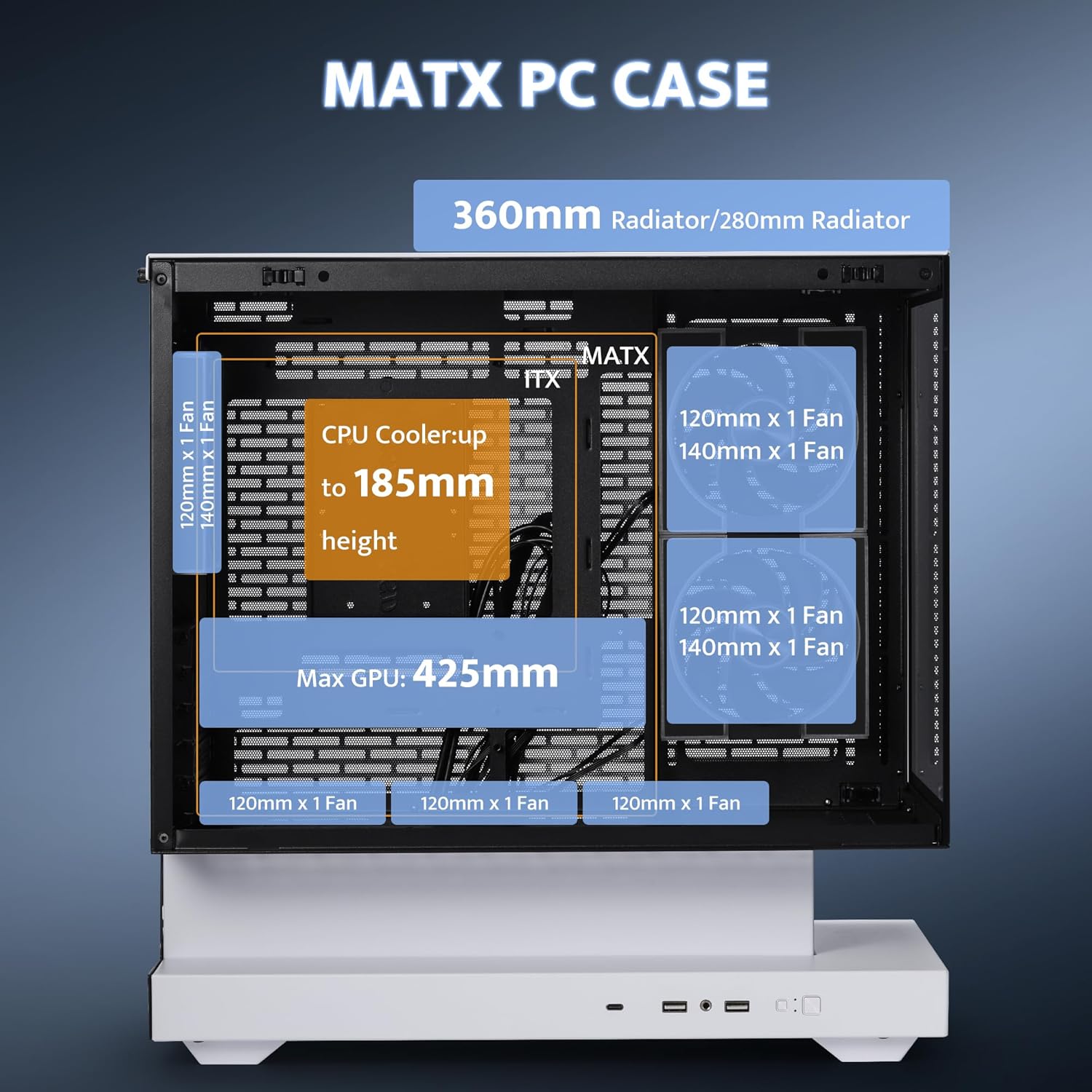
Image 1.3: Rear interior view of the darkFlash FLOATRON F1 PC Case, illustrating the design for back-connect motherboards and ample space for cable management behind the tray.
1.4 Электр менен камсыздоону орнотуу
The innovative bottom-mounted PSU layout provides ample space. Install your power supply unit (PSU) in the dedicated compartment within the base. Route cables through the provided cutouts for a tidy build.
Video 1.1: An official darkFlash video demonstrating the features and assembly of the FLOATRON F1 MATX PC Case, including component installation and design highlights.
2. Иштөө
This section details the operational aspects of the darkFlash FLOATRON F1 PC Case, focusing on its cooling capabilities and connectivity.
2.1 Аба агымы жана муздатуу
The FLOATRON F1 is designed for optimized airflow. Cool air is drawn from the bottom and sides, while hot air exhausts from the top and rear. The case comes pre-installed with 3 darkFlash DM08 ARGB PWM fans for efficient cooling and customizable lighting.

Image 2.1: Diagram showing the optimized airflow within the darkFlash FLOATRON F1 PC Case, with arrows indicating cool air intake from the bottom and sides, and hot air exhaust from the top.
2.2 Internal Layout and Space Utilization
The re-engineered bottom design maximizes space, boosting interior capacity for easier builds and cleaner cable management. The case supports GPUs up to 350mm, CPU coolers up to 185mm, and 360mm liquid cooling solutions.

Image 2.2: Internal layout diagram of the darkFlash FLOATRON F1 PC Case, highlighting the power supply sinking area and overall optimized space utilization for components.
2.3 Connectivity (I/O Ports)
The side-mounted I/O panel provides convenient access to essential ports, including a Type-C port, two USB 3.0 ports, and HD Audio jacks. These are located on the floating extended base.

Сүрөт 2.3: Жакын пландан view of the darkFlash FLOATRON F1 PC Case's floating extended base, showcasing the integrated I/O ports for easy connectivity.
Video 2.1: An official darkFlash video demonstrating the airflow capabilities and design of the FLOATRON F1(2025) case, emphasizing cooling from every angle.
3. Техникалык тейлөө
Proper maintenance ensures the longevity and optimal performance of your darkFlash FLOATRON F1 PC Case.
3.1 Чаң чыпкасын тазалоо
The case features magnetic dust filters for superior cooling performance while keeping your build clean. Regularly remove and clean these filters to prevent dust buildup and maintain optimal airflow. Use a soft brush or compressed air to remove accumulated dust.
3.2 Panel Removal and Reinstallation
The screwless front and side panels allow for quick, tool-free access for cleaning or component upgrades. To remove, gently pull the panels away from the chassis. To reinstall, align the panels with their respective slots and push until they click securely into place.

Image 3.1: Diagram illustrating the clamshell side panel opening mechanism of the darkFlash FLOATRON F1 PC Case, demonstrating easy, tool-free access to the interior.
3.3 Жалпы тазалоо
Use a soft, dry cloth to wipe down the exterior surfaces of the case. For glass panels, a microfiber cloth with a mild glass cleaner can be used. Avoid abrasive cleaners or solvents that may damage the finish.
4. Кыйынчылыктарды
This section provides basic troubleshooting steps for common issues you might encounter with your PC build in the darkFlash FLOATRON F1 case.
4.1 PC Not Powering On
- Ensure the power supply unit (PSU) is properly connected to the wall outlet and the power switch on the PSU is in the 'ON' position.
- Verify that the 24-pin ATX power cable and the 8-pin CPU power cable are securely connected to the motherboard.
- Check that the front panel power switch cable is correctly connected to the motherboard's front panel header. Refer to your motherboard manual for the correct pinout.
4.2 Fans Not Spinning or RGB Not Lighting Up
- Confirm that the fan power cables are connected to the appropriate fan headers on the motherboard or a fan controller.
- For ARGB lighting, ensure the 3-pin ARGB cable from the fans is connected to a compatible ARGB header on your motherboard or an ARGB controller.
- Вентилятордун ылдамдыгын жана жарыкты башкаруу үчүн энелик платаңыздын BIOS/UEFI жөндөөлөрүн же RGB программасын текшериңиз.
4.3 USB Ports or Audio Jacks Not Functioning
- Verify that the USB 3.0, Type-C, and HD Audio cables from the case's front I/O panel are correctly connected to their respective headers on the motherboard.
- Ensure the necessary drivers for your motherboard's chipset and audio are installed.
5. Техникалык шарттар
Key technical specifications for the darkFlash FLOATRON F1 Micro-ATX PC Case.
| Өзгөчөлүк | Спецификация |
|---|---|
| Модель аты | FLOATRON F1 |
| Иштин түрү | Micro Tower (Micro-ATX) |
| Motherboard шайкештиги | M-ATX, ITX (supports back-connect) |
| Өлчөмдөрү (LxWxH) | 15 x 9 x 18.1 дюйм (381 x 228.6 x 459.7 мм) |
| Элемент Салмагы | 11.57 фунт (5.26 кг) |
| Материал | Металл, чыңдалган айнек |
| GPU тазалоо | Up to 350mm (Max 425mm, refer to Image 5.1) |
| CPU муздаткычтын бийиктиги | 185 мм чейин |
| Суюк муздатуу колдоо | 360 мм AIO чейин |
| Алдын ала орнотулган күйөрмандар | 3x darkFlash DM08 ARGB PWM Fans |
| I/O порттору | 1x Type-C, 2x USB 3.0, HD Audio |
| PSU монтаждоо түрү | Төмөнкү тоо |
| картриджа Slots | 5 |
| Drive Bays | Multiple HDD/SSD mounts |

Image 5.1: Internal dimensions diagram of the darkFlash FLOATRON F1 PC Case, detailing maximum supported lengths for GPU (425mm), CPU cooler height (185mm), and radiator sizes (360mm/280mm).
6. Кепилдик маалыматы
For detailed warranty information regarding your darkFlash FLOATRON F1 PC Case, please refer to the warranty card included with your product packaging or visit the official darkFlash webсайт. Кепилдиктин шарттары аймакка жана сатуучуга жараша өзгөрүшү мүмкүн.
7. Кардарларды колдоо кызматы
Should you require further assistance, technical support, or have questions not covered in this manual, please contact darkFlash customer support through their official webсайт же продукт документациясында көрсөтүлгөн байланыш маалыматы. Сиз да зыярат кылсаңыз болот darkFlash Store on Amazon кошумча ресурстар үчүн.


