1. Киришүү
Thank you for choosing the Proscenic P11 Ultra Cordless Vacuum Cleaner. This manual provides essential information for the safe and efficient use, maintenance, and troubleshooting of your new appliance. Please read it thoroughly before first use and retain it for future reference.
The Proscenic P11 Ultra is designed for versatile cleaning across various surfaces, offering powerful suction and convenient features for a cleaner home environment.
2. Маанилүү коопсуздук нускамалары
Өрт, электр шок же жаракат алуу коркунучун азайтуу үчүн электр шаймандарын колдонууда ар дайым негизги коопсуздук чараларын сактаңыз.
- Шайманды колдонуудан мурун бардык нускамаларды окуп чыгыңыз.
- Сыртта же нымдуу беттерде колдонбоңуз.
- оюнчук катары колдонууга жол бербеңиз. Балдар тарабынан же алардын жанында колдонулганда кылдат көңүл буруу зарыл.
- Бул колдонмодо сүрөттөлгөндөй гана колдонуңуз. Өндүрүүчү сунуштаган тиркемелерди гана колдонуңуз.
- Бузулган шнур же сайгыч менен колдонбоңуз. Эгерде шайман керектелип иштебесе, кулап, бузулуп, сыртта калып же сууга түшүп кетсе, аны тейлөө борборуна кайтарыңыз.
- Тартпаңыз же шнур менен көтөрүп жүрбөңүз, шнурду тутка катары колдонбоңуз, шнурга эшикти жаппаңыз же шнурду курч четтеринен же бурчтарынан тартпаңыз. Шайманды шнурдун үстүнөн иштетпеңиз. Шнурды ысытылган беттерден алыс кармаңыз.
- шнурду тартып сууруп албаңыз. Электр розеткасынан сууруп алуу үчүн шнурдан эмес, сайгычтан кармаңыз.
- Штепсель же шайманды нымдуу кол менен кармабаңыз.
- Тешиктерге эч кандай нерсени салбаңыз. Бөгөттөлгөн ачуу менен колдонбоңуз; чаңдан, түктөн, чачтан жана аба агымын азайта турган нерселерден алыс болуңуз.
- Чачты, кенен кийимдерди, манжаларды жана дененин бардык бөлүктөрүн тешиктерден жана кыймылдуу бөлүктөрдөн алыс кармаңыз.
- Тамеки, ширеңке, ысык күл сыяктуу күйүп жаткан же чылым чеккен нерселерди албаңыз.
- Тепкичтерде тазалоодо өзгөчө этият болуңуз.
- Бензин сыяктуу күйүүчү же күйүүчү суюктуктарды алуу үчүн колдонбоңуз же алар болушу мүмкүн болгон жерлерде колдонбоңуз.
- Уулуу материалды (мисалы, хлор агартуучу, аммиак тазалагыч, дренажды тазалагыч) албаңыз.
- Майлуу боёктон, боёк эриткичтен, кээ бир күйүүчү чаңдан же башка жарылуучу же уулуу буулардан чыккан буулар болгон жабык мейкиндикте колдонбоңуз.
- Do not vacuum hard or sharp objects such as glass, nails, screws, or coins.
- Моторлуу соплолорду туташтыруудан же ажыратуудан мурун ар дайым бул шайманды өчүрүңүз.
- Шайманды үй ичинде сактаңыз. Кырсыктарды болтурбоо үчүн колдонуудан кийин алып салыңыз.
- Толуктоо үчүн өндүрүүчү берген заряддагычты гана колдонуңуз.
- Катуу бузулган болсо да шайманды өрттөбөңүз. Батареялар өрт учурунда жарылып кетиши мүмкүн.
- The battery should be fully charged and stored separately if the device is not used for a long time.
3. Пакеттин мазмуну
Carefully unpack your Proscenic P11 Ultra and check that all items are present and in good condition. If any items are missing or damaged, please contact customer support.
- Негизги вакуумдук агрегат
- Adjustable Telescopic Rod
- Motorized Floor Brush (Anti-Tangle with Green Light)
- Алынуучу батарея
- Кошумча жабдуулар топтому (жарака куралын, чаң сүртүүчү щетканы камтыйт)
- Адаптер (заряддагыч)
- Заряддоочу док / Дубалга монтаждоо
- Колдонуучунун Колдонмосу (бул документ)
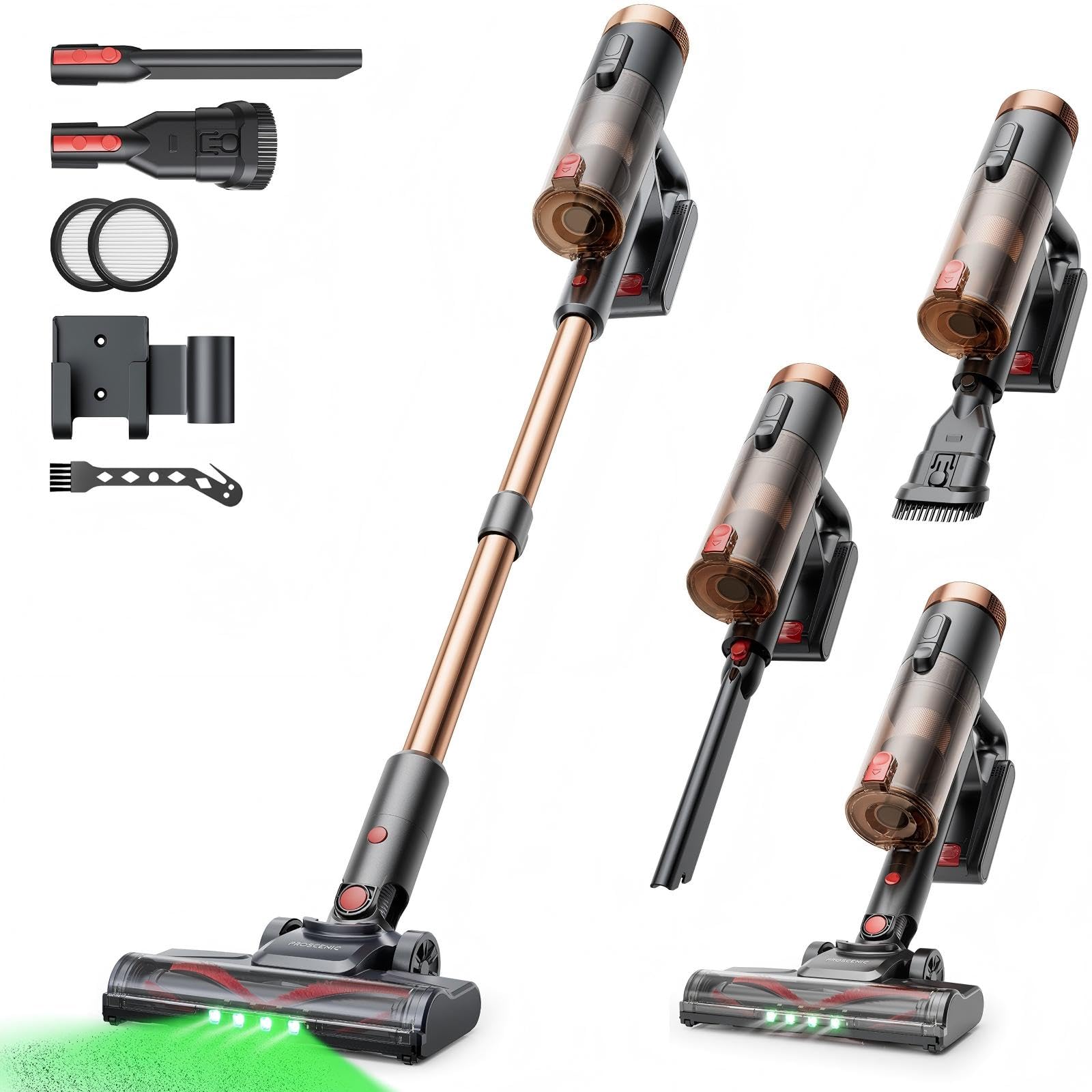
Image 1: Proscenic P11 Ultra main unit and included accessories. This image displays the vacuum cleaner's primary components, including the handheld unit, extension wand, floor brush, and various attachments.
4. Продукт бүтүп калдыview
Familiarize yourself with the key components and features of your Proscenic P11 Ultra.
Негизги өзгөчөлүктөрү:
- Өз алдынча дизайн: Allows the vacuum to stand upright independently for convenient storage and breaks during cleaning.
- 180° Rotating Floor Brush: Enhances maneuverability, allowing easy access to tight corners and under furniture.
- Adjustable Telescopic Rod: Customize the height for comfortable use by various users.
- Anti-Tangle Brush with Green Detection Light: Prevents hair tangles and illuminates hidden dust particles for thorough cleaning.
- 50 kPa Super Strong Suction Power: Provides powerful cleaning performance for stubborn dirt and debris.
- Intelligent Touchscreen: Displays real-time information on battery life, maintenance status, and suction modes.
- Two Suction Power Modes: Offers versatile cleaning options for different floor types and cleaning needs.
- Алынуучу батарея: Allows for extended cleaning time with an optional spare battery and convenient charging.
Image 2: Close-up of the Proscenic P11 Ultra's intelligent touchscreen. The screen provides visual feedback on the vacuum's status.
5. Орнотуу жана чогултуу
Follow these steps to assemble your Proscenic P11 Ultra and prepare it for first use.
5.1 Негизги блокту чогултуу
- Insert the adjustable telescopic rod into the main handheld vacuum unit until it clicks securely into place.
- Attach the motorized floor brush to the bottom end of the telescopic rod, ensuring it locks firmly.
- Insert the removable battery into the designated slot on the main unit until it clicks.
Image 3: Illustration of assembling the main vacuum unit, showing the connection points for the telescopic rod and floor brush.
5.2 Батареяны заряддоо
Биринчи колдонуудан мурун, батареяны толук заряддаңыз. Батареяны негизги блокко туташтырылганда же өзүнчө заряддоого болот.
- Connect the adapter to the charging port on the battery or the charging dock.
- Адаптерди электр розеткасына сайыңыз.
- The touchscreen display will indicate charging status. A full charge typically takes approximately 4-5 hours.
Image 4: The vacuum cleaner connected to its charger, illustrating the charging process. The battery can be charged while installed or removed.
5.3 Аксессуарларды тиркөө
To use the crevice tool or dusting brush, detach the telescopic rod and floor brush from the main unit. Insert the desired accessory directly into the main unit's nozzle until it clicks.
6. Операция
Learn how to effectively use your Proscenic P11 Ultra for various cleaning tasks.
6.1 Күйгүзүү/өчүрүү жана сормо режимдери
- Press the power button on the main unit to turn the vacuum cleaner on. It will start in the default suction mode.
- Use the mode selection button on the touchscreen to switch between the two available suction power modes: Standard and Max.
- Чаң соргучту өчүрүү үчүн кубат баскычын кайра басыңыз.
6.2 Беттерди тазалоо
- Hard Floors & Carpets: Use the motorized floor brush for general cleaning. The green detection light will help identify fine dust.
- Tight Spaces & Corners: Utilize the crevice tool for narrow gaps, edges, and hard-to-reach areas.
- Upholstery & Delicate Surfaces: Attach the dusting brush for cleaning sofas, curtains, and other sensitive items.
- Үй жаныбарларынын жүнү: The anti-tangle brush is specifically designed to effectively pick up pet hair without tangling.
Image 5: The Proscenic P11 Ultra in use, demonstrating its maneuverability on a hard floor surface. The green light on the brush head is visible.
6.3 Freestanding Function
The P11 Ultra features a freestanding design. When you need to pause cleaning or store the vacuum temporarily, simply ensure it is balanced and stands upright on its own. This allows for convenient breaks without needing to lean the vacuum against a wall or lay it down.
7. Техникалык тейлөө
Үзгүлтүксүз тейлөө оптималдуу иштешин камсыз кылат жана чаң соргучуңуздун иштөө мөөнөтүн узартат.
7.1 Таштанды кутусун бошотуу
Empty the dustbin after each use or when the MAX fill line is reached.
- Вакуум өчүрүлгөнүн текшериңиз.
- Таштанды челекти чыгаруу баскычын, адатта, туткасынын жанына жайгаштырыңыз.
- Press the button to open the dustbin flap and empty contents into a waste bin.
- Close the dustbin flap securely until it clicks.
Image 6: A user demonstrating how to empty the transparent dustbin of the Proscenic P11 Ultra into a trash receptacle.
7.2 HEPA чыпкасын тазалоо
Clean the HEPA filter regularly (e.g., monthly, depending on usage) to maintain suction power.
- Таштанды кутучасын негизги блоктон чыгарыңыз.
- Twist and pull out the HEPA filter assembly.
- Чаңды кетирүү үчүн чыпканы таштанды челектин үстүнөн акырын таптаңыз.
- If necessary, rinse the filter under cold running water. Ensure it is completely dry (for at least 24 hours) before reinserting. Do not use detergents.
- Фильтрди жана таштанды челекти кайра чогултуңуз.
7.3 Щетка түрмөгүн тазалоо
Щетканын рулонунда чаташкан чач же калдыктар бар-жогун мезгил-мезгили менен текшерип туруңуз.
- Turn off the vacuum and detach the motorized floor brush.
- Locate the brush roll release mechanism (refer to the floor brush diagram).
- Remove the brush roll. Use scissors or a cleaning tool to cut and remove any tangled hair or fibers.
- Щетка ролигин кайра салып, бошотуу механизмин бекитиңиз.
8. Кыйынчылыктарды
If you encounter issues with your Proscenic P11 Ultra, refer to the following common problems and solutions.
| Көйгөй | Мүмкүн себеп | Чечим |
|---|---|---|
| Вакуум күйбөйт | Батарея заряддалган эмес же туура орнотулган эмес. | Батарея толук заряддалганын жана коопсуз салынганын текшериңиз. |
| Соруу күчү төмөн | Dustbin is full; Filter is clogged; Brush roll is blocked. | Empty dustbin. Clean or replace HEPA filter. Remove blockages from brush roll. |
| Щетка түрмөгү айланбайт | Brush roll is tangled with hair/debris; Floor brush is not properly attached. | Clean brush roll. Reattach floor brush securely. |
| Батареянын иштөө мөөнөтү кыска | Battery not fully charged; Using Max suction mode frequently; Battery degradation. | Ensure full charge. Use Standard mode for longer runtime. Consider replacing battery if significantly degraded. |
| Адаттан тышкаркы ызы -чуу | Blockage in nozzle or hose; Damaged brush roll. | Check for and remove any blockages. Inspect brush roll for damage. |
If the problem persists after attempting these solutions, please contact Proscenic customer support.
9. Техникалык шарттар
Technical specifications for the Proscenic P11 Ultra Cordless Vacuum Cleaner.
- Модел: P11 Ultra
- Кубат булагы: Батарея менен иштейт
- Тtage: 22.5 вольт
- Соруу күчү: 50 кПа чейин
- Элемент Салмагы: 2.68 килограмм
- Таштанды урнасынын сыйымдуулугу: Approximately 1.0 Liter (1000 Microliters as per data, interpreted as 1.0L)
- Чыпка түрү: HEPA чыпкасы
- Форма фактору: Upright (Stick Vacuum)
- Зымсыз: Ооба
- Сунушталган беттер: Carpet, Solid Wood, Upholstery
- Өзгөчөлүктөр: Freestanding Design, Touchscreen, Green Detection Light, Anti-Tangle Brush, Adjustable Telescopic Rod, Removable Battery
10. Кепилдик жана Кардарларды колдоо
Proscenic provides a 2 жылдык кепилдик for the P11 Ultra Cordless Vacuum Cleaner, covering manufacturing defects from the date of purchase.
Суроолоруңуз, техникалык жардамыңыз же кепилдик боюнча дооматтарыңыз болсо, биздин кардарларды колдоо кызматыбызга кайрылыңыз. Биз сунуштайбыз 7x24 hours customer support сага жардам берүү үчүн.
Электрондук почта: service-de@proscenic.com
Please have your model number (P11 Ultra) and purchase information ready when contacting support.


