1. Продукт бүтүп калдыview
The JOMAA 78 Keys Dual Mode Wireless Trackball Keyboard offers versatile connectivity and ergonomic design for enhanced productivity across multiple devices. Featuring both 2.4GHz wireless and Bluetooth 5.0, it allows seamless switching between up to three connected devices. The integrated 19mm optical trackball provides precise cursor control, eliminating the need for a separate mouse and saving valuable desk space. Its compact, lightweight, and energy-efficient design makes it ideal for various computing environments.

Image 1: JOMAA 78 Keys Dual Mode Wireless Trackball Keyboard
This image displays the sleek, silver-colored JOMAA 78 Keys Dual Mode Wireless Trackball Keyboard, highlighting its compact layout and integrated trackball. The image also shows icons indicating system-wide compatibility (Windows, Mac, iOS, Android), multi-device association (three devices), and dual wireless connectivity (Bluetooth/2.4G).
2. Пакеттин мазмуну
- JOMAA 78 Keys Dual Mode Wireless Trackball Keyboard
- 2.4GHz USB Receiver (stored inside the keyboard's battery compartment)
- USB заряддоо кабели
- Quick Start Guide
- 2 x AA Batteries (included, pre-installed in some models)
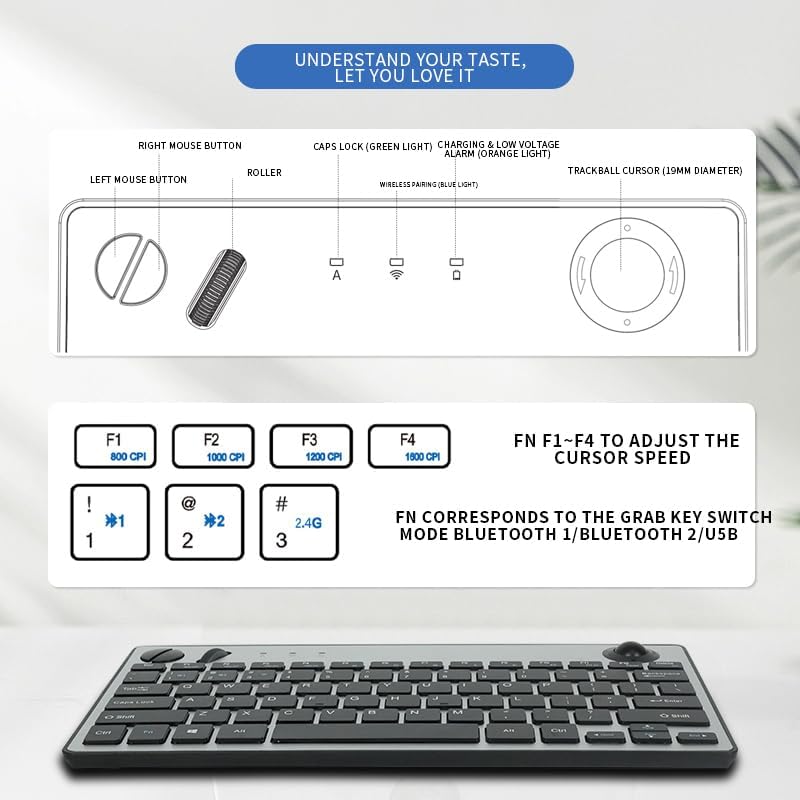
Image 2: JOMAA Keyboard Package Contents Diagram
This diagram illustrates the various components of the JOMAA keyboard, including the keyboard itself, the left and right mouse buttons, the roller, Caps Lock indicator, charging and low voltage alarm lights, and the 19mm trackball. It also details the DPI adjustment keys (F1-F4) and the function keys for switching between Bluetooth 1, Bluetooth 2, and USB modes.
3. Продукциянын өзгөчөлүктөрү
- Dual-Mode Wireless Connectivity: Supports stable 2.4GHz wireless (nano receiver included) and advanced Bluetooth 5.0 connection.
- Көп түзмөктү жупташтыруу: Easily pair with and switch between up to 3 devices (PC, tablet, phone) simultaneously.
- Кеңири шайкештик: Broadly compatible with Windows, macOS, iOS, and Android operating systems.
- Integrated Trackball Design: Features a built-in 19mm precision optical trackball for accurate and smooth cursor control, eliminating the need for a separate mouse.
- Энергия үнөмдүү: Low power consumption (≤10mA working current) for long-lasting battery life with 2 AA batteries.
- Портативдик дизайн: Compact 78-key layout and lightweight (403g) for travel or clutter-free workspaces.
- Plug-and-Play: No drivers needed for 2.4G connection; quick Bluetooth pairing.
- Колдонуучуга ыңгайлуу эргономика: Thoughtful key layout and thumb-operated trackball designed to reduce arm movement and wrist strain.

Image 3: JOMAA Keyboard Multi-Device Compatibility
This image illustrates the keyboard's ability to connect to multiple devices, including a smartphone, tablet, and desktop computer, via Bluetooth (BT1, BT2) and a 2.4G USB receiver, allowing for seamless switching between them.
4. Орнотуу нускамалары
4.1. Батареяны орнотуу
- Баскычтоптун астыңкы жагындагы батарея бөлүкчөсүн табыңыз.
- Батареянын капкагын жылдырыңыз.
- Туура полярдуулукту (+/-) камсыз кылуу менен 2 AA батарейкасын салыңыз.
- Батареянын капкагын бекем жабыңыз.
4.2. 2.4 ГГц зымсыз туташуу
- Locate the 2.4GHz USB receiver, usually stored in the keyboard's battery compartment.
- USB кабыл алгычты компьютериңиздеги же түзмөгүңүздөгү жеткиликтүү USB портуна сайыңыз.
- Slide the power switch on the keyboard to the 'ON' position.
- Press the 'FN' key + '3' key (labeled 2.4G) to select 2.4G mode. The indicator light will illuminate.
- Your device should automatically detect and connect to the keyboard.
4.3. Bluetooth Жупташтыруу
Клавиатура эки Bluetooth каналын (BT1 жана BT2) колдойт.
- Slide the power switch on the keyboard to the 'ON' position.
- Press and hold the 'FN' key + '1' key (for BT1) or 'FN' key + '2' key (for BT2) for 3-5 seconds until the corresponding Bluetooth indicator light starts blinking rapidly. This indicates the keyboard is in pairing mode.
- Түзмөгүңүздө (компьютер, планшет, смартфон) Bluetooth жөндөөлөрүнө өтүңүз.
- Издөө new devices and select "JOMAA Keyboard" (or similar name) from the list.
- Follow any on-screen prompts to complete the pairing process. The indicator light on the keyboard will stop blinking and remain solid once connected.
- To pair another device, repeat steps 2-5 using the other available Bluetooth channel.
Video 1: JOMAA Keyboard Unboxing and Setup
This video demonstrates the unboxing of the JOMAA keyboard, showing its sleek design and how to install the batteries and connect via the 2.4GHz USB receiver. It highlights the ease of setup and the keyboard's sturdy construction.
5. Иштөө нускамалары
5.1. Түзмөктөрдүн ортосунда которулуу
Once paired, you can switch between connected devices by pressing the 'FN' key along with the corresponding channel key:
- FN + 1: Bluetooth түзмөгүнө которулуу 1
- FN + 2: Bluetooth түзмөгүнө которулуу 2
- FN + 3: Switch to 2.4GHz USB Receiver Device
5.2. Trackball Usage
The integrated 19mm optical trackball is located on the right side of the keyboard. Use your thumb to control the cursor movement. The left and right mouse click buttons are positioned conveniently next to the trackball.

Image 4: JOMAA Keyboard Trackball and X-Structure
This image highlights the smooth trackball for accurate and precise cursor positioning. It also features a diagram illustrating the X-Structure of the keys, which provides a steady and great rebound feeling for comfortable typing.
5.3. Adjusting Trackball DPI (Cursor Speed)
You can adjust the trackball's DPI (dots per inch) to change cursor sensitivity:
- FN + F1: 800 CPI
- FN + F2: 1000 CPI
- FN + F3: 1200 CPI
- FN + F4: 1600 CPI
5.4. Media and Function Keys
The F1-F12 keys have secondary media functions. To activate these, press the 'FN' key simultaneously with the desired F-key.
- FN + F5: Мурунку трек
- FN + F6: Ойнотуу/Тыныгуу
- FN + F7: Кийинки трек
- FN + F8: Үнсүз
- FN + F9: Үндү төмөндөтүү
- FN + F10: Үндү көтөрүү
6. Батарея жөнүндө маалымат жана заряддоо
The keyboard operates on 2 AA batteries. For optimal performance and battery life, use high-quality alkaline batteries. The low power consumption design ensures extended usage.
- Low Voltage Ойготкуч: An orange indicator light will illuminate when the battery level is low, signaling that batteries need replacement.
- Заряддоо: If your model supports rechargeable batteries, use the provided USB charging cable to connect the keyboard to a power source. The charging indicator light will show charging status.
7. Техникалык тейлөө
- Тазалоо: Use a soft, dry cloth to clean the keyboard surface. For stubborn dirt, slightly dampчүпүрөктү суу же жумшак тазалоо эритмеси менен жууп салыңыз. Ашыкча нымдуулуктан сактаныңыз.
- Трекболду тазалоо: Periodically remove the trackball (if removable) and clean its housing and the ball itself to ensure smooth operation.
- Сактагыч: When not in use for extended periods, turn off the keyboard to conserve battery life. Store in a cool, dry place.
8. Кыйынчылыктарды
8.1. Байланыш маселелери
- Байланыш жок: Ensure the keyboard is powered on and the correct channel (BT1, BT2, or 2.4G) is selected.
- 2.4 ГГц: Verify the USB receiver is securely plugged into your device. Try a different USB port.
- Bluetooth: Ensure Bluetooth is enabled on your device and the keyboard is in pairing mode (blinking indicator). Remove previous pairings on your device and try re-pairing.
- Интерференция: Баскычтопту түзмөгүңүзгө жакыныраак жана тоскоолдук жаратышы мүмкүн болгон башка зымсыз түзмөктөрдөн алысыраак жылдырыңыз.
8.2. Баскычтоп жооп бербейт
- Батареяны текшерүү: Replace batteries if the low voltage indicator is on or if the keyboard is unresponsive.
- Power Cycle: Turn the keyboard off, wait a few seconds, then turn it back on.
- Кайра жупташтыруу: If issues persist, try re-pairing the keyboard with your device.
8.3. Trackball Not Working
- Таза трекбол: Dust or debris can affect trackball performance. Clean the trackball and its housing as described in the Maintenance section.
- DPI жөндөөлөрү: Ensure the DPI setting is not too low (FN + F1). Adjust to a higher setting if needed.
9. Техникалык шарттар
| Модел | 78 Keys Dual Mode Wireless Trackball Keyboard |
| Байланыш технологиясы | Bluetooth 5.0, 2.4 ГГц USB |
| Ачкычтардын саны | 78 |
| Трекболдун өлчөмү | 19mm Optical |
| Операциялык системанын шайкештиги | Windows, macOS, iOS, Android |
| Operating Voltage | 3V |
| Иштөө агымы | ≤10mA |
| Өткөрмө аралык | 7-10 meters (33 feet) |
| Power Source | 2 x AA батарейкалар |
| Элемент Салмагы | 1.14 pounds (403g without battery) |
| Өлчөмдөр | 12.6 x 10.63 x 1.57 дюйм |

Image 5: JOMAA Keyboard Dimensions and Specifications
Бул сүрөт майда-чүйдөсүнө чейин камсыз кылат view of the keyboard's dimensions (28.6cm length, 14.9cm width, 3.1cm height) and lists key specifications such as transmission distance (7-10m), number of keys (78), compatible OS (Windows 7/10/11, Mac 10.6-15.2), operating current (≤10mA), trackball size (19mm), weight (403g without battery), and operating voltage (3V).
10. Кепилдик жана колдоо
For warranty information, technical support, or customer service inquiries, please refer to the official JOMAA webсайтка же түздөн-түз кардарларды колдоо менен байланышыңыз. Кепилдик дооматтар үчүн сатып алуу дүмүрчөгүңүздү сактаңыз.