1. Киришүү
This manual provides essential information for setting up, operating, maintaining, and troubleshooting your ASUS ROG Zephyrus G14 gaming laptop. Designed for high-performance gaming and creative tasks, this laptop features an OLED 3K 120Hz display, AMD Ryzen 9 270 processor, and NVIDIA GeForce RTX 5060 GPU. Please read this manual thoroughly to ensure optimal use and longevity of your device.
2. Негизги өзгөчөлүктөрү
- OLED 3K 120Hz Display: Features a stunning 14-inch OLED ROG Nebula panel with 3K resolution, ultra-fast 120Hz refresh rate, and rapid 0.2ms response times, delivering vibrant colors and smooth visuals.
- Күчтүү процессор: Equipped with the AMD Ryzen 9 270 processor (8-core, 16-thread) for demanding games and productivity.
- Өркүндөтүлгөн графика: NVIDIA GeForce RTX 5060 GPU with 8GB GDDR7 memory, supporting real-time ray tracing and DLSS 4 AI upscaling.
- Premium and Portable Design: Durable aluminum chassis, ultra-portable at 0.63 inches thin and 3.31 lbs.
- Өркүндөтүлгөн муздатуу системасы: ROG Intelligent Cooling with liquid metal thermal compound and 2nd Gen Arc Flow Fans for sustained performance.
- Жакшыртылган аудио: Upgraded woofers for 252% volume boost, deep bass, and Dolby Atmos support across 6 speakers.
- Мыкты байланыш: Dual USB-C ports, HDMI 2.1, USB 3.2 Gen2 Type-A ports, and a dedicated UHS-II MicroSD card reader.

Figure 2.1: The ASUS ROG Zephyrus G14 laptop, highlighting its overall design and portability.

Figure 2.2: Details of the ROG Nebula Display, showcasing its high-resolution OLED panel and gaming-centric features.
3. Орнотуу колдонмосу
3.1 кутудан чыгаруу
Carefully remove the laptop and its accessories from the packaging. Ensure all components are present.
- ASUS ROG Zephyrus G14 Laptop
- Кубат адаптери (200 Вт)
3.2 Баштапкы күйгүзүү
- Кубат адаптерин ноутбуктун кубат киргизүү портуна, андан кийин розеткага туташтырыңыз.
- Ноутбуктун капкагын ачыңыз.
- Ноутбукту күйгүзүү үчүн, адатта, баскычтоптун палубасында жайгашкан кубат баскычын басыңыз.
- Windows 11 Pro орнотуу процессин аяктоо үчүн экрандагы көрсөтмөлөрдү аткарыңыз.
3.3 Перифериялык түзүлүштөрдү туташтыруу
Connect external devices such as a mouse, keyboard, or external display to the available ports on your laptop. Refer to the 'Connectivity' section for port details.
4. Иштөө нускамалары
4.1 Электр энергиясын башкаруу
- Күйгүзүү: Кубат баскычын басыңыз.
- Өчүрүү: Windows Start баскычын, андан кийин Power > Өчүрүү баскычын чыкылдатыңыз.
- Уйку режими: Close the lid or click the Windows Start button, then Power > Sleep.
4.2 Дисплей орнотуулары
Дисплей жөндөөлөрүн тууралоо үчүн:
- Иш тактасын оң баскыч менен чыкылдатып, "Дисплей орнотууларын" тандаңыз.
- Here you can change resolution (e.g., 2880x1800), refresh rate (up to 120Hz), and HDR settings.
4.3 Баскычтоп жана сенсордук такта
- The keyboard features a 1.7mm travel distance and a 240Hz report rate for responsive input.
- Сенсордук панел навигация үчүн көп тийүү жаңсоолорун колдойт. Ыңгайлаштыруу үчүн Windows жөндөөлөрүн караңыз.
4.4 Аудио орнотуулары
Adjust volume using the function keys or through the Windows sound settings. The laptop features 6 speakers with Dolby Atmos support for immersive audio.
4.5 Байланыш
The ROG Zephyrus G14 offers a variety of ports for connecting external devices:

Figure 4.1: ашыкview of the laptop's robust connectivity ports.
- ASUS Slim Power Jack: Кубат адаптерин туташтыруу үчүн.
- HDMI2.1: Тышкы дисплейлерге туташуу үчүн.
- USB 3.2 Gen2 Type-A: Перифериялык түзүлүштөр үчүн стандарттуу USB порттору.
- Аудио Jack: Combined microphone-in and headphone-out port.
- USB4 Type-C (with DisplayPort 2.1, Power Delivery 3.0): Versatile port for data, video output, and charging.
- USB 3.2 Gen2 Type-C (with DisplayPort 2.1, Power Delivery 3.0): Another versatile port for data, video output, and charging.
- Micro SD Card Reader (UHS II): For reading and writing to Micro SD cards.
- Зымсыз туташуу: Supports Wi-Fi 7 and Bluetooth for wireless connections.
5. Техникалык тейлөө жана кам көрүү
5.1 Тазалоо
- Экран: Бир аз жумшак, түксүз кездемени колдонуңуз dampсуу же экран тазалоочу менен бүттү. Катуу химиялык заттардан алыс болуңуз.
- Баскычтоп жана шасси: Use a soft cloth. For dust, a can of compressed air can be used.
5.2 Батареяга кам көрүү
- Батареяны бат-баттан толук кубаттап калуудан алыс болуңуз.
- Ноутбукту узак убакыт бою колдонбосо, салкын, кургак жерде сактаңыз.
- Use the provided ASUS power adapter for charging.
5.3 Программалык камсыздоо жаңыртуулары
Regularly update your Windows operating system, graphics drivers, and ASUS utilities to ensure optimal performance and security. Check the ASUS support webакыркы айдоочулар үчүн сайт.
5.4 Муздатуу системасы
The ROG Intelligent Cooling system uses liquid metal and Arc Flow Fans. Ensure the vents are not obstructed to maintain efficient cooling, especially during intensive tasks.
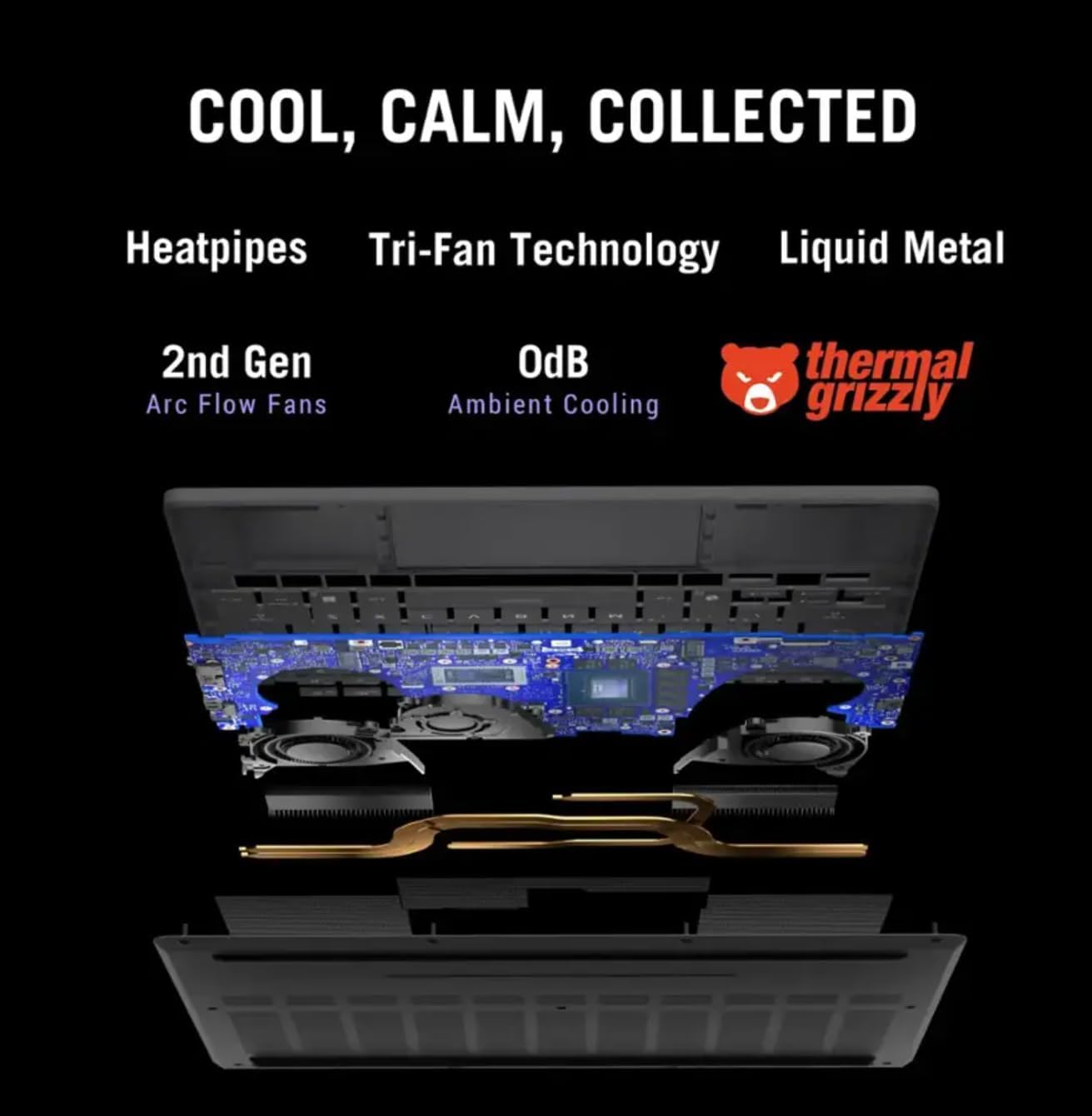
5.1-сүрөт: Ички view of the ROG Intelligent Cooling system.
6. Кыйынчылыктарды
6.1 Жалпы маселелер жана чечимдер
- Ноутбук күйбөйт: Кубат адаптери бекем туташтырылганын жана розетка иштеп турганын текшериңиз. Башка розетканы колдонуп көрүңүз.
- Дисплей көйгөйлөрү: Check display cable connections if using an external monitor. Update graphics drivers. Adjust display settings in Windows.
- Үн жок: Check volume levels, ensure speakers are not muted. Verify audio drivers are installed and updated.
- Wi-Fi туташуу көйгөйлөрү: Ensure Wi-Fi is enabled. Restart your router and laptop. Update wireless drivers.
- Ашыкча ысып кетүү: Ensure cooling vents are clear. Use the laptop on a hard, flat surface. Consider using a cooling pad.
Кыйынчылыктарды чечүү үчүн ASUS колдоо бөлүмүнө кайрылыңыз webсайтка же кардарларды тейлөөгө кайрылыңыз.
7. Техникалык шарттар
| Өзгөчөлүк | Спецификация |
|---|---|
| Бренд | ASUS |
| Модель аты | ROG Zephyrus G14 |
| Элемент моделинин номери | GA403UM-G14.R9HX4 |
| Операция системасы | Windows 11 Pro |
| Screen Size | 14 дюйм |
| Max Screen Resolution | 2880x1800 пиксел (3K) |
| Процессор | AMD Ryzen 9 270 (4 GHz, 8 Cores) |
| RAM | 16 ГБ LPDDR5 |
| Катуу диск | 1 ТБ PCIe SSD |
| Графикалык карта | NVIDIA GeForce RTX 5060 (Dedicated, 8 GB GDDR7) |
| Зымсыз түрү | Bluetooth, Wi-Fi 7 |
| USB 3.0 порттору | 4 (Includes Type-A and Type-C) |
| Продукциянын өлчөмдөрү (LxWxH) | 12.26 x 0.63 x 8.66 дюйм |
| Элемент Салмагы | 3.31 фунт |
| Өзгөчө өзгөчөлүк | Жеңил |
8. Кепилдик жана колдоо
Your ASUS ROG Zephyrus G14 laptop comes with a limited warranty. Please refer to the warranty card included with your product for specific terms and conditions, including coverage duration and service procedures.
Техникалык колдоо, драйверлерди жүктөп алуу, көп берилүүчү суроолор жана кошумча жардам алуу үчүн, ASUS расмий колдоо кызматына кайрылыңыз webсайт: www.asus.com/support/