1. Киришүү
This manual provides detailed instructions for the installation, operation, and maintenance of your VIKVIZ 5MP PoE IP Bullet Camera (Model: PG2T56IRC-ZS). Please read this manual thoroughly before using the product to ensure proper setup and functionality. Keep this manual for future reference.
2. Продукт бүтүп калдыview
2.1 Негизги өзгөчөлүктөрү
- 5MP Ultra HD токтому: Captures video at 2592 x 1944 resolution at 30 frames per second.
- 5X оптикалык чоңойтуу: Features a 2.7-13.5mm varifocal lens with a 105° ultra-wide viewбурч.
- Толук түстүү түнкү көрүнүш: Dual illuminated system with 4 warm LEDs and 4 IR LEDs for clear color night vision up to 98 feet.
- Акылдуу кыймылды аныктоо: Advanced human and vehicle detection to reduce false alarms.
- Эки тараптуу аудио: Реалдуу убакыт режиминде байланышуу үчүн орнотулган микрофон жана динамик.
- H.265+ Video кысуу: Efficiently saves storage space and provides smoother video.
- Power Over Ethernet (PoE): Single Ethernet cable for both power and data transmission.
- Аба ырайына чыдамдуу дизайн: IP66 rated metal casing for outdoor use in various weather conditions.
- Ийкемдүү сактагыч: Supports NFS, NVR, APP Cloud Storage, or SD cards (up to 256GB, purchased separately).
2.2 Пакеттин мазмуну
Пакетиңизде бардык буюмдар бар экенин текшериңиз:
- VIKVIZ 5MP PoE IP Bullet Camera
- Instruction Manual
- Монтаждоо бурамалар

Image: Contents of the VIKVIZ 5MP PoE IP Bullet Camera package, including the camera, instruction manual, and mounting screws.
3. Орнотуу
3.1 Орнотуу жери
Каалаган нерсени камсыз кылган ачык жерди тандаңыз viewing angle and is within reach of an Ethernet cable. The camera is IP66 weatherproof, suitable for various environmental conditions.

Image: A VIKVIZ bullet camera mounted on an exterior wall, shown operating in rainy conditions, highlighting its IP66 weatherproof rating.
3.2 Камераны орнотуу
- Mark the drilling points on the wall or ceiling using the camera's mounting base as a template.
- Белгиленген позицияларда пилоттук тешиктерди бургула.
- Insert the provided wall anchors (if necessary for your surface).
- Secure the camera's mounting base to the surface using the mounting screws.
- Камера бурчун керек болсо тууралаңыз.
3.3 Power and Network Connection (PoE)
The camera supports Power over Ethernet (PoE), simplifying installation by using a single Ethernet cable for both power and data.
- Connect one end of an Ethernet cable to the camera's PoE port.
- Connect the other end of the Ethernet cable to a PoE-enabled NVR, PoE switch, or PoE injector.
- Ensure the NVR/switch/injector is powered on. The camera will power up automatically.
Эскертүү: A PoE NVR/switch/injector and DC power adapter are not included. If PoE is not available, a 12V DC power adapter (not included) can be used with a standard Ethernet connection.

Image: A VIKVIZ PoE camera connected to a Network Video Recorder (NVR) using a single Ethernet cable, illustrating the Power over Ethernet setup for data, sound, and power.
3.4 Баштапкы конфигурация
For initial setup and configuration, use the recommended software:
- For Windows and MAC: Use AjDevTools software.
- For professional playback and recording: Blue Iris software is recommended.
- Мобилдик мүмкүндүк алуу: Download the "videolink" app for smartphone access.
The camera works with most major web browsers including Google Chrome, Microsoft Edge, and Safari.
4. Операция
4.1 Remote Access via Mobile App
The "videolink" app allows you to view жаша фооtage, receive motion alerts, and manage camera settings from your smartphone.
- Download and install the "videolink" app from your device's app store.
- Follow the in-app instructions to add your camera. This typically involves scanning a QR code on the camera or manually entering its details.
- Кошулгандан кийин, сиз түз эфирге кире аласыз view, playback recordings, and configure settings.
4.2 Smart Motion Detection (Human/Vehicle)
The camera features advanced recognition technology to accurately identify human and vehicle movement, minimizing false alarms.
- Configure detection zones and sensitivity settings within the camera's software or mobile app.
- When a person or vehicle is detected, the camera can trigger an event, sending notifications via email, FTP, or push alerts to your smartphone.
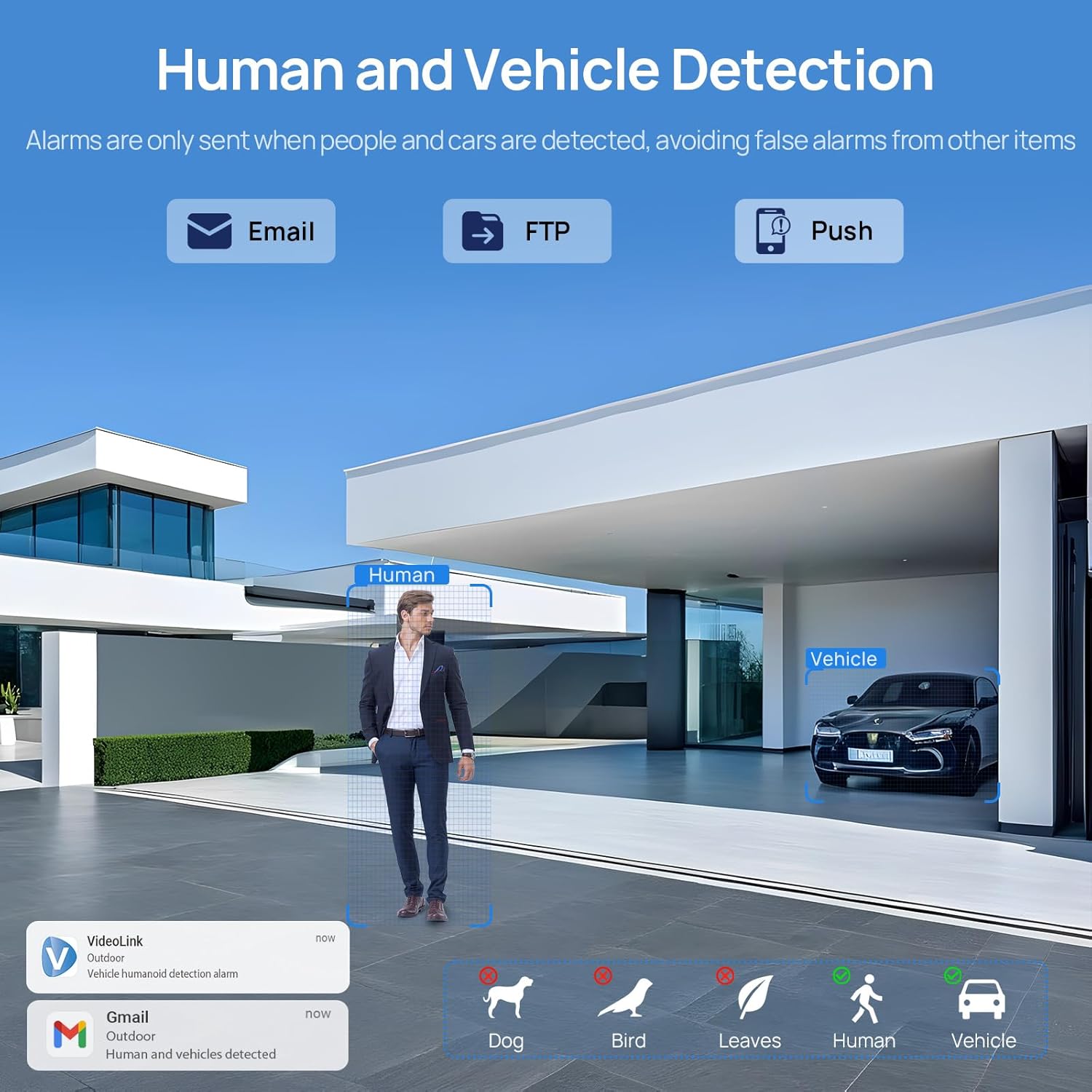
Image: A scene demonstrating the camera's human and vehicle detection capabilities, showing alerts for detected individuals and cars while ignoring animals or environmental factors.
4.3 Түнкү көрүү режимдери
The camera offers versatile night vision capabilities:
- IR Түнкү Көрүнүшү: By default, the IR illuminator is active at night for black and white surveillance.
- Толук түстүү түнкү көрүнүш: When a target is detected, the spotlight activates to record in full color. The spotlight will warn the target in the area.
- Акылдуу кош жарыктандыруу: The camera intelligently switches between IR light and warm light (spotlight) depending on the situation, providing color details when needed.

Image: A split image showing a scene at night with the spotlight off (black and white IR vision) and with the spotlight on (full-color night vision), demonstrating the camera's dual illumination feature.
4.4 5X оптикалык масштаб
The 2.7-13.5mm varifocal lens allows for 5X optical zoom, enabling you to adjust the viewing angle from 32° to 100° and focus on specific details without losing image quality.
- Adjust the zoom level through the camera's software or mobile application.
- The optical zoom maintains clarity even at maximum magnification.

Image: A series of images demonstrating the 5X optical zoom capability of the camera, showing a wide view and then progressively zoomed-in views of a specific area, highlighting the detail retention.
4.5 Эки тараптуу аудио
The integrated microphone and speaker enable two-way communication, allowing you to listen to the environment and speak through the camera.
- Access the two-way audio function via the mobile app.
- Use it to greet visitors or deter unwanted individuals.

Image: A scenario depicting a delivery person at a door, with a VIKVIZ camera facilitating a two-way audio conversation between the homeowner (via smartphone app) and the delivery person.
5. Техникалык тейлөө
- үзгүлтүксүз тазалоо: Мезгил-мезгили менен камеранын линзасын жумшак, гamp ачык сүрөт сапатын камсыз кылуу үчүн кездеме. Абразивдүү тазалагычтардан алыс болуңуз.
- Программалык камсыздоонун жаңыртуулары: Өндүрүүчүнү текшериңиз webоптималдуу аткарууну жана коопсуздукту камсыз кылуу үчүн жеткиликтүү микропрограммаларды жаңыртуу үчүн сайт же колдонмо.
- Кабелдик текшерүү: Regularly inspect the Ethernet cable for any signs of wear or damage, especially in outdoor installations.
- Курчап турган чөйрөнү коргоо: While the camera is weatherproof (IP66), ensure it is not submerged in water or exposed to extreme conditions beyond its operating temperature range (-10°C to 50°C).
6. Кыйынчылыктарды
- Кубат жок: Ensure the PoE NVR/switch/injector is powered on and the Ethernet cable is securely connected. If using a DC adapter, verify the power source and connection.
- Видео түрмөгү жок: Check network connectivity. Ensure the camera is properly configured in your NVR or app. Verify the IP address and network settings.
- Сүрөттүн сапаты начар: Камера линзасын тазалаңыз. Талаадагы тоскоолдуктарды текшериңиз view. Ensure sufficient lighting for night vision modes. Adjust focus if applicable.
- Жалган кыймыл эскертүүлөрү: Adjust the sensitivity settings for human/vehicle detection in the camera's software or app. Refine detection zones to exclude irrelevant areas.
- Эки тараптуу аудио көйгөйлөр: Check microphone and speaker settings in the app. Ensure network bandwidth is sufficient for real-time audio.
- Камерага алыстан кирүү мүмкүн эмес: Verify your internet connection. Ensure port forwarding (if required by your network setup) is correctly configured on your router. Check firewall settings.
7. Техникалык шарттар
| Өзгөчөлүк | Спецификация |
|---|---|
| Модель аты | PG2T56IRC-ZS |
| Резолюция | 5MP (2592 x 1944) @ 30fps |
| Оптикалык масштаб | 5X (2.7-13.5mm varifocal lens) |
| Viewбурч | 105° (wide) to 32° (telephoto) |
| Түнкү көрүү диапазону | 98 фут (30 метр) чейин |
| Түнкү көрүнүш түрү | Full Color, IR, Smart Hybrid Light |
| Аудио | Эки тараптуу аудио (Киргизилген микрофон жана динамик) |
| Видеону кысуу | H.265+, H.265, H.264 |
| Байланыш | Ethernet (PoE), ONVIF |
| Сактагыч параметрлери | NFS, NVR, APP Cloud Storage, Micro SD Card (up to 256GB) |
| Аба ырайына каршы рейтинг | IP66 |
| Иштөө температурасы | -10°Cден 50°Cге чейин (14°Fтен 122°Fге чейин) |
| Power Source | PoE (Ethernet аркылуу кубаттоо) же 12V DC (адаптер кошулган эмес) |
| Материал | Металл |
| Өлчөмдөр | 12.7 x 5.11 x 4.72 дюйм |
| Салмагы | 2.2 фунт |
8. Кепилдик жана колдоо
8.1 Кайтаруу саясаты
This product is eligible for a return within 30 days of purchase for a refund or replacement, subject to the retailer's terms and conditions.
8.2 Техникалык колдоо
For technical assistance, troubleshooting, or warranty inquiries, please contact VIKVIZ customer support through their official website or the retailer where the product was purchased. Refer to your purchase documentation for specific contact details.


