ANNKE 2MP коопсуздук камера системасынын колдонуучу колдонмосу
Model: AU-DX31NB4-V1-5OEP
1. Киришүү
This manual provides detailed instructions for the installation, operation, and maintenance of your ANNKE 2MP Security Camera System. Please read this manual thoroughly before using the product to ensure proper setup and functionality. Keep this manual for future reference.
2. Пакеттин мазмуну
Verify that all items listed below are included in your package. If any items are missing or damaged, please contact ANNKE customer support.
- 1x 32-Channel 3K Lite DVR with 4 TB Hard Drive
- 24x 2MP Wired Cameras
- 24x BNC Cables (various lengths)
- Камераны орнотуу үчүн 24x бурамалар топтому
- 7x 12V кубат адаптерлери
- 6x 1ден 4кө чейинки кубат бөлгүчтөрү
- 1x HDMI кабели
- 1x Network Cable
- 1x USB чычкан
- 1x Колдонуучунун колдонмосу (бул документ)
- 1x Wall Sticker

Сүрөт 2.1: Contents of the ANNKE Security Camera System package. This image displays the DVR, 24 cameras, a 4TB hard drive, various cables (BNC, HDMI, network), power adapters, power splitters, a USB mouse, and mounting screws, providing a visual checklist for users.
3. Орнотуу
Follow these steps to set up your ANNKE Security Camera System.
3.1. DVR Connection
- Connect the Hard Drive: The 4TB HDD is pre-installed. Ensure it is securely connected inside the DVR.
- Мониторго туташуу: Use the provided HDMI cable to connect the DVR to a monitor or TV.
- Чычканды туташтыруу: USB чычканды DVRдеги USB портуна сайыңыз.
- Тармакка туташуу (милдеттүү эмес): Алыскы үчүн viewing, connect the DVR to your router using the provided network cable.
- Күйгүзүү: Connect the DVR power adapter and plug it into an electrical outlet. The DVR will start automatically.
3.2. Камераны орнотуу
- Монтаждоо камералары: Select appropriate locations for your cameras, ensuring optimal viewing angles and coverage. Use the provided screw kits to securely mount each camera.
- Connect BNC Cables: Connect one end of a BNC cable to the camera's video output and the other end to an available video input port on the DVR.
- Кубаттуу камералар: Use the 12V power adapters and 1-to-4 power splitters to provide power to all cameras. Connect the power splitters to the power adapters, and then connect the camera power inputs to the splitters.
- Камеранын бурчун тууралоо: Once powered, adjust each camera's angle to cover the desired area.

Сүрөт 3.1: Бүттүview of the ANNKE 32-channel DVR security system components, including the DVR unit, 24 wired cameras, and the 4TB hard drive. This image illustrates the main hardware elements that need to be connected during setup.
4. Иштөө нускамалары
This section details the key features and operational aspects of your ANNKE Security Camera System.
4.1. Видео жаздыруу жана ойнотуу
The system supports continuous 24/7 recording to the pre-installed 4TB HDD. Advanced H.265+ compression technology optimizes storage space.
- Тынымсыз жаздыруу: The DVR automatically records footage from all connected cameras.
- H.265+ Кысуу: This technology reduces file sizes, allowing for longer recording periods and more efficient bandwidth usage.
- Акылдуу издөө: Utilize the Smart Search function on the DVR or through the mobile application to quickly locate specific events in recorded footage based on motion or other triggers.

Сүрөт 4.1: Comparison of H.264 and H.265+ video compression. This graphic demonstrates that H.265+ requires significantly less storage (25%) than H.264 (100%) for the same amount of video data, enhancing recording efficiency.
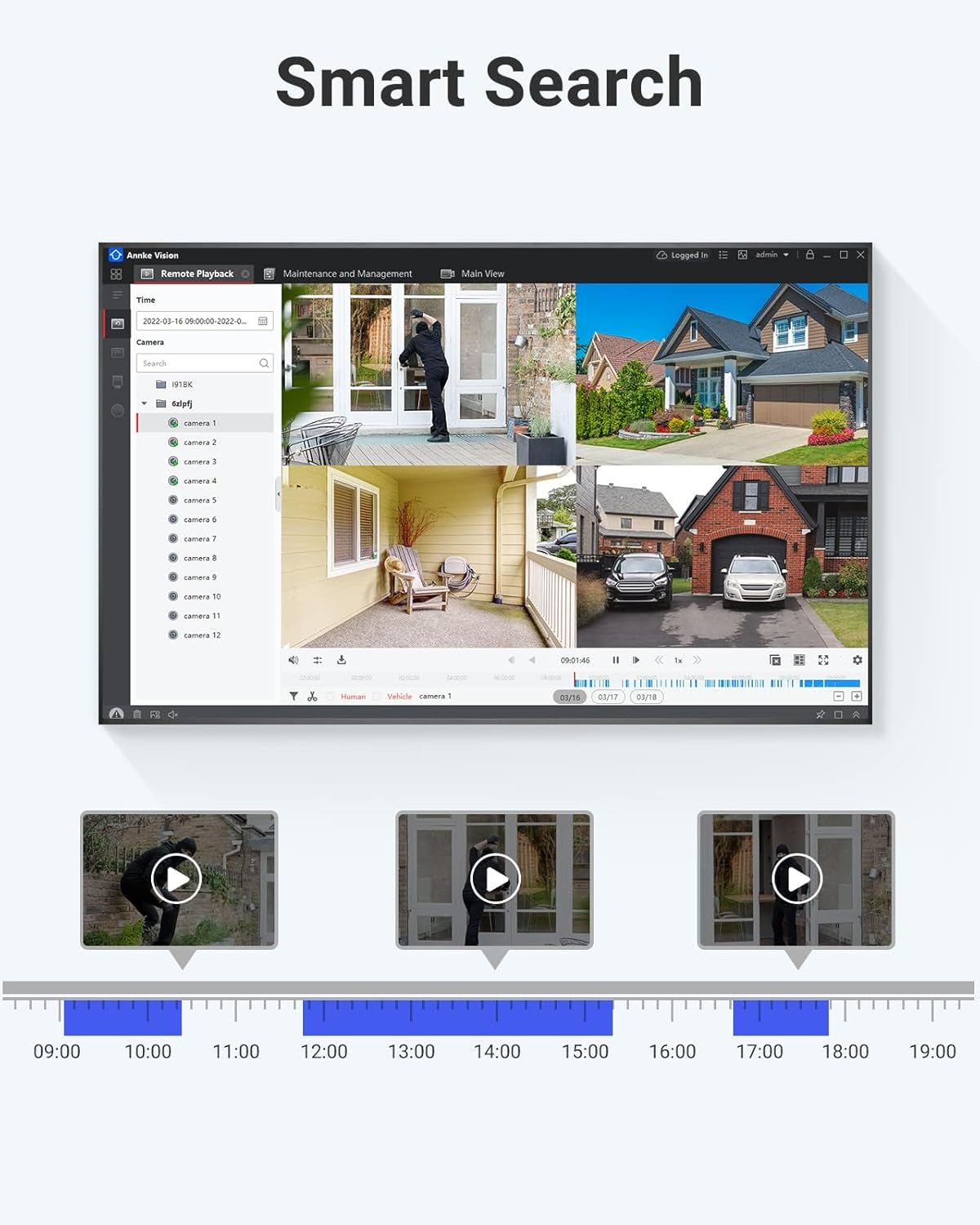
Сүрөт 4.2: User interface displaying the Smart Search feature. The image shows a multi-camera live view and a timeline with colored segments, indicating detected events for quick review and playback of specific incidents.
4.2. AI Motion Detection 2.0
The system incorporates advanced AI Motion Detection 2.0, capable of distinguishing between humans and vehicles, reducing false alarms.
- Адамдарды жана унааларды аныктоо: The system can accurately identify human and vehicle shapes, filtering out irrelevant motion from animals or environmental factors.
- Ыңгайлаштырылган аныктоо аймактары: Камералардын ичиндеги белгилүү бир зоналарды аныктаңыз view кыймылды аныктоо активдүү болушу керек болгон жерде.
- Ыкчам эскертүүлөр: Receive immediate notifications on your connected device when a human or vehicle is detected in a monitored area.

Сүрөт 4.3: Demonstration of AI Person & Vehicle Detection. This image shows a person and a car in a parking lot, with distinct bounding boxes and labels ('Person', 'Vehicle') indicating the system's ability to differentiate between types of movement.
4.3. Түнкү көрүү режимдери
The cameras offer flexible night vision options, including infrared (IR) and full-color night vision, adapting to different lighting conditions.
- Default IR Mode: Provides clear black and white video in low-light conditions, with an effective range of up to 20 meters.
- Smart Dual-Light: Cameras automatically switch from IR to white light when human or vehicle motion is detected at night, providing full-color video and acting as a deterrent.
- Manually Set Full Color: Users can manually activate full-color night vision, utilizing the camera's white lights for illumination up to 30 meters.

Сүрөт 4.4: Comparison of night vision modes. The top panel shows a scene in black and white using default IR mode, while the bottom panel displays the same scene in full color, achieved by manually activating the white light for enhanced detail at night.
4.4. Remote Access
Access your security system remotely from anywhere using the ANNKE Vision mobile application or desktop client.
- Live View: Monitor live feeds from all cameras on your smartphone, tablet, or computer.
- Ойнотуу: Review foo жазылганtagд алыстан.
- Эскертмелер: Receive push notifications for detected events.

Сүрөт 4.5: Illustration of unlimited remote access. This image depicts a cloud symbol connected to a laptop, desktop computer, and smartphone, all displaying live camera feeds, signifying the ability to monitor your system from multiple devices anywhere with an internet connection.
4.5. Видеонун сапаты
The 2MP cameras deliver clear 1080P HD video resolution, ensuring detailed surveillance footage.
- 1080P HD токтому: Capture high-definition video at 1920x1080 pixels for clear identification of details.
- 3.6mm Fixed Focal Lens: кенен чөйрөсүн камсыз кылат view suitable for general surveillance.

Сүрөт 4.6: Visual comparison of 1080P Full HD versus 720P video resolution. The image clearly demonstrates the superior detail and clarity offered by 1080P, making it easier to discern objects and faces.
5. Техникалык тейлөө
Үзгүлтүксүз техникалык тейлөө сиздин коопсуздук системаңыздын оптималдуу иштешин жана узак мөөнөттүү иштешин камсыз кылат.
- Камераны тазалоо: Камера линзаларын мезгил-мезгили менен жумшак, d чүпүрөк менен тазалап туруңузamp cloth to remove dust and smudges that may affect image clarity. Do not use harsh chemicals.
- Программалык камсыздоонун жаңыртуулары: ANNKE текшериңиз website or mobile app for available firmware updates for your DVR and cameras. Keeping firmware updated ensures access to the latest features and security patches.
- Кабелдик текшерүү: Regularly inspect all cables (BNC, power, network) for any signs of wear, damage, or loose connections. Replace damaged cables immediately.
- DVR желдетүү: Ensure the DVR is placed in a well-ventilated area to prevent overheating. Keep vents clear of obstructions.
- Маалыматтын камдык көчүрмөсү: Regularly back up important recorded footagзарыл болсо, тышкы сактагыч түзмөгүнө көчүрүңүз.
6. Кыйынчылыктарды
Сиз кабылышы мүмкүн болгон жалпы маселелерди чечүү үчүн бул бөлүмдү караңыз.
- Монитордо видео чыгышы жок:
Чечим: Check HDMI/VGA cable connections. Ensure the monitor is powered on and set to the correct input source. Restart the DVR. - Камера сүрөтү жок:
Чечим: Verify that the camera is receiving power (check power adapter and splitter connections). Ensure the BNC cable is securely connected to both the camera and the DVR. Try connecting the camera to a different DVR port or using a different BNC cable. - Алыстан кирүү иштебей жатат:
Чечим: Ensure the DVR is connected to the internet via the network cable. Check your router's internet connection. Verify network settings on the DVR and in the mobile application. Ensure port forwarding (if required by your network setup) is correctly configured. - Сүрөттүн сапаты начар:
Чечим: Clean the camera lens. Ensure the camera is properly focused (if applicable). Check BNC cable for damage or interference. Ensure sufficient lighting for optimal night vision performance. - DVR жаздырылбай жатат:
Чечим: Check the status of the hard drive in the DVR's settings. Ensure the HDD is initialized and has sufficient free space. Verify recording schedules are correctly configured.
7. Техникалык шарттар
Detailed technical specifications for the ANNKE 2MP Security Camera System.
7.1. DVR Specifications
- Модель номери: AU-DX31NB4-V1-5OEP
- Video Input: 32 Channels (HDTVI/AHD/CVI/CVBS/IP adaptive)
- IP Camera Input: Up to 40 network cameras
- Видео кысуу: H.265 Pro+/H.265 Pro/H.265/H.264+/H.264
- Encoding Ability: Up to 3K Lite @ 20 fps
- AI өзгөчөлүктөрү: Deep learning-based motion detection 2.0 (all analog channels), Deep learning-based perimeter protection, 4-ch line crossing detection, 4-ch intrusion detection
- Аудио киргизүү: Audio via coaxial cable supported
- HDD колдоо: Up to 10 TB capacity per HDD (4TB included)
- Байланыш: Wired (Ethernet for network)
- Кубат булагы: AC/DC
- Өлчөмдөрү (L x W x Y): 15.16 x 12.4 x 2.05 дюйм
7.2. Камеранын мүнөздөмөлөрү
- Чечим: 2 МП (1920 x 1080)
- Объектив: 3.6 мм туруктуу фокустук линза
- Түнкү көрүнүш: Up to 20 m (66 ft) IR distance, Up to 30 m (98 ft) white light distance
- Акылдуу түнкү көрүнүш: IR light works normally, switches to white light when humans or vehicles are detected at night
- Аба-ырайынын рейтинги: IP67 (Water and dust resistant)
- Иштөө температурасы: -40°F – 140°F (-40°C – 60°C)
- Түсү: Кара

Сүрөт 7.1: Durability features of the ANNKE camera. This image highlights the camera's IP67 weatherproof rating, showing it resistant to rain, and its robust design capable of operating in extreme temperatures ranging from -40°F to 140°F.
8. Коопсуздук боюнча маанилүү маалымат
- Use only power adapters specified for this product.
- Do not expose the product to water or moisture beyond its IP67 rating.
- DVR түз күн тийген жерге же жылуулук булактарына жакын жайгаштырбаңыз.
- Ensure proper ventilation for the DVR to prevent overheating.
- Продукцияны бөлүктөргө бөлүүгө же өзгөртүүгө аракет кылбаңыз. Бардык тейлөө иштерин квалификациялуу адистерге тапшырыңыз.
- Keep cables organized and secured to prevent tripping hazards or damage.


