1. Киришүү
Welcome to the user manual for your Laxasfit LF-01 Smart Watch. This guide provides essential information on setting up, operating, and maintaining your device to ensure optimal performance and a seamless user experience. Please read this manual thoroughly before using your smart watch.
1.1 Кутуда эмне бар
- Акылдуу саат
- Заряддоо кабели
- User Manual
2. Орнотуу
2.1 Аппаратты заряддоо
Before initial use, fully charge your Laxasfit LF-01 Smart Watch. Connect the provided charging cable to the charging port on the back of the watch and plug the USB end into a standard USB power adapter (not included) or a computer's USB port. The watch display will indicate charging status. A full charge typically takes approximately 2 hours.
2.2 Колдонмону орнотуу
To unlock the full potential of your smart watch, download and install the companion application on your smartphone. The application allows for data synchronization, notification management, and watch face customization.
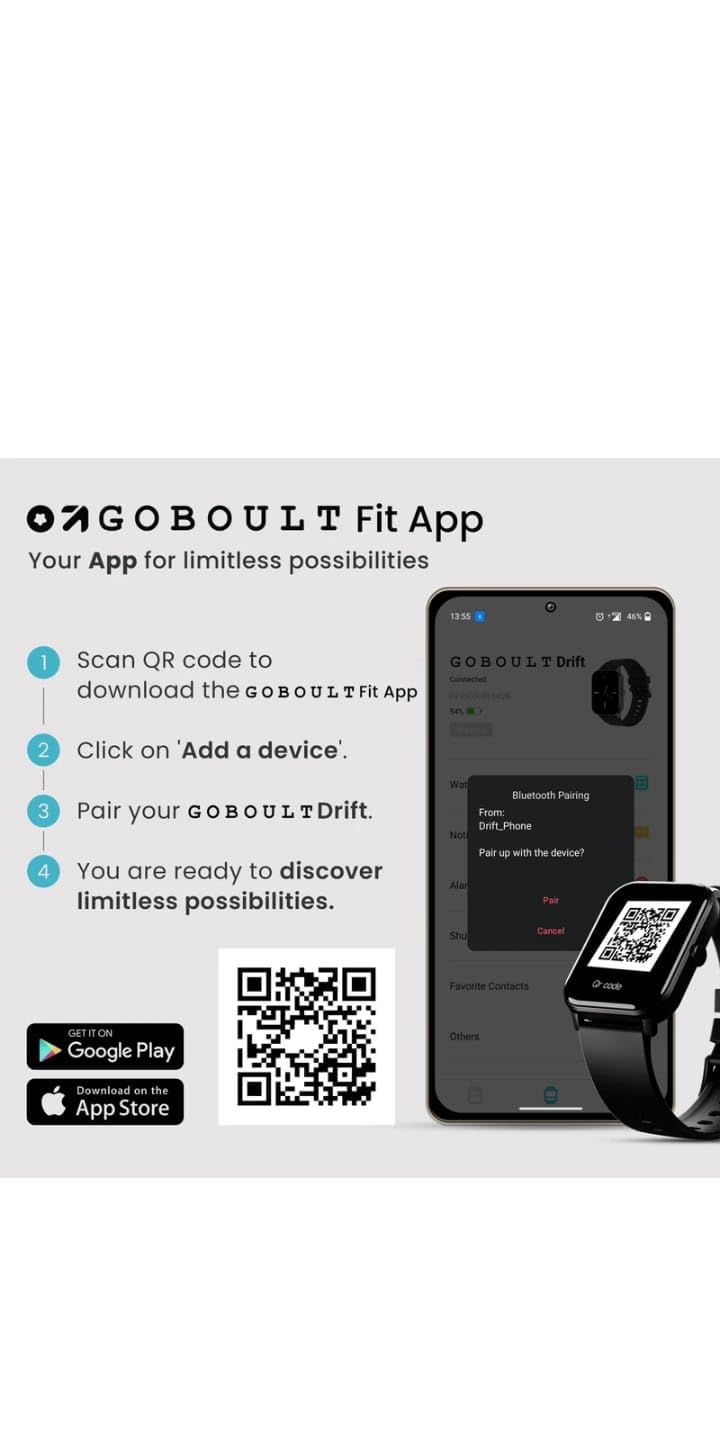
- Scan the QR code provided in the image below or search for "Boult Fit App" in your smartphone's app store (Google Play Store for Android, Apple App Store for iOS).
- Колдонмону орнотуу.
- Open the application and follow the on-screen instructions to create an account or log in.

Сүрөттүн сүрөттөлүшү: This image displays a smartphone screen with instructions for downloading and pairing the companion app. It shows four steps: "Scan QR code to download the Boult Fit App", "Click on 'Add a device'", "Pair your Boult Drift", and "You are ready to discover limitless possibilities." Below these steps are QR codes for both Google Play and the App Store, along with their respective logos. The right side of the image shows a smartwatch display and a phone screen demonstrating the Bluetooth pairing process within the app.
Download the Boult Fit App: https://app.moyoung.com/app-download/BoultFit
2.3 Смартфонуңуз менен жупташуу
After installing the app, follow these steps to pair your smart watch:
- Смартфонуңузда Bluetooth иштетилгенин текшериңиз.
- Open the companion app and navigate to the "Add Device" or "Pair Device" section.
- The app will search for available devices. Select "Laxasfit LF-01" or a similar device name from the list.
- Confirm the pairing request on both your smartphone and the smart watch if prompted.
- Жупташтырылгандан кийин, саат телефонуңуз менен маалыматтарды шайкештештирет.
3. Негизги өзгөчөлүктөрү
The Laxasfit LF-01 Smart Watch offers a range of features designed to enhance your daily life and fitness tracking.
3.1 Ден соолуктун мониторинги
Monitor your vital health parameters directly from your wrist.
- Жүрөктүн кагышын көзөмөлдөөчү: Күн бою жүрөктүн кагышын көзөмөлдөйт.
- Уйкуга көз салуу: Analyzes your sleep patterns, including deep sleep, light sleep, and wake times.
- Активдүүлүккө көз салуу: Кадамдарды, аралыкты жана күйгөн калорияларды жазат.

Сүрөттүн сүрөттөлүшү: This image shows a collage of smartwatch features. Prominently featured is a smartwatch display showing a heart rate monitor with a graph and current heart rate (108 bpm). Other elements include icons for 7-day battery life, IP68 water resistance, 60 sports modes, mini games, 1.69" HD display, Bluetooth calling, and multiple watch faces.
3.2 Спорт режимдери
The watch supports over 60 workout modes to accurately track various physical activities.
- Track specific metrics for activities like running, cycling, walking, and more.
- View real-time data such as duration, calories burned, and heart rate during workouts.

Сүрөттүн сүрөттөлүшү: A man is shown performing an exercise with a battle rope, wearing a smartwatch on his wrist. The image highlights the watch's capability to track over 60 workout modes. An overlay shows a smartwatch display with fitness metrics: "Steps 25969", "Distance 10.56 km", and "Calories 2982 Kcal".
3.3 Bluetooth чалуу
With its built-in speaker and microphone, the Laxasfit LF-01 allows you to manage calls directly from your wrist when connected to your smartphone via Bluetooth.
- Receive incoming call notifications.
- Answer or reject calls.
- Make calls using the watch's interface (requires phone connection).
Сүрөттүн сүрөттөлүшү: This image shows a smartwatch worn on a wrist, displaying an incoming call notification. The screen shows "Mom" as the caller, along with green (answer) and red (decline) call icons. Text above the watch states "Manage calls, the smart way." and "Bluetooth calling" with "Dedicated Speaker & Microphone" below.
3.4 Дисплей жана саат беттери
- Дисплей түрү: LCD touchscreen for clear visibility and easy interaction.
- Ыңгайлаштырылган саат жүздөрү: Choose from over 140 watch faces via the companion app to personalize your device.
4. Операция
4.1 Негизги навигация
- Сенсордук экран: Менюларды жана функцияларды чабыттоо үчүн солго/оңго, өйдө/ылдый сүрүңүз. Тандоо үчүн таптаңыз.
- Каптал баскычы: Typically used to wake the screen, return to the home screen, or access the app menu. Refer to the on-screen prompts for specific functions.
4.2 Using Fitness Tracking
Машыгууну баштоо үчүн:
- Swipe on the watch face to find the "Workout" or "Sports Modes" icon.
- Tap to select your desired activity (e.g., Running, Cycling).
- Tap "Start" to begin tracking.
- Машыгуу учурунда, сиз болот view реалдуу убакыт маалыматтар.
- Tap "Pause" or "End" to stop the workout. Data will sync with the app.
4.3 Managing Notifications
Once paired with your smartphone, the watch will display notifications for calls, messages, and other app alerts.
- Сааттын бетинен ылдыйга сүрүңүз view акыркы эскертмелер.
- Tap on a notification to read the full message (if supported).
- Notifications can be managed and filtered through the companion app settings.
5. Техникалык тейлөө
5.1 Акылдуу саатыңызды тазалоо
- Wipe the watch screen and strap regularly with a soft, damp кездеме.
- Катуу химиялык заттарды же абразивдик материалдарды колдонуудан алыс болуңуз, алар аппаратка зыян келтириши мүмкүн.
- Заряддоодон мурун заряддоо контакттары таза жана кургак экенин текшериңиз.
5.2 Батареяга кам көрүү
- Саатты экстремалдык температурага тийгизүүдөн сактаңыз.
- Саатты көп убакытка толук зарядсыз калтырбаңыз.
- For optimal battery life, charge the device before it completely runs out of power.
6. Кыйынчылыктарды
If you encounter issues with your Laxasfit LF-01 Smart Watch, refer to the following common solutions:
- Күйгүзүлбөй жаткан саат: Саат толук заряддалганын текшериңиз. Аны заряддагычка кеминде 30 мүнөт туташтырыңыз.
- Смартфон менен жупташуу мүмкүн эмес:
- Телефонуңузда Bluetooth иштетилгенин текшериңиз.
- Саат телефонуңуздун диапазонунда экенин текшериңиз.
- Restart both your phone and the smart watch.
- Түзмөктү колдонмо аркылуу жупташып, кайра жупташып көрүңүз.
- Inaccurate fitness data:
- Саат билегиңизге бекем тагылганын, туурасы билек сөөгүнөн бир манжага жакын экенин текшериңиз.
- Calibrate the device through the app if an option is available.
- Эскертмелер көрүнбөй жатат:
- Телефонуңуздагы жана коштоочу колдонмодогу колдонмонун эскертме жөндөөлөрүн текшериңиз.
- Саат Bluetooth аркылуу туура туташып турганын текшериңиз.
- Экран жооп бербейт: Restart the watch by pressing and holding the side button (if applicable) or by connecting it to the charger.
If problems persist, consult the companion app's help section or contact customer support.
7. Техникалык шарттар
| Өзгөчөлүк | Спецификация |
|---|---|
| Модел | LF-01 |
| Дисплей түрү | LCD |
| Байланыш | Bluetooth |
| Операция системасы | Менчик OS |
| Эстутум сактоо сыйымдуулугу | 32 ГБ |
| Өзгөчөлүктөр | Fitness Tracking, Heart Rate Monitor, Notifications, Sleep Tracking |
| Шайкеш түзмөктөр | Смартфон, Планшет |
| Заряддоо убактысы | 2 саат |
| Материал | Пластик, силикон |
| Элемент Салмагы | 200 г |
| Келип чыккан өлкө | Кытай |
8. Кепилдик жана колдоо
8.1 Кепилдик маалыматы
Your Laxasfit LF-01 Smart Watch typically comes with a standard warranty. Please refer to your purchase documentation for specific warranty terms and conditions. A 10-day replacement policy may apply, and extended warranty options might be available for purchase.
8.2 Кардарларды колдоо
For further assistance, technical support, or warranty claims, please refer to the contact information provided with your product packaging or visit the official Laxasfit website (if available). You may also contact the seller directly for support.


