1. Продукт бүтүп калдыview
The Keychron M6 Silent Wireless Gaming Mouse is designed for optimal comfort and performance across various tasks, from gaming to productivity. It features a lightweight, ergonomic design, versatile connectivity options, and a high-precision optical sensor. This manual provides detailed instructions for setup, operation, and maintenance.

Image: Keychron M6 Silent Wireless Gaming Mouse, showcasing its ergonomic shape and main buttons.
2. Негизги өзгөчөлүктөрү
- Ultra-Ergonomic & Lightweight Design: The M6 mouse combines a compact, ergonomic shape with a lightweight 86g body for extended comfort. It includes over ten customizable buttons and an infinite metal scroll wheel.
- Stable Wireless with Ultra-Low Latency: Experience reliable 2.4GHz wireless performance with a 1000Hz polling rate. The M6 also supports Bluetooth 5.3 for multi-device use and flexible switching.
- High-Precision PixArt 3395 Sensor: Equipped with the advanced PixArt 3395 optical sensor, the M6 provides up to 26,000 DPI, 650 IPS tracking speed, and pinpoint accuracy.
- Infinite Scroll & Premium Metal Wheel: Features dual scrolling modes: smooth, infinite scroll for fast navigation and tactile mode for precision. The solid metal wheel offers a quiet, premium feel.
- Fully Programmable via Keychron Engine Software: Customize every button with Keychron Engine software on macOS and Windows. Create shortcuts, set macros, adjust DPI, polling rate, and LOD.
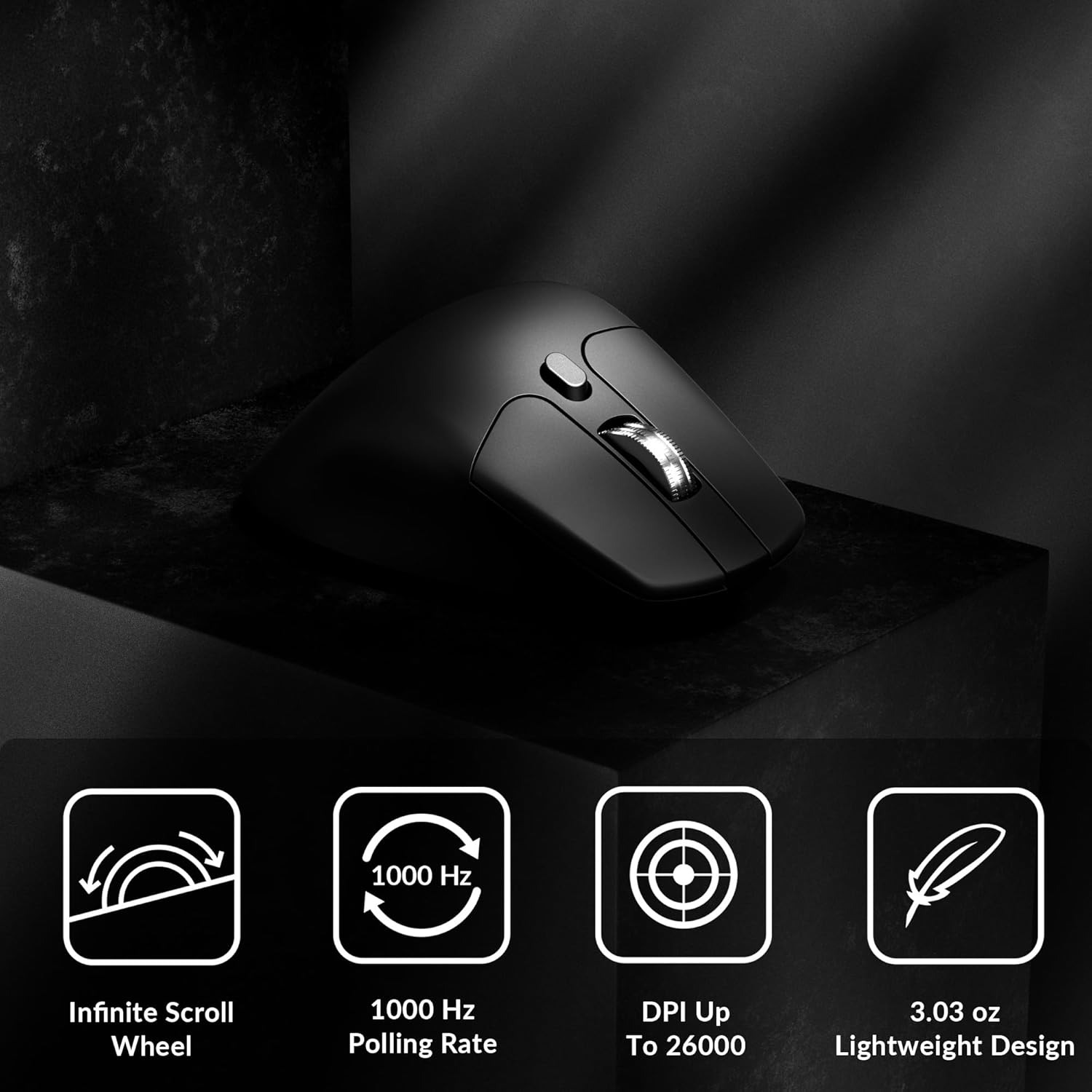
Image: Icons illustrating key features: Infinite Scroll Wheel, 1000 Hz Polling Rate, DPI Up To 26000, and Lightweight Design.
3. Орнотуу
3.1 Пакеттин мазмуну
Пакетте бардык буюмдар бар экенин текшериңиз:
- 1x Keychron M6 Mouse
- 1x Type-C - Type-C кабели
- 1x Type-A to Type-C адаптер
- Алуучу үчүн 1x узартуу адаптери
- 1x Type-C 2.4 GHz Receiver
- 1x Type-A 2.4 ГГц кабылдагыч
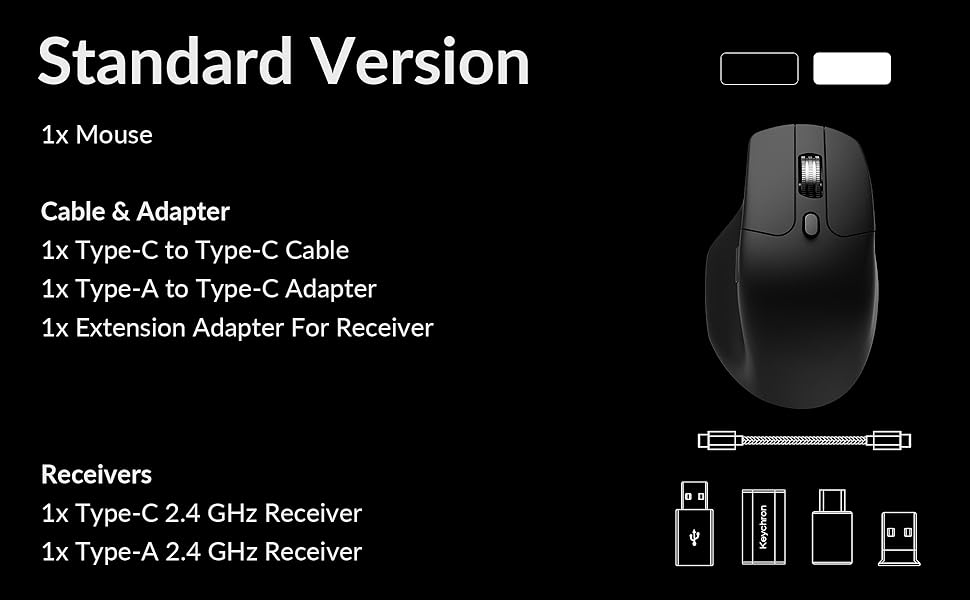
Image: Diagram showing the contents of the Keychron M6 mouse package.
3.2 Алгачкы заряддоо
Before first use, it is recommended to fully charge the mouse. Connect the mouse to your computer using the provided Type-C cable. The LED indicator will show charging status.
3.3 Чычканды туташтыруу
The Keychron M6 supports three connection modes: 2.4GHz wireless, Bluetooth 5.3, and wired.
- 2.4 ГГц зымсыз: Insert the 2.4GHz receiver (Type-A or Type-C) into your computer's USB port. Switch the mode switch on the bottom of the mouse to 'G' (Gaming) mode. The mouse should connect automatically.
- Bluetooth 5.3: Switch the mode switch on the bottom of the mouse to 'B' (Bluetooth) mode. On your computer, search for Bluetooth devices and select 'Keychron M6' to pair.
- текст: Connect the mouse directly to your computer using the provided Type-C cable. The mouse will function in wired mode and charge simultaneously.

Image: Keychron M6 mouse connected to a laptop via 2.4GHz receiver, with Bluetooth 5.3 icon.
4. Иштөө нускамалары
4.1 Негизги функциялар
- Сол/оң чыкылдатуу: Стандарттык чычкан баскычы функциялары.
- Жылдыруу дөңгөлөгү: Вертикалдуу жылдыруу үчүн колдонулат.
- Каптал баскычтары: Default to Forward/Backward navigation. Customizable via software.
- Бармак дөңгөлөк: Located on the side, used for horizontal scrolling.
4.2 DPI жөндөө
The DPI (Dots Per Inch) button on the bottom of the mouse allows you to cycle through preset sensitivity levels. Each level is indicated by a specific LED color. You can customize these DPI levels using the Keychron Engine software.
4.3 Добуш берүү көрсөткүчүн тууралоо
The polling rate button on the bottom of the mouse allows you to switch between different polling rates (125Hz, 500Hz, 1000Hz). A higher polling rate provides more responsive tracking, ideal for gaming. The LED indicator will change color to reflect the current polling rate.

Image: Close-up of the polling rate switch and indicator light on the mouse's underside.
4.4 Infinite Scroll Mode
The M6 features a button near the main scroll wheel to toggle between infinite scroll mode and tactile (notched) scroll mode. Infinite scroll allows for rapid navigation through long documents or web барактар.

Image: Diagram showing the infinite scroll button and the horizontal scrolling function of the thumb wheel.
5. Keychron Engine программасы менен ыңгайлаштыруу
The Keychron Engine software allows for comprehensive customization of your M6 mouse. It is compatible with macOS and Windows and can be accessed online, eliminating the need for a download.
- Баскычты дайындоо: Remap any of the mouse buttons to perform different functions, including keyboard shortcuts, multimedia keys, or macros.
- Макро түзүү: Record and assign complex sequences of commands to a single button.
- DPI/Polling Rate/LOD Adjustment: Fine-tune sensor settings to match your preferences.
Расмий Keychronга барыңыз website to access the Keychron Engine software.

Image: Screenshot of the Keychron Engine software interface, showing button customization options for the M6 mouse.
6. Байланыш режимдери
The M6 mouse offers flexible connectivity to suit various setups:
- 2.4 ГГц зымсыз: Provides a stable, low-latency connection with a 1000Hz polling rate, ideal for gaming and demanding tasks. Uses a dedicated USB receiver.
- Bluetooth 5.3: Offers seamless connection to multiple devices, allowing for quick switching between systems. Suitable for general use and productivity.
- Зымдуу (USB-C): Connects directly via the USB-C cable, providing a reliable connection and simultaneously charging the mouse.
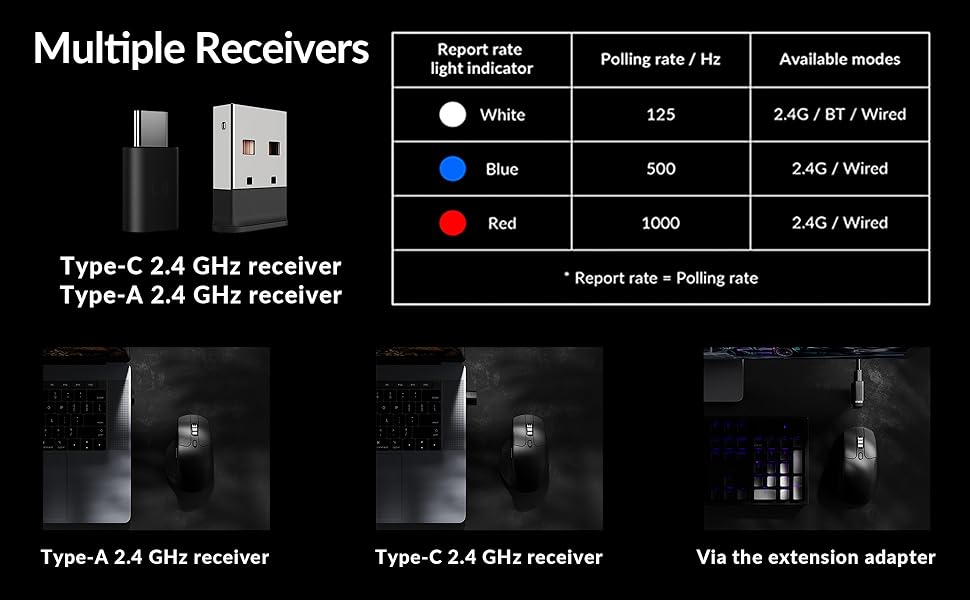
Image: Illustration of the Type-C and Type-A 2.4 GHz receivers, along with a table detailing polling rates and available modes.
7. Техникалык шарттар
| Модель номери | M6S |
| Сенсор | PixArt 3395 оптикалык сенсор |
| DPI | 26,000ге чейин |
| IPS көзөмөлдөө ылдамдыгы | 650 |
| Добуш берүү көрсөткүчү | 1000Hz (2.4GHz/Wired), 125Hz (Bluetooth) |
| Байланыш | 2.4 ГГц зымсыз, Bluetooth 5.3, USB-C зымдуу |
| Салмагы | 86г (3.03 унция) |
| Батарея | 800 мАч (80 саатка чейин) |
| Которгучтар | Huano 20M Silent Micro Switch |
| Шайкештик | Windows, macOS, Linux |
| Өлчөмдөр | 4.82 x 2.97 x 1.97 дюйм (122.5 x 75.4 x 50 мм) |
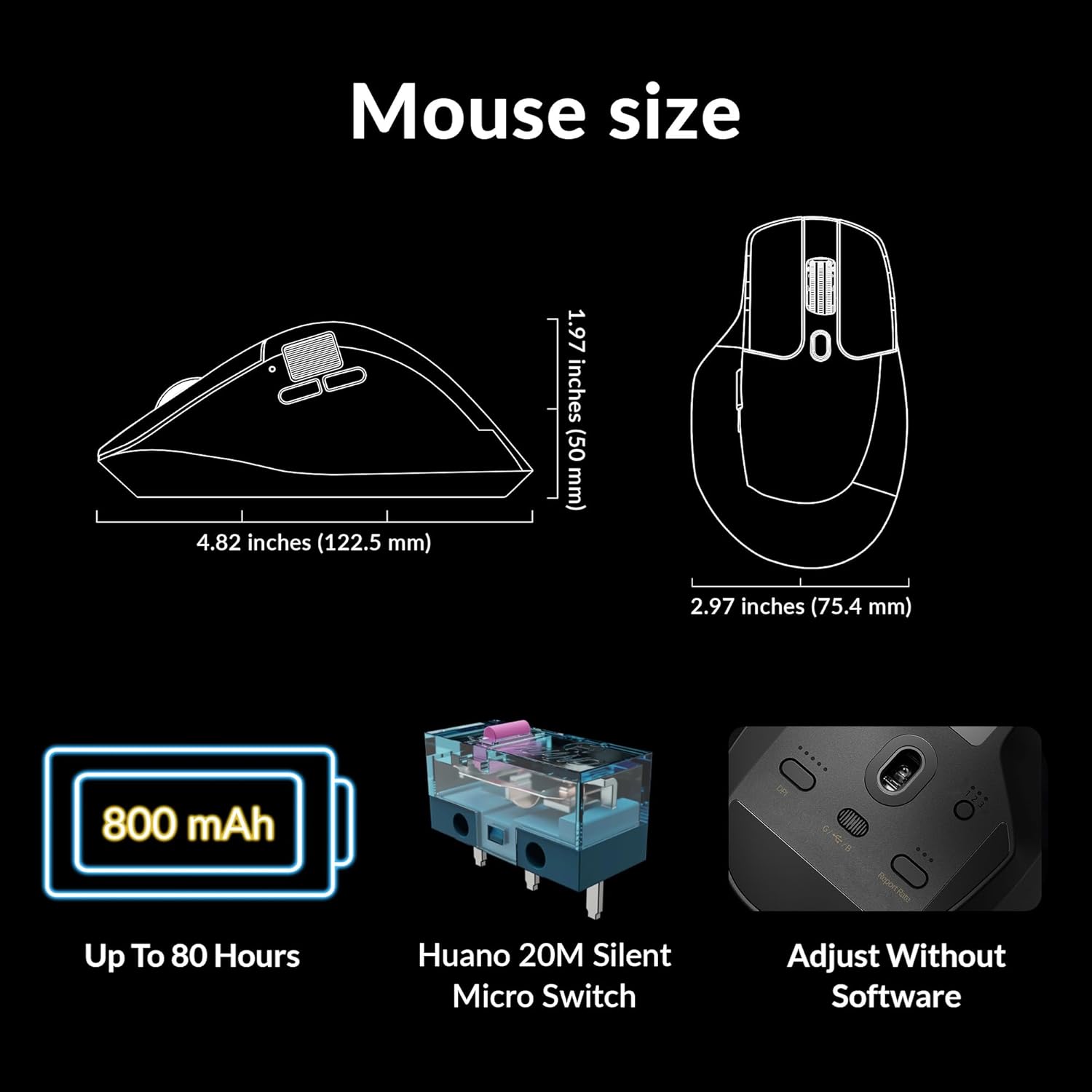
Image: Diagram showing the dimensions of the Keychron M6 mouse, its 800 mAh battery, and Huano 20M Silent Micro Switches.
8. Техникалык тейлөө
To ensure the longevity and optimal performance of your Keychron M6 mouse, follow these maintenance guidelines:
- Тазалоо: Чычкандын бетин сүртүү үчүн жумшак, кургак чүпүрөктү колдонуңуз. өжөр кир үчүн, бир аз гampчүпүрөктү суу же жумшак тазалоо эритмеси менен жууп салыңыз. Катуу химиялык заттардан алыс болуңуз.
- Сенсорго кам көрүү: Так көз салуу үчүн чычкандын түбүндөгү оптикалык сенсорду чаңдан же таштандыдан таза кармаңыз.
- Батареяга кам көрүү: Avoid fully discharging the battery frequently. For long-term storage, charge the mouse to about 50% and store it in a cool, dry place.
- Сактагыч: When not in use, store the mouse in a safe place to prevent physical damage.
9. Кыйынчылыктарды
If you encounter issues with your Keychron M6 mouse, refer to the following common solutions:
- Чычкан жооп бербейт:
- Чычкандын заряддалганын текшериңиз.
- Check the connection mode switch (2.4GHz, Bluetooth, Wired) is set correctly.
- For 2.4GHz, ensure the receiver is properly inserted and try a different USB port.
- For Bluetooth, re-pair the device in your computer's Bluetooth settings.
- Зымсыз көйгөйлөрдү болтурбоо үчүн USB-C кабели аркылуу туташтырып көрүңүз.
- Туура эмес байкоо жүргүзүү:
- Чычкандын түбүндөгү оптикалык сенсорду тазалаңыз.
- Чычканды ылайыктуу жерде (мисалы, чычкан аянтчасында) колдонуп жатканыңызды текшериңиз.
- Adjust the DPI settings to a comfortable level.
- Баскычтар иштебейт:
- Check Keychron Engine software for custom button assignments that might be interfering.
- Чычкандын микропрограммасы жаңыртылганын текшериңиз.
- Жылдыруу дөңгөлөгүндөгү көйгөйлөр:
- Toggle the infinite scroll button to ensure it's in the desired mode.
- Clean any debris around the scroll wheel.
10. Расмий продукт Video
Видео: Аткаминерview of the Keychron M6 Silent Wireless Optical Gaming Mouse, highlighting its features and design.
11. Кепилдик жана колдоо
Keychron products come with a limited warranty. For detailed warranty information, technical support, and frequently asked questions, please visit the official Keychron webсайтка же кардарларды тейлөөгө кайрылыңыз. Кепилдик дооматтар үчүн сатып алганыңыздын далилин сактаңыз.


