1. Бүттүview
The Element 32-inch 720p HD Xumo Smart TV offers reliable performance and smart functionality in a compact design. Ideal for smaller spaces such as kitchens, dorm rooms, guest rooms, or offices, this television combines a clear HD display with a versatile smart platform and modern connectivity options.
Key features include a 720p resolution display, a 120Hz effective refresh rate for smooth motion, and the integrated Xumo OS for access to numerous streaming applications and free live channels. Connectivity is robust with multiple HDMI ports, USB, LAN, Bluetooth, and Apple AirPlay support. The TV also comes with a voice remote for convenient navigation.
2. Кутуда эмне бар
Upon unboxing your Element 32-inch Xumo Smart TV, please ensure all the following components are present:
- 32-inch Element Xumo TV
- Voice Remote + 2 AAA batteries
- TV Stand & Screws
- Quick Start Guide

Image: The contents of the TV box, showing the 32-inch television, its remote control, two stand feet, and a bag of screws for assembly. Dimensions of the TV are also displayed.
3. Орнотуу
3.1 Телевизордун отургучун бекитүү
- Сыналгынын экранын кылдаттык менен ылдый каратып жумшак, таза бетке коюңуз.
- Ар бир стенддик бутту телевизордун түбүндөгү тиешелүү бурамалар тешиктерине тууралаңыз.
- Secure each stand foot using the provided screws. Ensure they are tightened firmly but do not overtighten.
- Телевизорду этияттык менен көтөрүп, туруктуу, тегиз жерге коюңуз.
Alternatively, the TV supports VESA mounting for wall installation (wall mount hardware sold separately).
3.2 Кубат туташтыруу
Connect the power cord to the TV's power input and then plug it into a standard electrical outlet. A pilot light on the TV will indicate that it is receiving power.
3.3 Initial Setup (Xumo OS)
Биринчи жолу күйгүзүлгөндө, сыналгы сизди баштапкы орнотуу процессине жетектейт. Буга төмөнкүлөр кирет:
- Тил тандоо: Өзүңүзгө жаккан тилди тандаңыз.
- Тармак туташуусу: Connect the TV to your home Wi-Fi network or via an Ethernet cable.
- Xumo OS Account Setup: Follow on-screen prompts to set up or log in to your Xumo OS account. This is necessary to access smart features and apps.
- Каналды сканерлөө: Эгер антенна туташтырылса, сыналгы жеткиликтүү каналдарды издейт.

Image: The Element 32-inch Xumo Smart TV is shown on a wooden TV stand, displaying its smart interface with various streaming app icons.
4. Байланыштар
The Element Xumo Smart TV provides a variety of ports for connecting external devices:
- HDMI порттору (3): Connect high-definition devices such as Blu-ray players, gaming consoles, or cable/satellite boxes. One HDMI port supports eARC (enhanced Audio Return Channel) for simplified audio connections to compatible soundbars or AV receivers.
- USB порту (1): USB сактагыч түзмөктөрдү туташтыруу view сүрөттөр, музыка ойнотуу же видео көрүү.
- LAN (Ethernet) порту: Зымдуу интернет байланышы үчүн.
- Audio Out (Optical) / Headphone Jack: Тышкы аудио тутумдарды же кулакчындарды туташтыруу үчүн.
- Composite Input / Analog Tuner: For connecting older devices or an antenna.
5. Сыналгыңызды иштетүү
5.1 Алыстан башкаруу
The included voice remote allows for intuitive control of your TV. It features dedicated buttons for popular streaming services and a microphone for voice commands.
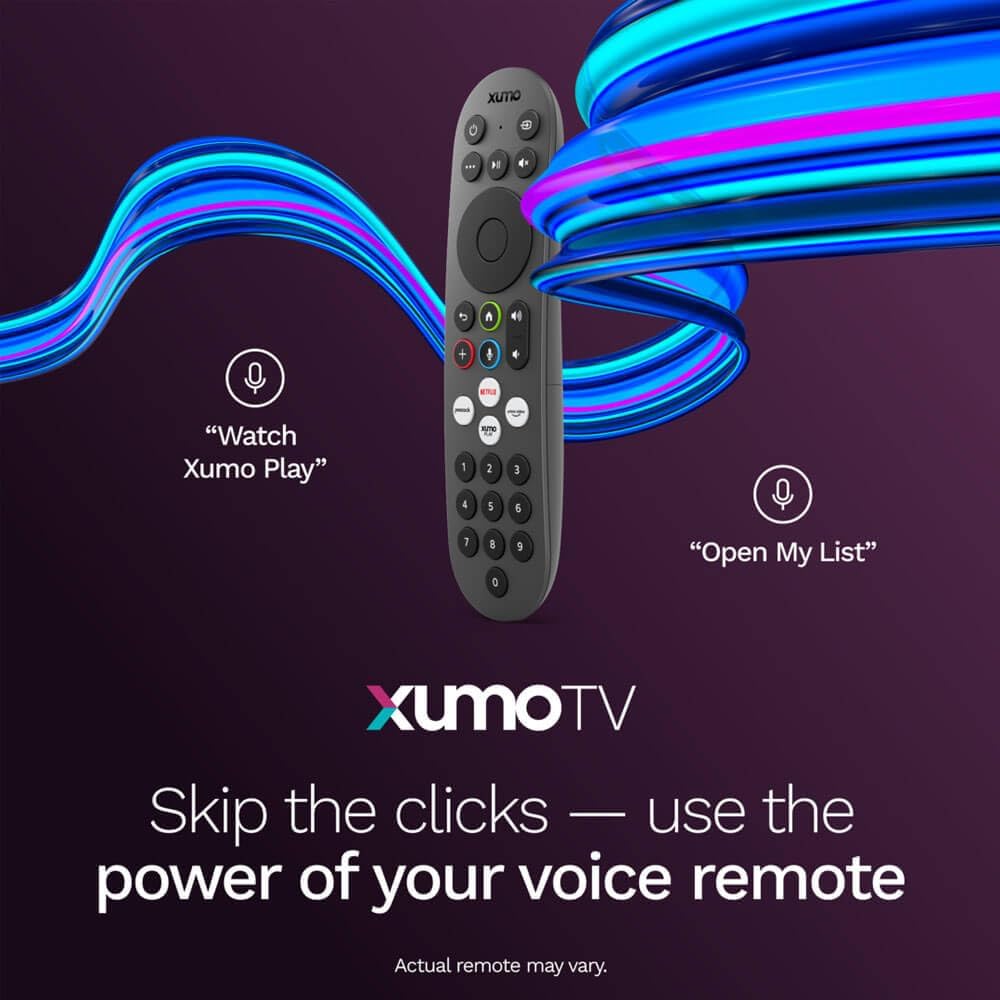
Image: A close-up of the Element Xumo Smart TV voice remote, highlighting its various buttons including a microphone for voice commands and quick access buttons for streaming services.
5.2 Smart Features & Streaming (Xumo OS)
The Xumo OS provides access to over 250 preloaded apps and more than 750 free live channels. You can:
- Издөө мазмуну: Use the unified search function to find content across all your installed apps.
- Менин тизмем: Curate your personal watchlist for easy access to your favorite shows and movies.
- Free On-Demand Libraries: Explore a wide selection of free on-demand content.
- Үн менен башкаруу: Use the voice remote to navigate, search, and control your TV hands-free.

Image: The Xumo TV interface showing a selection of popular streaming applications and content recommendations.
5.3 Сүрөт жана үн орнотуулары
Your TV delivers a crisp 720p HD display with a 120Hz effective refresh rate, minimizing motion blur for clear visuals. Dolby Audio processing enhances the sound experience. You can adjust picture and sound settings via the TV's menu to suit your preferences.
- Сүрөт режимдери: Select from various preset picture modes (e.g., Standard, Vivid, Movie, Sports) or customize settings like brightness, contrast, and color.
- Үн режимдери: Choose from different sound modes (e.g., Standard, Music, Movie, Speech) or adjust bass and treble levels.
5.4 Apple AirPlay & Home Support
Seamlessly stream content or mirror your screen from your iPhone, iPad, or Mac directly to your Element TV using Apple AirPlay. With Apple Home support, you can integrate your TV into your Apple smart home ecosystem for convenient control.
6. Техникалык тейлөө
To ensure the longevity and optimal performance of your Element Xumo Smart TV, follow these maintenance guidelines:
- Экранды тазалоо: Экранды жумшак, кургак, түксүз чүпүрөк менен акырын сүртүңүз. өжөр белгилери үчүн, жеңил гampчүпүрөккө суу же экранга арналган тазалоо эритмеси менен (эч качан түз экранга чачпаңыз).
- Кабинетти тазалоо: Телевизордун шкафын тазалоо үчүн жумшак, кургак чүпүрөктү колдонуңуз. Абразивдүү тазалагычтарды же эриткичтерди колдонуудан алыс болуңуз.
- Вентиляция: Ашыкча ысып кетүүнүн алдын алуу үчүн телевизордун артындагы желдетүү тешиктери жабылбагандыгын текшериңиз.
- Колдонулбаганда өчүрүү: Энергияны үнөмдөө жана анын иштөө мөөнөтүн узартуу үчүн телевизорду колдонбогон учурда өчүрүп коюңуз.
7. Кыйынчылыктарды
If you encounter any issues with your Element Xumo Smart TV, refer to the following common troubleshooting tips:
- Кубат жок: Check if the power cord is securely plugged into both the TV and the electrical outlet. Ensure the outlet is functional.
- Сүрөт/үн жок: Verify that the correct input source is selected. Check all cable connections (HDMI, antenna, etc.) for secure fit.
- Пульт иштебейт: Replace the AAA batteries in the remote control. Ensure there are no obstructions between the remote and the TV's IR sensor.
- Тармакка туташуу маселелери: Restart your Wi-Fi router. Check the TV's network settings to ensure it's connected to the correct network and the password is entered correctly.
- Smart App Problems: Try restarting the app. If the issue persists, clear the app's cache or reinstall it. Ensure your TV's software is up to date.
For persistent issues, please contact Element customer support.
8. Техникалык шарттар
| Өзгөчөлүк | Спецификация |
|---|---|
| Модель номери | E300AE32C |
| Screen Size | 32 дюйм |
| Display Resolution | 720p (1366x768) |
| Жаңыртуу ылдамдыгы | 60 Hz (120Hz Effective) |
| Аспект катышы | 1.78:1 |
| Операция системасы | Xumo OS |
| Байланыш | 3x HDMI (1x eARC), 1x USB, LAN (Ethernet), Optical Audio Out, Headphone Jack, Composite Input, Wi-Fi, Bluetooth |
| Өзгөчөлүктөр | Bezel-Less Design, Built-In Speaker, Voice Remote, Apple AirPlay & Home Support |
| TV with Stand Dimensions (W x H x D) | 28.8" x 19.2" x 7.0" |
| TV without Stand Dimensions (W x H x D) | 28.8" x 17.0" x 2.7" |
| Элемент Салмагы | 8.8 фунт |
9. Кепилдик жана колдоо
The Element 32-inch 720p HD Xumo Smart TV comes standard with a 2 жылдык Өндүрүүчүнүн Кепилдиги. Бул кепилдик нормалдуу колдонуудагы материалдардагы жана жасалгадагы кемчиликтерди камтыйт. Кепилдик дооматтары үчүн сатып алганыңыздын далилин сактап коюңуз.
For technical support, warranty inquiries, or further assistance, please refer to the contact information provided in your Quick Start Guide or visit the official Element Electronics webсайт.


