Introduction
This manual provides detailed instructions for the installation, operation, and maintenance of your Soundstream VRCA1-78W 7-inch Flip-Out Car Stereo. This unit features a motorized touchscreen, Wireless Apple CarPlay, Android Auto, Bluetooth 5.0, USB/SD playback, AM/FM radio, and backup camera support. Please read this manual thoroughly before use to ensure proper operation and to maximize your enjoyment of the product.
Коопсуздук маалыматы
Жабдууга зыян келтирбөө же жаракат алуунун алдын алуу үчүн төмөнкү коопсуздук чараларын сактаңыз:
- Агрегатты айдоодон алаксыта тургандай иштетпеңиз. Ар дайым жол коопсуздугун биринчи орунга коюу.
- Ensure proper wiring and installation to prevent electrical shorts or fire hazards. Consult a professional if unsure.
- Үндүн катуулугун сырттагы жол кыймылынын үндөрүн угууга мүмкүндүк берген деңгээлде кармаңыз.
- Аппаратты экстремалдык температурага, түз күн нуруна узак убакытка же ашыкча нымдуулукка дуушар кылуудан алыс болуңуз.
- Агрегатты ажыратууга же өзгөртүүгө аракет кылбаңыз. Бул кепилдикти жокко чыгарып, зыян келтириши мүмкүн.
Пакеттин мазмуну
Пакетте бардык буюмдар бар экенин текшериңиз:
- Soundstream VRCA1-78W Car Stereo Unit
- User Manual
- Электр зымдары
- Орнотуу жабдыктары
- GPS антеннасы

Орнотуу жана орнотуу
The VRCA1-78W is designed for single DIN dashboard openings. Professional installation is recommended.
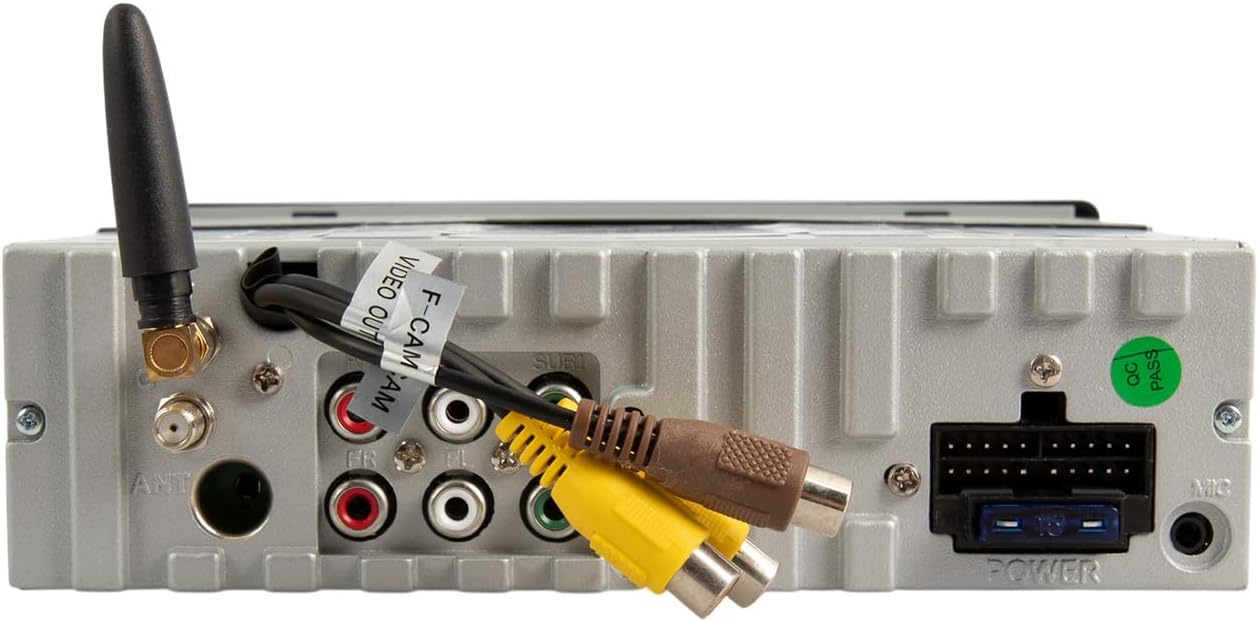
Зымдарды туташтыруу
Конкреттүү туташуулар үчүн камтылган зымдарынын схемасын караңыз. Негизги байланыштарга төмөнкүлөр кирет:
- Күч: Connect to vehicle's constant 12V, accessory 12V, and ground.
- Баяндамачылар: Connect to vehicle's speaker wires (front left/right, rear left/right).
- Антенна: Унаанын радио антеннасын туташтырыңыз.
- Камдык камера киргизүү: Connect an optional backup camera for enhanced parking safety.
- RCA чыгаруулары: Тышкы туташтыруу үчүн ampкөтөргүчтөр (алдыңкы, арткы, сабвуфер).
- USB/AUX Inputs: For external media devices.
Монтаждоо
Secure the unit into the single DIN opening using the provided installation hardware. Ensure the unit is firmly seated and does not obstruct any vehicle controls or vents. The motorized screen requires adequate clearance for deployment and retraction.
Иштөө нускамалары
Алдыңкы панелдин башкаруу элементтери

- Кубат / режим баскычы: Press to turn the unit on/off. Short press to cycle through audio sources (AM/FM, USB, SD, Bluetooth, AUX).
- Үн баскычы: Rotate to adjust volume. Press to mute/unmute.
- MENU баскычы: Access system settings or menu options.
- БАНД баскычы: In radio mode, cycles through FM1, FM2, FM3, AM1, AM2 bands.
- AMS Button: Радиону автоматтык түрдө сактоо/алдын ала коюлган скандоо.
- OPEN/TILT Button: Controls the motorized 7-inch display. Press to open or close the screen. Hold to adjust the screen tilt angle.
- Микрофон (МИК): Handsfree чалуу үчүн орнотулган микрофон.
- USB порт: Connect USB devices for media playback or smartphone connection.
- AUX киргизүү: тышкы аудио түзмөктөр үчүн 3.5 мм уячасы.
Motorized Display Operation
басыңыз OPEN/TILT button to extend the 7-inch touchscreen. Press it again to retract the screen. To adjust the viewing angle, press and hold the OPEN/TILT button while the screen is extended, then release when the desired angle is reached.

Зымсыз Apple CarPlay жана Android Auto
This unit supports wireless connectivity for both Apple CarPlay and Android Auto. To connect:
- Смартфонуңуздун Bluetooth жана Wi-Fi иштетилгенин текшериңиз.
- On the stereo, select the CarPlay or Android Auto source.
- Follow the on-screen prompts to pair your phone via Bluetooth. Once paired, the system will establish a Wi-Fi connection for CarPlay/Android Auto functionality.
- Access navigation, music, calls, and messages directly from the touchscreen or via voice commands.
Bluetooth Connectivity (Hands-Free Calling & Audio Streaming)
To pair your phone for Bluetooth audio and calls:
- Смартфонуңузда Bluetooth'ду күйгүзүңүз.
- Стереодо Bluetooth булагын тандаңыз.
- Издөө available devices on your phone and select "Soundstream VRCA1-78W" (or similar name).
- Эгер суралса, жупташтыруу кодун ырастаңыз.
- Once connected, you can make/receive calls and stream audio wirelessly.
Media Playback (USB/SD/AM/FM)
- USB/SD: Insert a USB drive into the front USB port or an SD card into the designated slot. The unit will automatically detect and play compatible audio/video files.
- AM/FM радиосу: Select the radio source. Use the seek buttons to find stations or the BAND button to switch between frequency bands.
Mirror Link
The Mirror Link feature allows you to mirror your smartphone's screen onto the stereo display. Refer to the on-screen instructions or the full manual for specific setup steps, as this often requires a wired connection and specific app installation on your phone.
Камдык камераны колдоо
When a compatible backup camera is connected to the dedicated input, the display will automatically switch to the camera view when the vehicle is put into reverse. On-screen parking guidelines may be available to assist with maneuvering.
Техникалык тейлөө
- Экранды тазалоо: Сенсордук экранды акырын сүртүү үчүн жумшак, түксүз чүпүрөктү колдонуңуз. өжөр тактар үчүн, бир аз гampчүпүрөккө суу же экранды тазалоочу каражат. Катуу химиялык заттардан алыс болуңуз.
- Жалпы тазалоо: Keep the unit free from dust and debris. Use a soft brush or compressed air for hard-to-reach areas.
- Тоскоолдуктарды болтурбоо: Ensure the motorized screen mechanism is free from obstructions to prevent damage during opening and closing.
Проблемаларды чечүү
If you encounter issues with your VRCA1-78W, refer to the following common problems and solutions:
| Көйгөй | Мүмкүн себеп | Чечим |
|---|---|---|
| Күч жок | Туура эмес зымдар, күйгүзгүч | Check power connections and vehicle fuses. Consult installation guide. |
| Үн жок | Volume muted, incorrect source, speaker wiring issues | Check volume, ensure correct audio source is selected. Verify speaker connections. |
| CarPlay/Android Auto зымсыз туташпай жатат | Bluetooth/Wi-Fi off, phone not paired, software glitch | Ensure phone's Bluetooth and Wi-Fi are active. Re-pair phone. Restart phone and stereo. |
| Screen not opening/closing | Obstruction, motor issue, power issue | Check for obstructions. Ensure unit has power. If issue persists, seek professional service. |
| Screen glare in sunlight | Environmental factor, screen angle | Adjust screen tilt using the OPEN/TILT button. |
| Slow startup or occasional lag | System initialization, heavy processing | This can be normal during startup. If persistent, ensure firmware is updated (if applicable) or perform a system reset. |
If the problem persists after attempting these solutions, contact Soundstream customer support or a qualified service technician.
Техникалык шарттар
- Модел: VRCA1-78W
- Дисплей: 7-inch Motorized LCD Touchscreen
- Шайкештик: Single DIN Dashboards
- Смартфон интеграциясы: Wireless Apple CarPlay, Wireless Android Auto, Mirror Link
- Bluetooth: Version 5.0 (Hands-Free Calling, Audio Streaming)
- Медиа киргизүүлөр: USB, SD Card, AUX (3.5mm)
- Радио: AM/FM тюнер
- Камераны колдоо: Backup Camera Input with Parking Guidelines
- Аудио чыгаруу режими: Стерео
- Чыгуу күчү: 200 Ватт (чоку)
- Элемент Салмагы: 4.3 фунт
- Пакеттин өлчөмдөрү: 10.5 x 9 x 4.5 дюйм
Кепилдик жана колдоо
For warranty information and technical support, please refer to the warranty card included with your product or visit the official Soundstream webсайт. Кепилдик дооматтар үчүн сатып алганыңыздын далилин сактаңыз.


