Introduction
Thank you for choosing the LogiLink BT0070 BT 6.0 Gaming Headset. This manual provides essential information for the proper setup, operation, and maintenance of your headset. Please read these instructions carefully before using the product to ensure optimal performance and longevity.
The LogiLink BT0070 is a versatile wireless gaming headset designed for clear communication and immersive audio experiences. It features a 360° microphone, comfortable ear pads, an adjustable headband, and a long-lasting battery.
Коопсуздук маалыматы
- Гарнитураны экстремалдык температурага, нымдуулукка же жегич заттардын таасирине тийгизбеңиз.
- Гарнитураны түшүрүүдөн же катуу таасирлерге дуушар кылуудан качыңыз.
- Гарнитураны бөлүктөргө бөлүүгө же өзгөртүүгө аракет кылбаңыз. Бул кепилдикти жокко чыгарат жана зыян келтириши мүмкүн.
- Гарнитураны суудан жана башка суюктуктардан алыс кармаңыз.
- Көрсөтүлгөн кубаттоо көлөмүн гана колдонуңузtage жана ток.
- Үндүн катуу деңгээлинде узакка созулган угуу угуунун бузулушуна алып келиши мүмкүн. Үндү коопсуз деңгээлге тууралаңыз.
Пакеттин мазмуну
Сураныч, пакетте төмөнкү нерселерди текшериңиз:
- LogiLink BT0070 Gaming Headset
- USB заряддоо кабели
- 3.5 мм AUX аудио кабели
- Колдонуучунун Колдонмосу (бул документ)
Продукт бүттүview
Familiarize yourself with the components of your LogiLink BT0070 Gaming Headset.

Сүрөт: Бүттүview of the LogiLink BT0070 headset highlighting its adjustable headband, adjustable microphone, soft memory earmuffs, and flexible design for various head shapes.
- Жөнгө салынуучу баш боосу: Allows for a customized and comfortable fit.
- Жөнгө салынуучу микрофон: A 360° noise-isolating microphone for clear voice communication.
- Soft Memory Ear Pads: Designed for extended comfort during long gaming sessions.
- Башкаруу баскычтары: (Specific button functions will be detailed in the Operating section).
- 3.5 мм AUX порту: Зымдуу түзмөктөргө туташуу үчүн.
- Заряддоо порту: Ички батареяны кайра заряддоо үчүн.
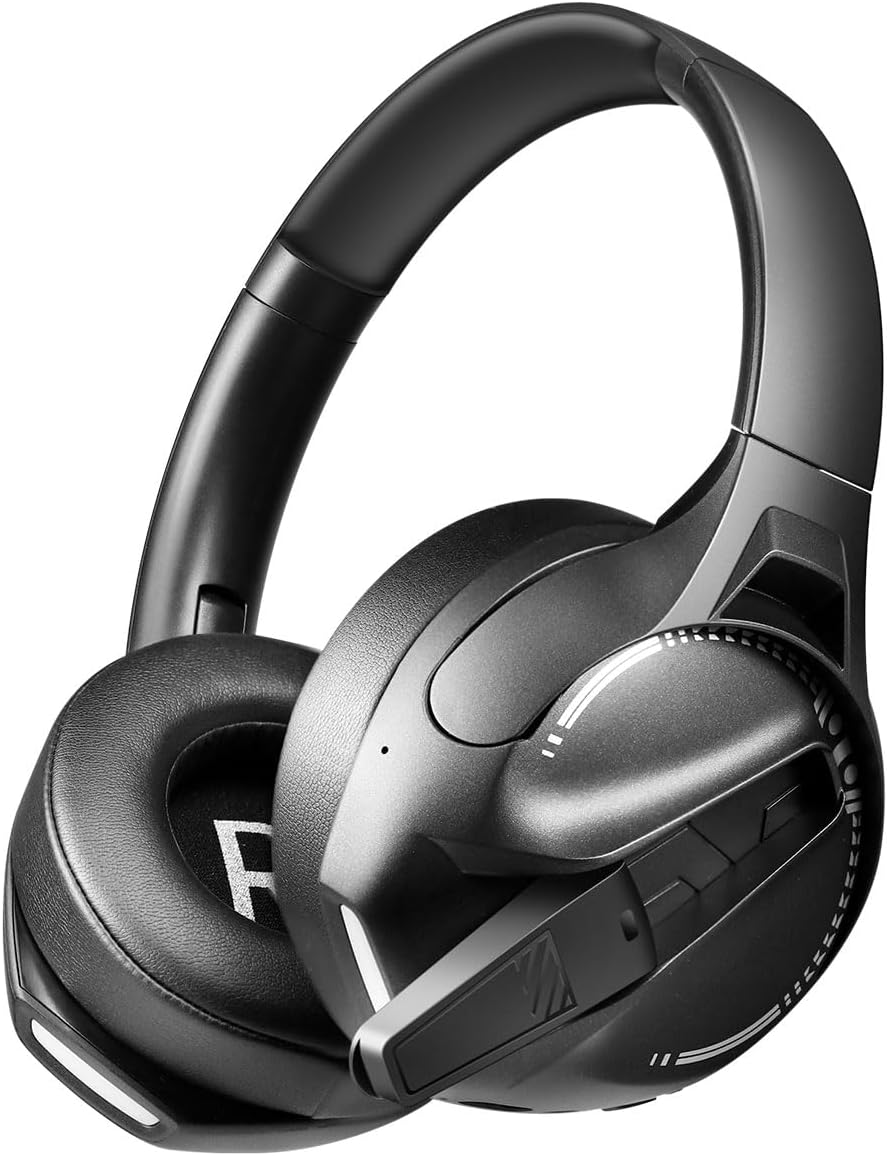
Сүрөт: Side view of the LogiLink BT0070 headset, showing the extended microphone arm and ear cup design.

Сүрөт: Фронт view of the LogiLink BT0070 headset, showcasing анын жалпы дизайны.
Жайгашуу
1. Гарнитураны заряддоо
Before first use, fully charge the headset. Connect the USB charging cable to the headset's charging port and the other end to a compatible USB power source (e.g., computer USB port, USB wall adapter).

Сүрөт: Illustration of power adapter requirements. Use a 3.0-3.0W power adapter. Note that a power adapter is not included with the headset.
- A full charge typically takes approximately [X] hours (specific time not provided, refer to product packaging or LED indicator).
- The LED indicator on the headset will change color or turn off once charging is complete.
- Ensure the power source provides 3.0-3.0W for optimal charging.
2. Күйгүзүү / Өчүрүү
- Күйгүзүү үчүн: LED индикатору күйгөнгө чейин Кубат баскычын болжол менен 3 секунд басып туруңуз.
- Өчүрүү үчүн: LED индикатору өчмөйүнчө кубат баскычын болжол менен 5 секунд басып туруңуз.
3. Bluetooth Жупташтыруу
Гарнитураңызды зымсыз түзмөккө туташтыруу үчүн:
- Гарнитура өчүрүлгөнүн текшериңиз.
- Жупташтыруу режимин көрсөткөн LED индикатору тез күйүп-өчкөнгө чейин (адатта көк жана кызыл) Кубат баскычын болжол менен 5-7 секунд басып туруңуз.
- Түзмөгүңүздө (смартфон, ноутбук ж.б.) Bluetooth'ду иштетип, жаңы түзмөктөрдү издеңиз.
- Select "LogiLink BT0070" from the list of available devices.
- Once paired, the LED indicator on the headset will typically flash slowly or turn solid blue.
4. Wired Connection (3.5mm AUX)
For a wired connection, use the included 3.5mm AUX audio cable:
- 3.5 мм аудио кабелдин бир учун гарнитуранын AUX портуна сайыңыз.
- Экинчи учун түзмөгүңүздүн 3.5 мм аудио уячасына сайыңыз.
- The headset will operate in passive mode, drawing no power from its battery.
5. тууралоо
For optimal comfort and sound quality, adjust the headset to fit your head:
- Extend or retract the adjustable headband until the ear cups comfortably cover your ears.
- Ensure the soft memory ear pads create a good seal around your ears.
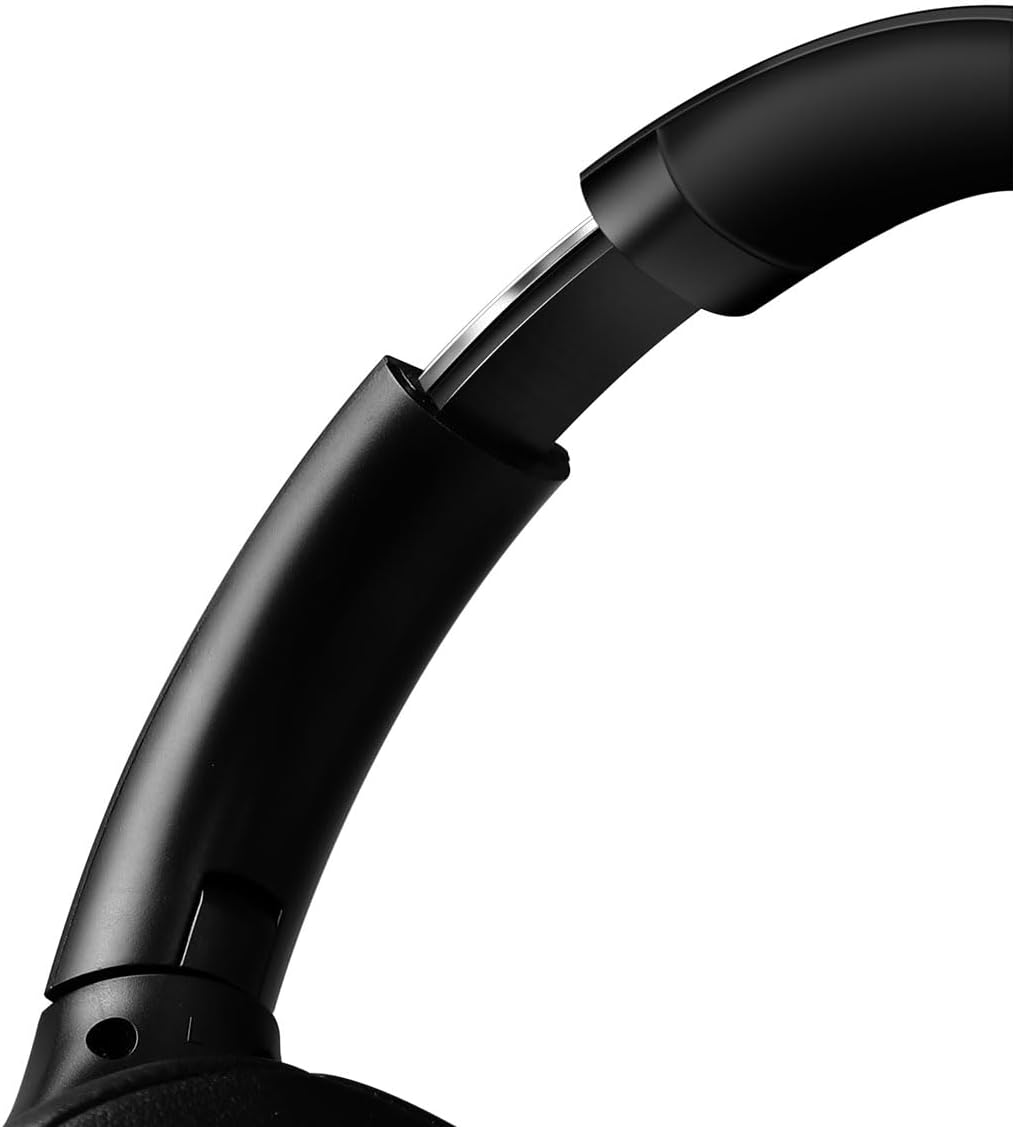
Сүрөт: Жакын план view of the adjustable headband mechanism, demonstrating how to customize the fit.
Гарнитураны иштетүү
1. Негизги башкаруу элементтери
The headset features intuitive controls, typically located on the ear cups:
- Кубат баскычы: Press and hold to power on/off. Short press for [X function, e.g., play/pause, answer call - specifics not provided, common functions listed].
- Үндү жогорулатуу/Кийинки трек: Үнүн жогорулатуу үчүн кыска басыңыз. Кийинки трекке көпкө басыңыз.
- Үнүн азайтуу/Мурунку трек: Үнүн азайтуу үчүн кыска басыңыз. Мурунку трек үчүн көпкө басыңыз.
- Көп функциялуу баскыч (MFB): (Often combined with Power button) Single press to Play/Pause music or Answer/End calls. Double press to Redial last number.
2. Микрофонду колдонуу
The integrated 360° noise-isolating microphone is designed for clear communication.
- Микрофонду тууралоо: Үндү оптималдуу кабыл алуу үчүн микрофонду оозуңузга жакын коюңуз.
- Үнсүз/Ачуу: (Specific button for mute not provided, common methods listed) Look for a dedicated mute button on the headset or use your device's software controls.
3. Активдүү ызы-чууну жокко чыгаруу (ANC)
Гарнитура айлана-чөйрөдөгү ызы-чууну азайтуу үчүн активдүү ызы-чууну жокко чыгаруу функциясына ээ.
- ANC иштетилүүдө: (Specific button for ANC not provided, common methods listed) Look for a dedicated ANC button or a combination press on existing buttons.
- When ANC is active, you may notice a slight change in audio characteristics.

Сүрөт: Users experiencing immersive audio with the LogiLink BT0070 headset, emphasizing its 3D surround sound capabilities for gaming.
Техникалык тейлөө
1. Тазалоо
- Гарнитураны жумшак, кургак, түксүз чүпүрөк менен сүртүңүз.
- Абразивдүү тазалагычтарды, спиртти же химиялык эриткичтерди колдонбоңуз.
- Кулак төшөктөрүн акырын тазалаңыз.
2. Сактоо
- Гарнитураны күн нурунан жана экстремалдык температурадан алыс салкын, кургак жерде сактаңыз.
- Эгер батарейканы узак убакытка сактап жатсаңыз, анын иштөө мөөнөтүн сактоо үчүн анын жарым-жартылай заряддалганын (болжол менен 50%) текшериңиз.

Сүрөт: The LogiLink BT0070 headset shown in a folded configuration, suitable for compact storage or transport.
3. Батареяга кам көрүү
- Батареяны бат-баттан толук кубаттап калуудан алыс болуңуз.
- Charge the headset regularly, even if not in use, to maintain battery health.
Проблемаларды чечүү
Эгерде сиз гарнитураңыз менен көйгөйлөргө туш болсоңуз, төмөнкү кеңири таралган көйгөйлөрдү жана чечимдерди караңыз:
| Көйгөй | Мүмкүн чечим |
|---|---|
| Гарнитура күйбөйт. | Ensure the headset is fully charged. Press and hold the Power button for the required duration. |
| Bluetooth аркылуу жупташтыруу мүмкүн эмес. | Ensure the headset is in pairing mode (rapidly flashing LED). Turn off and on your device's Bluetooth. Move closer to the device. Clear previous Bluetooth connections on your device. |
| Үн жок же үнү төмөн. | Check headset and device volume levels. Ensure the headset is properly connected (Bluetooth or AUX). For Bluetooth, check audio output settings on your device. |
| Микрофон иштебей жатат. | Ensure the microphone is not muted. Check microphone input settings on your device. Ensure the microphone is positioned correctly. |
| Үн сапаты начар. | Ensure the headset is within Bluetooth range. Check for interference from other wireless devices. For wired connection, ensure the 3.5mm cable is fully inserted. |
Техникалык шарттар
Key technical specifications for the LogiLink BT0070 Gaming Headset:
| Өзгөчөлүк | Деталь |
|---|---|
| Модел | BT0070 |
| Байланыш технологиясы | Bluetooth 6.0, 3.5 мм AUX |
| Зымсыз байланыш | Bluetooth |
| Гарнитуранын түрү | Ашыкча кулак |
| Айдоочунун диаметри | 40 мм |
| Импеданс | 32 Ом |
| Микрофон | 360° Noise-isolating, Omnidirectional |
| Noise Control | Активдүү ызы-чууну жокко чыгаруу |
| Батареянын иштөө мөөнөтү | 50 саатка чейин |
| Түс | Кара |
| Элемент Салмагы | 500 грамм |
| Продукциянын өлчөмдөрү | 16.8 x 17.8 x 7.5 см |
| менен шайкеш келет | Smartphone & Laptop |
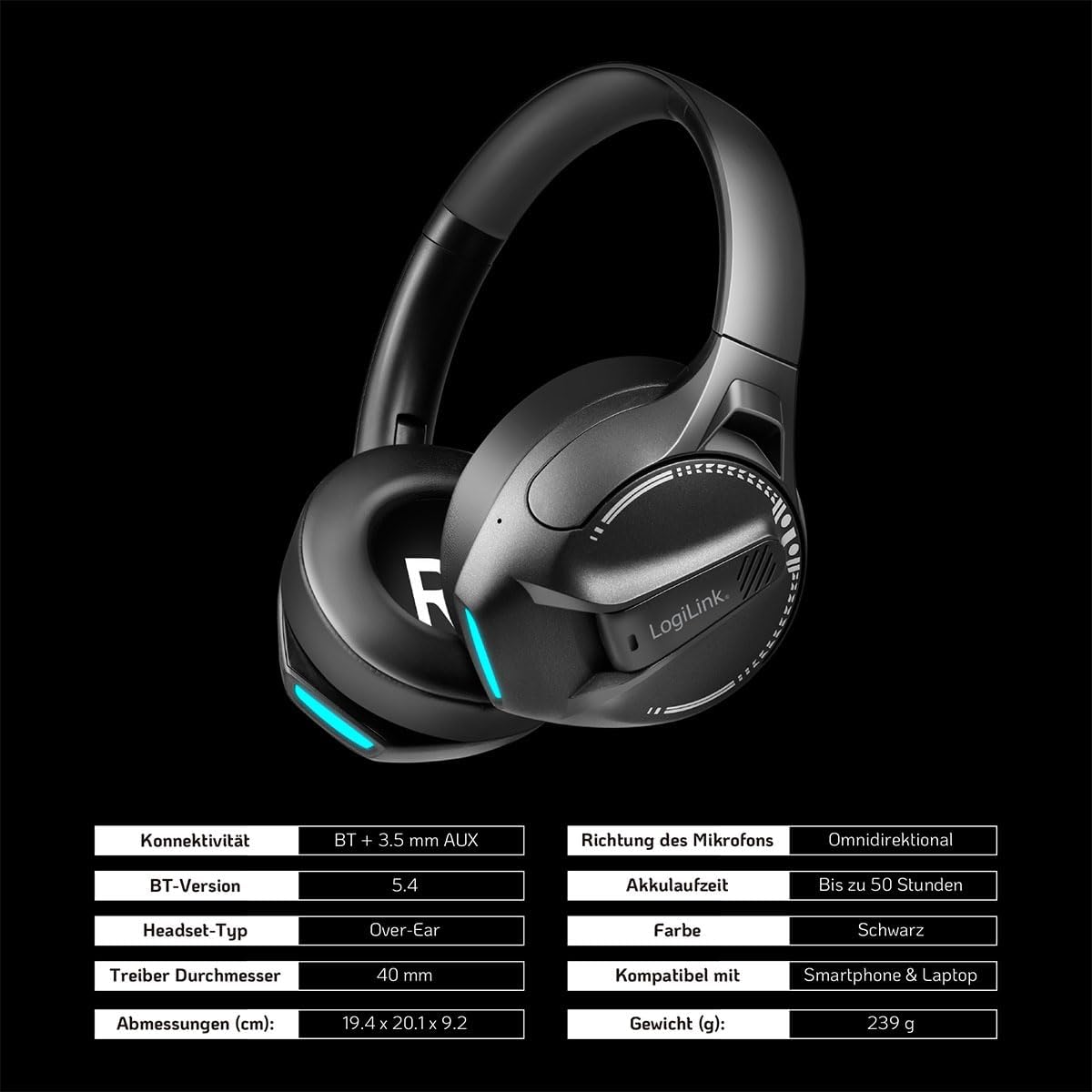
Сүрөт: Visual representation of key specifications for the LogiLink BT0070 headset, including connectivity, battery life, and dimensions. Note: The image lists Bluetooth version 5.4, while the product title specifies 6.0.
Кепилдик жана колдоо
LogiLink products are designed and manufactured to the highest quality standards. For warranty information and technical support, please refer to the warranty card included with your product or visit the official LogiLink webсайт.
Кепилдик дооматтары үчүн сатып алганыңыздын далилин сактап коюңуз.


