1. Киришүү
This manual provides essential instructions for the safe and efficient operation of your Minuteman EN450G 450VA Standby Uninterruptible Power Supply (UPS). The EN450G is designed to provide reliable backup power and surge protection for various electronic devices, including gaming consoles, desktop PCs, home office equipment, and network devices. Please read this manual thoroughly before installation and use, and retain it for future reference.
2. Маанилүү коопсуздук нускамалары
WARNING: To reduce the risk of electric shock, fire, or injury to persons, read all instructions before using this product.
- Бул UPS коркунучтуу том камтыйтtages. Do not attempt to disassemble the unit. Servicing should be performed by qualified service personnel only.
- Медициналык жабдуулар, жашоону камсыз кылуучу жабдуулар, микротолкундуу мештер же чаң соргучтар сыяктуу компьютерге тиешеси жок нерселерди UPSке туташтырбаңыз.
- Вентиляция тешиктерин жаап албаңыз. Агрегаттын айланасында адекваттуу аба агымын камсыз кылыңыз.
- Do not install the UPS in direct sunlight, near heat sources, or in areas with excessive dust, moisture, or flammable liquids.
- Connect the UPS to a properly grounded AC power outlet.
- The battery is hot-swappable. Exercise caution when replacing the battery. Refer to the Maintenance section for instructions.
- In case of emergency, press the power button to turn off the UPS and disconnect the power cord from the AC power outlet.
3. Продукт бүтүп калдыview
The Minuteman EN450G UPS provides comprehensive power protection. Familiarize yourself with its components:
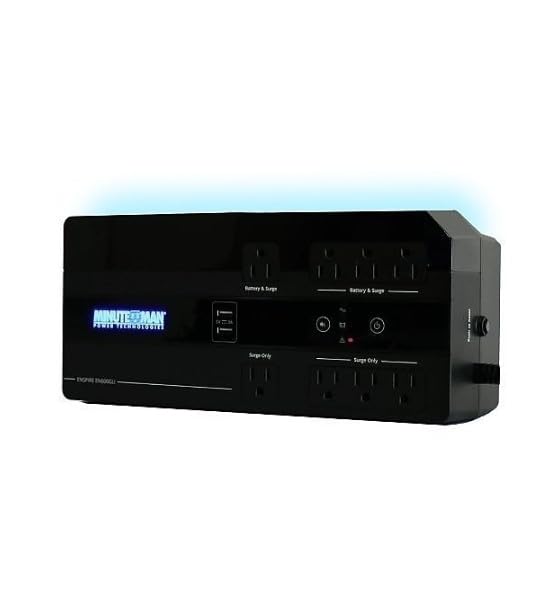
1-сүрөт: Minuteman EN450G UPS Unit. This image displays the Minuteman EN450G UPS unit. The front panel features the 'Minuteman Power Technologies' logo, two USB charging ports, and control buttons. The top surface shows four 'Battery & Surge' protected outlets and four 'Surge Only' outlets, clearly labeled. The unit is black and designed for compact placement.
3.1 Алдыңкы панелдин өзгөчөлүктөрү
- Кубат баскычы: UPSти күйгүзөт же өчүрөт.
- USB кубаттоо порттору: Two ports for charging mobile devices.
- Статус көрсөткүчтөрү: LEDs indicating power status, battery status, and fault conditions.
3.2 Арткы панелдин өзгөчөлүктөрү
- Battery & Surge Outlets (x4): Provide battery backup power and surge protection for critical devices.
- Surge Only Outlets (x4): Provide surge protection only for non-critical devices.
- AC киргизүү: UPSти дубалдагы розеткага туташтырат.
- Ажыраткыч: Кайра жүктөлүүчү ашыкча жүктөлүүдөн коргоону калыбына келтирүү.
4. Орнотуу жана орнотуу
4.1 Пакеттен чыгаруу
Carefully unpack the UPS and inspect it for any shipping damage. If damage is found, do not operate the unit and contact your dealer.
4.2 Орнотуу
The EN450G is designed for versatile placement:
- иш-такта: Агрегатты туруктуу, тегиз бетке коюңуз.
- Кабат: Position on the floor, ensuring ventilation is not obstructed.
- Дубалга орнотуу: The unit can be mounted on a wall using appropriate hardware (not included). Ensure the mounting surface can support the weight of the UPS.
Ensure the installation area is clean, dry, and has adequate ventilation. Avoid placing the UPS near heat-emitting appliances or in direct sunlight.
4.3 Кубатка туташуу
- Ensure the UPS is turned off.
- Plug the UPS power cord into a grounded 120V AC wall outlet.
- Батареянын оптималдуу иштешин камсыз кылуу үчүн, UPSти биринчи жолу колдонуудан мурун кеминде 8 саат кубаттаңыз.
4.4 Түзмөктөрдү туташтыруу
- Battery & Surge Protected Outlets: Connect critical devices such as your computer, monitor, router, or other essential electronics that require continuous power during outages.
- Жалгыз толкундар: Connect non-critical devices like printers, scanners, or desk lamps that only require surge protection.
CAUTION: Do not connect laser printers or shredders to the battery backup outlets, as their high power draw can overload the UPS.
5. Операция
5.1 UPSти күйгүзүү/өчүрүү
- Күйгүзүү: Press and hold the power button for approximately 2 seconds until you hear a beep and the power indicator illuminates.
- Өчүрүү: Press and hold the power button for approximately 2 seconds until you hear a beep and the power indicator turns off.
5.2 Статус индикаторлору
The front panel LEDs provide information about the UPS status:
- Жашыл LED (катуу): UPS is operating normally, providing AC power.
- Green LED (Flashing) & Audible Alarm: UPS иштөө учурунда батареянын кубаты менен иштейтtage.
- Red LED (Solid) & Audible Alarm: Battery low or fault condition. Refer to Troubleshooting.
5.3 Батареянын иштөө убактысы
The EN450G provides approximately 3 minutes of runtime at full load (450VA/255W) and 11 minutes at half load. Actual runtime may vary based on connected equipment and battery age.
6. Техникалык тейлөө
6.1 Батареяны алмаштыруу
The EN450G features a hot-swappable Sealed Lead Acid (SLA) battery, allowing replacement without interrupting power to connected devices. Batteries typically last 3-5 years depending on usage and environmental conditions. A flashing red LED or continuous alarm may indicate a need for battery replacement.
- Ensure the UPS is connected to AC power and operating normally.
- Locate the battery access panel (refer to product diagram if available).
- Carefully slide out the old battery pack.
- Insert the new, fully charged replacement battery pack, ensuring correct orientation.
- Secure the battery access panel.
- Allow the new battery to charge for 8-12 hours to reach full capacity.
WARNING: Use only approved replacement batteries. Improper battery replacement can result in fire or explosion. Dispose of old batteries properly at a recycling facility.
6.2 Тазалоо
УПСтин сыртын жумшак, кургак чүпүрөк менен маал-маалы менен тазалап туруңуз. Суюктук же аэрозолдук тазалоочу каражаттарды колдонбоңуз. Желдетүү тешиктери чаңдан жана таштандыдан таза болушун камсыз кылыңыз.
7. Кыйынчылыктарды
This section addresses common issues you may encounter with the EN450G UPS. If a problem persists after attempting the solutions below, contact technical support.
| Көйгөй | Мүмкүн себеп | Чечим |
|---|---|---|
| UPS күйбөйт. | Батарея туташкан эмес же заряды бүтө элек. Электр зымы туташкан эмес. | Ensure battery is properly connected and charged. Verify power cord is securely plugged into wall outlet and UPS. |
| UPS beeps continuously or red LED is solid. | Battery low or fault condition. Overload on battery outlets. | Allow battery to charge. If problem persists, battery may need replacement. Disconnect non-essential devices from battery outlets. Check circuit breaker. |
| UPS operates on battery frequently. | Кирүүчү AC кубаты туруксуз. UPS sensitivity setting (if applicable, though not specified for this model). | Check the quality of your incoming AC power. Consider connecting to a different outlet. |
| No power from surge-only outlets. | Ажыраткыч өчүрүлдү. | Press the circuit breaker reset button on the rear panel. Reduce load if necessary. |
8. Техникалык шарттар
| Өзгөчөлүк | Деталь |
|---|---|
| Модел | EN450G |
| Кубаттуулугу | 450VA / 255W |
| Киргизүү/Чыгуу Voltage | 120V AC |
| Output Waveform | Симуляцияланган синус толкуну |
| Соода түйүндөрү | 4 x Battery & Surge Protected, 4 x Surge Only |
| Батарея түрү | Sealed Lead Acid (SLA), Hot-Swappable |
| Typical Runtime (Full Load) | 3 мүнөткө чейин |
| Typical Runtime (Half Load) | 11 мүнөткө чейин |
| Өлчөмдөр (D x W x H) | 12.8 x 5.7 x 4.1 дюйм (32.5 x 14.5 x 10.4 см) |
| Салмагы | 4.4 фунт (2 кг) |
| Монтаждоо параметрлери | Desktop, Floor, Wall Mount |
9. Кепилдик маалыматы
Please refer to the warranty card included with your product or visit the manufacturer's webдеталдуу кепилдик шарттары жана шарттары үчүн сайт. Кепилдик дооматтар үчүн сатып алганыңыздын далилин сактаңыз.
10. Техникалык колдоо
If you require technical assistance or have questions regarding your Minuteman EN450G UPS, please contact your dealer or the manufacturer's customer support. Have your model number (EN450G) and serial number ready when contacting support.
For more information, you may visit the official Minuteman webсайт.


