1. Баштапкы орнотуу
This section guides you through the initial setup of your DOOGEE Tab A9 Pro tablet.
1.1 Пакеттин мазмуну
Пакетте бардык буюмдар бар экенин текшериңиз:
- 1x DOOGEE Tab A9 Pro Tablet
- 1x Type-C USB кабели
- 1x заряддагыч
- 1x Stylus (VIP Edition)
- 1x Tempered Film (VIP Edition)
- 1x Bluetooth Mouse (VIP Edition)
- 1x Leather Protective Cover (VIP Edition)
- 1x Bluetooth Keyboard (VIP Edition)
- 1x таңгак кутусу
- 1x Колдонуучунун колдонмосу

Image: DOOGEE Tab A9 Pro tablet shown with its complete set of accessories, including a stylus, tempered film, Bluetooth mouse, leather protective cover, and Bluetooth keyboard.
1.2 Планшетти заряддоо
Before first use, fully charge the tablet. Connect the Type-C USB cable to the tablet's USB port and the charger to a power outlet. The tablet supports a maximum charging current of 10W.
1.3 Күйгүзүү/өчүрүү
- Күйгүзүү үчүн: Press and hold the power button until the DOOGEE logo appears.
- Өчүрүү үчүн: Press and hold the power button, then select "Power off" from the options on the screen.
1.4 Баштапкы конфигурация
Upon first power-on, follow the on-screen prompts to configure your tablet. This includes selecting your language, connecting to a Wi-Fi network, setting up your Google account, and configuring security options.

Сүрөт: алдыңкы жана арткы view of the DOOGEE Tab A9 Pro tablet, highlighting its sleek design and camera placement.
2. Иштөө нускамалары
This section provides guidance on using the core features of your DOOGEE Tab A9 Pro tablet.
2.1 Android 15 интерфейсинде навигациялоо
The tablet runs on Android 15. Familiarize yourself with gestures and navigation:
- Өйдө серпүү: Колдонмонун суурмасына кириңиз.
- Төмөн сүрүү: Ыкчам жөндөөлөргө жана эскертмелерге кириңиз.
- таптаңыз: Элементтерди тандаңыз.
- Узак басуу: Контексттик менюларга кириңиз же сүрөтчөлөрдү жылдырыңыз.
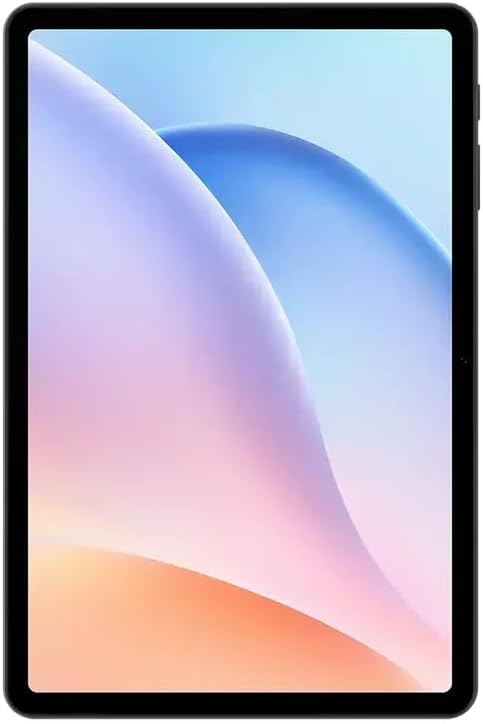
Сүрөт: алдыңкы view of the DOOGEE Tab A9 Pro tablet, showcasing its 10.1-inch IPS HD display.
2.2 Wi-Fi жана Bluetooth байланышы
Wi-Fi же Bluetooth түзмөктөрүнө туташуу үчүн:
- барыңыз Орнотуулар.
- Тандоо Тармак жана интернет Wi-Fi үчүн же Туташкан түзмөктөр Bluetooth үчүн.
- Toggle Wi-Fi or Bluetooth on and select the desired network or device to connect.
The tablet supports Wi-Fi 802.11 a/b/g/n/ac (2.4GHz/5GHz) and Bluetooth 5.0.
2.3 Камераны колдонуу
The tablet features a 5MP front camera and an 8MP rear camera with flash. Open the Camera app to capture photos and videos. Video recording supports FHD 30fps.
2.4 External Storage (TF Card)
The tablet includes a TF card slot, supporting up to 2TB of external storage. Insert a compatible TF card to expand your device's memory for photos, videos, and documents.
2.5 Перифериялык түзүлүштөрдү туташтыруу
The VIP Edition includes a Bluetooth keyboard and mouse. Pair these devices via Bluetooth settings for enhanced productivity. The tablet also supports OTG (On-The-Go) functionality via its Type-C USB port for connecting other USB devices, and has a 3.5mm earphone jack.
3. Техникалык тейлөө
Proper maintenance ensures the longevity and optimal performance of your DOOGEE Tab A9 Pro.
3.1 Планшетти тазалоо
- Экранды жана денени тазалоо үчүн жумшак, түксүз чүпүрөктү колдонуңуз.
- Катуу химиялык заттарды, абразивдүү тазалагычтарды же аэрозолдук спрейлерди колдонуудан алыс болуңуз.
- өжөр тактар үчүн, бир аз гampчүпүрөктү суу менен.
3.2 Батареяга кам көрүү
Планшет 6580 мАч батарея менен жабдылган. Батареянын иштөө мөөнөтүн максималдуу түрдө көбөйтүү үчүн:
- Ашыкча температурадан сактаныңыз.
- Батареянын бат-баттан түгөнүп калышына жол бербеңиз.
- Оптималдуу кубаттоо үчүн берилген кубаттагычты колдонуңуз.

Image: Visual representation of the DOOGEE Tab A9 Pro's 6580mAh battery, highlighting its capacity and 10W fast charging capability.
3.3 Программалык камсыздоо жаңыртуулары
Планшетиңизде эң акыркы функциялар, коопсуздук жаңыртуулары жана майнаптуулугу жакшыртылганын текшерүү үчүн программалык камсыздоо жаңыртууларын дайыма текшерип, орнотуп алыңыз. барыңыз Орнотуулар > Система > Системаны жаңыртуу.
4. Кыйынчылыктарды
Бул бөлүмдө DOOGEE Tab A9 Pro менен кездешиши мүмкүн болгон жалпы көйгөйлөр каралат.
4.1 Планшет күйбөй жатат
- Планшеттин жетиштүү заряддалганын текшериңиз. Аны кубаттагычка кеминде 30 мүнөт туташтырыңыз.
- Try a forced restart by holding the power button for 10-15 seconds.
4.2 Wi-Fi туташуу маселелери
- Check if Wi-Fi is enabled in Settings.
- Wi-Fi роутериңизди өчүрүп күйгүзүңүз.
- Планшеттин жөндөөлөрүнөн тармакты унутуп, кайра туташыңыз.
- Wi-Fi сигналынын чегинде экениңизди текшериңиз.
4.3 Жай аткаруу
- Керексиз фон колдонмолорун жабуу.
- Колдонмолор үчүн кэш дайындарын тазалоо.
- Жеткиликтүү сактоо мейкиндигин камсыз кылыңыз.
- Планшетти кайра иштетиңиз.
4.4 Экран жооп бербейт
- Perform a forced restart.
- Эгер көйгөй чечилбесе, заводдук жөндөөлөргө кайтарууну карап көрүңүз (Эскертүү: Бул бардык маалыматтарды жок кылат).
5. Техникалык шарттар
Detailed specifications for the DOOGEE Tab A9 Pro tablet.

Image: Infographic detailing the 10.1-inch IPS HD display features, including 1280x800 resolution, 80.2% screen-to-body ratio, and 16.7 million screen colors.
| Өзгөчөлүк | Спецификация |
|---|---|
| Модел | DOOGEE Tab A9 Pro |
| Операция системасы | Android 15 |
| Өлчөмдөр | 242.5 x 160.9 x 9.7 мм |
| Салмагы | 512г |
| Screen Size | 10.1 дюйм |
| Дисплей түрү | IPS LCD HD Display |
| Резолюция | 1280 x 800 пиксель |
| PPI | 149 |
| Экрандын корпуска катышы | 80.2% |
| Процессор (CPU) | Unisoc T310 Octa-core (1x Arm Cortex-A75 @2.0GHz, 3x Arm Cortex-A55 @1.8GHz) |
| Графика (GPU) | Arm Mali-G52 |
| RAM | 4GB LPDDR4 (with 16GB virtual RAM expansion, total 20GB) |
| Ички сактагыч (ROM) | 128 ГБ eMMC |
| Кеңейтүүчү сактагыч | TF Card Slot, up to 2TB |
| Wi-Fi | 802.11 a / b / g / n / ac (2.4GHz / 5GHz) |
| Bluetooth | Bluetooth 5.0 |
| Алдыңкы камера | 5MP |
| Арткы камера | Жаркылдатуучу камерасы бар 8 мегапиксел |
| Батарея сыйымдуулугу | 6580mAh |
| Заряддоо | 10W Max Charging Current, Type-C USB |
| Аудио Jack | 3.5мм |
| Сенсорлор | G-сенсор |
| Башка өзгөчөлүктөр | OTG support, Bluetooth keyboard connection support |
6. Кепилдик жана колдоо
Your DOOGEE Tab A9 Pro comes with a warranty and access to customer support.
6.1 Кепилдик маалыматы
The DOOGEE Tab A9 Pro includes a 12 айлык кепилдик from the date of purchase. This warranty covers manufacturing defects and malfunctions under normal use. It does not cover damage caused by misuse, accidents, unauthorized repairs, or normal wear and tear. Please retain your proof of purchase for warranty claims.
6.2 Кардарларды колдоо
For technical assistance, warranty claims, or further inquiries, please contact DOOGEE customer support through their official website or the retailer where the product was purchased. Have your product model and purchase details ready when contacting support.


