1. Киришүү
This manual provides essential information for the safe operation, assembly, maintenance, and troubleshooting of your Varstrom VS10 Electric Scooter. Please read this manual thoroughly before first use to ensure proper function and to prevent injury or damage.
2. Коопсуздук боюнча көрсөтмөлөр
Operating an electric scooter carries inherent risks. Adhere to the following safety guidelines:
- Ар дайым туулга жана тиешелүү коргоочу каражаттарды (тизе, чыканак төшөктөрү) кийиңиз.
- Бардык жергиликтүү жол мыйзамдарын жана эрежелерин сактаңыз.
- Нымдуу шарттарда, катуу жамгырда же тайгак жерлерде жүрбөңүз.
- Avoid riding at night or in low visibility conditions. If unavoidable, ensure all lights are functional and wear reflective clothing.
- Коопсуз ылдамдыкты жана башка унаалардан жана жөө жүргүнчүлөрдөн аралыкты сактаңыз.
- Каскадёрлорду же капыстан маневрлерди жасабаңыз.
- Ар бир сапардан мурун скутердин толук заряддалганын жана бардык компоненттеринин бекем орнотулганын текшериңиз.
- Жүктүн максималдуу көтөрүмдүүлүгү 120 кг. Бул чектен ашпаңыз.
- This scooter is intended for adult use only.
3. Пакеттин мазмуну
Пакетте бардык буюмдар бар экенин текшериңиз:
- Varstrom VS10 Electric Scooter
- Заряддагыч
- Колдонуучунун Колдонмосу (бул документ)
4. Продукт бүтүп калдыview
Familiarize yourself with the main components of your Varstrom VS10 Electric Scooter.

Сүрөт: каптал view of the Varstrom VS10 Electric Scooter, showcasinанын жалпы дизайны жана компоненттери.
Негизги өзгөчөлүктөрү:
- Мотор: 500W Brushless DC Motor for efficient power delivery.
- Батарея: 48V 15.6Ah Lithium-ion battery for extended range.
- Шиналар: 10-inch puncture-proof solid tires.
- Токтотуу: Front dual suspension and rear dual suspension for ride comfort.
- Жарыктандыруу: Integrated headlight, bright rear brake light, and dual handlebar turn signals.
- Дисплей: Intelligent LED screen showing speed, battery level, and riding mode.
- Контролдоо: App control via smartphone for various settings.
- Көчүрүү мүмкүнчүлүгү: Quick folding mechanism for easy storage and transport.
5. Чогултуу жана орнотуу
5.1 Скутерди ачуу
The scooter is shipped in a folded state. Follow these steps to unfold it:
- Скутерди тегиз жерге коюңуз.
- Locate the folding mechanism latch near the base of the steering column.
- Release the latch and carefully lift the steering column until it locks into the upright position. Ensure the locking mechanism is fully engaged.
- Raise the handlebars and secure them if they are folded down.

Image: Illustration showing the folded and unfolded dimensions of the Varstrom VS10 Electric Scooter, demonstrating its compact storage capability.
5.2 Алгачкы заряддоо
Биринчи жолу саякаттаардан мурун, скутердин батареясын толугу менен заряддаңыз.
- Скутердин өчүрүлгөнүн текшериңиз.
- Кубаттоочу портту, адатта, палубанын капталынан табыңыз.
- Заряддагычты заряддоо портуна туташтырыңыз, андан кийин заряддагычты стандарттуу розеткага сайыңыз.
- Кубаттоочу түзүлүштөгү кубаттоо индикатору, адатта, кубаттоо учурунда кызыл түстө күйүп, толук кубатталганда жашыл түскө айланат.
- Кубаттоо убактысы болжол менен 6-7 саат. Ашыкча кубаттабаңыз.

Сүрөт: деталдуу view of the scooter's battery compartment and charging specifications, highlighting the 48V 15.6Ah battery and 6-7 hour charging time.
6. Операция
6.1 Күйгүзүү/өчүрүү
- Күйгүзүү үчүн: Экран күйгөнгө чейин LED дисплейдеги кубат баскычын басып, кармап туруңуз.
- To power off: Press and hold the power button until the screen turns off.
6.2 LED дисплей жана башкаруу элементтери
The integrated LED display provides real-time information and control options.

Image: Close-up of the scooter's intelligent LED screen, displaying current speed, selected gear (riding mode), and battery level.
- Ылдамдык көрсөтүү: Учурдагы айдоо ылдамдыгын көрсөтөт.
- Батарея дисплей: Батареянын калган зарядын көрсөтөт.
- Gear Shift (Riding Modes): Press the 'Set/Switch' button to cycle through Eco, Drive, and Sport modes.
6.3 Айдоо режимдери
- Эко режими: Lowest speed, maximum range, suitable for beginners or crowded areas.
- Айдоо режими: Medium speed, balanced performance for daily commuting.
- Спорт режими: Highest speed, maximum power, for experienced riders on open roads.
6.4 Круиздик контрол
To activate cruise control, maintain a consistent speed for a few seconds. The scooter will beep, and cruise control will engage. To disengage, press the brake lever or accelerate.
6.5 Жарыктандыруу системасы
The scooter is equipped with a comprehensive lighting system for visibility and safety.
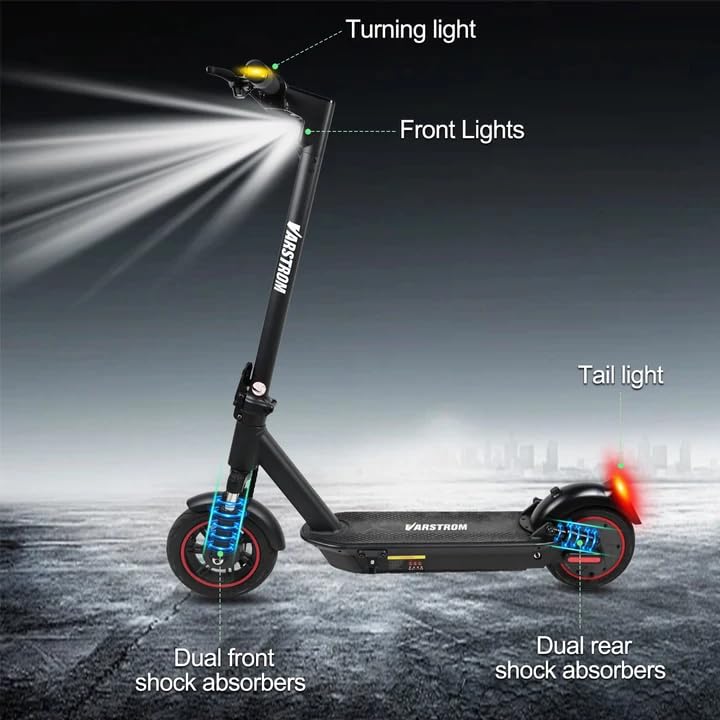
Image: Diagram illustrating the scooter's front lights, turning lights on the handlebars, tail light, and the dual front and rear shock absorbers.
- Фара: Turn on/off via the app or dedicated button (if available).
- Арткы жарык/Тормоз жарыгы: The rear light illuminates when the scooter is powered on and brightens when the brake is applied.
- Бурулуш сигналдары: Activate turn signals using the controls on the handlebars to indicate your turning direction.
6.6 Тормоздоо
The scooter features front braking. Apply the brake lever gently to slow down. For emergency stops, apply firm and even pressure to the brake lever. Avoid sudden braking at high speeds.
6.7 Tuya Smart App Control
Enhance your riding experience by connecting your scooter to the Tuya Smart app.

Image: Screenshot of the Tuya Smart App interface, showing options to unlock the scooter, control cruise, turn on/off headlights, switch riding modes, and set speed limits.
- Download the 'Tuya Smart' app from your smartphone's app store.
- Скутериңиз күйүк экенин жана телефонуңузда Bluetooth күйгүзүлгөнүн текшериңиз.
- Open the app and follow the instructions to add a new device. You may need to hold the brake and power button simultaneously to activate Bluetooth pairing mode.
- Колдонмо аркылуу сиз:
- Unlock/Lock the scooter remotely.
- Adjust lights.
- Switch riding modes.
- Круиз контролун орнотуу.
- Toggle units (km/mph).
- View real-time ride data.
- Enable/disable zero start (safety feature).
7. Техникалык тейлөө
7.1 Батареяга кам көрүү
- Батарейканын ден соолугун сактоо үчүн колдонулбаса да, аны үзгүлтүксүз заряддап туруңуз.
- Батареяны толугу менен түгөтүп жибербеңиз.
- Скутерди түз күн нурунан жана экстремалдык температурадан алыс салкын, кургак жерде сактаңыз.
- Берилген заряддагычты гана колдонуңуз.
7.2 Тазалоо
Скутерди жарнама менен сүртүңүзamp cloth. Do not use high-pressure water jets or immerse the scooter in water, as this can damage electrical components.
7.3 Дөңгөлөктөрдү текшерүү
Although the tires are puncture-proof solid tires, regularly inspect them for any signs of damage, cracks, or embedded debris.
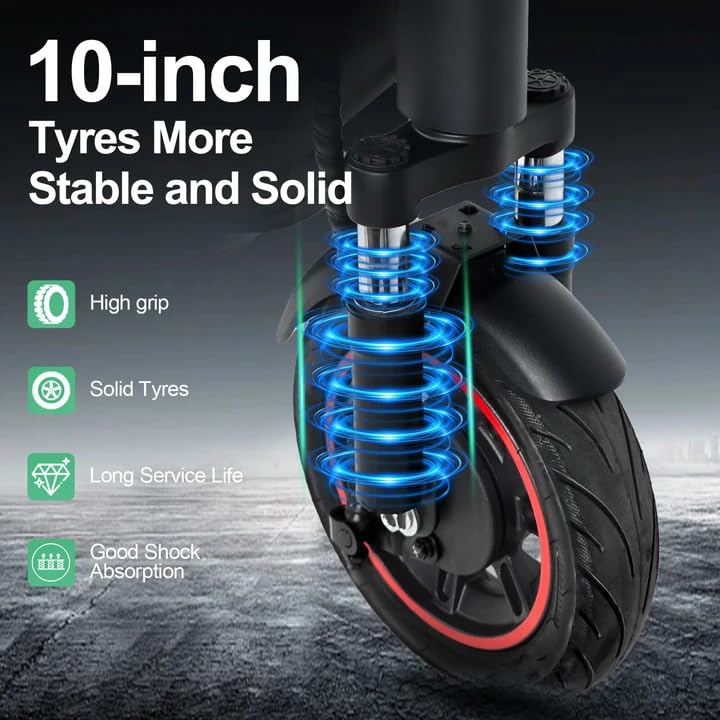
Image: Close-up of the scooter's 10-inch solid tires and dual suspension system, emphasizing stability and shock absorption.
8. Кыйынчылыктарды
| Көйгөй | Мүмкүн себеп | Чечим |
|---|---|---|
| Скутер күйбөйт | Батарея аз; Байланыштардын начарлашы; Кубат баскычынын иштебей калышы | Charge the battery; Check all visible connections; Contact support if issue persists. |
| Азайтылган диапазон же кубаттуулук | Low battery; Overload; Cold weather; Tire damage | Fully charge battery; Ensure load is within limits; Battery performance decreases in cold; Inspect tires. |
| Колдонмо туташпай жатат | Bluetooth off; Scooter not in pairing mode; App issue | Ensure phone Bluetooth is on; Activate scooter's Bluetooth pairing mode (brake + power button); Restart app/phone. |
| Тормоздор жооп бербейт | Brake cable loose or damaged | Inspect brake cable and lever; Seek professional service if necessary. |
9. Техникалык шарттар
| Параметр | Нарк |
|---|---|
| Мотор | 500W Brushless (50N·m torque) |
| Батарея | 48V 15.6Ah Литий |
| Макс диапазон | Up to 60 km per charge |
| Максималдуу ылдамдык | 25 км/саат |
| Заряддоо убактысы | 6-7 саат |
| Шиналар | 10-inch Puncture-Proof Solid Tires |
| Токтотуу | Front Dual Suspension + Rear Dual Suspension |
| Max Load | 120 кг |
| Climbing Angle | 15° |
| Unfolding Size (LWH) | 117 x 53 x 120 см |
| Folding Size (LWH) | 117 x 53 x 56 см |
| Салмагы | 19.6 кг |
| Өзгөчөлүктөр | Digital Display, Foldable, Rechargeable, App Control, Cruise Control, Turning Indicator Light |

Сүрөт: Кесилген view illustrating the 500W brushless DC motor, highlighting its power and efficiency, alongside key performance metrics.
10. Кепилдик жана колдоо
For warranty information, technical support, or service inquiries, please refer to the purchase documentation or contact your retailer. Keep your proof of purchase for warranty claims.


