1. Киришүү
Thank you for choosing the EWEADN V102 Wired Gaming Keyboard. This manual provides essential information for setting up, operating, and maintaining your new keyboard. Please read it thoroughly to ensure optimal performance and longevity of your device.

Figure 1: EWEADN V102 Wired Gaming Keyboard
2. Пакеттин мазмуну
Пакетте бардык буюмдар бар экенин текшериңиз:
- EWEADN V102 Wired Gaming Keyboard
- USB Type-C кабели
- Колдонуучунун Колдонмосу (бул документ)
3. Орнотуу нускамалары
3.1 Баскычтопту туташтыруу
- Баскычтоптогу USB Type-C портун табыңыз.
- Берилген USB Type-C кабелинин бир учун клавиатурага туташтырыңыз.
- Connect the other end of the USB Type-C cable to an available USB port on your computer or compatible device.
- Баскычтоп плагин жана ойнотуу болуп саналат жана операциялык тутумуңуз тарабынан автоматтык түрдө таанылышы керек.

Figure 2: Wired Type-C Connectivity
4. Иштөө нускамалары
4.1 Multi-Function Control Knob
The smart rotary knob provides quick control over various functions:
- Жалгыз басуу: Toggles between backlight modes.
- Айлантуу: Adjusts backlight brightness.
- Hold FN + Rotate Knob: Switches to multimedia mode for volume control (rotate) and mute (press).

Figure 3: Multi-Function Control Knob
Video 1: Demonstration of the EWEADN V102 Keyboard's multi-function knob and lighting effects.
4.2 Дисплей экраны
The integrated display screen shows real-time status indicators without requiring additional software:
- Caps Lock status
- Num Lock status
- Win Lock status
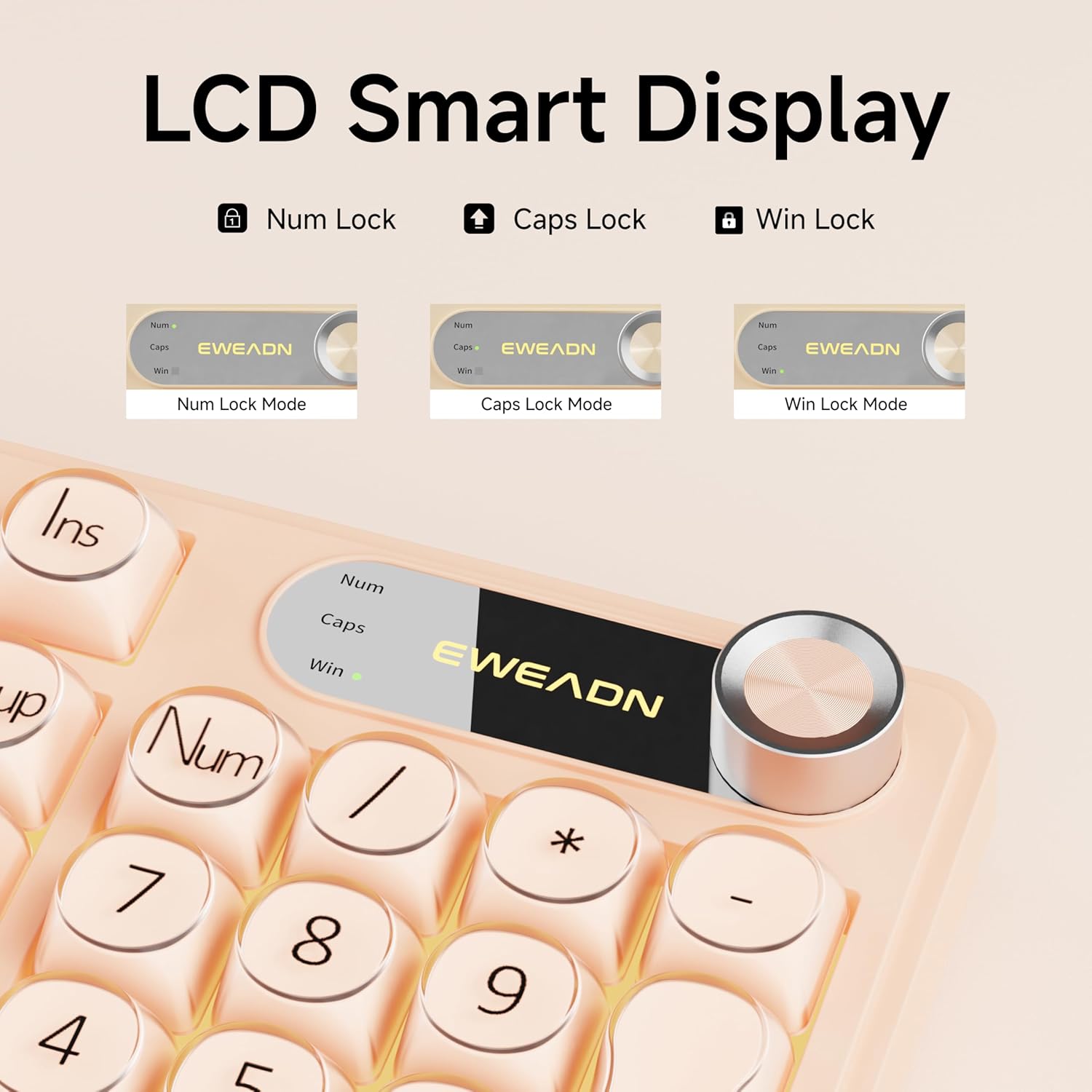
Figure 4: LCD Smart Display
4.3 RGB арткы жарыктандыруу
Customize your typing experience with dynamic RGB lighting:
- FN + INS: Switches between 12 stunning RGB lighting effects.
- FN + PGUP/PGDN: Adjusts backlight brightness (5 levels).
- FN + "_" or "+": Adjusts lighting speed (5 levels).
- FN + Backspace: Арткы жарыкты күйгүзөт/өчүрөт.

Figure 5: RGB Backlight Control Functions
Video 2: Demonstration of various RGB lighting effects on the keyboard.
4.4 Dual-System Compatibility
The V102 keyboard is designed for broad compatibility across multiple operating systems and devices:
- Windows
- Mac (FN + S for Mac layout)
- Android
- iOS
- Xbox
- PS4
- PS5

Figure 6: Dual-System Connection for Windows and Mac
4.5 Эргономикалык дизайн
The keyboard features a streamlined layout and adjustable typing angles for enhanced comfort during extended use. It includes a numeric keypad for efficient data entry.

Figure 7: 98-Key Layout and Adjustable Feet
4.6 Үнсүз иштөө
The membrane keyboard design is engineered to reduce typing sound, providing a quieter experience suitable for various environments.

Figure 8: Silent Computer Keyboard Design
4.7 Spill-Resistant Design
The keyboard features a spill-resistant design to protect against accidental liquid spills. In case of a spill, promptly disconnect the keyboard and allow it to dry completely before reconnecting.

Figure 9: Spill-Resistant Design
5. Техникалык тейлөө
To ensure the longevity and optimal performance of your EWEADN V102 keyboard, follow these maintenance guidelines:
- Тазалоо: Use a soft, lint-free cloth to wipe the surface of the keyboard. For deeper cleaning, use a can of compressed air to remove dust and debris from between the keys. Avoid using harsh chemicals or abrasive materials.
- Сактагыч: Клавиатураны күн нурунан жана экстремалдык температурадан алыс, салкын, кургак жерде сактаңыз.
- Колдонуу: Баскычтопту түшүрүүдөн же ички бөлүктөргө зыян келтирүүчү ашыкча күч колдонуудан качыңыз.
6. Кыйынчылыктарды
Эгер клавиатураңызда көйгөйлөргө туш болсоңуз, төмөнкү жалпы чечимдерди караңыз:
- Баскычтоп жооп бербей жатат: Ensure the USB Type-C cable is securely connected to both the keyboard and your device. Try connecting to a different USB port or a different device to rule out port or device issues.
- Арткы жарык иштебейт: Check if the backlight is turned off using the FN + Backspace shortcut. Adjust brightness using FN + PGUP/PGDN.
- Катталбай жаткан ачкычтар: Ensure no debris is lodged under the keys. If the issue persists, contact customer support.
- Incorrect layout (Mac users): Press FN + S to switch to the Mac layout.
Көбүрөөк жардам алуу үчүн, Кепилдик жана колдоо бөлүмүн караңыз.
7. Техникалык шарттар
| Модел | V102 |
| Макет | 98-Key Compact Layout with Number Pad |
| Байланыш | Wired USB Type-C |
| Арткы жарыктандыруу | Dynamic RGB (12 effects, 5 brightness levels, 5 speed levels) |
| Өзгөчөлүктөр | Multi-Function Control Knob, Display Screen, Silent Membrane Keys, Spill-Resistant Design, Adjustable Typing Angles |
| Шайкеш түзмөктөр | Laptop, PC, Gaming Console (Windows, Mac, Android, iOS, Xbox, PS4, PS5) |
| Материал | Полибутилентерефталат |
| Элемент Салмагы | 2.4 фунт |
| Пакеттин өлчөмдөрү | 17.68 x 7.05 x 1.97 дюйм |
8. Кепилдик жана колдоо
Your EWEADN V102 Wired Gaming Keyboard is backed by a standard warranty. For specific warranty details, please refer to the product packaging or contact your retailer.
Кардарларды колдоо
For technical assistance, troubleshooting, or any product-related inquiries, please contact EWEADN customer support:
- Электрондук почта колдоо: eweadnkeyboard@outlook.com
- Онлайн колдоо: зыярат кылыңыз EWEADN Store on Amazon and click 'Ask a question' to contact the seller.


