1. Киришүү
This manual provides essential information for the safe and efficient use of your Marstek Venus E GEN 3.0 AC Battery System. Please read this manual thoroughly before installation and operation, and retain it for future reference. This system is designed to provide reliable energy storage and backup power for your home or business, integrating seamlessly with existing AC grids and PV systems.
2. Коопсуздук нускамалары
Always adhere to the following safety guidelines to prevent injury, damage, or malfunction:
- Орнотуу жергиликтүү электр эрежелерине жана эрежелерине ылайык квалификациялуу кызматкерлер тарабынан аткарылышы керек.
- Do not attempt to open, disassemble, or modify the battery system. There are no user-serviceable parts inside.
- Ensure the system is installed in a well-ventilated area, away from direct sunlight, heat sources, and flammable materials.
- Keep children and pets away from the battery system.
- In case of fire, use a Class D fire extinguisher (for lithium-ion batteries). Do not use water.
- Avoid contact with liquids. If the system comes into contact with water, disconnect power immediately and contact support.
- Туура жерге туташтыруу коопсуз иштөө үчүн маанилүү.
3. Продукт бүтүп калдыview
The Marstek Venus E GEN 3.0 is an advanced AC-coupled battery system featuring LiFePO4 technology for enhanced safety and longevity. It offers significant improvements over previous generations in size, weight, and efficiency.
Негизги өзгөчөлүктөрү:
- New compact design: 38.5% smaller and 7.4% lighter than previous models.
- Premium die-cast aluminum housing for durability and heat dissipation.
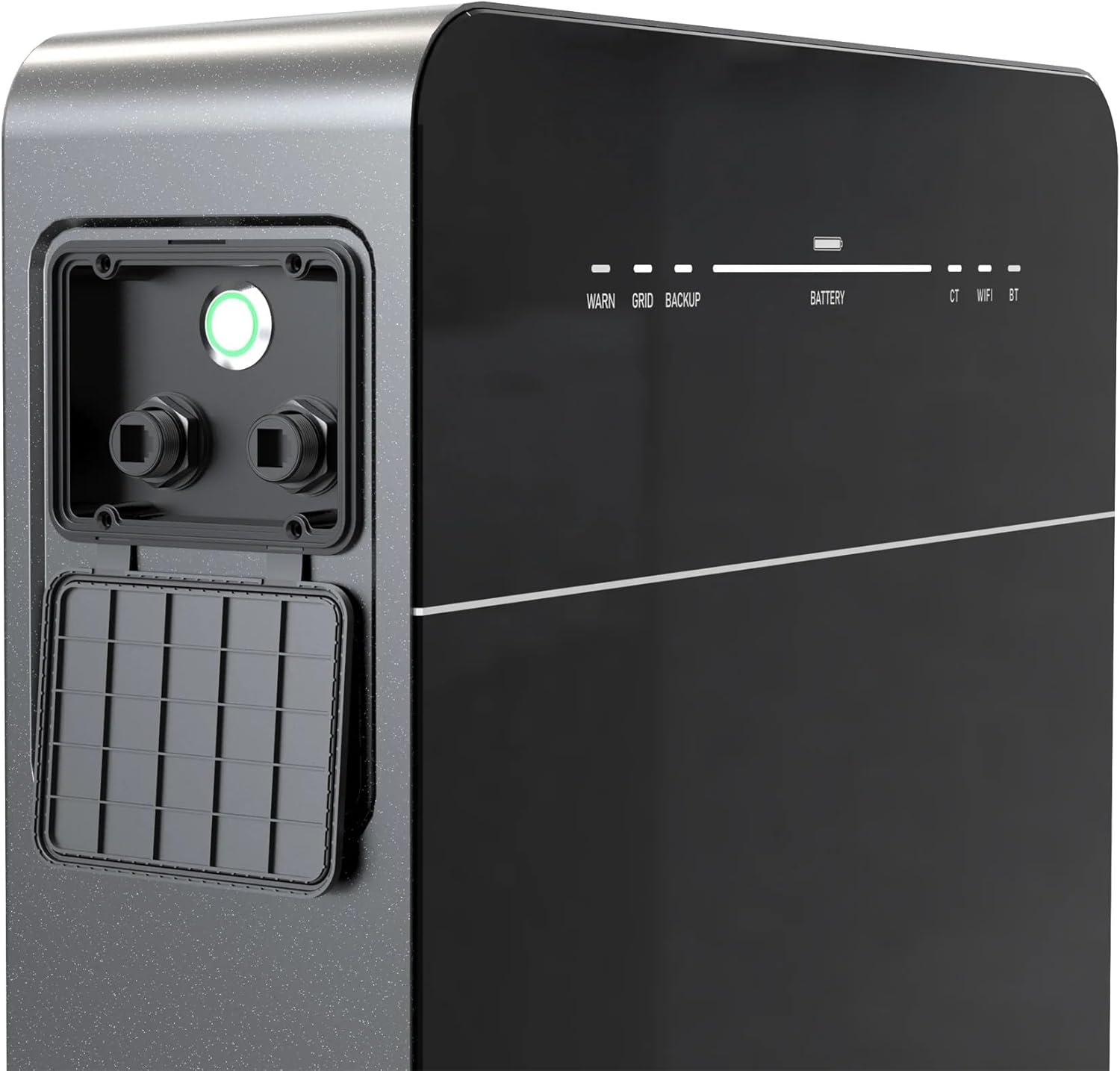
- Dual RJ45 ports for RS485 communication and Ethernet connectivity.
- Integrated PCB technology for reduced wiring complexity and improved round-trip efficiency.
- 100% compatibility with existing PV (Photovoltaic) systems.
- Up to 2500 W AC input/output power.
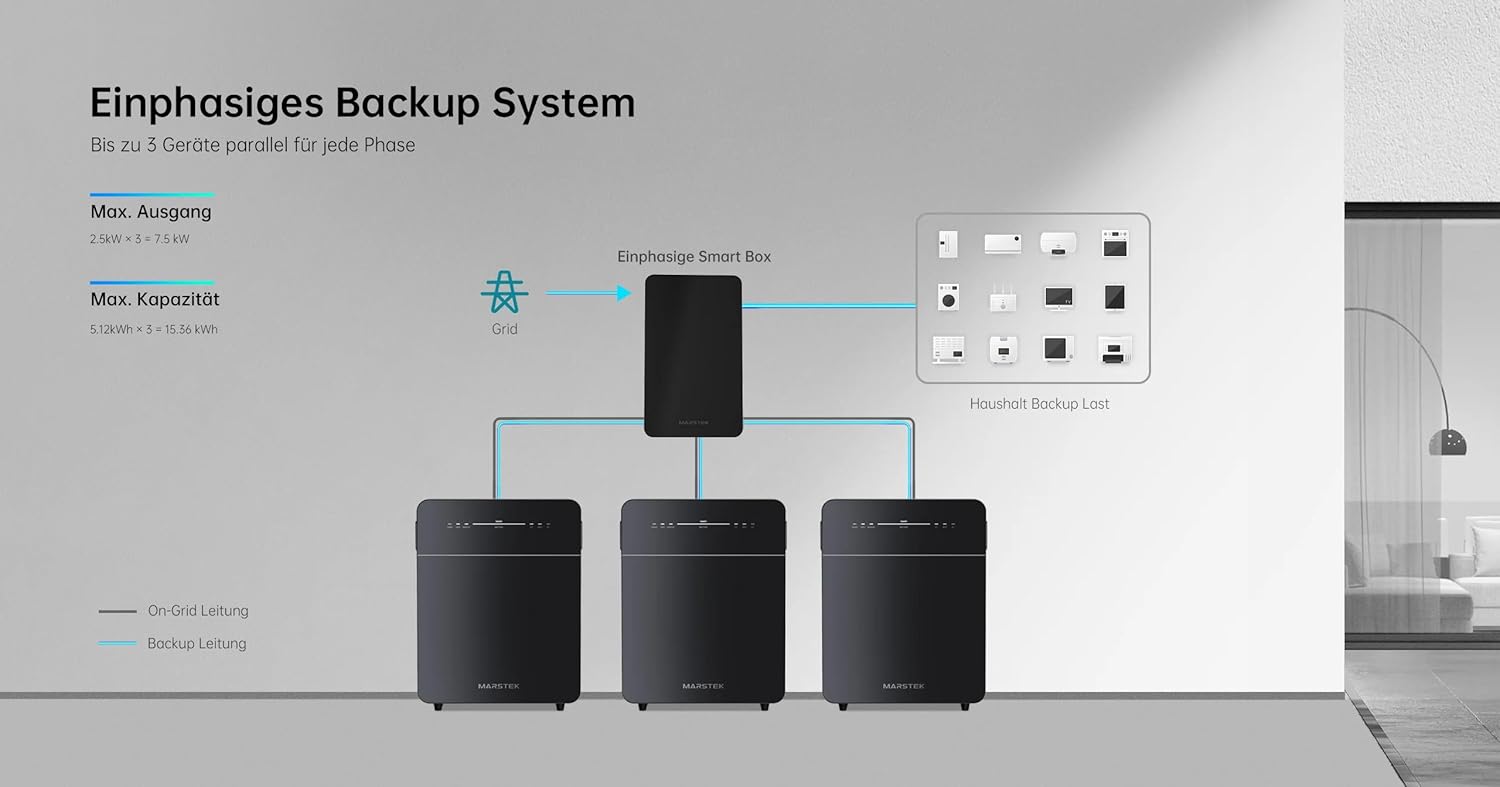
- Expandable capacity up to 15.36 kWh for single-phase systems.
- Long-life LiFePO4 battery with over 6000 cycles and a 10-year warranty.
Компоненттери:
The system consists of the main battery unit and associated connection ports. Indicators on the front panel provide status information.



4. Орнотуу жана орнотуу
Proper installation is crucial for the performance and safety of your Marstek Venus E GEN 3.0 system. It is recommended that installation be performed by a certified electrician.
4.1 Кутудан чыгаруу жана текшерүү
- Carefully remove the battery system from its packaging.
- Inspect the unit for any signs of physical damage. If damage is found, do not proceed with installation and contact your supplier immediately.
- Таңгактоо тизмесинде көрсөтүлгөн бардык компоненттердин бар экендигин текшериңиз.
4.2 Орнотуу
- Install the unit on a flat, stable, and non-flammable surface.
- Ensure adequate clearance around the unit for ventilation (minimum 20 cm on all sides).
- Avoid locations with extreme temperatures, high humidity, or direct exposure to water. The unit is designed for indoor or protected outdoor environments.
4.3 Электр байланыштары
The Venus E GEN 3.0 is an AC-coupled system, meaning it connects directly to your home's AC electrical panel. It is 100% compatible with existing PV systems.
- AC тор байланышы: Connect the system to your main electrical panel via the designated AC input/output port. Follow local electrical codes for wiring and circuit breaker sizing.
- PV System Integration: The system can be integrated with your solar PV inverter to optimize energy usage and storage. Consult the detailed wiring diagrams provided in the full installation guide for specific configurations.
- Негиздөө: Ensure the system is properly grounded to prevent electrical hazards.

4.4 Network Configuration (LAN/WiFi)
The system supports both LAN (Ethernet) and WiFi connectivity for monitoring and control via a smartphone application.
- LAN туташуу: Connect an Ethernet cable to one of the RJ45 ports for a stable wired network connection.
- WiFi туташуусу: Follow the instructions in the dedicated mobile app to connect the device to your home WiFi network.
- Смартфондук колдонмо: Download the official Marstek app (compatible with smartphones) from your app store to monitor system status, energy flow, and adjust settings.

4.5 Системанын конфигурациясы Мисamples

5. Операция
Once installed and connected, the Marstek Venus E GEN 3.0 operates largely automatically, managing energy flow based on your settings and grid conditions.
5.1 Күйгүзүү/өчүрүү
- Күйгүзүү: Press and hold the power button on the unit for approximately 3 seconds until the indicator lights illuminate.
- Өчүрүү: Press and hold the power button for approximately 5 seconds until all indicator lights turn off. Ensure no critical loads are relying on the battery before powering off.
5.2 Статус индикаторлору
The front panel features LED indicators for system status:
- ЭСКЕРТҮҮ: Indicates a warning or fault condition. Refer to the troubleshooting section.
- GRID: Indicates connection to the utility grid.
- КАМДЫК КӨЧҮРМӨ: Indicates the system is providing backup power to connected loads.
- БАТАРЕЯ: Учурдагы батарея заряддын деңгээлин көрсөтөт.
- КТ: Indicates current transformer status.
- WIFI/BT: Indicates WiFi or Bluetooth connectivity status.
5.3 Мониторинг жана контролдоо
Use the Marstek smartphone application to:
- View real-time energy production and consumption.
- Monitor battery charge status and health.
- Set charging and discharging schedules.
- Configure backup power settings.
- Эскертмелерди жана эскертмелерди алыңыз.
5.4 Системаны кеңейтүү
The Marstek Venus E GEN 3.0 system is expandable. Multiple units can be connected in parallel to increase total energy storage capacity up to 15.36 kWh for single-phase systems. Refer to the advanced installation guide for multi-unit configurations.
6. Техникалык тейлөө
The Marstek Venus E GEN 3.0 is designed for minimal maintenance. Regular checks can help ensure optimal performance and longevity.
6.1 Тазалоо
- Ensure the system is powered off and disconnected from the AC supply before cleaning.
- Use a soft, dry cloth to wipe the exterior of the unit. Do not use liquid cleaners, solvents, or abrasive materials.
- Желдетүүчү тешиктерди чаңдан жана таштандылардан тазалаңыз.
6.2 Батареяга кам көрүү
The LiFePO4 battery technology requires no specific user maintenance. The internal Battery Management System (BMS) handles cell balancing and protection. Avoid fully discharging the battery frequently to maximize its lifespan.
6.3 Микропрограмма жаңыртуулары
Periodically check the Marstek app for available firmware updates. Updates can improve performance, add features, or address security vulnerabilities. Follow the in-app instructions for safe firmware updates.
7. Кыйынчылыктарды
If you encounter issues with your Marstek Venus E GEN 3.0, refer to the following common problems and solutions. For persistent issues, contact customer support.
7.1 Жалпы маселелер жана чечимдер
- Система күйбөй жатат:
- Check AC power connection.
- Ensure the power button is pressed and held correctly.
- Verify the circuit breaker is not tripped. - No Grid Connection (GRID LED off):
- Check the AC input cable and connections.
- Verify utility grid power is available.
- Consult an electrician if the issue persists. - WARN LED Illuminated:
- This indicates a system warning or fault. Check the Marstek app for specific error codes or messages.
- Common warnings include over-temperature, under-voltage, or communication errors.
- Power cycle the unit (turn off, wait 1 minute, turn on). If the warning persists, contact support. - No Network Connectivity (WIFI/BT LED off or blinking):
- For WiFi, ensure the unit is within range of your router and the network credentials are correct in the app.
- For LAN, check the Ethernet cable connection.
- Restart your router and the Marstek unit. - Батарея кубатталбай/заряддалбай жатат:
- Check system settings in the Marstek app (e.g., charge/discharge schedules).
- Ensure the PV system or grid connection is active and providing power.
- Verify no fault conditions are present (WARN LED).
8. Техникалык шарттар
The following table outlines the key technical specifications for the Marstek Venus E GEN 3.0 AC Battery System:
| Өзгөчөлүк | Спецификация |
|---|---|
| Модел | Venus E GEN 3.0 |
| Батарея түрү | LiFePO4 |
| Номиналдуу кубаттуулук | 5120 Wh |
| Кеңейтүүчү кубаттуулук | Up to 15.36 kWh (single-phase) |
| AC Input/Output Power | 2500 Вт чейин |
| Байланыш порттору | Dual RJ45 (RS485, Ethernet) |
| Зымсыз байланыш | WiFi, Bluetooth |
| Шайкеш түзмөктөр | Smartphone (for app control) |
| Элемент Салмагы | 60 килограмм |
| Кепилдик | 10 жыл |
9. Кепилдик маалыматы
The Marstek Venus E GEN 3.0 AC Battery System comes with a 10 жылдык чектелген кепилдик from the date of purchase. This warranty covers defects in materials and workmanship under normal use and service conditions. Please retain your proof of purchase for warranty claims. The warranty does not cover damage caused by improper installation, misuse, unauthorized modifications, or acts of nature.
10. Кардарларды колдоо кызматы
For technical assistance, warranty claims, or any questions regarding your Marstek Venus E GEN 3.0 system, please contact your authorized dealer or Marstek customer support. Have your product model and serial number ready when contacting support.
You can typically find support contact information on the official Marstek website or through the mobile application.


