1. Киришүү
The Denon AVC-X2850H is a high-performance 7.2-channel AV Surround Amplifier designed to deliver an immersive home theater experience. It supports the latest video and audio technologies, including 8K Ultra HD, HDR10+, eARC, Dolby Atmos, and DTS:X. This manual provides essential information for setting up, operating, and maintaining your AVC-X2850H to ensure optimal performance and longevity.

Figure 1.1: Denon AVC-X2850H AV Surround Amplifier (Front View) with included remote control and setup microphone.
2. Коопсуздук нускамалары
Please read these safety instructions carefully before using the unit. Keep this manual for future reference.
- Кубат булагы: Түзмөктү AC розеткасына гана туташтырыңызtage арткы панелде көрсөтүлгөн.
- Вентиляция: Ensure adequate ventilation. Do not block ventilation openings. Avoid placing the unit on carpets or near heat sources.
- Нымдуулук: Агрегатты жамгырга же нымдуулукка дуушар кылбаңыз. Ваза сыяктуу суюктуктар толтурулган нерселерди аппараттын үстүнө койбоңуз.
- Чет өлкөлүк объекттер: Do not insert any metallic objects or flammable materials into the unit's openings.
- Тейлөө: Агрегатты өзүңүз тейлөөгө аракет кылбаңыз. Бардык тейлөөлөрдү квалификациялуу тейлөө кызматкерлерине тапшырыңыз.
- Кабелдер: Handle power cords and other cables carefully to prevent damage.
3. Пакеттин мазмуну
Баардык буюмдар пакетте камтылганын текшериңиз:
- Denon AVC-X2850H AV Surround Ampөмүрлүү
- Алыстан башкаруу бирдиги
- Setup Microphone (for Audyssey calibration)
- FM/AM антенналары
- Электр кабели
- Quick Start Guide
- Коопсуздук нускамалары
4. Орнотуу
4.1. Байланыштар
Before making any connections, ensure the AVC-X2850H and all connected devices are powered off and unplugged from the wall outlet.
4.1.1. Speaker Connections
Connect your speakers to the corresponding terminals on the rear panel. Ensure correct polarity (+ to + and - to -) for each speaker. The AVC-X2850H supports a 7.2 channel configuration.
4.1.2. HDMI Connections
Connect your video sources (e.g., Blu-ray player, game console, streaming device) to the HDMI IN ports. Connect your TV or projector to one of the HDMI OUT ports. For optimal audio return, use the HDMI OUT (TV1) port which supports eARC/ARC.

Figure 4.1: Rear panel connections of the AVC-X2850H, illustrating HDMI, speaker, and other audio/video ports.
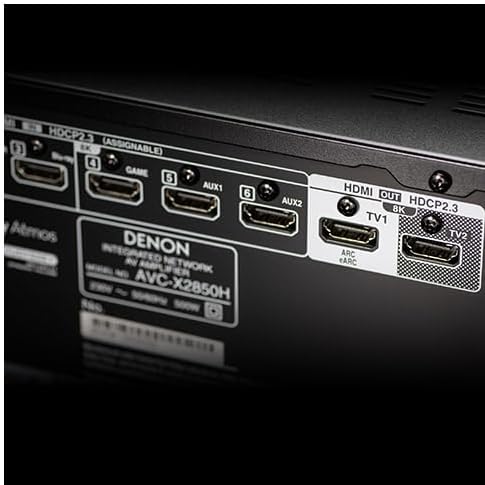
4.2-сүрөт: Детальдуу view of the HDMI input and output ports, including the eARC/ARC compatible HDMI OUT (TV1) port.
4.1.3. Тармакка кошулуу
For network audio features and firmware updates, connect the unit to your home network via an Ethernet cable to the NETWORK port or wirelessly using the built-in Wi-Fi.
4.1.4. Power Connection
After all other connections are made, connect the power cord to the unit and then to a wall outlet.
4.2. Initial Setup and Speaker Calibration
Upon first power-on, the AVC-X2850H will guide you through an on-screen setup assistant. Follow the instructions displayed on your TV screen.
- Audyssey MultEQ XT: Use the included setup microphone and follow the on-screen prompts to perform Audyssey MultEQ XT automatic speaker calibration. This optimizes the sound settings for your specific room acoustics and speaker configuration.
- Тармакты орнотуу: Configure your network settings (Wi-Fi or wired) to enable streaming services and firmware updates.
5. Иштөө нускамалары
5.1. Негизги операция
- Күйгүзүү/өчүрүү: Алдыңкы панелдеги же алыстан башкаруудагы POWER баскычын басыңыз.
- Киргизүүнү тандоо: Use the INPUT SELECT buttons on the front panel or remote control to switch between connected sources (e.g., Blu-ray, Game, TV Audio).
- Үндү көзөмөлдөө: Adjust the master volume using the VOLUME knob on the front panel or the VOLUME +/- buttons on the remote control.
5.2. Network Audio Functions (HEOS)
The AVC-X2850H integrates HEOS Built-in technology, allowing access to various music streaming services and network audio playback.
- HEOS App: Download the free HEOS app to your smartphone or tablet. Use the app to control music playback, manage streaming services (Amazon Music, Spotify, Deezer, etc.), and group HEOS-enabled devices for multi-room audio.
- USB ойнотуу: Connect a USB storage device to the front USB port to play audio files.
- Bluetooth: Pair your Bluetooth device with the AVC-X2850H to stream audio wirelessly.

Figure 5.1: The HEOS app interface, used for controlling network audio functions and streaming services.
5.3. Immersive Audio Technologies
Experience multi-dimensional sound with support for object-based audio formats.
- Dolby Atmos: Enjoy sound that moves around you in three-dimensional space, including overhead effects.
- DTS:X: Delivers an immersive audio experience that adapts to your speaker layout.
- MPEG-4 AAC: Supports audio formats used in 4K/8K satellite broadcasts for high-quality sound with ultra-high-resolution video.
6. Техникалык тейлөө
- Тазалоо: Агрегатты жумшак, кургак чүпүрөк менен сүртүңүз. Абразивдүү тазалагычтарды же эриткичтерди колдонбоңуз.
- Программалык камсыздоонун жаңыртуулары: Periodically check for firmware updates via the network connection to ensure your unit has the latest features and performance enhancements. Access this through the setup menu.
- Вентиляция: Вентиляция тешиктери чаңдан жана таштандыдан таза болушун текшериңиз.
7. Кыйынчылыктарды
Эгер көйгөйлөргө туш болсоңуз, төмөнкү жалпы көйгөйлөрдү жана чечимдерди караңыз:
| Көйгөй | Мүмкүн болгон себеп / Чечим |
|---|---|
| Үн жок |
|
| Видео жок |
|
| Тармакка туташуу маселелери |
|
| Пульт иштебейт |
|
If the problem persists, consult the Denon support webсайтка же кардарларды тейлөөгө кайрылыңыз.
8. Техникалык шарттар
The following specifications are for the Denon AVC-X2850H AV Surround Ampөмүр берүүчү:
- Модел: AVC-X2850H
- Каналдар: 7.2
- Чыгуу кубаттуулугу: 185W per channel (6Ω, 1kHz, THD 10%, 1ch driven)
- Видео колдоо: 8K/60Hz, 4K/120Hz, HDR10+, Dolby Vision, HLG, HDCP 2.3
- Аудио форматтары: Dolby Atmos, DTS:X, Dolby TrueHD, DTS-HD Master Audio, MPEG-4 AAC
- HDMI порттору: 6 Inputs / 2 Outputs (1 x eARC/ARC compatible)
- Байланыш: Wi-Fi, Bluetooth, Ethernet, USB, RCA, Optical
- Өлчөмдөрү (W x D x H): 43.4 см х 33 см х 16.7 см
- Салмагы: 9.5 кг
- ASIN: B0FPQH4Y17
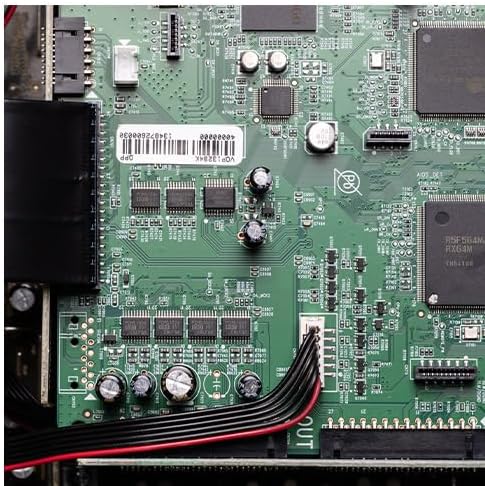
8.1-сүрөт: Ички view of the AVC-X2850H, showcasing its advanced circuitry and discrete power ampкөтөргүч дизайн.
9. Кепилдик жана колдоо
Denon products are manufactured to the highest quality standards. For warranty information, please refer to the warranty card included with your product or visit the official Denon webсайт.
For technical support, FAQs, and additional resources, please visit the Denon support page:


