1. Киришүү
This manual provides essential information for the safe and efficient operation of your SANSUI 65-inch 4K QLED Google TV, model JSW65UG23Q. Please read this manual thoroughly before using the television and retain it for future reference.
2. Коопсуздук маалыматы
Өрт, электр шок жана жаракат алуу коркунучун азайтуу үчүн бул телевизорду колдонууда ар дайым негизги коопсуздук чараларын сактаңыз.
- Телевизорду жамгырга же нымга тийгизбеңиз.
- Телевизорду ачпаңыз casing; бардык тейлөөлөрдү квалификациялуу кызматкерлерге тапшырыңыз.
- Телевизордун айланасын туура желдетүүнү камсыз кылыңыз.
- Телевизор менен кошо берилген кубат шнурын гана колдонуңуз.
- Телевизорду жылуулук булактарынан жана түз күн нурунан алыс кармаңыз.
- Телевизорду жумшак, кургак чүпүрөк менен гана тазалаңыз.
3. Кутуда эмне бар
Таңгактан чыгарууда бардык компоненттер бар экенин текшериңиз:
- 1 Piece TV
- 1 Piece User Manual (this document)
- 1 Piece Remote Control
- 1 Set Base Stand
- 1 Pair Batteries
- 1 Piece Wall Mounting Set
4. Орнотуу
4.1 Физикалык орнотуу
Your SANSUI TV can be installed using the included base stand for table mounting or with the provided wall mounting set.
Table Mount Installation:
- Телевизордун экранын кылдаттык менен ылдый каратып жумшак, тегиз жерге коюңуз.
- Attach the base stands to the designated slots on the bottom of the TV using the provided screws. Ensure they are securely fastened.
- Телевизорду туруктуу, тегиз жерге коюп, жетиштүү желдетүүнү камсыз кылыңыз.
Дубалга орнотуу:
- Consult the separate wall mount installation guide included with the wall mounting set for detailed instructions.
- Ensure the wall can support the weight of the TV (approximately 15.1 kg) and the wall mount. Professional installation is recommended.
4.2 Перифериялык түзүлүштөрдү туташтыруу
Тышкы түзмөктөрүңүздү тиешелүү портторду колдонуп, телевизорго туташтырыңыз.
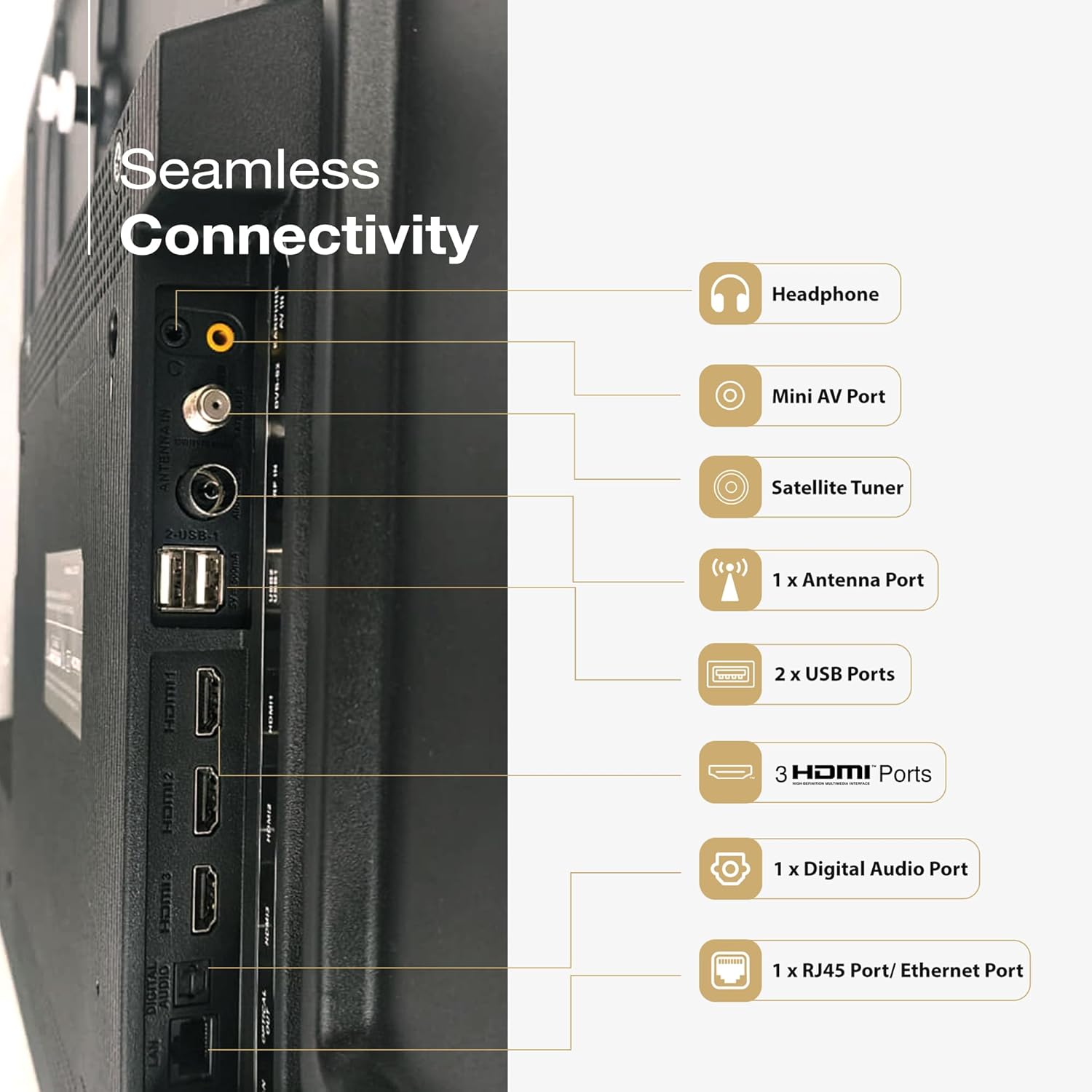
Сүрөт: Арткы view of the SANSUI TV displaying its various input and output ports, including HDMI, USB, and audio connections.
- HDMI порттору (3): Blu-ray ойноткучтарын, оюн консолдорун, приставкаларды ж.б. туташтырыңыз.
- USB порттору (2): Медиа ойнотуу үчүн USB сактагыч түзмөктөрдү туташтырыңыз.
- Ethernet (RJ45) порту: Зымдуу интернет байланышы үчүн.
- Mini AV Port: Эски аналогдук түзмөктөр үчүн.
- Антенна порту: Жер үстүндөгү антеннаны туташтыруу үчүн.
- Digital Audio Port: Тышкы аудио системаларына туташуу үчүн.
- Гарнитура уячасы: Жеке угуу үчүн.
4.3 Кубат туташтыруу
After all connections are made, plug the power cord into the TV and then into a wall outlet. The TV will enter standby mode.
5. Сыналгыңызды иштетүү
5.1 Биринчи жолу орнотуу
Upon first power-on, the TV will guide you through the initial setup process, including language selection, network connection (Wi-Fi or Ethernet), Google account sign-in, and channel scanning.
5.2 Алыстан башкаруу
The included remote control features Bluetooth and IR technology, along with dedicated hotkeys for popular streaming services and Google Assistant.

Image: The SANSUI Smart Remote control, highlighting the Google Assistant button and quick access hotkeys for Netflix, Prime Video, and YouTube.
- Кубат баскычы: Телевизорду күйгүзөт/өчүрөт же күтүү режимине коёт.
- Google Жардамчы баскычы: Үн менен башкарууну иштетет.
- Навигация аянтчасы: Меню багыттоо үчүн.
- Көлөм +/-: Үн көлөмүн тууралайт.
- Канал +/-: Каналдарды өзгөртөт.
- Ыкчам баскычтар: Direct access to Netflix, Prime Video, and YouTube.
5.3 Google TV интерфейси
Your SANSUI TV runs on Google TV, providing a personalized home screen with content recommendations from your subscriptions and apps. You can browse movies, shows, and apps, and manage your library.

Image: A living room scene with the SANSUI TV displaying the Google TV interface, featuring various streaming app icons and content suggestions.
5.4 Google Жардамчысы менен үн менен башкаруу
Мазмун издөө, акылдуу үй түзмөктөрүн башкаруу, жооп алуу жана башкалар үчүн пультуңуздагы Google Жардамчы баскычын басыңыз жана буйруктарды айтыңыз.
6. Негизги өзгөчөлүктөрү
The SANSUI JSW65UG23Q TV incorporates advanced technologies for an enhanced viewing жана аудио тажрыйбасы.
6.1 4K QLED Display with Dolby Vision, HDR10+, HLG

Image: A close-up of a reptile eye displayed on the SANSUI 4K QLED TV, illustrating the clarity and color depth of 4K, QLED, and HDR10+ technologies.
- 4K токтому: Provides four times the detail of Full HD for crisp, clear images.
- QLED технологиясы: Quantum Dot technology delivers vibrant and accurate colors with improved brightness.
- Dolby Vision, HDR10+, HLG: Support for multiple High Dynamic Range formats ensures superior contrast, brightness, and color reproduction in compatible content.
6.2 FloLED Panel

Сүрөт: жарылган view diagram showing the layers of the FloLED panel, including the enriched color display with prism layer, advanced light diffusion, and high-intensity glowing LED structure.
The FloLED Panel technology enhances brightness and color uniformity across the screen, utilizing an advanced light diffusion and dispersal system with a high-intensity glowing LED structure.
6.3 Dolby Atmos Sound with Tweeters

Image: A SANSUI TV displaying a lighthouse during a storm, with text indicating "Explosive Sonic with Dolby Atmos" and details about 30W box speakers with tweeters.
Experience immersive audio with Dolby Atmos, delivering multi-dimensional sound that moves around you. The TV features 30W surround sound output with integrated tweeters for clear highs and rich audio.
6.4 HSR 120Hz and MEMC

Image: A person playing a racing game on the SANSUI TV, illustrating the smooth motion provided by HSR 120Hz refresh rate and MEMC technology for lag-free gaming.
The 120Hz High Speed Refresh (HSR) rate combined with Motion Estimation, Motion Compensation (MEMC) technology ensures smooth, blur-free motion, especially beneficial for fast-paced content and gaming.
6.5 Quadcore Processor

Сүрөт: деталдуу view of a MediaTek Quadcore Processor chip on a circuit board, representing the TV's processing power.
Powered by a Quadcore Processor, the TV delivers responsive performance for smooth navigation, quick app loading, and efficient multitasking.
6.6 Bezel-Less Design

Image: A SANSUI TV displaying a large elephant, emphasizing the immersive viewing experience provided by its sleek, bezel-less design.
The TV features a bezel-less design, maximizing screen space and providing a more immersive viewтажрыйбасы.
7. Байланыш
Сиздин SANSUI TV ар кандай туташуу параметрлерин сунуштайт:
- Аппараттык интерфейс: Bluetooth, Ethernet, HDMI, USB
- Жалпы USB порттору: 2
- Audio Input Compatible: HDMI, USB, mini AV
- Bluetooth технологиясы: Ооба
- Wi-Fi: Supports 2.4GHz and 5GHz bands for wireless internet connection.
- Chromecast built-in / Google Cast: Allows casting content from compatible mobile devices to the TV.
8. Техникалык тейлөө
Туура тейлөө сыналгыңыздын узак иштөөсүн жана оптималдуу иштешин камсыз кылат.
- Экранды тазалоо: Экранды жумшак, түксүз чүпүрөк менен акырын сүртүңүз. өжөр белгилери үчүн, бир аз гampчүпүрөккө суу же атайын экран тазалагыч (экранга түздөн-түз чачпаңыз).
- Тазалоо Casing: Телевизорду сүртүү үчүн жумшак, кургак чүпүрөктү колдонуңуз casinг. Абразивдүү тазалагычтардан же эриткичтерден качыңыз.
- Вентиляция: Телевизордун артындагы желдеткич тешиктери жабылбаганын текшериңиз.
- Электр кабели: Электр шнурунун бузулушу бар-жоктугун дайыма текшерип туруңуз.
9. Кыйынчылыктарды
If you encounter issues, refer to the following common solutions before contacting customer support.
| Көйгөй | Мүмкүн чечим |
|---|---|
| Күч жок | Кубат шнуру телевизорго жана розеткага бекем сайылганын текшериңиз. Пульттагы же телевизордогу кубат баскычын басыңыз. |
| Сүрөт жок, бирок үн бар | Туура киргизүү булагы тандалганын текшериңиз. Тышкы түзмөктөргө кабелдик байланыштарды текшериңиз. |
| Үн жок, бирок сүрөт бар | Check volume level and mute status. Verify audio cable connections. If using external audio, ensure TV speakers are not disabled. |
| Пульт иштебей жатат | Replace batteries. Ensure no obstructions between the remote and the TV's IR sensor. Re-pair Bluetooth remote if necessary. |
| Сүрөттүн сапаты начар | Check antenna or cable connections. Adjust picture settings (brightness, contrast, sharpness). Try a different input source. |
| Wi-Fi'га туташпай жатат | Ensure Wi-Fi is enabled on the TV. Restart your router. Check Wi-Fi password. Try moving the TV closer to the router or using a wired Ethernet connection. |
10. Техникалык шарттар
Detailed technical specifications for the SANSUI JSW65UG23Q TV:
| Өзгөчөлүк | Спецификация |
|---|---|
| Бренд | САНСУИ |
| Модель аты | JSW65UG23Q |
| Screen Size | 65 дюйм (165 см) |
| Дисплей технологиясы | QLED |
| Резолюция | 4K (3840 x 2160 пиксел) |
| Жаңыртуу ылдамдыгы | 120 Hz (HSR) |
| Операция системасы | Google TV |
| Өзгөчөлүктөр | Bezel Less Design, Wide Viewing Angle, Chromecast built-in, Google Cast, Dolby Vision, HDR10+, HLG, MEMC |
| Аудио коддоо | Dolby Atmos |
| Динамиктердин максималдуу чыгаруу күчү | 30 Ватт |
| Динамиктин айланасындагы үн каналынын конфигурациясы | 2.0 |
| Аппараттык интерфейс | Bluetooth, Ethernet, HDMI (3), USB (2) |
| Эстутум сактоо сыйымдуулугу | 32 ГБ |
| Жооп убактысы | 8 Миллисекунд |
| Продукциянын өлчөмдөрү (LxWxH) | 144.5 x 90.8 x 7.8 см |
| Элемент Салмагы | 15.1 кг |
| Тtage | 240 вольт |
| Ватtage | 200 Ватт |
| Модель жылы | 2025 |
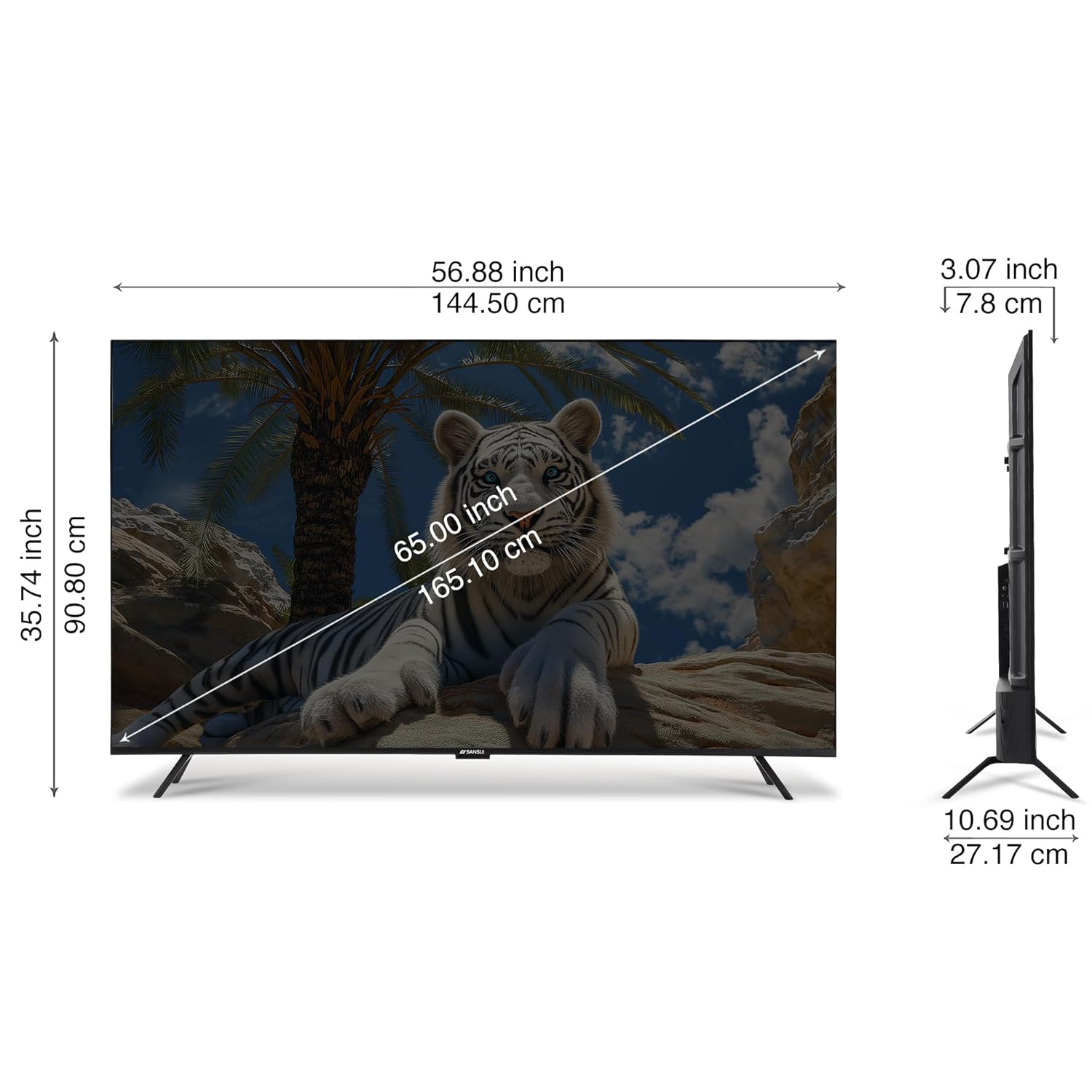
Image: A diagram illustrating the physical dimensions of the SANSUI 65-inch TV, showing measurements in both inches and centimeters for screen size, width, height, and depth.
11. Кепилдик жана колдоо
Your SANSUI 65-inch 4K QLED Google TV comes with a 1 жылдык кепилдик. For warranty claims, technical support, or service requests, please contact SANSUI customer care.
For further assistance, visit the official SANSUI website or refer to the contact information provided in your warranty card.
12. Продукт бүтүп калдыview Video
Көрүү үчүн бул видеону көрүңүзview of the SANSUI Smart TV features.
Видео: Кыскача алдын ала маалыматview видео шоуcasing various features and design aspects of the SANSUI Smart TV line, including display quality, sound, and smart functionalities.


