1. Киришүү
Welcome to the user manual for your SGIN Android Tablet 10.1 Inch, Model GE8300. This manual provides essential information for setting up, operating, maintaining, and troubleshooting your new tablet. Designed with children in mind, this tablet features a durable case, parental controls, and pre-installed educational content through Kidoz software. Please read this manual thoroughly to ensure proper use and to maximize your tablet's potential.
2. Продукт бүтүп калдыview
The SGIN Android Tablet 10.1 Inch is equipped with a 10.1-inch HD IPS display, a quad-core processor, 4GB RAM, and 64GB of internal storage. It runs on Android 13 and includes a protective case with an adjustable bracket.
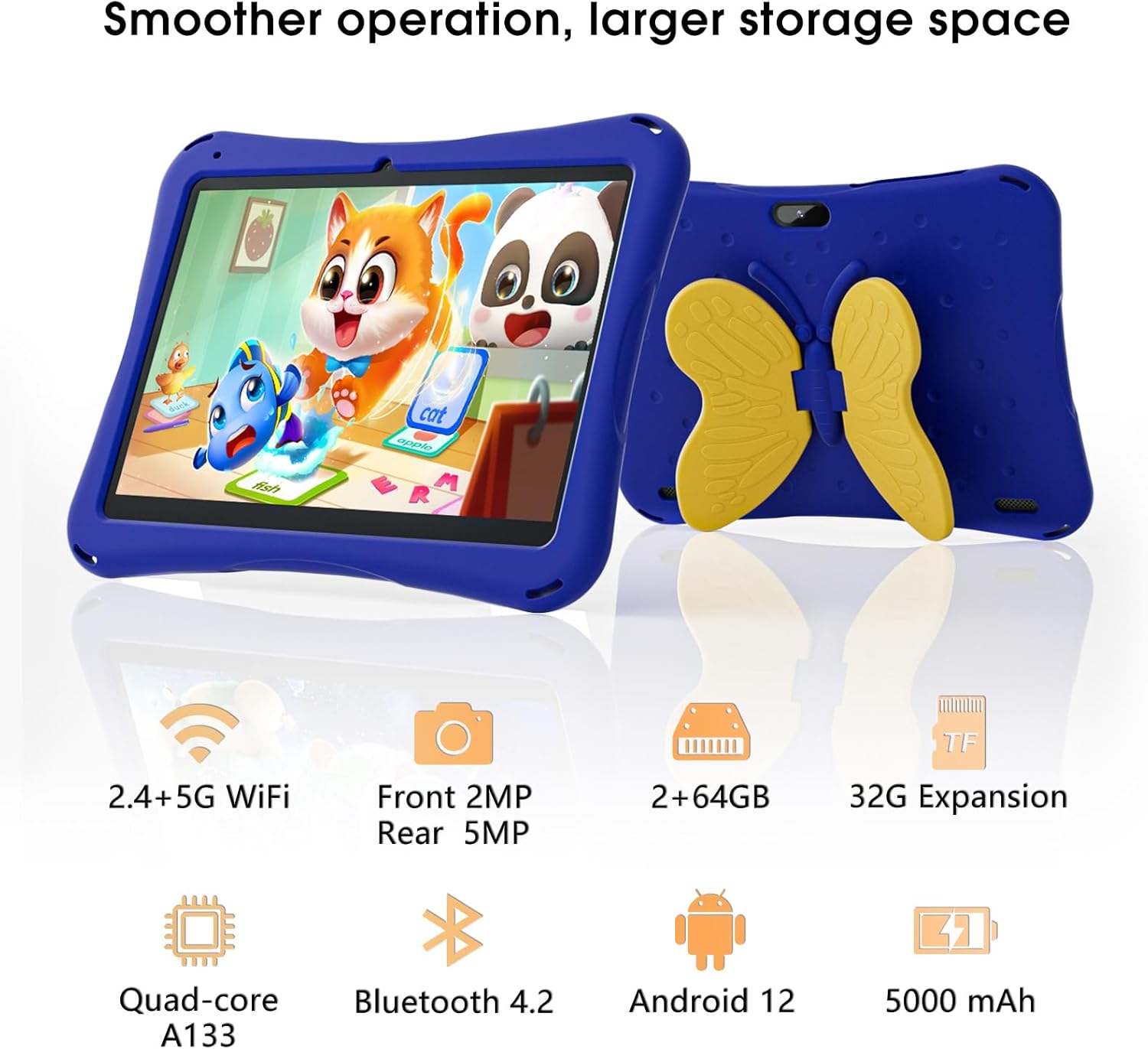
Image: SGIN Android Tablet 10.1 Inch with its protective blue case and yellow butterfly stand.
Планшет компоненттери

Image: Detailed diagram illustrating the various components and ports of the SGIN Android Tablet.
- Алдыңкы камера: Видео чалуулар жана селфи үчүн.
- Арткы камера: Сүрөт жана видео тартуу үчүн.
- Баяндамачылар: Аудио чыгаруу үчүн.
- Тип-C Port: Заряддоо жана маалыматтарды өткөрүү үчүн.
- TF карта уячасы: Кеңейтилүүчү сактагыч үчүн.
- Гарнитура уячасы: Зымдуу кулакчындарды туташтыруу үчүн.
- Көлөмүн жогорулатуу: Button to raise the audio level.
- Үнүн азайтуу: Button to lower the audio level.
- кашаа: Adjustable stand integrated into the protective case.
3. Орнотуу
3.1 Планшетти заряддоо
Before first use, fully charge the tablet using the provided Type-C cable and power adapter. The 5000mAh battery provides approximately 6-8 hours of usage on a full charge. A charging indicator will typically appear on the screen.
3.2 Күйгүзүү/өчүрүү
- Күйгүзүү үчүн: Press and hold the power button (usually located on the side) until the SGIN logo appears.
- Өчүрүү үчүн: Press and hold the power button, then select 'Power Off' from the options on the screen.
- Кайра баштоо үчүн: Кубат баскычын басып, кармап туруңуз, андан кийин параметрлерден "Кайра баштоону" тандаңыз.
3.3 Баштапкы орнотуу жана Wi-Fi туташуусу
Upon first power-on, follow the on-screen prompts to complete the initial Android 13 setup. This includes selecting your language, region, and connecting to a Wi-Fi network. The tablet supports both 2.4G and 5G Wi-Fi for stable internet connectivity.
- барыңыз Орнотуулар > Тармак жана интернет > Wi-Fi.
- Wi-Fi которуштуруу On.
- Тизмеден каалаган тармакты тандаңыз.
- Эгер суралса, сырсөздү киргизиңиз, андан кийин таптаңыз Туташуу.
4. Иштөө нускамалары
4.1 Негизги навигация
The tablet uses a touch-sensitive screen for navigation. Common gestures include tapping to select, swiping to scroll, pinching to zoom, and long-pressing for additional options.
4.2 Камераны колдонуу
The tablet features a 2MP front-facing camera and a 5MP rear camera. To use the camera:
- ачыңыз Камера колдонмо.
- Select between front and rear cameras using the switch icon.
- Сүрөткө тартуу же видео жазууну баштоо/токтоо үчүн жапкычты таптаңыз.
4.3 Сактагычты башкаруу
The tablet comes with 64GB of internal storage. If more space is needed, you can expand it by inserting a TF (microSD) card into the TF card slot. The tablet supports expansion up to 34GB.
4.4 Bluetooth байланышы
The tablet supports Bluetooth 4.2 for connecting to wireless accessories such as headphones or speakers.
- барыңыз Орнотуулар > Туташкан түзмөктөр > Туташуу артыкчылыктары > Bluetooth.
- Bluetooth которуштуруу On.
- Түзмөгүңүздү жупташтыруу үчүн жеткиликтүү түзмөктөрдүн тизмесинен тандаңыз.
5. Ата-энелик көзөмөл функциялары
The SGIN tablet includes a built-in parental control security system to manage your child's usage and content access.
- Сырсөздөрдү коюу: Create a password to secure parental control settings.
- Экран убактысынын чектөөлөрү: Define daily usage limits for the tablet.
- Мазмунду чыпкалоо: Eliminate unwanted ads and create specific media files or approved websites for your children.
- Multiple Accounts: Set up individual accounts for each child, allowing personalized settings and content access.
6. Kidoz Kids Software
The tablet comes with the Kidoz Kid's software pre-installed, offering a safe and engaging environment for children.
- Accessing Kidoz: Launch the Kidoz app from the home screen.
- Kids Store: Explore thousands of free games and educational apps available for download within the Kidoz environment.
- Билим берүү мазмуну: Kidoz provides content that supports learning in subjects like math, language, music, and painting.
7. Техникалык тейлөө
7.1 Тазалоо
Use a soft, lint-free cloth to clean the screen and the tablet's body. For stubborn smudges, slightly dampчүпүрөктү суу менен. Катуу химиялык заттардан же абразивдүү материалдардан алыс болуңуз.
7.2 Батареяга кам көрүү
To prolong battery life, avoid exposing the tablet to extreme temperatures. Charge the tablet regularly and avoid letting the battery completely drain frequently.
7.3 Программалык камсыздоо жаңыртуулары
Оптималдуу иштөөнү жана коопсуздукту камсыз кылуу үчүн системанын жаңыртууларын мезгил-мезгили менен текшерип туруңуз. Орнотуулар > Система > Системаны жаңыртуу.
7.4 Коргоочу кап
The included kid-proof case is designed to protect the tablet from dust, bumps, and drops. It also features a hollow design for heat dissipation. Ensure the tablet is properly seated within the case for maximum protection.

Image: The durable anti-drop protective case with its adjustable bracket.
8. Кыйынчылыктарды
If you encounter issues with your SGIN tablet, refer to the following common solutions:
- Планшет күйбөйт: Ensure the tablet is charged. Connect it to the charger and wait a few minutes before attempting to power it on again.
- Жоопсуз экран: If the screen becomes unresponsive, try restarting the tablet by holding down the power button for approximately 10-15 seconds until it powers off, then power it on normally.
- Wi-Fi туташуу маселелери: Check if other devices can connect to the Wi-Fi network. Restart your Wi-Fi router. On the tablet, forget the network and reconnect.
- Жай аткаруу: Close unused applications running in the background. Clear cache data for apps. Consider performing a factory reset if performance issues persist (back up important data first).
- Колдонмолор бузулуп жатат: Ensure apps are updated to their latest versions. Clear the app's cache and data via Орнотуулар > Колдонмолор > [Колдонмонун аты] > Сактоо жана кэш.
Бул кадамдар менен чечилбеген көйгөйлөр үчүн кардарларды колдоо кызматына кайрылыңыз.
9. Техникалык шарттар
Key technical specifications for the SGIN Android Tablet 10.1 Inch Model GE8300:
| Өзгөчөлүк | Спецификация |
|---|---|
| Модель номери | GE8300 |
| Screen Size | 10.1 дюйм |
| Display Resolution | 1280 x 800 пиксел (HD IPS) |
| Процессор | 1.6 GHz Quad-core (Allwinner A133) |
| RAM | 4 ГБ (2 ГБ физикалык + 2 ГБ кеңейтилүүчү) |
| Ички сактагыч | 64 ГБ ROM |
| Кеңейтүүчү сактагыч | TF картасы аркылуу 34 ГБ чейин |
| Операция системасы | Android 13 |
| Батарея сыйымдуулугу | 5000mAh |
| Алдыңкы камера | 2MP |
| Арткы камера | 5MP |
| Зымсыз байланыш | 2.4G/5G WiFi, Bluetooth 4.2 |
| Түс | Deep Blue |
| Почталардын өлчөмдөрү | 32.2 x 20.4 x 4.7 см; 1.04 кг |
10. Кепилдик жана колдоо
10.1 Продукциянын кепилдиги
The SGIN Android Tablet 10.1 Inch Model GE8300 comes with a 1 жылдык кепилдик сатып алынган күндөн тартып. Бул кепилдик нормалдуу колдонуудагы өндүрүш кемчиликтерин камтыйт. Кепилдик дооматтары үчүн сатып алганыңыздын далилин сактап коюңуз.
10.2 Кардарларды колдоо
If you require further assistance or have questions not covered in this manual, please contact SGIN customer support. Refer to the product packaging or the official SGIN webакыркы байланыш маалыматы үчүн сайт.


