1. Киришүү
This manual provides essential information for the safe and efficient use of your Baseus Picogo 100W USB C Charger. Please read this manual thoroughly before operating the device and retain it for future reference.

Figure 1: Baseus Picogo 100W USB C Charger and included cables.
The Baseus Picogo 100W USB C Charger is a multi-port power adapter designed for fast charging a variety of devices, including laptops, tablets, and smartphones. It features a smart digital display for real-time monitoring and incorporates advanced GaN technology for efficient and safe operation.
2. Продукциянын өзгөчөлүктөрү
- 100 Вт өтө тез кубаттоо: Delivers up to 100W power from either USB-C port, enabling rapid charging for compatible devices.
- Акылдуу санариптик дисплей: Provides real-time information on charging status, temperature, and individual port output.
- 3-бирде-1 көп порттуу дизайн: Equipped with two USB-C ports and one USB-A port for simultaneous charging of up to three devices.
- Компакт жана бүктөлүүчү: Features a compact design and foldable plug for enhanced portability, making it ideal for travel.
- Advanced GaN Technology with BCT: Utilizes Gallium Nitride (GaN) technology for high efficiency and reduced heat generation, complemented by AI-powered Baseus Cooling Technology (BCT) for continuous temperature monitoring.

Figure 2: The smart digital display provides real-time charging data.
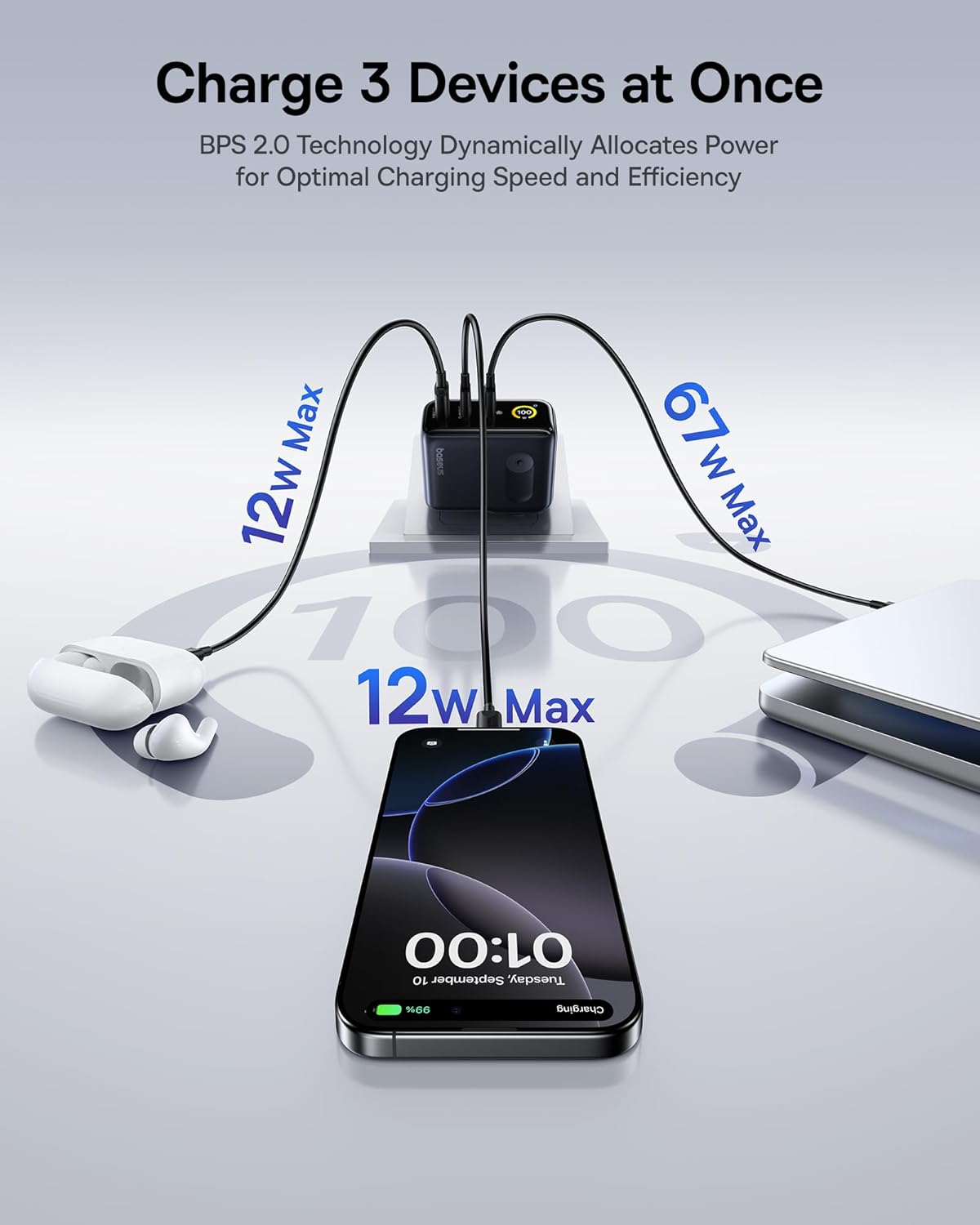
Figure 3: The charger supports simultaneous charging of multiple devices.
3. Орнотуу
- Заряддагычты таңгактан чыгаруу: Carefully remove the Baseus Picogo 100W USB C Charger and the included 100W USB C cable from its packaging.
- Сайгычты ачыңыз: If the AC prongs are folded, gently unfold them until they lock into place.
- Розеткага туташуу: Insert the charger's AC prongs into a standard wall outlet. The smart digital display will illuminate.
- Түзмөктөрдү туташтыруу: Use appropriate USB-C to USB-C or USB-C to USB-A cables to connect your devices to the available ports on the charger.
Video 1: Demonstrates connecting the Baseus Picogo 100W USB C Charger to a power outlet and observing the smart display.
4. Иштөө нускамалары
4.1 Заряддоо түзүлүштөрү
Once connected to a power outlet, plug your devices into the charger. The charger will automatically detect the connected devices and deliver optimal power. The smart digital display will show the real-time wattage output for each port and the overall charging status.
4.2 Understanding the Smart Digital Display
The display provides key information:
- Total Power Output (W): Бириктирилген ватты көрсөтөтtage бардык туташкан түзмөктөргө жеткирилет.
- Individual Port Output (W): Ват көрсөтөтtage for each active USB-C (C1, C2) and USB-A (A) port.
- Температура: Indicates the charger's operating temperature, monitored by BCT.
- Balanced Mode Indicator: A snowflake icon indicates the charger is in balanced cooling mode.
4.3 Дисплейди башкаруу
The charger features a touch-sensitive button on its side for display control:
- Жалгыз басуу: Switches between different display interfaces (e.g., total wattage, individual port details).
- Кош басуу: Rotates the display 90 degrees for better viewбагыттоо.
- Басуу жана кармап туруу: Turns the display off completely. Press again to turn it back on.
Видео 2: Бүттүview of the Baseus Picogo AE21 100W Charger Block, including its ports and display functionality.
5. Техникалык тейлөө
- Тазалоо: Тазалоодон мурун заряддагычты розеткадан ажыратыңыз. Бетти сүртүү үчүн жумшак, кургак чүпүрөктү колдонуңуз. Суюк тазалагычтарды же аэрозолдорду колдонбоңуз.
- Сактагыч: When not in use, store the charger in a cool, dry place away from direct sunlight and moisture. Ensure the foldable plug is retracted for compact storage.
- Колдонуу: Кубаттагычты түшүрүп албоодон же катуу соккуга кабылбоодон алыс болуңуз. Кубаттагычты бөлүктөргө бөлүүгө же өзгөртүүгө аракет кылбаңыз, анткени бул кепилдикти жокко чыгарып, зыянга же жаракатка алып келиши мүмкүн.
6. Кыйынчылыктарды
| Көйгөй | Мүмкүн себеп | Чечим |
|---|---|---|
| Заряддагыч күйбөй жатат. | розеткадан электр энергиясы жок; бош байланыш. | Check if the wall outlet is functional. Ensure the charger is firmly plugged in. |
| Түзмөк кубатталбай жатат же жай кубатталууда. | Incompatible cable; device not supporting fast charging; multiple high-power devices connected. | Use a certified fast-charging cable. Verify device compatibility. If charging multiple devices, power distribution may adjust; try charging fewer devices or check individual port outputs on the display. |
| Smart display is off. | Display turned off manually. | Press the side button once to reactivate the display. |
| Заряддагыч иштөө учурунда жылуу сезилет. | Normal operation; high power output. | This is normal due to GaN technology and high power delivery. The BCT system actively monitors temperature to ensure safe operation. If it becomes excessively hot, disconnect immediately and contact support. |
7. Техникалык шарттар
| Өзгөчөлүк | Деталь |
|---|---|
| Бренд | Baseus |
| Модель номери | E0121C |
| Ватtage | 100 ватт |
| Жалпы USB порттору | 3 (2x USB Type C, 1x USB Type A) |
| Киргизүү көлөмүtage | 240 вольт |
| Элемент Салмагы | 9.9 унция |
| Пакеттин өлчөмдөрү | 5.2 x 3.39 x 2.13 дюйм |
| Өзгөчөлүктөр | Fast Charging, Multi Device Charging, Smart Display Screen, Travel-friendly |
| Шайкеш түзмөктөр | Tablet, Laptop, Cell Phone, Headphone, Smart Watch, Switch, Steam Deck, ROG Ally |
| Камтылган компоненттер | Baseus Picogo AE21 100W USB C Charger, 100W USB C Cable, User Manual |
8. Кепилдик жана колдоо
For warranty information and technical support, please refer to the documentation included with your product or contact Baseus directly.
Байланыш маалыматы:
- Global Phone Support: +1 800 220 8056
- Global Email Support: care@baseus.com
Please have your product model number (E0121C) and purchase details ready when contacting support.

Figure 4: Back of product packaging with support details and certifications.


