1. Киришүү
This manual provides detailed instructions for the installation, operation, and maintenance of your Varstrom 48V 500W Ebike Hub Motor Conversion Kit. Please read this manual thoroughly before attempting installation or operation to ensure proper function and safety. This kit is designed to convert a standard pedal bicycle into an electric bicycle, offering enhanced performance and efficiency.
2. Коопсуздук маалыматы
Always prioritize safety when working with electrical components and bicycles. Failure to follow safety guidelines can result in serious injury or damage to the product.
- Кесиптик орнотуу сунушталат: If you are unsure about any step, seek assistance from a qualified bicycle mechanic or ebike specialist.
- Электр энергиясын өчүрүү: Always disconnect the battery before performing any installation, maintenance, or troubleshooting.
- Электр коопсуздугу: Avoid exposing electrical components to water or extreme moisture. Ensure all connections are secure and properly insulated.
- Тормозду текшерүү: After installation, thoroughly test your bicycle's brakes to ensure they are functioning correctly.
- Туулга колдонуу: Always wear a helmet and appropriate safety gear when riding an ebike.
- Жергиликтүү эрежелер: Be aware of and comply with all local laws and regulations regarding ebike usage, speed limits, and power output.
- Батарея менен иштөө: Handle the battery with care. Do not puncture, short-circuit, or expose it to extreme temperatures. Use only the charger provided or recommended by Varstrom.
3. Пакеттин мазмуну
Verify that all components listed below are present in your package. If any items are missing or damaged, contact your seller immediately.

Figure 3.1: Varstrom Ebike Conversion Kit Package Contents
- Rear Wheel & Hub Motor (Pre-assembled)
- Controller
- Brake Lever or Hydraulic Brake Sensor (Optional)
- Thumb Throttle
- Controller Case
- Varstrom LCD Display (Optional)
- Батарея (Милдеттүү эмес)
- Узартуу кабель
- PAS (Pedal Assist Sensor)
- 1T4 кабели
- Фара
- Пластик боолор
- Sticker (Motor Specification Label)
4. Продукт бүтүп калдыview жана Техникалык шарттар
The Varstrom 48V 500W Ebike Hub Motor Conversion Kit provides a powerful and efficient solution for electrifying your bicycle. It features a brushless gear drive motor, various display options, and compatibility with different bicycle types.
4.1. Негизги компоненттер

Figure 4.1: Main Components of the Conversion Kit
- Хаб мотору: 48V 500W brushless gear drive motor, available for front or rear wheel installation. Features helical nylon gears for durability and quiet operation.
- Контроллер: Manages power delivery to the motor. Max current 22A/30A.
- Дисплей: Optional LCD displays (VD03, EKD01, VD04) provide ride data, PAS level control, and optional features like remote locking/unlocking and navigation.
- PAS сенсору: Pedal Assist Sensor detects pedaling motion to provide motor assistance.
- Муунткуч: Provides on-demand power assistance.
- Brake Levers/Sensors: Cut off motor power when brakes are applied for safety.
4.2. Мотордун спецификациялары

Figure 4.2: Varstrom Hub Motor Specifications Overview

Figure 4.3: 125XVH Rear Hub Motor (Performance Version) Specifications
| Спецификация | Нарк |
|---|---|
| Мотор түрү | Gear Drive Brushless Motor |
| Номиналдуу кубаттуулук | 500 Ватт |
| Чоку күч | 864 Ватт |
| Rated Voltage | 48 вольт (ток) |
| Максималдуу ылдамдык | 45-50 KM/H (approx. 31 MPH) |
| Max Torque | 65 Нм |
| Натыйжалуулук | ≥80% |
| Compatible Dropout Size | 135-145mm Rear Dropout |
| Тормоз түрү шайкештиги | Disc Brake / V Brake |
| Кассета түрү | ≤10-Speed Cassette |
| Noise Grade | <60дБ |
| Суу өткөрбөйт рейтинги | IPX5 |
| Иштөө температурасы | -20°C ~ 45°C |
4.3. Батареянын мүнөздөмөлөрү (милдеттүү эмес)
If your kit includes a battery, refer to the following specifications. Note that battery models and capacities may vary.
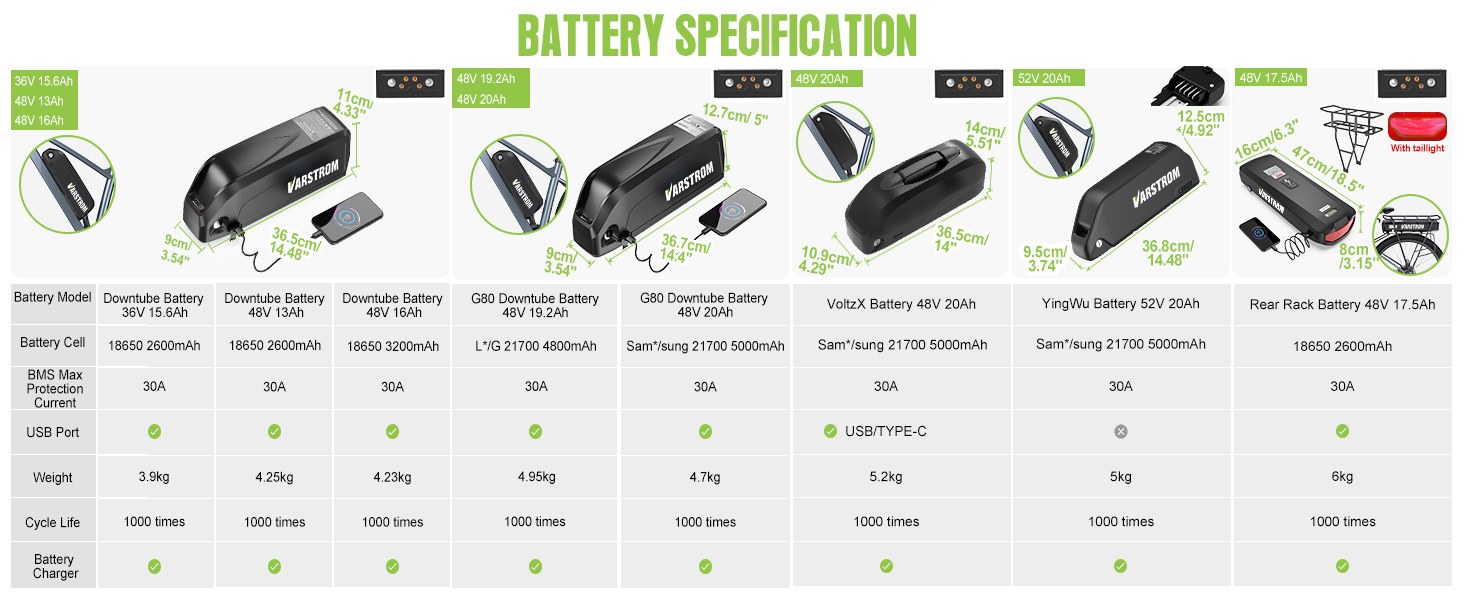
Figure 4.4: Varstrom Ebike Battery Specifications
4.4. Дисплей параметрлери

Figure 4.5: Varstrom Display Options (VD03, EKD01, VD04)
The kit may come with one of the following display options, each offering different features:
- VD03 Display: 1.5" LCD screen, 9 PAS levels, IP67 waterproof, English language support.
- EKD01 Display: 2.4" TFT screen, 9 PAS levels, IP67 waterproof, navigation function, multi-language support, remote locking/unlocking via app.
- VD04 Display: 3.5" IPS screen, 9 PAS levels, IP67 waterproof, navigation function, multi-language support, remote locking/unlocking via app.
5. Орнотуу боюнча колдонмо
Careful installation is crucial for the safe and reliable operation of your ebike kit. Follow these steps sequentially.
5.1. Орнотууга чейинки текшерүүлөр
- Bicycle Compatibility: Ensure your bicycle frame has the correct dropout spacing (135-145mm for rear hub motor, 100mm for front hub motor).
- Дөңгөлөктүн көлөмү: Confirm the wheel size of your kit matches your bicycle (20", 26", 27.5", or 700C).

Figure 5.1: Dropout and Brake Compatibility

Figure 5.2: How to Choose the Correct Wheel Size
5.2. Motor Wheel Installation
- Remove your existing bicycle wheel.
- Install the new motor wheel into the appropriate dropout (front or rear). Ensure the motor cable exits towards the frame.
- Secure the wheel with axle nuts, ensuring it is centered and tight.
- If using disc brakes, install the disc rotor onto the motor hub. If using V-brakes, ensure the rim is properly aligned.
5.3. Контроллерди орнотуу
Mount the controller in a secure, protected location on your bike frame, typically using the provided controller case and plastic straps. Ensure it is away from moving parts and potential water splashes.
5.4. Зымдарды туташтыруу
Refer to the wiring diagram below for connecting all components to the controller. Ensure all connectors are firmly seated and waterproofed where applicable.

Figure 5.3: Easy Installation Wiring Diagram
- Connect the motor cable to the controller.
- Install the PAS sensor on the left side of the bottom bracket. Ensure the sensor and magnet disc are correctly aligned and spaced. Connect the PAS sensor cable to the controller.
- Mount the thumb throttle on the handlebar and connect its cable to the controller.
- Install the brake levers (or brake sensors) on the handlebars and connect their cables to the controller.
- Mount the display on the handlebar and connect its cable to the controller.
- Connect the headlight to the designated port on the controller or 1T4 cable.
- If using an optional battery, connect it to the controller.
5.5. Кабелдик башкаруу
Use the provided plastic straps to neatly secure all cables along the bicycle frame. Ensure cables do not interfere with steering, braking, or pedaling, and are protected from moving parts.
6. Иштөө нускамалары
Familiarize yourself with the operation of your new ebike system before riding.
6.1. Күйгүзүү / Өчүрүү
To power on the system, press and hold the power button on your display. To power off, press and hold the power button again.
6.2. Педальга жардам берүүчү система (PAS)
The PAS system provides motor assistance based on your pedaling. Use the '+' and '-' buttons on your display to adjust the PAS level. Higher levels provide more assistance.
6.3. Throttle Operation
The thumb throttle provides instant motor power, allowing you to ride without pedaling. Use it cautiously, especially when starting from a standstill.
6.4. Функцияларды көрсөтүү
Your display provides important information and control over your ebike system. Functions may vary slightly depending on your specific display model (VD03, EKD01, VD04).
- Ылдамдык көрсөтүү: Current speed, average speed, max speed.
- Батарея деңгээли: Батареянын калган зарядын көрсөтөт.
- PAS Level Indicator: Учурдагы педалдын жардам деңгээлин көрсөтөт.
- Одометр/Сапар аралыгы: Tracks total distance or trip distance.
- Фараны башкаруу: Turn the headlight on/off via the display.
- Ката коддору: Displays diagnostic codes if a system fault occurs.
- Quick-Switch 25 km/h Mode: For compliance with certain road legality requirements, some displays offer a quick switch to limit speed to 25 km/h (typically by holding '+' and '-' buttons together).
- App Connectivity (EKD01/VD04): Supports remote locking/unlocking and advanced ride data tracking via the 'BIKEGO+' app.
7. Техникалык тейлөө
Regular maintenance ensures the longevity and optimal performance of your Varstrom ebike kit.
- Тазалоо: Regularly clean the motor, controller, and battery with a damp кездеме. Жогорку басымда түздөн-түз электрдик тетиктерди жуубаңыз.
- Батареяга кам көрүү: Батареяны салкын, кургак жерде сактаңыз. Батареянын иштөө мөөнөтүн сактоо үчүн, колдонулбаса да, аны үзгүлтүксүз кубаттап туруңуз. Батареянын толук заряды түгөнүп калышына жол бербеңиз.
- Зымдарды текшерүү: Periodically check all cables and connectors for wear, damage, or loose connections. Ensure waterproof connections are sealed.
- Мотор инспекциясы: Listen for unusual noises from the motor. Ensure the wheel spins freely when power is off.
- Тормоз системасы: Regularly inspect and maintain your bicycle's brake system. Ensure brake levers/sensors are functioning correctly to cut motor power.
- Шина басымы: Maintain correct tire pressure for safety and efficiency.
8. Кыйынчылыктарды
Бул бөлүм сиз кабылышы мүмкүн болгон жалпы көйгөйлөрдү карайт. Татаал көйгөйлөр үчүн кардарларды колдоо бөлүмүнө кайрылыңыз.
| Көйгөй | Мүмкүн себеп | Чечим |
|---|---|---|
| Система күйбөйт | Battery not charged or connected; Loose wiring; Faulty display/controller | Check battery charge and connection; Inspect all wiring; Contact support if issue persists. |
| Мотор жардам бербейт | PAS sensor misaligned or damaged; Brake levers engaged; Low battery; Faulty motor/controller | Check PAS sensor alignment and connection; Ensure brake levers are not engaged; Charge battery; Contact support. |
| Дисплей ката кодун көрсөтөт | Specific component fault | Refer to your display's specific manual for error code meanings or contact support with the code. |
| Мотордон адаттан тыш ызы-чуу | Loose components; Internal motor issue | Check for loose parts; Discontinue use and contact support if noise persists. |
9. Кепилдик жана колдоо
Varstrom products are manufactured to high-quality standards. For warranty information, please refer to the documentation provided with your purchase or contact your seller directly. Keep your proof of purchase for warranty claims.
For technical support or assistance with installation and troubleshooting, please contact the Varstrom customer service team or your authorized dealer. Provide your product model number (125XVH-500) and a detailed description of the issue when seeking support.


