1. Киришүү
This manual provides essential instructions for the setup, operation, and maintenance of your innioasis G3 160GB MP3 Player. Please read this guide thoroughly to ensure optimal performance and longevity of your device.
2. Кутуда эмне бар
- Mp3 ойноткуч x 1
- 128GB SD card x1
- USB-C кабели x 1
- Зымдуу кулакчындар x 1
- Колдонуучунун колдонмосу x 1

Figure 2.1: Included components with the innioasis G3 MP3 Player.
3. Орнотуу
3.1. Аппаратты заряддоо
Connect the provided USB-C cable to the device's USB-C port and the other end to a compatible USB power adapter or computer. The device features a 1500mAh battery, providing up to 25 hours of continuous music playback with wired earphones or 5 hours of video on a single charge. A full charge typically takes about 2 hours.

Figure 3.1: USB-C charging port and 3.5mm audio output.
3.2. SD картаны салуу
The device comes with a pre-installed 128GB SD card. The expansion slot supports up to 1TB for additional storage. To insert or replace an SD card, locate the card slot on the side of the device and gently push the card until it clicks into place.

Figure 3.2: Storage capacity overview and SD card slot.
3.3. Wi-Fiга туташуу
The innioasis G3 supports Dual-Band Wi-Fi (2.4GHz & 5GHz). To connect:
- барыңыз Орнотуулар.
- Тандоо Тармак жана Интернет.
- Wi-Fi которуштуруу On.
- Select your desired Wi-Fi network and enter the password if prompted.
3.4. Bluetooth түзмөктөрүнө туташуу
The device features Bluetooth 4.2 with two-way sending for connecting to wireless headphones, speakers, or car audio systems. To connect:
- барыңыз Орнотуулар.
- Тандоо Туташкан түзмөктөр.
- Bluetooth которуштуруу On.
- Тандоо Жаңы түзмөктү жупташтыруу жана тизмеден түзмөгүңүздү тандаңыз.

Figure 3.3: Bluetooth connectivity for audio output.
4. Иштөө нускамалары
4.1. Негизги навигация
The device features a 4-inch HD touchscreen for easy navigation. Swipe left or right to access different app screens. Use the on-screen navigation buttons (Home, Back, Recent Apps) at the bottom of the display.

Figure 4.1: Device interface with app icons.
4.2. Музыканы ойнотуу
The MP3 player supports a wide range of audio formats (MP3, WAV, FLAC, AAC, APE, OGG, M4A, WMA, MP2, etc.) and comes pre-installed with popular music apps like Spotify, Amazon Music, Apple Music, Pandora, Tidal, and Deezer.
- Жергиликтүү музыка: Use the pre-installed 'Music' app to scan and import your entire library, create custom playlists, and search for songs.
- Агымдуу колдонмолор: Open any pre-installed streaming app, log in with your account, and enjoy online music via Wi-Fi.
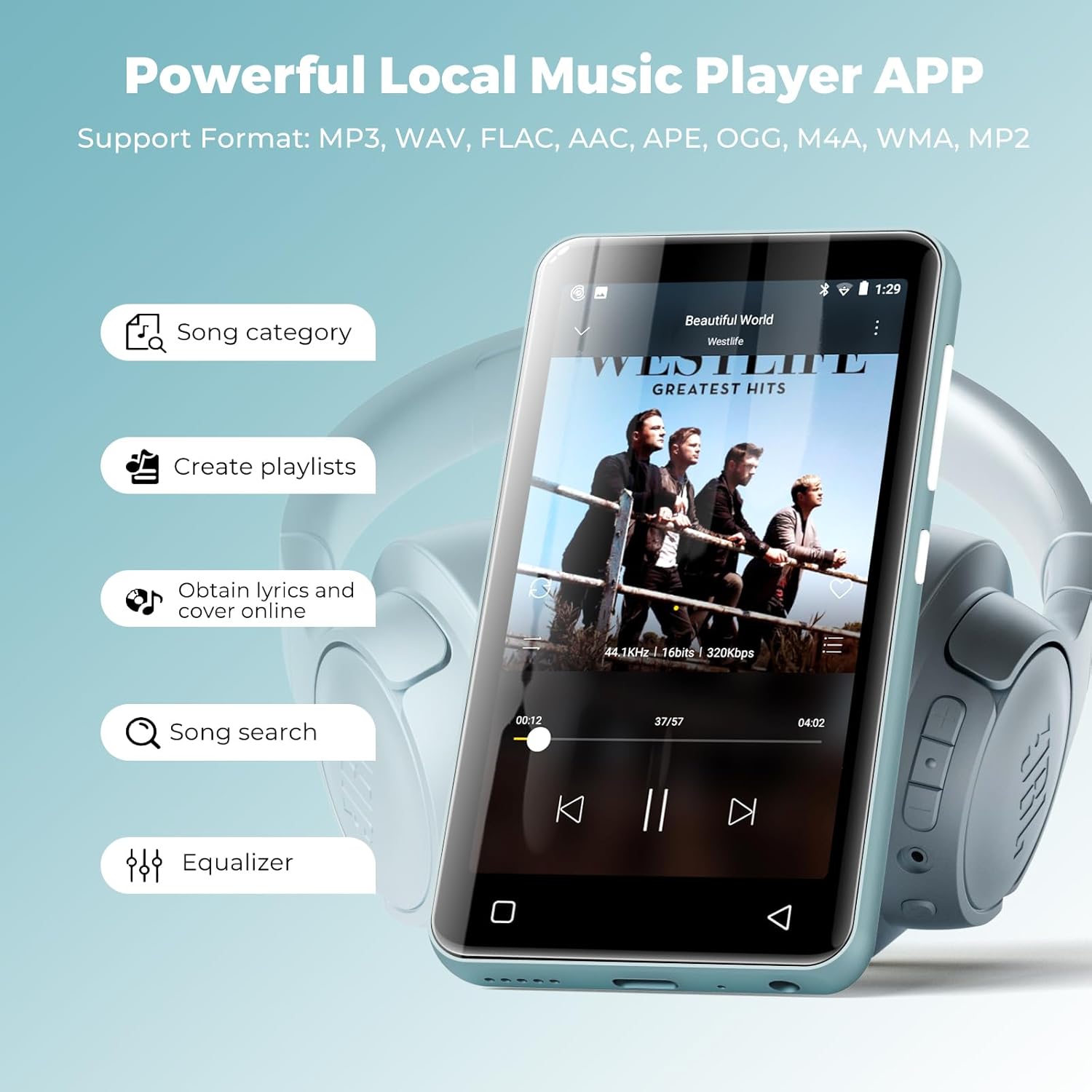
Figure 4.2: Local music player interface and features.
4.3. Audiobook Playback
The device comes pre-loaded with audiobook apps such as Audible, Libby, and Audiobooks. Launch the desired app, log in, and access your audiobook library.

Figure 4.3: Audiobook listening experience.
4.4. Видеону ойнотуу
The 4-inch HD touchscreen supports 720p or 1080p video playback. Compatible formats include AVI, MKV, MP4, MPEG, MOV, VOB, WMV, WEBM, DIVX, F4V, FLV, Xvid, 3GP, etc. Transfer video files to the device's internal storage or SD card and access them via the 'Videos' app.

Figure 4.4: Video playback on the device.
4.5. App Management and Parental Controls
You can install new apps and update existing ones. The parental control feature requires your approval before any app can be downloaded. Apps that require Google Play services (e.g., YouTube, YouTube Music) are not supported. You can also easily uninstall apps to free up space.
- To Manage Apps: барыңыз Орнотуулар > Колдонмолор жана эскертмелер.
- Ата-энелик көзөмөл: Мүмкүнчүлүк Орнотуулар > Ата-энелик көзөмөл to set a password and manage app installation permissions.

Figure 4.5: Parental control settings interface.
4.6. Other Applets
The device includes a collection of handy apps such as FM radio, e-book reader, voice recorder, file manager, clock, calendar, and calculator.

Figure 4.6: ашыкview of additional utility apps.
5. Техникалык шарттар
| Өзгөчөлүк | Деталь |
|---|---|
| Продукциянын өлчөмдөрү | 0.39 x 2.36 x 4.33 дюйм |
| Элемент Салмагы | 0.018 унция |
| Элемент моделинин номери | G3 |
| Батареялар | 1 литий-иондук батарейкалар талап кылынат (кошулган) |
| Бренд | innioasis |
| Модель аты | G3 |
| Өзгөчөлүктөр | Equalizer, FM Radio, Hi-Res Audio, Video Playback, Voice Recorder |
| Байланыш технологиясы | Bluetooth, USB, Wi-Fi |
| Эстутум сактоо сыйымдуулугу | 160 GB (32GB internal + 128GB SD card) |
| Screen Size | 4 дюйм |
| Медиа түрү | Micro SD, Micro SDHC, Micro SDXC, SD Card, SDHC |
| Дисплей технологиясы | LCD |
6. Техникалык тейлөө
6.1. Жалпы кам көрүү
- Аппаратты кургак жана экстремалдуу температурадан алыс кармаңыз.
- Clean the screen with a soft, lint-free cloth. Avoid abrasive materials.
- Аппаратты жерге түшүрүүдөн же катуу таасирлерден сактаныңыз.
6.2. Батареяга кам көрүү
- Charge the device regularly, but avoid leaving it fully charged or fully discharged for extended periods.
- Заряддоо үчүн берилген USB-C кабелин гана колдонуңуз.
7. Кыйынчылыктарды
7.1. Түзмөк күйбөй жатат
- Ensure the device is sufficiently charged. Connect it to a power source for at least 15 minutes before attempting to turn it on again.
- Мажбурлап кайра иштетүү үчүн кубат баскычын 10-15 секунд басып туруңуз.
7.2. Unable to Connect to Wi-Fi/Bluetooth
- Verify that Wi-Fi/Bluetooth is enabled in the device settings.
- Ensure the network password is correct for Wi-Fi.
- For Bluetooth, ensure the target device is in pairing mode and within range.
- Restart both the MP3 player and the Wi-Fi router/Bluetooth device.
7.3. Apps Not Functioning Correctly
- Ensure the device has a stable internet connection if the app requires it.
- Clear the app's cache: Go to Орнотуулар > Колдонмолор жана эскертмелер, select the app, then Сактоо жана кэш, жана таптаңыз Кэшти тазалоо.
- Note that apps requiring Google Play services are not supported on this device.
8. Кепилдик жана колдоо
All innioasis Bluetooth music players are backed by a 1-year warranty. For any inquiries or support needs, please contact our customer service team, available for 12 hours to ensure your complete satisfaction.


