Introduction
This manual provides essential information for the safe and efficient use of your Blaupunkt 40FGC5500S 40-inch Full HD Google TV. Please read it thoroughly before operating the device and retain it for future reference. This television combines Full HD LED display technology with the Google TV operating system, offering a wide range of entertainment options and smart features.
Жайгашуу
1. Пакеттен чыгаруу жана мазмуну
Carefully remove the television and all accessories from the packaging. Ensure all components are present:
- Blaupunkt 40FGC5500S TV Unit
- Алыстан башкаруу
- Электр кабели
- TV Stands (2 pieces) and Screws
- Колдонуучунун Колдонмосу (бул документ)
Inspect the TV for any damage. If any damage is found, do not proceed with installation and contact customer support.

Фронт view of the Blaupunkt 40FGC5500S 40-inch Full HD Google TV, showcasing анын дисплейин жана ичке жээктерин.

Бурчтуу алдыңкы view of the Blaupunkt 40FGC5500S 40-inch Full HD Google TV, providing a perspective of its design.
2. Стенд орнотуу
If placing the TV on a table, attach the two included stands to the bottom of the TV using the provided screws. Ensure the stands are securely fastened to prevent the TV from tipping.
3. Дубалга орнотуу
The Blaupunkt 40FGC5500S is compatible with VESA 200x200 mm wall mounts. For wall mounting, remove the stands and follow the instructions provided with your wall mount bracket. Professional installation is recommended for safety.

Арткы view of the Blaupunkt 40FGC5500S 40-inch Full HD Google TV, showing the VESA mounting pattern and connection panel.
4. Перифериялык түзүлүштөрдү туташтыруу
Connect external devices such as set-top boxes, gaming consoles, or sound systems to the TV's ports. The TV features 3 HDMI ports, 2 USB ports, an Ethernet (LAN) input, and a 3.5mm audio output.

Side view of the Blaupunkt 40FGC5500S 40-inch Full HD Google TV, illustrating the accessible input ports for various devices.
5. Күйгүзүү жана баштапкы орнотуу
Connect the power cable to the TV and a power outlet. Press the power button on the remote control or the TV. Follow the on-screen instructions to complete the initial setup, which includes:
- Тил тандоо
- Тармакка туташуу (Wi-Fi же Ethernet)
- Google каттоо эсебине кирүү
- Google Жардамчыны орнотуу
- Каналды сканерлөө (эгер бар болсо)
Иштеп жатат
1. Google TV интерфейси
Your Blaupunkt TV runs on Google TV, providing a personalized home screen with content recommendations from your subscriptions. Navigate using the remote control's directional pad and select button.

The Google TV interface on the Blaupunkt 40FGC5500S, displaying various streaming applications and content suggestions.
2. Google Жардамчы менен Үн менен башкаруу
Press the Google Assistant button on your remote control and speak into the microphone to search for content, control smart home devices, get answers, and more.

Icon indicating the voice control feature, powered by Google Assistant.
3. Тиркемелерге кирүү
The Google TV home screen provides quick access to popular streaming services like Netflix, YouTube, and Google Play. You can download additional apps from the Google Play Store.

Icon representing the smart features and application access on the TV.
4. Байланыш
- Wi-Fi 2T2R: Интернетке кирүү үчүн үйүңүздөгү зымсыз тармакка туташыңыз.
- Bluetooth 5.0: Pair wireless headphones, speakers, or other Bluetooth-enabled devices.
- Chromecast камтылган: Мазмунду шайкеш келген смартфонуңуздан, планшетиңизден же компьютериңизден түз эле телевизорго чыгарыңыз.
5. Сүрөт жана үн орнотуулары
Navigate to the settings menu to adjust picture modes (e.g., Standard, Vivid, Movie), brightness, contrast, and color. The TV supports HDR for enhanced visual detail. Audio settings allow you to customize sound profiles and volume levels from the integrated 16W speakers.

Icon representing the high-quality display and picture settings.
6. Кошумча функциялар
- Электрондук программалык колдонмо (EPG): View upcoming TV programs and schedule recordings (if external recording device is connected).
- Уйку таймери: Set the TV to automatically turn off after a specified period.
- Балдар кулпусу: Айрым каналдарга же мазмунга кирүүнү чектөө.
Техникалык тейлөө
1. Телевизорду тазалоо
Before cleaning, unplug the TV from the power outlet. Use a soft, dry, lint-free cloth to gently wipe the screen and cabinet. Do not use liquid cleaners, aerosols, or abrasive materials, as they may damage the TV's surface.
2. Программалык камсыздоону жаңыртуу
The TV may receive automatic software updates via the internet to improve performance and add new features. Ensure your TV is connected to the internet to receive these updates. You can also manually check for updates in the settings menu.
Проблемаларды чечүү
Телевизоруңузда көйгөйлөргө туш болсоңуз, төмөнкү жалпы көйгөйлөрдү жана аларды чечүү жолдорун караңыз:
| Көйгөй | Мүмкүн чечим |
|---|---|
| Күч жок | Электр кабели сыналгыга да, электр розеткасына да бекем туташтырылганын текшериңиз. Башка розеткадан аракет кылып көрүңүз. |
| Сүрөт жок, бирок үн бар | Туура киргизүү булагы тандалганын текшериңиз. Тышкы түзмөктөргө кабелдик байланыштарды текшериңиз. |
| Үн жок, бирок сүрөт бар | Check volume levels and mute settings. Ensure external audio systems are properly connected and selected. |
| Пульт иштебей жатат | Батареяларды алмаштырыңыз. Пульт менен сыналгынын IR сенсорунун ортосунда эч кандай тоскоолдуктар жок экенин текшериңиз. |
| Wi-Fi'га туташпай жатат | Verify your Wi-Fi password. Restart your router and the TV. Ensure the TV is within range of your Wi-Fi network. |
Бул чечимдерди колдонуп көргөндөн кийин көйгөй чечилбесе, кардарларды колдоо менен байланышыңыз.
Техникалык шарттар
The following table details the technical specifications of the Blaupunkt 40FGC5500S 40-inch Full HD Google TV:
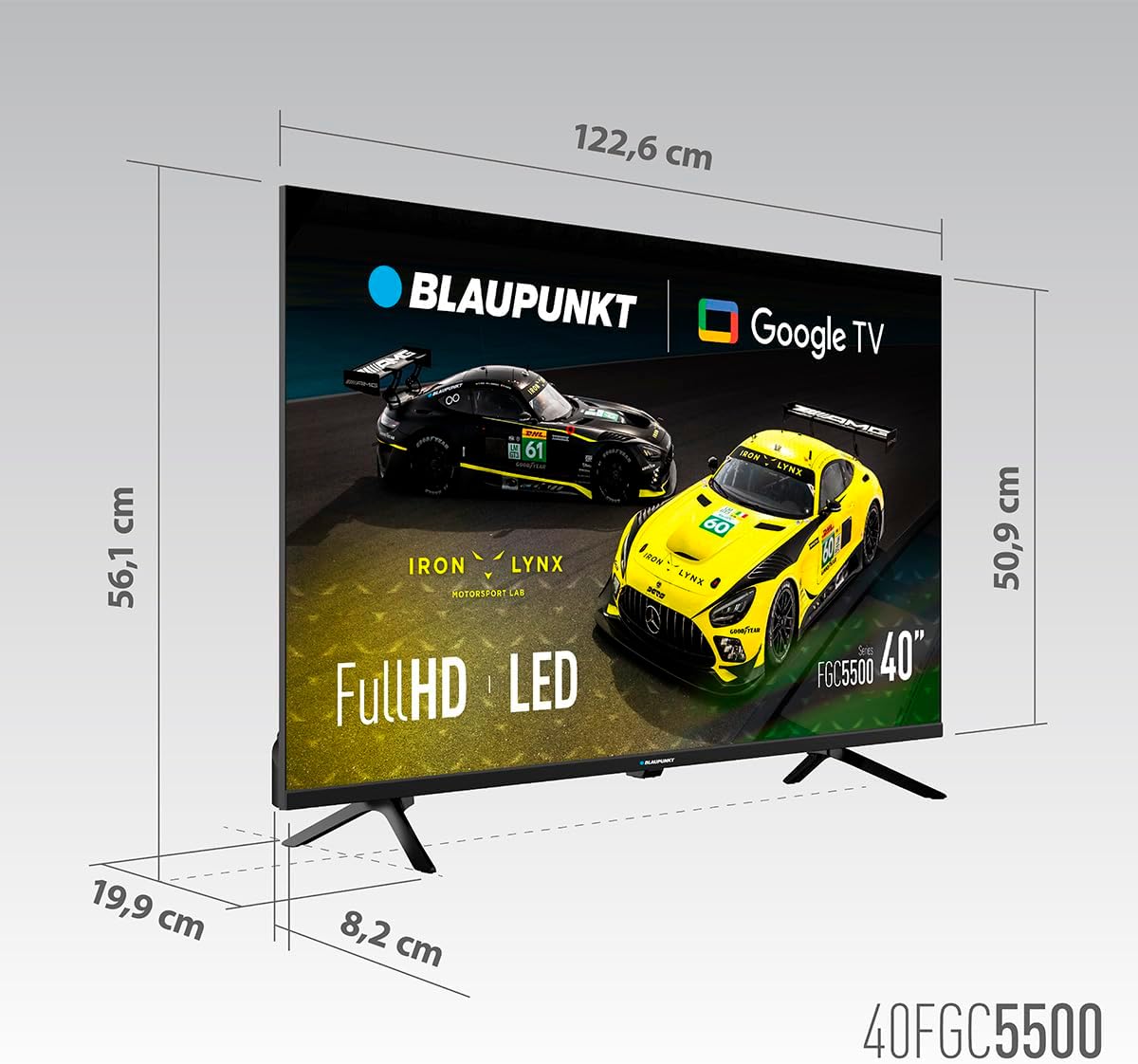
Dimensional diagram of the Blaupunkt 40FGC5500S 40-inch Full HD Google TV, showing its width, height, and depth.
| Өзгөчөлүк | Деталь |
|---|---|
| Бренд | Blaupunkt |
| Модель аты | 40FGC5500S |
| Screen Size | 40 дюйм (102 сантиметр) |
| Дисплей технологиясы | LED |
| Дисплей түрү | VA |
| Резолюция | 1920 x 1080 пиксел (Full HD) |
| Жаңыртуу ылдамдыгы | 60 Гц |
| Операция системасы | Google TV |
| Байланыш | Bluetooth 5.0, Ethernet, HDMI (3 ports), USB (2 ports), Wi-Fi 2T2R, 3.5mm Audio |
| Аудио чыгаруу күчү | 16 Ватт (жалпы) |
| Өзгөчөлүктөр | Built-in Speaker, Chromecast, Sleep Timer, Wide Viewing Angle, HDR |
| Монтаждоо шайкештиги | VESA 200x200 mm (Wall Mount, Table Stand) |
| Продукциянын өлчөмдөрү (LxWxH) | 89.3 x 19.9 x 56.1 см |
| Продукт Салмагы | 5.6 кг |
| Энергия натыйжалуулугунун рейтинги | F |
Кепилдик жана колдоо
Кепилдик маалымат
For detailed warranty information, please refer to the warranty card included with your product or visit the official Blaupunkt webсайт. Кепилдик, адатта, сатып алынган күндөн тартып белгилүү бир мезгил ичинде өндүрүш кемчиликтерин камтыйт.
Кардарларды колдоо
If you require technical assistance, have questions about your product, or need to report a fault, please contact Blaupunkt customer support. Contact details can usually be found on the official Blaupunkt webсайтында же сыналгы менен берилген документтерде.


