1. Продукт бүтүп калдыview
The Baseus BS1 NC Semi-in-Ear Noise Cancelling Earbuds offer a blend of comfort and advanced audio technology. Featuring Adaptive Hybrid Active Noise Cancellation (ANC), Hi-Res Audio with LDAC support, and a lightweight design, these earbuds are engineered for extended listening and clear communication. They are also equipped with a 6-microphone AI system for clear calls and IP55 water and dust resistance.

Image: Baseus BS1 NC Semi-in-Ear Noise Cancelling Earbuds and their charging case in black.
2. Пакеттин мазмуну
Пакетте бардык буюмдар бар экенин текшериңиз:
- Baseus Bass BS1 NC Semi-in-Ear Earbuds (Left and Right)
- Заряддоо кутусу
- USB-C заряддоо кабели
- Quick Start Guide

Image: The complete retail package for the Baseus BS1 NC Earbuds, showing the earbuds, charging case, USB-C cable, and quick start guide.
3. Кулакчындарды жана кутуну кубаттоо
Оптималдуу иштеши үчүн, биринчи жолу колдонуудан мурун кулакчындарды жана кубаттоочу кутучаны толук кубаттаңыз.
3.1 Кулакчындарды заряддоо
- Кулакчындарды кубаттоочу кутуга салыңыз. Алар тиешелүү уячаларына туура орнотулганын текшериңиз (сол жагына L, оң жагына R).
- Close the charging case. The earbuds will begin charging automatically.
3.2 Корпусун заряддоо
- Берилген USB-C заряддоо кабелин корпустагы заряддоо портуна туташтырыңыз.
- Кабелдин экинчи учун USB кубат адаптерине (кошумча эмес) же компьютердин USB портуна туташтырыңыз.
- The LED indicator on the case will show the charging status:
- Жашыл: 75% - 100% заряддалган
- Сары: 25% - 75% заряддалган
- Кызыл: Below 25% charged
- A full charge for the case provides up to 40 hours of total playtime for the earbuds (with ANC off). A 10-minute charge can provide up to 2 hours of playback.

Image: The Baseus BS1 NC Earbuds resting in their open charging case, highlighting the 40-hour total playtime and rapid charging capabilities.
4. Жупташтыруу жана туташуу
4.1 Баштапкы жупташтыруу
- Заряддоо кутучасын ачыңыз. Кулакчындар жупташтыруу режимине автоматтык түрдө кирет.
- Түзмөгүңүздө (смартфон, планшет, компьютер) Bluetooth иштетиңиз.
- Издөө "Baseus Bass BS1 NC" in the list of available Bluetooth devices.
- Select "Baseus Bass BS1 NC" to connect. A voice prompt will confirm successful pairing.
4.2 Автоматтык кайра кошуу
Once paired, the earbuds will automatically reconnect to the last connected device when removed from the charging case and within Bluetooth range.
4.3 Көп чекиттүү туташуу
The Baseus BS1 NC supports Baseus Smart-Connect (BSC) technology, allowing simultaneous connection to two devices. This enables seamless switching between audio sources without manual re-pairing.
To use multipoint connection:
- Кулакчындарды биринчи түзмөгүңүз менен жупташтырыңыз.
- Кулакчындарды биринчи түзмөктүн Bluetooth жөндөөлөрүнөн ажыратыңыз (ажыратпаңыз).
- Кулакчындарды экинчи түзмөгүңүз менен жупташтырыңыз.
- Кулакчындарды Bluetooth жөндөөлөрүнөн биринчи түзмөккө кайра туташтырыңыз. Эми кулакчындар эки түзмөккө тең туташтырылышы керек.
Аудио автоматтык түрдө түзмөктүн мазмунун ойнотуп же чалууну кабыл алып жаткан версиясына которулат.
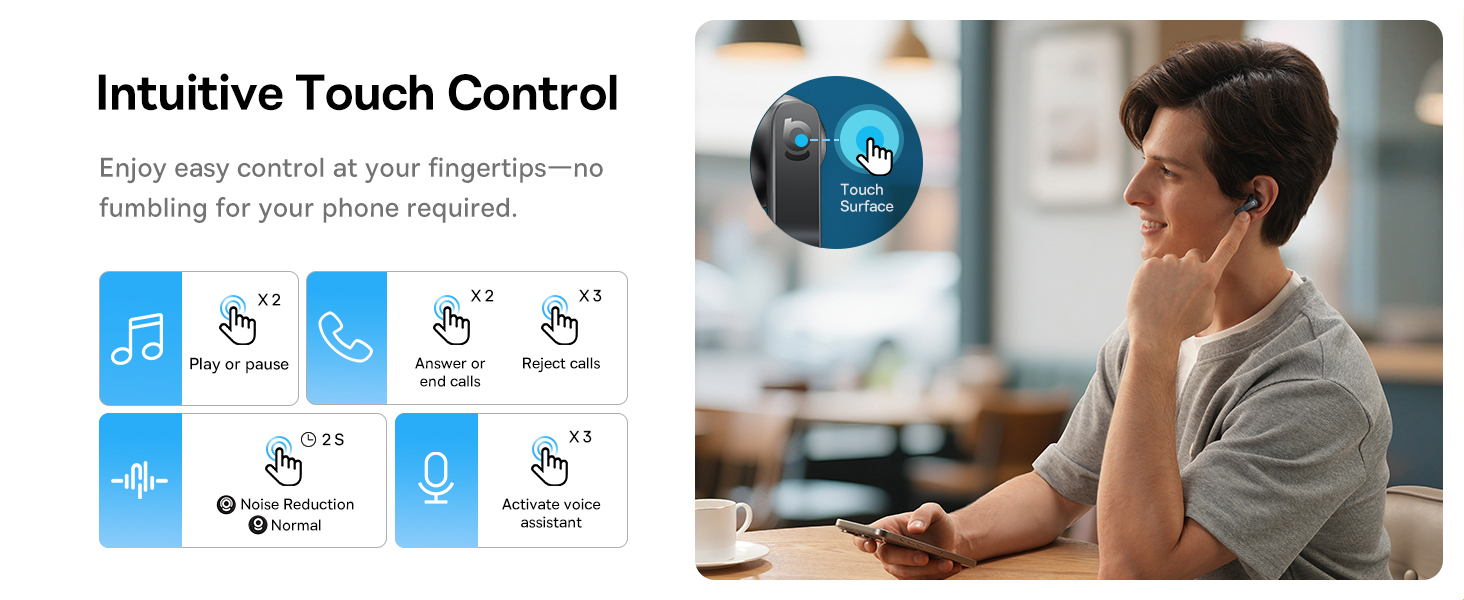
Image: A visual representation of the Baseus BS1 NC Earbuds connected to both a laptop and a smartphone, showcasing the instant multipoint connection feature.
5. Кулакчын тагынуу
The Baseus BS1 NC earbuds feature a semi-in-ear design for comfortable, pressure-free wear. For optimal sound quality and noise cancellation, ensure a proper fit.
- Сол (L) жана оң (R) кулакчындарды аныктаңыз.
- Ар бир кулакчынды кулак каналыңызга акырын киргизиңиз.
- Adjust the earbud until it feels secure and comfortable. The stem should point slightly forward or downward.

Image: A person wearing the Baseus BS1 NC Earbuds, illustrating their ergonomic and lightweight design for all-day comfort.
6. Иштөө нускамалары
6.1 Сенсордук башкаруу
The earbuds feature intuitive touch controls on their stems. The following are default functions, which may be customizable via the Baseus app:
| Акция | Функция |
|---|---|
| Double-tap (Left or Right Earbud) | Музыканы ойнотуу/тындыруу, Чалууга жооп берүү/Аяктоо |
| Triple-tap (Left or Right Earbud) | Reject call, Activate voice assistant |
| Басып туруңуз (2 секунд) | Switch Noise Control Mode (ANC/Normal/Transparency) |

Image: An illustration detailing the intuitive touch controls on the Baseus BS1 NC Earbuds for various functions like play/pause, call management, noise reduction, and voice assistant activation.
6.2 Ызы-чууну башкаруу режимдери
The Baseus BS1 NC earbuds offer three noise control modes:
- Adaptive Hybrid ANC (Active Noise Cancellation): Reduces ambient noise for an immersive listening experience. Ideal for noisy environments.
- Ачыктык режими: Allows you to hear your surroundings while still enjoying your audio. Useful for awareness in urban settings or conversations.
- Кадимки режим: Standard audio playback without active noise cancellation or transparency features.
Switch between modes by pressing and holding the touch area on either earbud for 2 seconds.

Image: A cutaway diagram of a Baseus BS1 NC earbud in an ear, illustrating the semi-in-ear fit and the availability of Adaptive Noise Cancelling and Transparency Mode.
6.3 Hi-Res Audio with LDAC
These earbuds support LDAC technology, enabling high-resolution audio transmission for a detailed and rich sound experience. Ensure your device supports LDAC and activate it in your device's Bluetooth settings for the best audio quality.

Image: The Baseus BS1 NC Earbuds surrounded by sound waves, emphasizing features like Hi-Res Audio, SuperBass 2.0, and 13mm dynamic drivers for powerful sound.
6.4 6-Mic AI Clear Calls
The earbuds are equipped with 6 microphones and AI noise isolation technology to ensure your voice is clear during calls, even in noisy environments. Wind noise reduction further enhances call clarity outdoors.
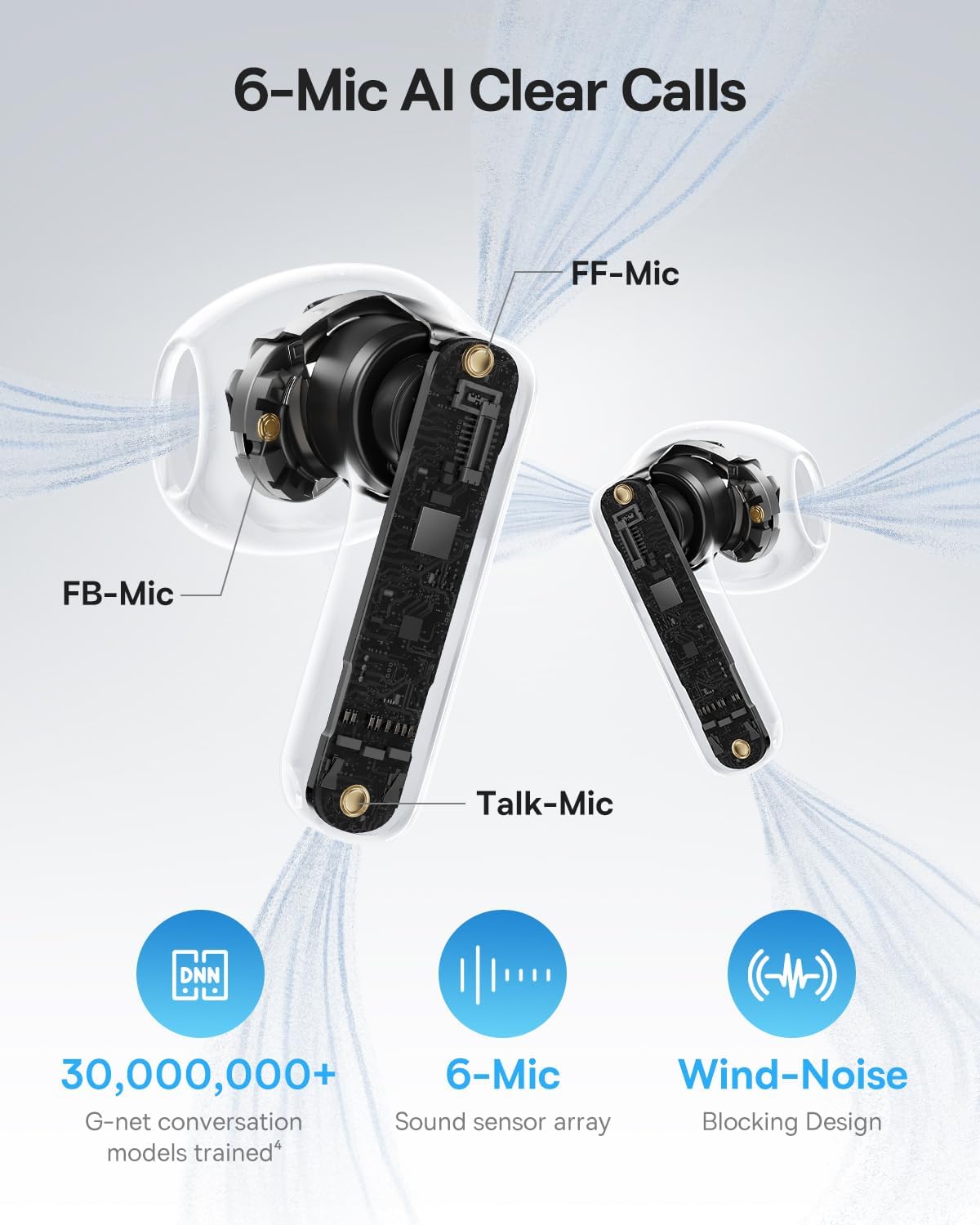
Image: A detailed diagram of the Baseus BS1 NC earbud, highlighting the placement of the FF-Mic, FB-Mic, and Talk-Mic, which contribute to the 6-Mic AI Clear Call technology and wind-noise blocking design.
6.5 Smart App Control
Download the dedicated Baseus app for enhanced control and customization options. The app allows you to:
- Adjust Bass Boost levels.
- Select from various EQ Modes.
- Control Spatial Acoustics settings.
- Use the "Find Your Earbuds" feature.
Note: In guest mode, no account creation or permissions are required to customize features, but GPS access is needed to locate lost earbuds.

Image: A smartphone displaying the Baseus app interface, which offers various sound control options including Bass Boost, EQ Modes, Spatial Acoustics, and a "Find Your Earbuds" function.
7. Техникалык тейлөө жана кам көрүү
7.1 Тазалоо
- Кулакчындарды жана заряддоо кутусун жумшак, кургак, түксүз чүпүрөк менен дайыма тазалап туруңуз.
- Катуу химиялык заттарды, тазалоочу эриткичтерди же күчтүү жуучу каражаттарды колдонбоңуз.
- Gently remove any earwax or debris from the earbud mesh and charging contacts using a small, soft brush or cotton swab.
7.2 Суу жана чаңга туруктуулук (IP55)
The earbuds are rated IP55, meaning they are protected against limited dust ingress and low-pressure water jets from any direction. This makes them suitable for workouts and light rain exposure.
- Кулакчындарды сууга салбаңыз.
- Кулакчындарды кайра заряддоо кутусуна коюудан мурун, кубаттоо контакттарына зыян келтирбөө үчүн кургатылганын текшериңиз.
- Заряддоо кутусу сууга чыдамдуу эмес.

Image: The Baseus BS1 NC Earbuds shown with water droplets, signifying their IP55 rating for dust and water resistance.
7.3 Сактоо
Кулакчындарды коргоо жана кубаттоо үчүн колдонулбаган учурда кубаттоо кутучасында сактаңыз.
8. Кыйынчылыктарды
If you encounter issues with your Baseus BS1 NC earbuds, refer to the following common solutions:
- Үн/Туташуу маселеси жок:
- Кулакчындардын кубатталганын текшериңиз.
- Verify Bluetooth is enabled on your device and "Baseus Bass BS1 NC" is selected.
- Try placing earbuds back in the case, closing it, and then reopening to reset the connection.
- Bluetooth жөндөөлөрүңүздө түзмөктү унутуп, кайра жупташтырыңыз.
- Бир кулакчын иштебей жатат:
- Эки кулакчындын тең кубатталганын текшериңиз.
- Place both earbuds back in the case, close, and reopen.
- Наушниктеги жана корпустун ичиндеги заряддоо контакттарын тазалаңыз.
- Үн сапаты начар:
- Кулакчындар кулагыңызга туура орнотулганын текшериңиз.
- Clean the earbud mesh to remove any obstructions.
- Check your device's audio settings and ensure LDAC is enabled if supported.
- ANC күчүнө кирбейт:
- Ensure ANC mode is activated via touch control or the Baseus app.
- Adjust the earbuds for a better seal in your ears.
9. Техникалык шарттар
| Өзгөчөлүк | Деталь |
|---|---|
| Модель аты | Baseus Bass BS1 NC |
| Noise Control | Adaptive Noise Cancellation, Environmental Noise Cancellation, Hybrid Noise Cancellation |
| Байланыш технологиясы | Bluetooth 6.0, зымсыз |
| Зымсыз байланыш технологиясы | Bluetooth 6.0 |
| Bluetooth диапазону | 10 метр |
| Аудио драйвер түрү | Динамикалык драйвер |
| Аудио драйверинин өлчөмү | 13 миллиметр |
| Frequency Response | 40 KHz |
| Аудио кечигүү | 60 Миллисекунд |
| Батареянын иштөө мөөнөтү (наушник) | 7 саат (ANC өчүрүү) |
| Жалпы ойноо убактысы (Кеп менен) | 40 саат (ANC өчүрүү) |
| Charging Time (Rapid Charge) | 2 саат ойнотуу үчүн 10 мүнөт |
| Сууга туруктуулук деңгээли | IP55 (Кулакчындар гана) |
| Башкаруу түрү | Touch Control |
| Материал | Акрилонитрил бутадиен стирол (ABS), поликарбонат (PC) |
| Буюмдун салмагы (кулакчын) | Кулакчын үчүн 4 г |
| Product Dimensions (Earbuds) | 1.2 x 0.7 x 0.7 дюйм |
| Шайкеш түзмөктөр | Devices with Bluetooth Audio Capability, including iOS, Android, Windows, Mac OS and Switch. |
10. Расмий продукт Video
Watch the official product video for a visual guide on the Baseus BS1 NC Earbuds:
Video: An official product video from Baseus showcasing the features and usage of the Baseus BS1 NC Semi-in-Ear True Wireless Earbuds.
11. Кепилдик жана колдоо
For warranty information, technical support, FAQs, and further assistance, please visit the official Baseus support center.
Refer to the Quick Start Guide included in your package for a direct link or visit the Baseus webсайт.
Note: Protection plans may be available for purchase separately.


