1. Киришүү
This manual provides essential instructions for the setup, operation, and maintenance of your CHIQ L43QST 43-inch Full HD QLED Google Smart TV. Please read this manual thoroughly before using your television and retain it for future reference. Following these instructions will ensure proper use and extend the lifespan of your device.
2. Коопсуздук маалыматы
To reduce the risk of electric shock, fire, or injury, always observe the following safety precautions:
- Телевизорду жамгырга же нымга тийгизбеңиз.
- Телевизорду ачпаңыз casing; бардык тейлөөлөрдү квалификациялуу кызматкерлерге тапшырыңыз.
- Телевизордун айланасын туура желдетүүнү камсыз кылыңыз. Вентиляция тешиктерин жаап албаңыз.
- Телевизор кулап калбашы үчүн аны туруктуу, түз жерге коюңуз.
- Чагылган түшкөн учурда же көп убакытка колдонулбаган учурда телевизорду розеткадан сууруп коюңуз.
- Майда бөлүктөрүн жана батареяларды балдар жетпеген жерде сактаңыз.
3. Пакеттин мазмуну
Таңгакта бардык буюмдар бар экенин текшериңиз:
- CHIQ L43QST 43-inch Smart TV
- Алыстан башкаруу пульту (2 AAA батарейка талап кылынат, дайыма эле кошула бербейт)
- TV Stand (assembly required)
- Wall Mount Components (for optional wall mounting)
- Электр кабели
- Колдонуучунун Колдонмосу (бул документ)

А фронт view of the CHIQ L43QST 43-inch Smart TV, showcasing анын ичке рамкасынын дизайны.
4. Орнотуу
4.1. Тирөөч же дубалга орнотуу
Стенд жыйыны: Carefully place the TV screen-down on a soft, clean surface. Attach the provided stand components to the designated slots on the bottom of the TV using the screws included. Ensure the stand is securely fastened.
Дубалга орнотуу: If you intend to wall mount the TV, refer to the instructions provided with your wall mount kit. Ensure the wall mount is compatible with the TV's VESA mounting pattern and that the wall can support the TV's weight. Professional installation is recommended for wall mounting.
4.2. Түзмөктөрдү туташтыруу
Your CHIQ L43QST TV offers various connectivity options:
- HDMI порттору: Blu-ray ойноткучтары, оюн консолдору же приставкалар сыяктуу тышкы түзмөктөрдү туташтырыңыз.
- USB порттору: Insert USB drives for media playback (photos, videos, music).
- Ethernet порту: Туруктуу зымдуу интернет байланышы үчүн.
- Wi-Fi: Интернетке кирүү үчүн үйүңүздөгү зымсыз тармакка туташыңыз.
- Bluetooth: Pair wireless headphones, soundbars, or other compatible accessories.
4.3. Баштапкы күйгүзүү жана Google TV орнотуу
After connecting the power cable and any desired devices, press the power button on the TV or remote control. Follow the on-screen instructions to complete the initial setup, including language selection, network connection, and Google account sign-in for Google TV features.
5. Иштөө нускамалары
5.1. Google TV интерфейси
Navigate the Google TV interface using your remote control. The home screen provides access to streaming apps, live TV, and personalized content recommendations. Use the directional pad and 'OK' button to select items.
5.2. Негизги өзгөчөлүктөрү
- QLED технологиясы: Experience vibrant and accurate colors due to the Quantum Dot film, enhancing the purity of the backlight.
- Full HD Resolution (1920 x 1080): Enjoy clear and sharp images with a resolution higher than standard HD.
- HDR10 колдоосу: Benefit from improved contrast and finer details in both bright and dark scenes, providing a more realistic viewтажрыйбасы.
- Dolby Audio: The integrated professional audio decoding technology enhances stereo and surround sound, delivering clear, powerful, and rich audio.
- Chromecast камтылган: Easily cast movies, shows, photos, and more from your phone or tablet directly to your TV.
- Smart Voice Recognition: Use voice commands through the remote control for convenient navigation and content search.
- Ата-энелик көзөмөл: Manage and restrict access to certain content or applications for younger viewлүү.
- DLNA: Share media content from compatible devices on your home network directly to your TV.
6. Техникалык тейлөө
Телевизоруңуздун иштешин жана көрүнүшүн сактоо үчүн:
- Экранды тазалоо: Экранды жумшак, түксүз чүпүрөк менен акырын сүртүңүз. өжөр белгилери үчүн, бир аз гampчүпүрөккө суу же атайын экран тазалоочу каражат. Суюктукту экранга түз чачпаңыз.
- Тазалоо Casing: Телевизорду сүртүү үчүн жумшак, кургак чүпүрөктү колдонуңуз casinг. Абразивдүү тазалагычтардан же эриткичтерден качыңыз.
- Вентиляция: Ensure the ventilation openings on the back of the TV are not blocked by dust or objects.
- Өчүрүү: Always turn off and unplug the TV before cleaning or performing any maintenance.
7. Кыйынчылыктарды
Телевизоруңузда көйгөйлөргө туш болсоңуз, төмөнкү жалпы чечимдерди караңыз:
| Көйгөй | Мүмкүн чечим |
|---|---|
| Күч жок | Электр кабели сыналгыга жана розеткага бекем сайылганын текшериңиз. Башка розеткадан аракет кылып көрүңүз. |
| Сүрөт/Үн жок | Туура киргизүү булагы тандалганын текшериңиз. Тышкы түзмөктөргө кабелдик байланыштарды текшериңиз. |
| Пульт иштебейт | Батареяларды алмаштырыңыз (2 AAA). Пульт менен сыналгынын IR сенсорунун ортосунда эч кандай тоскоолдуктар жок экенин текшериңиз. |
| Тармакка туташуу маселелери | Роутериңизди жана модемиңизди өчүрүп-күйгүзүңүз. Wi-Fi сырсөзүн текшериңиз. Зымдуу туташуулар үчүн Ethernet кабелинин туура туташканын текшериңиз. |
| Сүрөттүн сапаты маселелери | Сүрөттүн жөндөөлөрүн тууралаңыз (жарыктык, контраст, түс). Мазмун булагынын жогорку сапатта экенин текшериңиз. |
8. Техникалык шарттар
| Өзгөчөлүк | Деталь |
|---|---|
| Бренд | CHiQ |
| Модель номери | L43QST |
| Screen Size | 43 дюйм (108 см) |
| Дисплей технологиясы | QLED, LED |
| Резолюция | Толук HD (1920 x 1080p) |
| Жаңыртуу ылдамдыгы | 60 Гц |
| Операция системасы | Android, Google TV |
| Байланыш | Bluetooth, Ethernet, HDMI, USB, Wi-Fi |
| Өзгөчөлүктөр | Chromecast, Parental Control, DLNA, Smart Voice Recognition |
| Аудио технологиясы | Dolby Audio |
| HDR колдоо | HDR10 |
| Энергия эффективдүүлүгү классы | E |
| Энергияны керектөө (SDR) | 42 кВт/саат/1000 саат |
| Энергияны керектөө (HDR) | 42 кВт/саат/1000 саат |
| Продукциянын өлчөмдөрү (DxWxH) | 20P x 95l x 58.3H см |
| Аспект катышы | 16:9 |
| Алыстан башкаруунун батареялары | 2 AAA (not always included) |
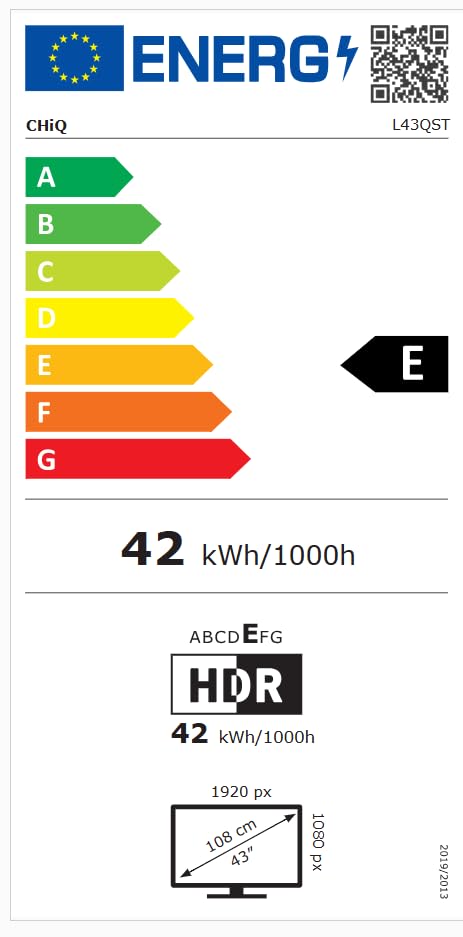
The EU energy efficiency label for the CHIQ L43QST television, indicating an energy class E and a consumption of 42 kWh per 1000 hours for both standard and HDR modes. It also shows the screen resolution as 1920x1080 pixels and a diagonal size of 43 inches (108 cm). For more details, visit the EPREL маалымат базасы.
9. Кепилдик жана колдоо
For detailed warranty information, please refer to the warranty card included with your product or visit the official CHiQ website. For technical support or service inquiries, please contact CHiQ customer service through their official channels.


