1. Киришүү
This manual provides essential instructions for the setup, operation, and maintenance of your Laxasfit H9 Pro Max Smart Watch. Designed for daily wear, this smartwatch combines modern technology with a user-friendly interface to help you monitor your health and stay connected. Please read this manual thoroughly before using your device to ensure proper functionality and longevity.
2. Пакеттин мазмуну
Төмөндө тизмеленген нерселердин баары сиздин продукт таңгагыңызда бар экенин текшериңиз:
- H9 Pro Max Smart Watch
- USB заряддоо кабели
- User Manual
- Extra Strap (Black Silicone)

Үстүбүздөгү чыгым view of the H9 Pro Max Smart Watch package contents, including the watch with a pink strap, an additional black strap, a USB charging cable, and the product box.
3. Баштоо
3.1. Акылдуу саатты кубаттоо
Before initial use, fully charge your H9 Pro Max Smart Watch. Connect the provided USB charging cable to the charging dock and align the watch with the magnetic pins on the dock. Connect the USB end to a standard USB power adapter (not included) or a computer USB port. A full charge typically takes approximately 2 hours.
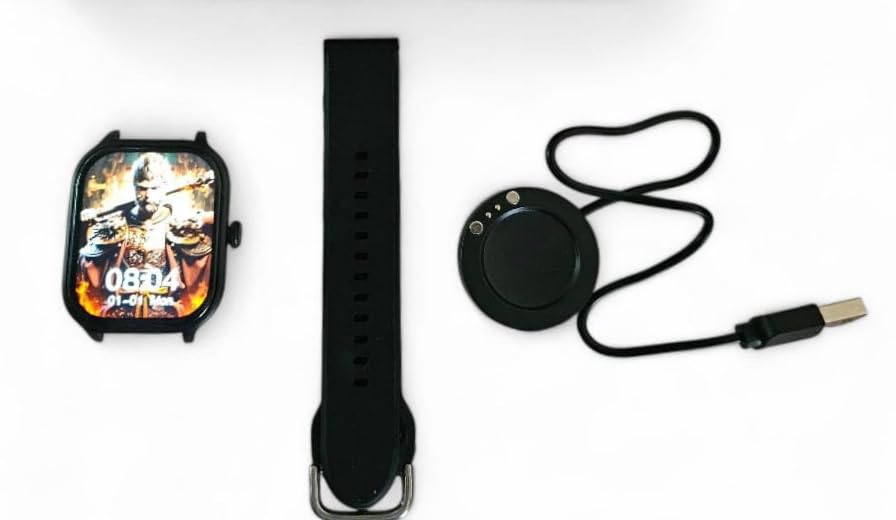
The H9 Pro Max Smart Watch face, a black silicone strap, and the circular USB charging dock laid out separately.
3.2. Күйгүзүү / Өчүрүү
- Күйгүзүү үчүн: Экран күйгөнгө чейин каптал баскычты басып, кармап туруңуз.
- Өчүрүү үчүн: Капталдагы баскычты басып, кармап туруңуз, андан кийин экрандагы "Өчүрүү" опциясын тандаңыз.
3.3. Боону орнотуу
The H9 Pro Max Smart Watch comes with interchangeable straps. To attach or change a strap, align the spring bar with the lug holes on the watch body and gently push until it clicks into place. Ensure both ends of the spring bar are securely seated.
3.4. Колдонмону орнотуу жана түзмөктү жупташтыруу
To unlock the full functionality of your smartwatch, download the companion application on your smartphone. The app is compatible with both Android and iOS devices.
- Scan the QR code in the user manual (if provided) or search for the official app in your smartphone's app store.
- Тиркемени смартфонуңузга орнотуңуз.
- Смартфонуңузда Bluetooth'ду иштетиңиз.
- Open the app and follow the on-screen instructions to pair your H9 Pro Max Smart Watch. Ensure the watch is powered on and within Bluetooth range of your phone.
4. Акылдуу саатыңызды иштетүү
4.1. Негизги навигация
The H9 Pro Max Smart Watch features a responsive touchscreen display for navigation:
- Өйдө/ылдый сүрүү: Менюларды же эскертмелерди сыдырыңыз.
- Солго/Оңго сүрүү: Ар кандай виджеттерге же тез жөндөөлөргө кириңиз.
- таптаңыз: Бир нерсени тандаңыз же аракетти ырастаңыз.
- Каптал баскычын басыңыз: Return to the home screen or activate a specific function (configurable in settings).
4.2. Сааттын жүзүн ыңгайлаштыруу
Personalize your smartwatch by changing the watch face. You can select from various pre-installed designs or download additional options through the companion app. To change the watch face directly on the device, press and hold the current watch face, then swipe left or right to browse available options and tap to select.
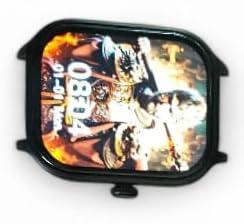
Жакын план view of the H9 Pro Max Smart Watch display, showing a customized watch face with time and date.
4.3. Smart Features
The H9 Pro Max Smart Watch offers several features to support your daily activities and health monitoring:
- Активдүүлүккө көз салгыч: Monitors steps taken, distance covered, and calories burned.
- Жүрөктүн кагышын көзөмөлдөөчү: Provides real-time heart rate readings.
- Уйку монитору: Уйкунун үлгүсүн жана сапатын көзөмөлдөйт.
Access these features through the watch's menu or the companion app for detailed insights and historical data.
4.4. Эскертмелер
Once paired with your smartphone, the H9 Pro Max Smart Watch can display notifications for calls, messages, and app alerts. Ensure notification permissions are enabled in both your phone's settings and the companion app.
5. Техникалык тейлөө
5.1. Тазалоо
Акылдуу саатыңыздын көрүнүшүн жана функционалдуулугун сактоо үчүн:
- Экранды жана сааттын корпусун жумшак, түксүз чүпүрөк менен сүртүңүз.
- өжөр тактар үчүн, бир аз гampчүпүрөктү суу менен. Катуу химиялык заттарды же абразивдүү материалдарды колдонуудан алыс болуңуз.
- Натыйжалуу кубаттоону камсыз кылуу үчүн заряддоо контакттарын мезгил-мезгили менен тазалап туруңуз.
5.2. Батареяга кам көрүү
Батареянын иштөө мөөнөтүн узартуу үчүн:
- Ашыкча температурадан качыңыз, алар батареянын иштешин начарлатышы мүмкүн.
- Саатты үзгүлтүксүз кубаттап туруңуз, бирок аны көпкө чейин толугу менен зарядсыз калтырбаңыз.
- If storing the watch for a long time, charge it to about 50% before storage.
6. Кыйынчылыктарды
If you encounter issues with your H9 Pro Max Smart Watch, try the following common troubleshooting steps:
- Күйгүзүлбөй турган саат: Саат толук заряддалганын текшериңиз. Аны заряддагычка кеминде 30 мүнөт туташтырыңыз.
- Смартфон менен жупташуу мүмкүн эмес: Check that Bluetooth is enabled on your phone and the watch. Restart both devices and try pairing again. Ensure the companion app has necessary permissions.
- Туура эмес ден соолук маалыматтары: Саат өтө тар же өтө бош эмес, билегиңизге бекем тагылганын текшериңиз. Сааттын артындагы сенсорду тазалаңыз.
- Эскертмелер көрүнбөй жатат: Verify that notifications are enabled in your phone's settings and within the smartwatch companion app. Check that the watch is connected via Bluetooth.
- Экран жооп бербейт: Try restarting the watch by pressing and holding the side button. If unresponsive, allow the battery to fully drain and then recharge.
7. Продукттун спецификациялары
| Өзгөчөлүк | Спецификация |
|---|---|
| Бренд | Laxasfit |
| Модел | H9 Pro Max |
| Дисплей өлчөмү | 1.9 дюйм |
| Дисплей түрү | Санарип |
| Операциялык системанын шайкештиги | Android, iOS |
| Шайкеш түзмөктөр | Смартфондор |
| Өзгөчөлүктөр | Activity Tracker, Heart Rate Monitor, Sleep Monitor |
| Эстутум сактоо сыйымдуулугу | 1 MB |
| Батарея түрү | Lithium Metal (Built-in) |
| Батареянын орточо иштөө мөөнөтү | 1 күнгө чейин |
| Заряддоо убактысы | 2 саат |
| Зымсыз байланыш | Bluetooth |
| Туташтыргыч түрү | USB |
| Primary Interface | Сенсордук экран |
| Материалдар | Металл, пластик |
| Элемент Салмагы | 85 г |
| Пакеттин өлчөмдөрү | 15 x 12 x 8.5 см |
8. Кепилдик жана колдоо
Your Laxasfit H9 Pro Max Smart Watch comes with a 3 айлык кепилдик сатып алынган күндөн тартып. Бул кепилдик нормалдуу колдонуудагы өндүрүш кемчиликтерин камтыйт. Кепилдик дооматтары үчүн сатып алганыңыздын далилин сактап коюңуз.
For technical assistance, troubleshooting beyond this manual, or warranty inquiries, please refer to the contact information provided with your purchase documentation or visit the official Laxasfit support webсайт.


