Introduction
The Divoom MiniToo is a compact, retro PC-style computer speaker featuring a smart pixel screen. It offers Bluetooth and USB audio connectivity, along with alarm, white noise, and focus tools. This manual provides instructions for setting up, operating, maintaining, and troubleshooting your MiniToo speaker.
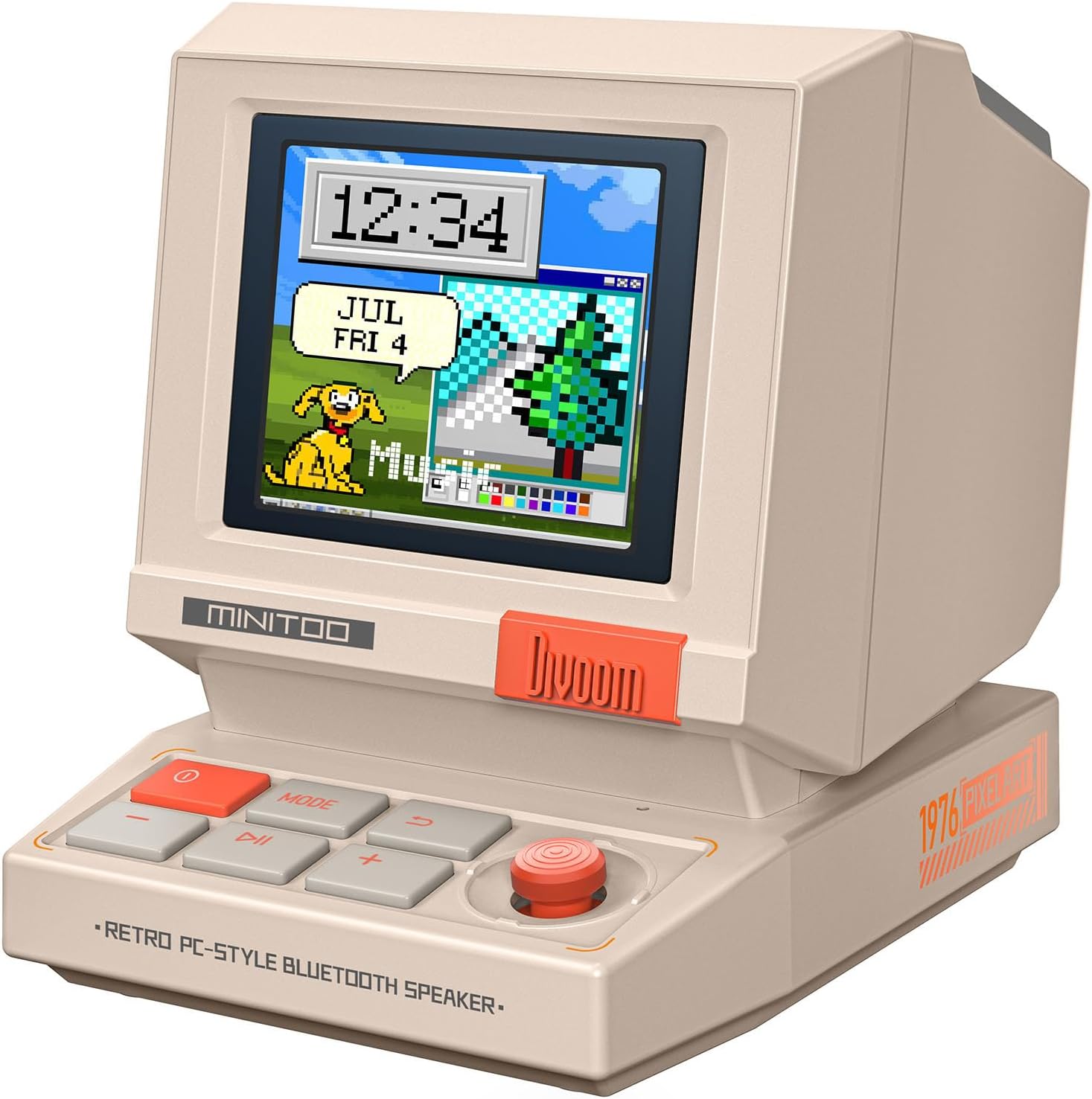
Сүрөт: алдыңкы view of the Divoom MiniToo speaker, showcasing its retro computer design and pixel art display with a clock and a dog illustration.
Пакеттин мазмуну
- Divoom MiniToo Speaker
- Quick Start Guide
- USB заряддоо кабели
Жайгашуу
1. Күйгүзүү жана заряддоо
The MiniToo speaker includes a built-in battery. Before first use, fully charge the device using the provided USB cable. Connect the USB cable to the speaker's charging port and a compatible USB power adapter (not included) or computer USB port.

Сүрөт: Арткы view of the Divoom MiniToo speaker, highlighting the USB port for charging and audio, and the TF card slot.
2. Баштапкы байланыш
The MiniToo supports Bluetooth, USB audio, and TF card playback.
- Bluetooth жупташууда:
- Динамикти иштетүү үчүн кубат баскычын басып, кармап туруңуз.
- The pixel screen will display a Bluetooth icon, indicating it's in pairing mode.
- On your device (smartphone, tablet, computer), enable Bluetooth and search for "Divoom MiniToo".
- Select "Divoom MiniToo" to connect. A confirmation sound will play upon successful pairing.
- USB аудио: Connect the speaker to your computer using a USB cable. The speaker will be recognized as an audio output device. Select it from your computer's sound settings.
- TF картасын ойнотуу: Аудиосу бар TF картасын салыңыз files into the designated slot on the back of the speaker. The speaker will automatically switch to TF card playback mode.

Image: The Divoom MiniToo speaker connected to a laptop via USB, illustrating its versatile connectivity options including Bluetooth, USB Audio, and TF Card playback.
3. Divoom App Installation
For full functionality, including pixel art customization and advanced features, download the Divoom app from your device's app store (iOS App Store or Google Play Store). Follow the in-app instructions to connect your MiniToo speaker.
Иштөө нускамалары
1. Негизги башкаруу элементтери
The MiniToo features several buttons and a joystick for navigation and control:
- Кубат баскычы (Кызыл): Press and hold to power on/off. Short press to switch display modes.
- MODE баскычы: Short press to cycle through different functions (e.g., Music, Clock, Alarm, Tools).
- Ойнотуу/тындыруу баскычы: Аудиону ойнотуу же тындыруу.
- Үн баскычтары (+/-): Үндү тууралоо.
- Джойстик: Navigate menus, confirm selections, or snooze alarms.

Image: The Divoom MiniToo speaker showcasing its pixel screen with a digital clock and retro computer-style interface, demonstrating its display capabilities.
2. Pixel Screen Customization
The 1.77" pixel display can be customized via the Divoom app:
- DIY Faces & Messages: Create your own pixel art, animations, or text messages.
- Саат беттери: Choose from over 70 retro clock faces and widgets.
- Сүрөт көрсөтүү: Cast photos from your phone to the speaker's screen using the app.

Image: A user interacting with the Divoom app on a smartphone to create pixel art, which is simultaneously displayed on the MiniToo speaker's screen.

Image: The Divoom MiniToo speaker displaying a photo on its screen, demonstrating the photo casting feature from a smartphone app.

Image: A collage showing multiple retro clock faces and widgets available for the Divoom MiniToo speaker, both on the device and within the companion app.
3. Alarm Clock, White Noise & Focus Tools
The MiniToo integrates several utility functions:
- Ойготкуч саат: Set gentle alarms with various sounds directly on the device or through the app. Use the joystick to snooze.
- White Noise & Sleep Sounds: Access a selection of white noise and natural sounds (e.g., rain, forest) to aid sleep or relaxation.
- Focus Tools: Utilize Pomodoro timers and reminders to manage your work or study sessions.

Image: The Divoom MiniToo speaker displaying an alarm, accompanied by a visual list of 12 distinct wake-up sounds available for selection.

Image: The Divoom MiniToo speaker on a bedside table, showing a pixel art display, with visual cues for its white noise and sleep sound functions.
Техникалык тейлөө
1. Тазалоо
Wipe the speaker with a soft, dry, lint-free cloth. Do not use abrasive cleaners, solvents, or spray directly onto the device. Avoid getting moisture into any openings.
2. Батареяга кам көрүү
To prolong battery life, avoid fully discharging the battery frequently. If storing the device for an extended period, charge it to approximately 50% every few months.
Проблемаларды чечүү
| Көйгөй | Мүмкүн себеп | Чечим |
|---|---|---|
| Түзмөк күйбөйт. | Батарея аз же кубат баскычы туура басылган жок. | Charge the device. Press and hold the power button for 3-5 seconds. |
| Динамиктен үн жок. | Volume too low, incorrect input source, or device not connected. | Increase volume. Check Bluetooth connection, USB audio selection, or TF card insertion. |
| Bluetooth жупташуусу болбой жатат. | Speaker not in pairing mode, or device too far. | Ensure speaker is in pairing mode. Move devices closer. Forget "Divoom MiniToo" on your device and try pairing again. |
| Pixel screen is unresponsive or frozen. | Программанын катасы. | Perform a soft reset by holding the power button until the device restarts. If issues persist, consult the Divoom app for firmware updates. |
Техникалык шарттар
| Модель аты | MiniToo |
| Динамик түрү | Көчмө спикер |
| Байланыш технологиясы | Bluetooth 5.3, USB Audio, TF Card |
| Динамиктин максималдуу чыгаруу күчү | 5 Ватт |
| Дисплей | 1.77" TFT, 128x160, 60 Hz |
| Продукт өлчөмдөрү (W x D x H) | 3.2 x 2.4 x 2.9 дюйм |
| Элемент Салмагы | 201.8 г (болжол менен 7.1 унция) |
| Батарея | 5.55 Wh, approx. 6 hours playtime |
| Камтылган компоненттер | Quick Start Guide, USB Charging Cable |

Image: A detailed diagram illustrating the physical dimensions and key technical specifications of the Divoom MiniToo speaker.
Кепилдик жана колдоо
For warranty information, please refer to the Quick Start Guide included in your package or visit the official Divoom website. For technical support or further assistance, please contact Divoom customer service through their official channels.
Official Divoom Webсайт: www.divoom.com