1. Киришүү
Сатып алганыңыз үчүн рахматasing the Acerpure Cozy HF1 Foldable Hand Fan. This manual provides essential information for the safe and efficient operation of your device. Please read it thoroughly before use and retain it for future reference.
The Acerpure Cozy HF1 is a versatile personal cooling device featuring a powerful motor, 100-level adjustable speed, a cold compress function, and a portable, foldable design. Its integrated HD display provides real-time information on battery level, wind speed, and cooling mode.
2. Коопсуздук маалыматы
Коопсуз иштөөнү камсыз кылуу жана зыян келтирбөө үчүн төмөнкү сактык чараларын сактаңыз:
- Keep the fan away from water and other liquids. Do not operate with wet hands.
- Do not insert fingers or foreign objects into the fan blades or air inlets/outlets.
- Avoid dropping the fan or subjecting it to strong impacts.
- Do not disassemble, repair, or modify the fan yourself. Contact qualified service personnel for assistance.
- Балдар жана үй жаныбарлары жетпеген жерде сактаңыз.
- Use only the provided charging cable or a certified DC 5V/2A USB-C charger.
- Do not expose the fan to extreme temperatures, direct sunlight, or high humidity.
- If the fan emits smoke, unusual odors, or makes abnormal noises, immediately turn it off and disconnect the power source.
3. Продукт бүтүп калдыview жана Пакеттин мазмуну
3.1 Пакеттин мазмуну
Пакетте бардык буюмдар бар экенин текшериңиз:
- Acerpure Cozy HF1 Foldable Hand Fan
- USB-C заряддоо кабели
- Колдонуучунун Колдонмосу (бул документ)
- Neck Strap (if included with your model)
3.2 Продукт компоненттери
Familiarize yourself with the different parts of your Acerpure Cozy HF1 fan.
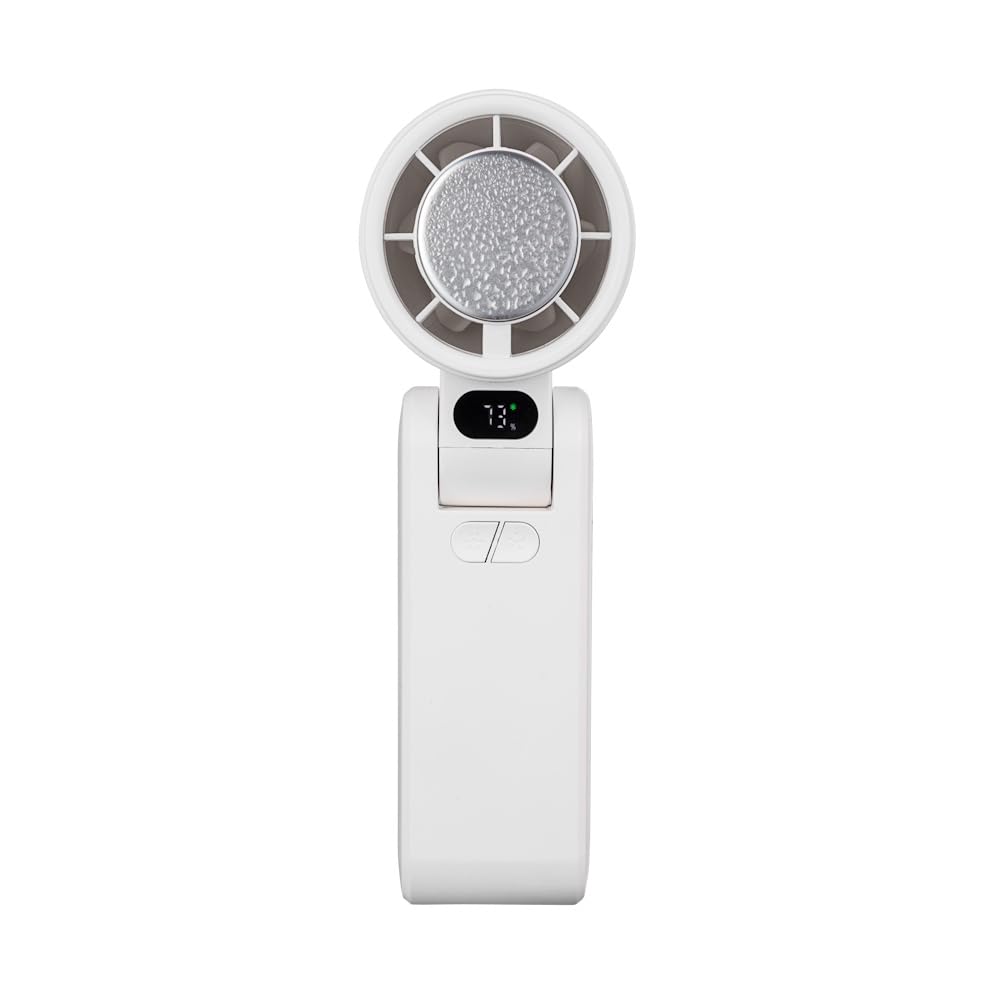
1-сүрөт: Фронт view of the Acerpure Cozy HF1 Hand Fan. This image displays the fan in its upright, unfolded position, highlighting the fan head, the digital display, control buttons, and the USB-C charging port on the side.

2-сүрөт: Side view of the Acerpure Cozy HF1 Hand Fan in its folded configuration. This view emphasizes the compact nature of the fan when folded, suitable for portability, and shows the display and USB-C port.
- Вентилятор башы: Contains the fan blades and the cold compress plate.
- Digital HD Display: Shows battery level, wind speed, cooling mode, and charging status.
- Кубат/Ылдамдык баскычы: Controls power on/off and adjusts fan speed.
- Cooling Mode Button: Activates/deactivates the cold compress function.
- USB-C заряддоо порту: Ички батареяны заряддоо үчүн.
- Foldable Hinge: Allows the fan to be folded for compact storage or adjusted for various angles.
- Lanyard/Strap Attachment Point: For attaching the neck strap.
4. Орнотуу
4.1 Алгачкы заряддоо
Before first use, fully charge the fan. The fan is equipped with a 3600mAh rechargeable battery.
- Connect the provided USB-C charging cable to the fan's USB-C port.
- Connect the other end of the cable to a DC 5V/2A USB power adapter (not included) or a compatible USB port.
- The HD display will show the charging status. A full charge typically takes approximately 4 hours.
4.2 Ачуу жана жайгаштыруу
The fan features a foldable design for versatile use.
- Gently unfold the fan head from the handle until it locks into the desired angle. The fan supports multi-angle adjustment.
- For handheld use, hold the fan by the handle.
- For desktop use, position the fan on a flat, stable surface.
- To wear around the neck, attach the neck strap to the designated attachment points and adjust for comfort.

3-сүрөт: The Acerpure Cozy HF1 fan being worn around the neck using the included strap, demonstrating its hands-free portability.

4-сүрөт: The Acerpure Cozy HF1 fan attached to a bag, illustrating its compact size and ease of transport for on-the-go use.

5-сүрөт: An illustration showing the Acerpure Cozy HF1 fan's multi-angle adjustment capabilities, allowing it to be positioned for different uses and scenarios.
5. Иштөө нускамалары
5.1 Power On/Off and Fan Speed Adjustment
The fan offers 100 levels of adjustable wind speed.
- Күйгүзүү үчүн: Press and hold the Power/Speed button for approximately 2 seconds. The fan will start at a low speed, and the HD display will illuminate.
- Ылдамдыкты жөнгө салуу үчүн: Briefly press the Power/Speed button repeatedly to cycle through the 100 speed levels. The current speed level will be shown on the HD display.
- Өчүрүү үчүн: Press and hold the Power/Speed button for approximately 2 seconds until the fan stops and the display turns off.

6-сүрөт: Illustration of the powerful airflow generated by the Acerpure Cozy HF1 fan, highlighting its 13,000 RPM motor and efficient design.
5.2 Cold Compress Function
The fan includes a built-in cold compress feature for rapid cooling.
- Жандыруу үчүн: With the fan powered on, briefly press the Cooling Mode button. A snowflake icon will appear on the HD display, indicating the cold compress is active.
- Өчүрүү үчүн: Briefly press the Cooling Mode button again. The snowflake icon will disappear.
Note: Using the cold compress function will consume battery power more quickly.

7-сүрөт: The Acerpure Cozy HF1 fan demonstrating its instant cooling capability with the cold compress function, depicted with ice surrounding the fan head.
5.3 HD Display Information
The HD panel provides real-time operational status:
- Батарея деңгээли: Indicated by a percentage (e.g., "73%") and a battery icon.
- Шамалдын ылдамдыгы: Shown as a numerical value (1-100).
- Муздатуу режими: A snowflake icon indicates the cold compress is active.
- Кубаттоо абалы: A charging icon appears when connected to power.

8-сүрөт: Close-up of the Acerpure Cozy HF1's HD display, illustrating battery level (100%) and estimated working time (6 hours).
6. Техникалык тейлөө
6.1 Тазалоо
Үзгүлтүксүз тазалоо оптималдуу аткарууну сактоого жардам берет.
- Ensure the fan is powered off and disconnected from any power source before cleaning.
- Вентилятордун сыртын жумшак, кургак же бир аз кургак чүпүрөк менен сүртүңүзamp кездеме.
- Абразивдүү тазалагычтарды, эриткичтерди же катуу химиялык заттарды колдонбоңуз, анткени алар бетке зыян келтириши мүмкүн.
- Use a soft brush or compressed air to gently remove dust from the fan grille and blades. Do not attempt to remove the fan grille.
6.2 Сактоо
Узак мөөнөткө колдонулбаганда:
- Fully charge the fan before storing.
- Fold the fan into its compact position.
- Салкын, кургак жерде, түз күндүн нурунан жана экстремалдык температурадан алыс сактаңыз.
7. Кыйынчылыктарды
If you encounter issues with your Acerpure Cozy HF1, refer to the following table:
| Көйгөй | Мүмкүн себеп | Чечим |
|---|---|---|
| Желдеткич күйбөйт. | Батарея аз. | Желдеткичти толук заряддаңыз. |
| Желдеткич күйбөйт. | Кубат баскычы туура басылган жок. | Press and hold the Power/Speed button for 2 seconds. |
| Алсыз аба агымы. | Төмөн желдеткич ылдамдыгын орнотуу. | Increase fan speed using the Power/Speed button. |
| Алсыз аба агымы. | Obstruction in air inlet/outlet. | Ensure air inlets and outlets are clear of debris. |
| Cold compress not working. | Function not activated. | Press the Cooling Mode button to activate (snowflake icon should appear). |
| Cold compress not working. | Батарея аз. | Charge the fan. The cold compress function may be limited when battery is low. |
| Желдеткич заряддалбай жатат. | Cable or adapter issue. | Ensure USB-C cable is securely connected. Try a different USB-C cable or power adapter (DC 5V/2A recommended). |
Эгер көйгөй чечилбесе, кардарларды колдоо менен байланышыңыз.
8. Техникалык шарттар
| Модел | HF1 |
| Бренд | Acerpure |
| Мотор ылдамдыгы | 13,000 RPM чейин |
| Күйөрмандардын ылдамдыгы | 100 жөнгө салынуучу деңгээл |
| Батарея сыйымдуулугу | 3600mAh |
| Заряддоо убактысы | Болжол менен 4 саат |
| Жумуш убактысы | 2-6 hours (depending on speed and cooling mode usage) |
| Муздатуу убактысы | 1-3 hours (when cold compress is active) |
| Заряддоо киргизүү | DC 5V/2A (USB-C) |
| Өлчөмү (Бүктөлгөн) | Болжол менен 5D x 6W x 17H см |
| Элемент Салмагы | 234 г |
| Материал | Пластик |
| Өзгөчөлүктөр | Foldable, Cold Compress Function, HD Display, Wearable |
9. Кепилдик жана Кардарларды колдоо
Acerpure products are manufactured to high quality standards. For information regarding warranty coverage, please refer to the warranty card included with your purchase or visit the official Acerpure webсайт.
If you require technical assistance, troubleshooting beyond this manual, or have questions about your product, please contact Acerpure customer support through their official channels. Please have your product model number (HF1) and purchase details ready when contacting support.