1. Киришүү
Thank you for choosing the LOEWE Leo Wireless Headphones. These premium headphones are designed to deliver an exceptional audio experience with advanced features such as Hi-Res Audio, adaptive noise cancellation, and real-time voice translation. This manual provides essential information for setting up, operating, and maintaining your headphones to ensure optimal performance and longevity.
2. Пакеттин мазмуну
Колдонуудан мурун, таңгактагы бардык буюмдардын бар экендигин текшериңиз:
- LOEWE Leo Wireless Headphones
- USB-C заряддоо кабели
- AUX to USB-C Audio Cable
- Кожа ташуучу куту
- Hard Carrying Case
- Cable Pouch
- Колдонуучунун Колдонмосу (бул документ)
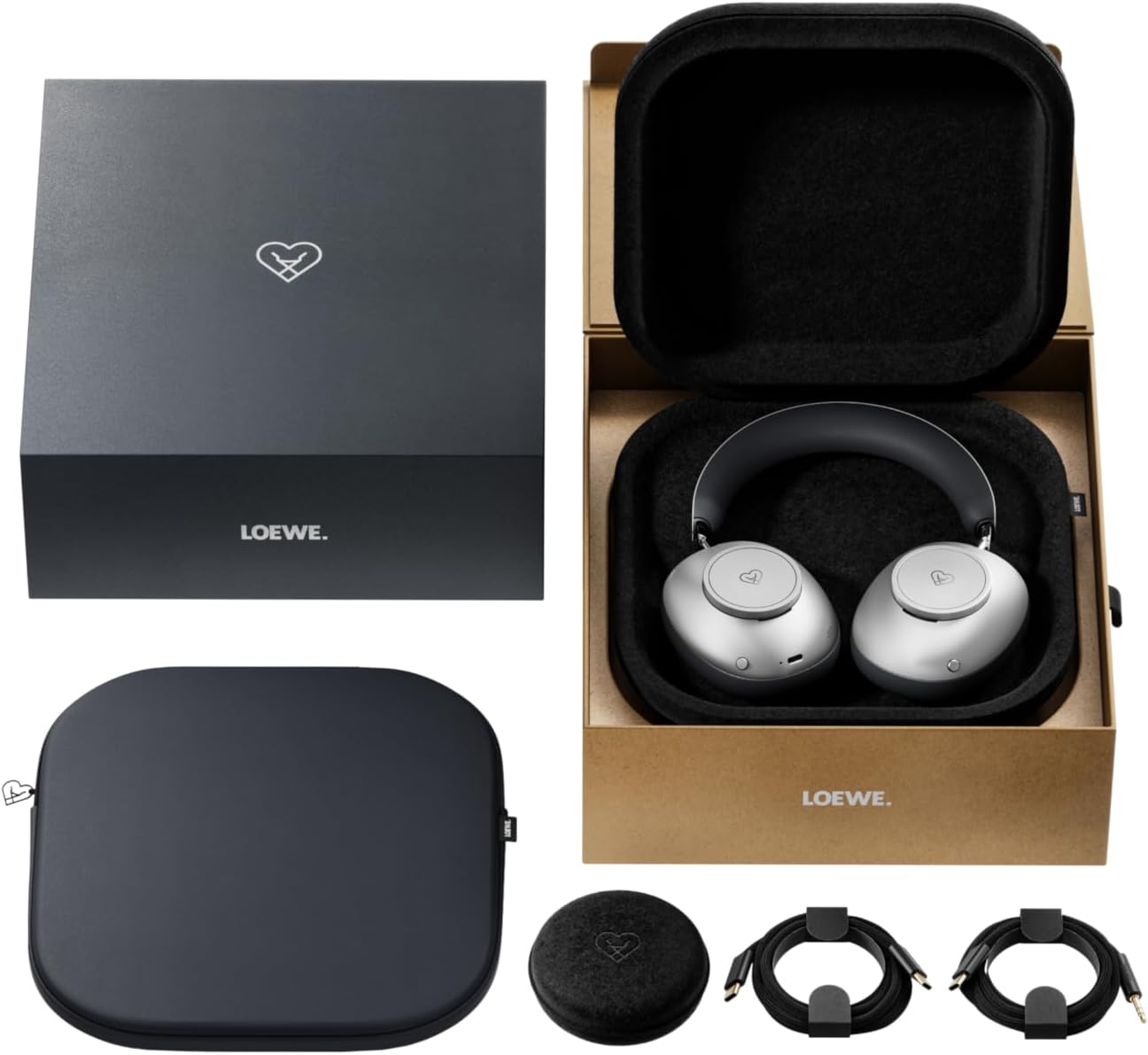
Image: The LOEWE Leo Wireless Headphones package contents, showing the headphones, USB-C cable, AUX cable, leather case, hard case, and cable pouch.
3. Продукт бүтүп калдыview
Familiarize yourself with the physical components and controls of your LOEWE Leo headphones.

Сүрөт: алдыңкы view of the LOEWE Leo Wireless Headphones, showcasing кулакчындарды жана баш орогучту.
3.1. Башкаруу каражаттары жана порттор
Наушниктерде оңой иштөө үчүн интуитивдик башкаруу элементтери бар:
- Контролдук терүүлөр: Two precision-crafted rotary wheels for volume adjustment and navigation.
- Аракет баскычтары: Dedicated buttons for playback control, ANC modes, and voice translation activation.
- USB-C порту: Кубаттоо жана зымдуу аудио туташуу үчүн.
- 3.5 мм Jack: For traditional wired audio connection.

Сүрөт: деталдуу view of the earcup, highlighting the control dial, USB-C port, and 3.5mm audio jack.
4. Баштоо
4.1. Наушниктерди заряддоо
Before first use, fully charge your LOEWE Leo headphones. A full charge provides up to 65 hours of continuous playback.
- Берилген USB-C заряддоо кабелин гарнитурадагы USB-C портуна туташтырыңыз.
- Кабелдин экинчи учун туура келген USB кубат адаптерине (кошумча эмес) же компьютердин USB портуна туташтырыңыз.
- Наушниктеги LED индикатору кубаттоо абалын көрсөтөт. Адатта ал толугу менен кубатталгандан кийин өчөт же түсүн өзгөртөт.
4.2. Күйгүзүү/өчүрүү
- Күйгүзүү үчүн: LED индикатору күйгөнгө чейин Кубат баскычын болжол менен 3 секунд басып туруңуз.
- Өчүрүү үчүн: LED индикатору өчмөйүнчө кубат баскычын болжол менен 3 секунд басып туруңуз.
4.3. Bluetooth Жупташтыруу
The LOEWE Leo headphones utilize Bluetooth Low Energy (BLE) for faster pairing and reduced power consumption.
- Наушниктердин өчүрүлгөнүн текшериңиз.
- Press and hold the Power button for approximately 5 seconds until the LED indicator flashes rapidly, indicating pairing mode.
- Түзмөгүңүздө (смартфон, планшет, компьютер) Bluetooth иштетип, жеткиликтүү түзмөктөрдү издеңиз.
- Select "LOEWE Leo" from the list of found devices.
- Туташкандан кийин, LED индикатору жарк этүүнү токтотуп, көк бойдон калат.
4.4. Зымдуу туташуу
For a wired audio experience, use the supplied AUX to USB-C cable.
- Connect the USB-C end of the AUX cable to the headphones.
- Connect the 3.5mm end of the AUX cable to your audio source's 3.5mm jack.
- Наушник автоматтык түрдө зымдуу режимге өтөт.
5. Наушниктерди иштетүү
5.1. Аудио ойнотуу жана үндү башкаруу
Use the control dials and action buttons for managing your audio:
- Үнүн жогорулатуу/төмөндөтүү: Rotate the designated control dial.
- Ойнотуу/тындыруу: Press the central action button once.
- Кийинки трек: Double-press the central action button.
- Мурунку трек: Triple-press the central action button.

Image: Close-up of the earcup's control dial, used for volume and navigation.
5.2. Адаптивдүү ызы-чууну жокко чыгаруу (ANC)
The LOEWE Leo features advanced adaptive noise cancellation that continuously analyzes your environment and adjusts in real-time.
- ANCти иштетүү/өчүрүү: Press the dedicated ANC button once.
- Ачыктык режими: Press the ANC button twice to allow ambient sounds to pass through, enhancing situational awareness.

Image: Illustration of the adaptive noise cancellation feature, depicting sound wave management.
5.3. Real-time Voice Translation
Communicate across language barriers with the integrated real-time voice translation feature.
- Ensure your headphones are connected to a device with internet access and the LOEWE companion app installed.
- Activate the translation feature via the dedicated button or the companion app.
- Speak into the headphone's microphone. The translated audio will be played back in real-time.

Image: Earcup detail showing the microphone for voice input and the 'leo' icon, representing the real-time translation function.
5.4. Dolby Atmos and Spatial Audio
Experience immersive sound with Dolby Atmos and spatial audio support. This feature is automatically enabled when compatible content is played through a connected device that supports these audio technologies.
6. Техникалык тейлөө жана кам көрүү
6.1. Тазалоо
- Наушниктерди жумшак, кургак, түксүз чүпүрөк менен сүртүңүз.
- Абразивдүү тазалагычтарды, спиртти же химиялык эриткичтерди колдонбоңуз.
- Keep moisture away from openings.
6.2. Батареяга кам көрүү
- Батареяны бат-баттан толук кубаттап калуудан алыс болуңуз.
- Store the headphones in a cool, dry place when not in use for extended periods.
- The battery is user-replaceable, contributing to the product's longevity.
6.3. Modular Design
The LOEWE Leo headphones feature a durable modular design with replaceable components, such as ear cushions and headbands. This design allows for easy replacement of worn parts, extending the product's lifespan.

Image: The modular construction of the LOEWE Leo headphones, showing detachable earcups and headband for maintenance or replacement.
7. Кыйынчылыктарды
If you encounter issues with your LOEWE Leo headphones, refer to the following common solutions:
- Кубат жок: Кулакчындар толук заряддалганын текшериңиз. Аларды USB-C кабели аркылуу кубат булагына туташтырыңыз.
- Үн жок:
- Наушниктердин жана туташкан түзмөгүңүздүн үнүнүн деңгээлин текшериңиз.
- Ensure the headphones are properly paired via Bluetooth or the AUX cable is securely connected.
- Кулакчындарды да, аудио булак түзмөгүн да өчүрүп-күйгүзүп көрүңүз.
- Bluetooth ажыратуу:
- Ensure the headphones are within the Bluetooth range of your device (typically 10 meters).
- Түзмөгүңүздөгү Bluetooth'ту өчүрүп, кайра иштетип, андан кийин кайра жупташтырып көрүңүз.
- Clear the LOEWE Leo from your device's Bluetooth history and pair again.
- ANC эффективдүү иштебей жатат:
- Ensure the earcups form a good seal around your ears. Adjust the fit if necessary.
- Verify that ANC is activated.
- Voice Translation Issues:
- Түзмөгүңүздүн интернет байланышын текшериңиз.
- Ensure the LOEWE companion app is up-to-date and configured correctly.
- Таза жана орточо темпте сүйлө.
If problems persist, please contact LOEWE customer support.
8. Техникалык шарттар
| Өзгөчөлүк | Description |
|---|---|
| Модель аты | Лео |
| Модель номери | 64641J10 |
| Байланыш технологиясы | Wireless (Bluetooth), Wired |
| Зымсыз байланыш | Bluetooth аз энергия (BLE) |
| Үн өзгөчөлүктөрү | Hi-Res Audio, Dolby Atmos, Spatial Audio |
| Noise Cancellation | Adaptive Noise Reduction (ANC) |
| Өзгөчөлүктөр | Real-time Voice Translation, Modular Design with Replaceable Components |
| Батареянын иштөө мөөнөтү | 65 саатка чейин (болжол менен) |
| Башкаруу түрү | Button Control, Rotary Dials |
| Шайкеш түзмөктөр | Cellular Phone, Tablet, Computer, Laptop |
| Салмагы | 3 Kilograms (product weight as listed, may include packaging) |
9. Кепилдик жана колдоо
9.1. Өндүрүүчүнүн Кепилдиги
The LOEWE Leo Wireless Headphones come with a 2 жылдык өндүрүүчүнүн кепилдиги. Бул кепилдик нормалдуу колдонуудагы материалдардагы жана жасалгадагы кемчиликтерди камтыйт. Кепилдик дооматтары үчүн сатып алганыңыздын далилин сактап коюңуз.
For specific terms and conditions of the warranty, please refer to the warranty card included in your product packaging or visit the official LOEWE webсайт.
9.2. Кардарларды колдоо кызматы
For technical assistance, troubleshooting, or warranty inquiries, please contact LOEWE customer support through their official webсайт же продукт документациясында көрсөтүлгөн байланыш маалыматы.
Онлайн ресурстар: Visit the official LOEWE webКөп берилүүчү суроолор, программалык камсыздоону жаңыртуу жана кошумча колдоо ресурстары үчүн сайт.