1. Киришүү
Thank you for choosing the SUNLU S4 Filament Dryer. This device is designed to effectively dry 3D printer filaments, improving print quality and preventing common issues caused by moisture absorption. The S4 features a large capacity for up to four 1KG spools, rapid heating, uniform drying with triple fans, and intelligent humidity control for optimal filament conditioning.
2. Коопсуздук нускамалары
- Аппаратты иштетүүдөн мурун бардык нускамаларды окуп чыгыңыз.
- электр менен жабдууну камсыз кылуу voltage matches the specifications indicated on the device.
- Аппаратты нымдуу колдор менен же дamp чөйрөлөр.
- Keep the device away from flammable materials and heat sources.
- Иштөө учурунда желдетүү тешиктерин жаппаңыз.
- Аппаратты колдонбогондо же тазалоодон мурун электр розеткасынан сууруп алыңыз.
- Аппаратты өз алдынча бөлүүгө же оңдоого аракет кылбаңыз. Жардам алуу үчүн кардарларды колдоо бөлүмүнө кайрылыңыз.
- Балдар жетпеген жерде сактаңыз.
3. Пакеттин мазмуну
Сураныч, пакетте төмөнкү нерселерди текшериңиз:
- SUNLU S4 Filament Dryer Unit
- Кубаттуу адаптер
- Колдонуучунун Колдонмосу (бул документ)
- 1KG White High Speed PLA+2.0 Filament (bundled item)
4. Продукт бүтүп калдыview
The SUNLU S4 Filament Dryer is designed to provide optimal drying conditions for various 3D printing filaments. Key features include:
- Чоң сыйымдуулугу: Accommodates up to four 1KG spools simultaneously, enabling multi-color or multi-machine printing without interruption.
- Тез жылытуу: Equipped with a 350W PTC heater, the S4 heats from 25℃ to 50℃ in approximately 30 minutes, ensuring efficient drying.
- Uniform Drying: Three built-in fans (two circulating on sides, one on bottom) maintain a temperature balance within ±3℃ for consistent drying throughout the box.
- Triple Security: Features PTC, temperature switch, and software protection for enhanced safety and real-time temperature monitoring.
- Smart Auto Humidity Control: Allows users to set a desired humidity range (30%~50%). The dryer automatically starts drying when humidity exceeds the set range and stops when it falls below 25% to prevent over-drying.
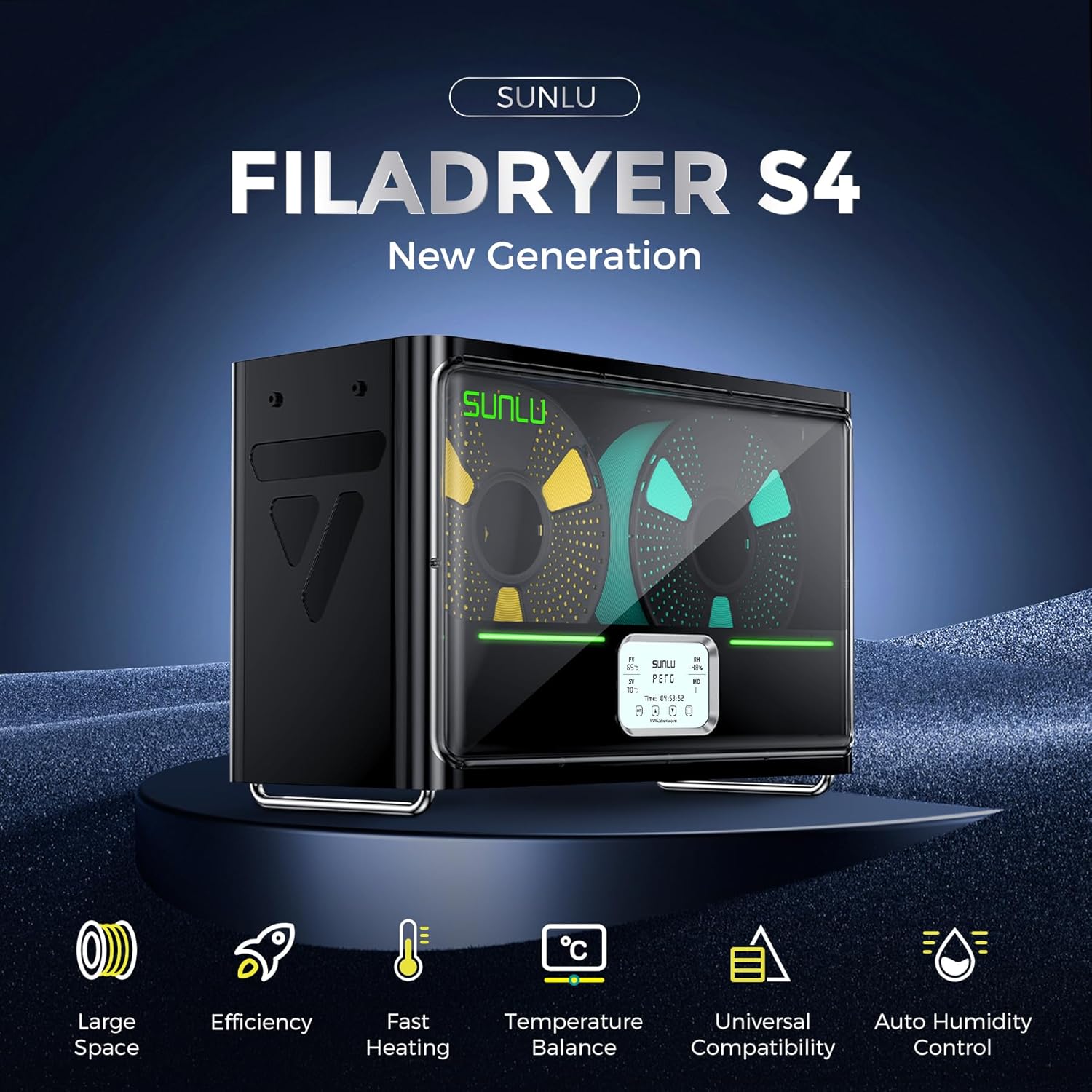
Image: The SUNLU S4 Filament Dryer highlighting its main features including large space, efficiency, fast heating, temperature balance, universal compatibility, and auto humidity control.
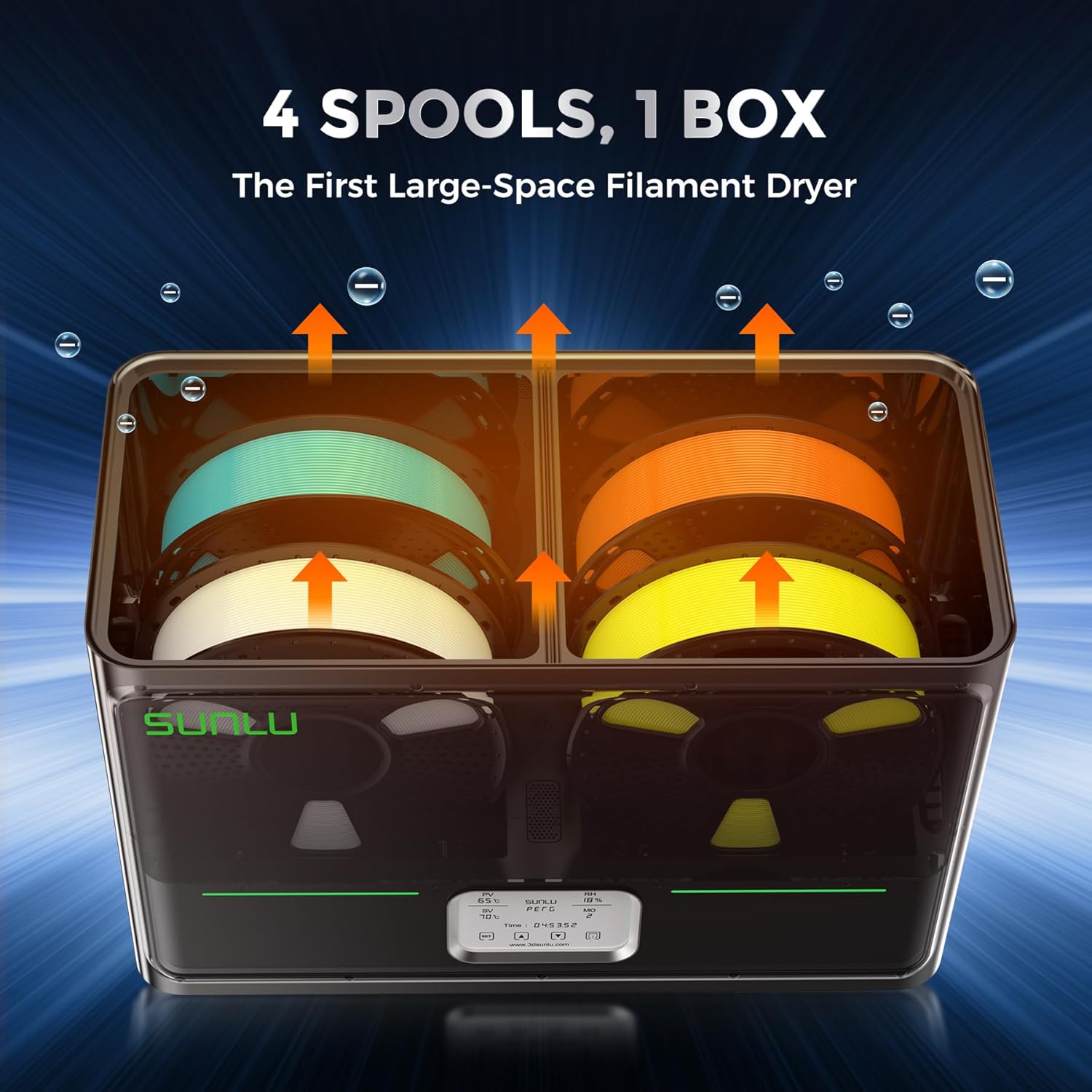
Сүрөт: ички view of the SUNLU S4 Filament Dryer demonstrating its capacity to hold four 1KG filament spools, with arrows indicating airflow for drying.

Image: A visual comparison showing a 3D printed object made with wet filament (left, rough surface) versus the same object made with dried filament (right, smooth surface), illustrating the benefits of drying.
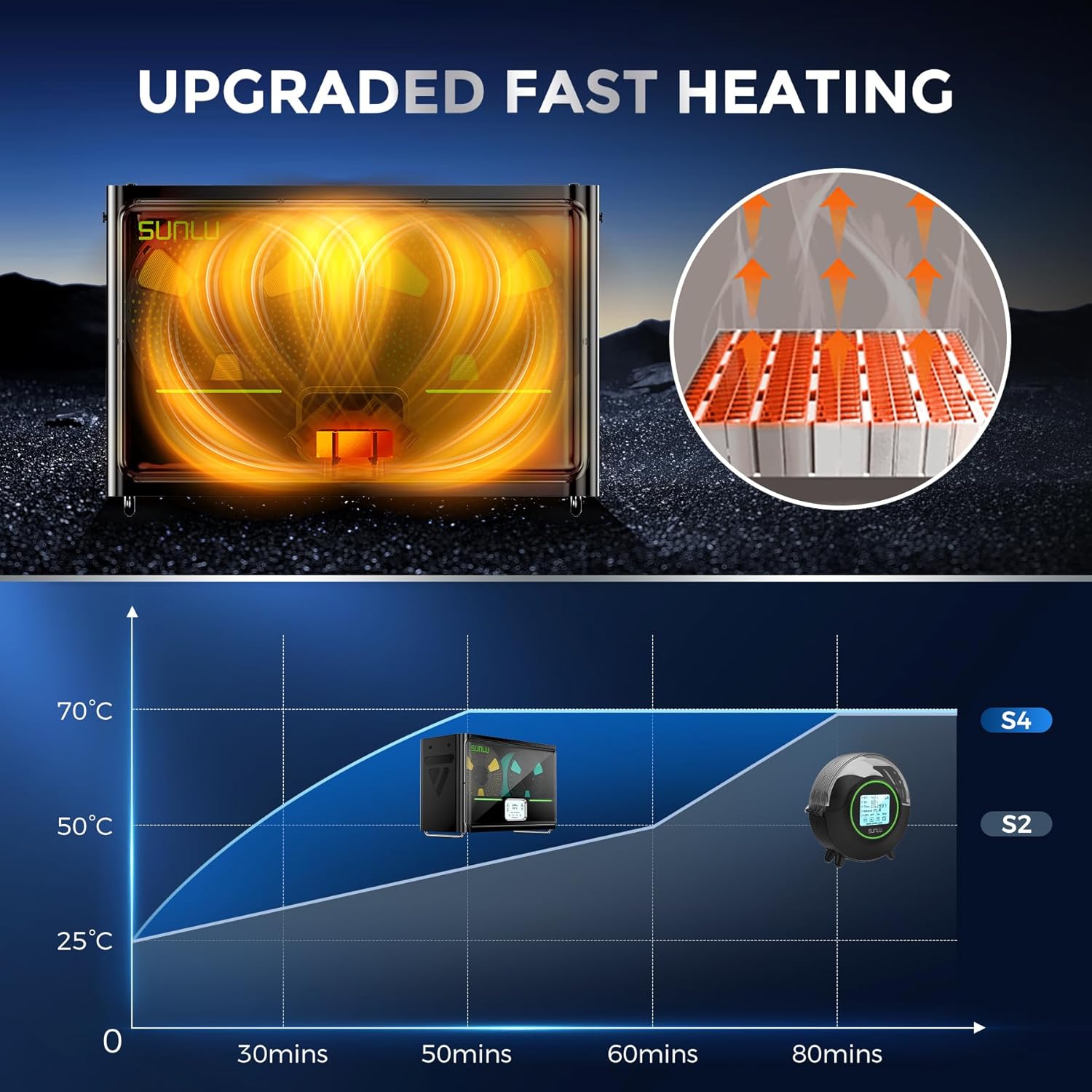
Image: A graph illustrating the rapid heating capability of the SUNLU S4, showing it reaches 50°C from 25°C in approximately 30 minutes, significantly faster than previous models.

Image: An illustration depicting the three internal fans of the SUNLU S4, highlighting their role in circulating air for uniform and 360-degree drying of filament.

Image: A diagram showing the triple security features of the S4: Smart PTC, Temperature Switch, and Software Protection, ensuring safe operation with real-time temperature monitoring.
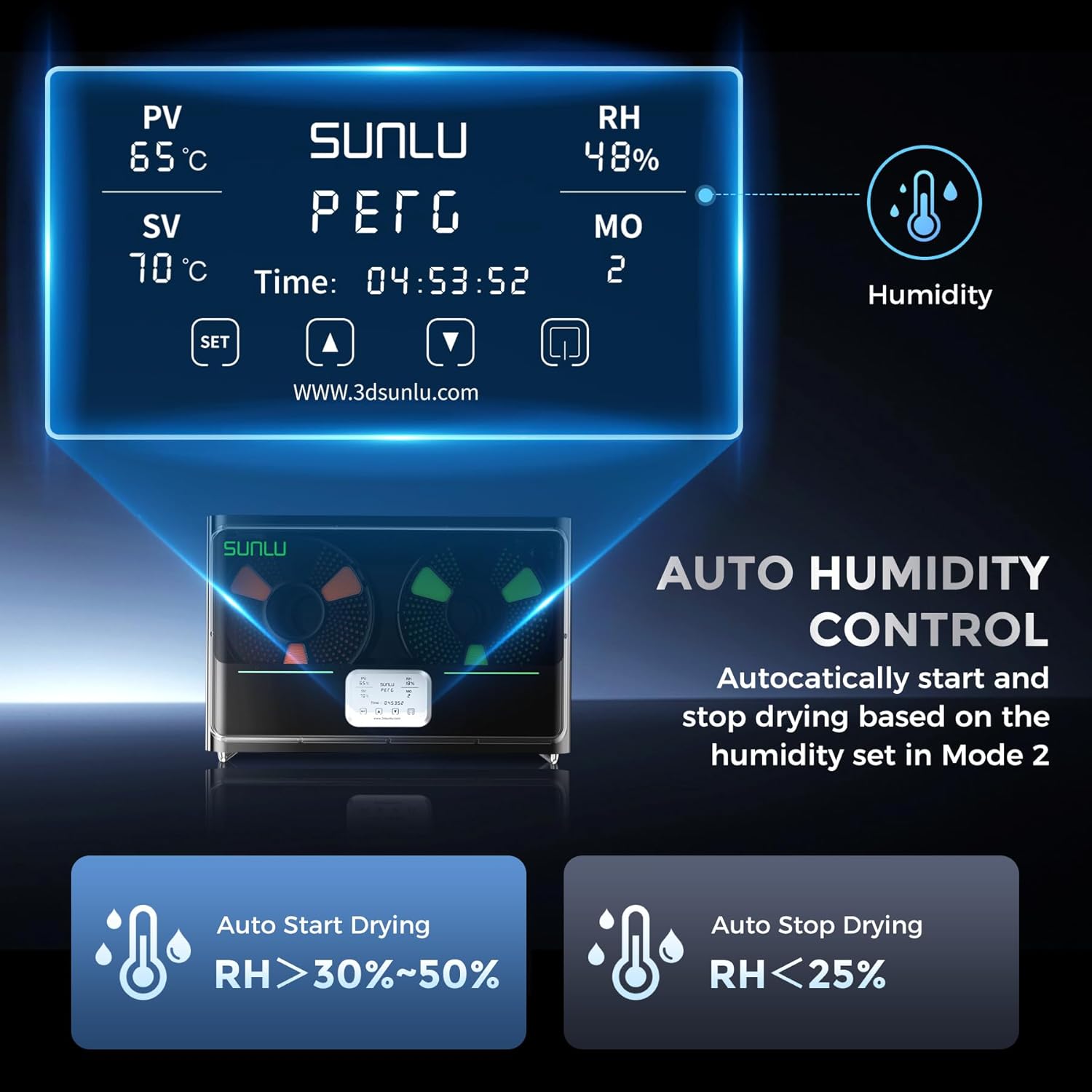
Image: The control panel display of the SUNLU S4, showing current temperature (PV), set temperature (SV), relative humidity (RH), and mode (MO). It also illustrates the auto humidity control logic for starting and stopping drying.
5. Орнотуу
- Таңылганын ачуу: Carefully remove the SUNLU S4 Filament Dryer and all accessories from the packaging.
- Жайгашкан жери: Place the dryer on a stable, flat, and heat-resistant surface, ensuring adequate ventilation around the unit.
- Filament жүктөө: Open the lid of the dryer. Place up to four 1KG filament spools onto the internal rollers. Ensure the filament can unroll smoothly.
- Туташуу кубаты: Plug the power adapter into the dryer's power input port, then connect the adapter to a suitable power outlet.
- Күйгүзүү: Press the power button to turn on the device. The display will illuminate.
6. Иштөө нускамалары
The SUNLU S4 offers various modes for drying filament. Refer to the display and control buttons for operation.
6.1. Негизги операция
- Күйгүзүү/өчүрүү: Бирдикти күйгүзүү же өчүрүү үчүн кубат баскычын басыңыз.
- Temperature Setting (SV): Use the 'SET' button to enter temperature adjustment mode. Use the up/down arrows to set the desired drying temperature. Press 'SET' again to confirm.
- Drying Time Setting: The dryer typically operates for a set duration or until humidity targets are met. Consult the on-screen display for current drying time.
6.2. Auto Humidity Control (Mode 2)
This mode allows the dryer to automatically manage humidity levels to prevent over-drying while ensuring optimal conditions.
- Activate Mode 2: Navigate to Mode 2 on the display.
- Set Humidity Range: In Mode 2, you can adjust the target humidity range, typically between 30% and 50%.
- Автоматтык иштетүү: The S4 will automatically initiate drying when the internal relative humidity (RH) rises above your set range.
- Автоматтык токтотуу: Drying will automatically cease when the internal RH drops below 25%, preserving filament quality.
Эскертүү: Always refer to the specific filament manufacturer's recommendations for optimal drying temperatures and durations.
7. Техникалык тейлөө
- Тазалоо: Ensure the device is unplugged before cleaning. Use a soft, dry cloth to wipe the exterior. Do not use abrasive cleaners or solvents.
- Ички тазалоо: Periodically check the interior for any filament debris or dust. Use a soft brush or compressed air to gently remove any accumulation.
- Сактагыч: When not in use for extended periods, store the dryer in a cool, dry place, away from direct sunlight and moisture.
8. Кыйынчылыктарды
| Көйгөй | Мүмкүн себеп | Чечим |
|---|---|---|
| Түзмөк күйбөйт | Электр менен камсыздоо жок; байланышы начар | Check power cable connection; ensure outlet is functional. |
| Filament not drying effectively | Incorrect temperature/time settings; heavily saturated filament | Increase drying temperature or duration; ensure correct mode is selected. |
| Температуранын өзгөрүшү | Blocked vents; extreme ambient temperature | Ensure vents are clear; operate in a stable room temperature environment. |
| Дисплей иштебейт | Power issue; internal fault | Power cycle the device. If issue persists, contact support. |
9. Техникалык шарттар
| Өзгөчөлүк | Деталь |
|---|---|
| Модел | S4 |
| Бренд | СУНЛУ |
| Жылытуу күчү | 350W PTC Heater |
| Filament Capacity | Up to 4 x 1KG spools |
| Температураны көзөмөлдөө | ±3℃ balance |
| Нымдуулукту көзөмөлдөө | Auto start (RH > 30-50%), Auto stop (RH < 25%) |
| Коопсуздук өзгөчөлүктөрү | PTC, Temperature Switch, Software Protection |
| ASIN | B0FS74DPRD |
| Дата биринчи жеткиликтүү | 6-июль, 2025-жыл |
10. Кепилдик жана колдоо
SUNLU products are manufactured to high-quality standards. For warranty information, technical support, or service inquiries, please refer to the official SUNLU website or contact your retailer. Please have your product model (S4) and purchase information ready when contacting support.


