1. Киришүү
Welcome to the OnePlus 15 user manual. This guide provides essential information for setting up, operating, maintaining, and troubleshooting your new smartphone. The OnePlus 15 is designed for high performance and extended battery life, featuring a Snapdragon 8 Elite Gen 5 processor, a 7300mAh battery, and a triple 50 MP camera system. Please read this manual thoroughly to ensure optimal use of your device.
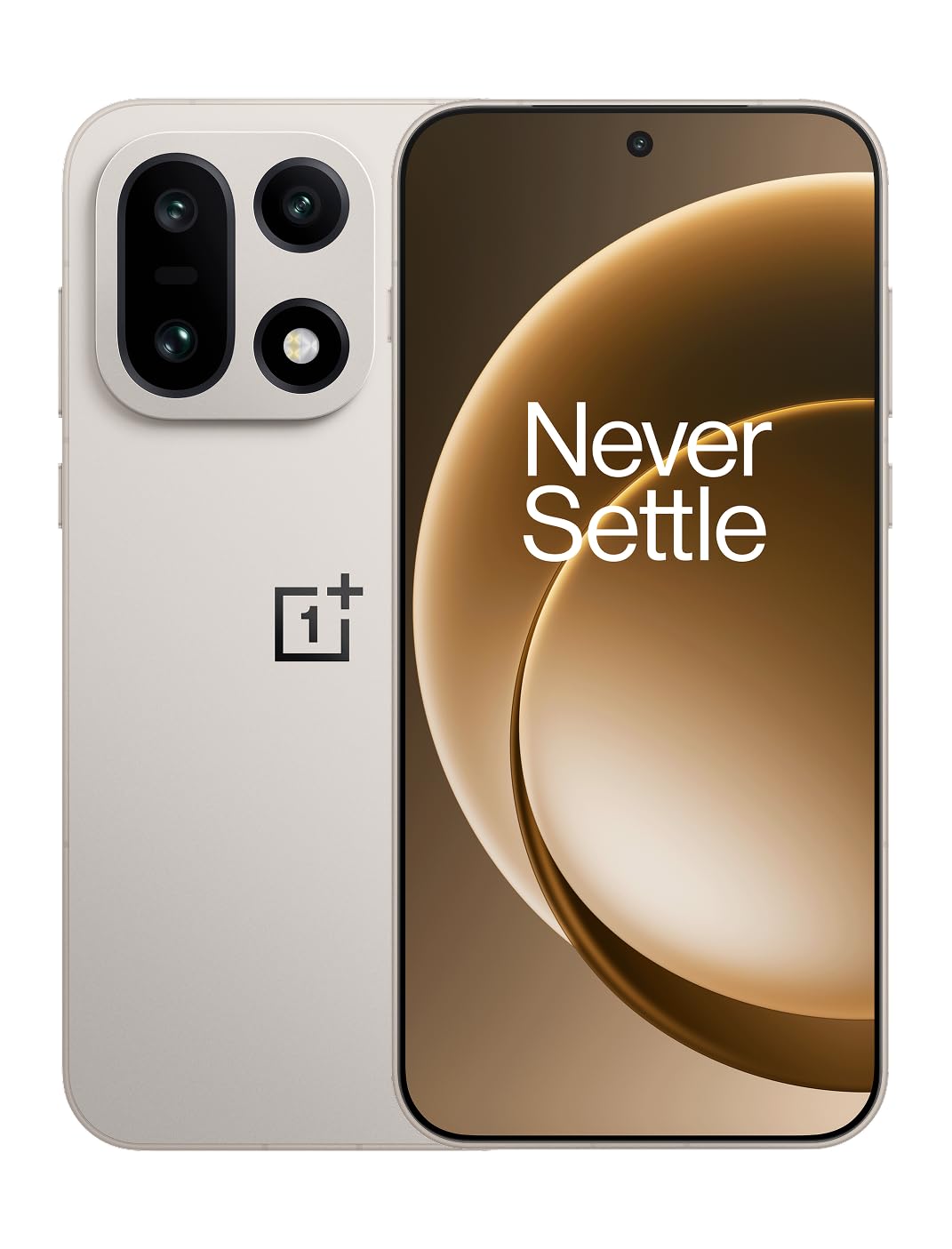
Сүрөт 1: Алдыңкы view of the OnePlus 15 smartphone.
2. Кутуда эмне бар
Продукцияңыздын таңгагында бардык элементтер бар экенин текшериңиз:
- OnePlus 15 Smartphone (x1)
- Заряддагыч (x1)
- USB Data Cable (x1)
- SIM Ejector Tool (x1)
- Ыкчам жетектеме (x1)
- Safety Guide (x1)

Figure 2: Included items in the OnePlus 15 package.
3. Орнотуу
3.1. SIM картаны орнотуу
The OnePlus 15 supports Dual-SIM functionality. To install your SIM card(s):
- Аппараттын капталындагы SIM карта салгычын табыңыз.
- SIM чыгаруучу куралды лотоктун жанындагы кичинекей тешикке киргизип, лоток чыгып кеткенче бекем басыңыз.
- Nano-SIM картаңызды алтын түстүү контакттары ылдый каратып, лотокко салыңыз. Алардын туура орнотулганын текшериңиз.
- SIM карта салгычын телефонго кылдаттык менен кайра салыңыз.

3-сүрөт: Каптал view of the OnePlus 15, highlighting the SIM card tray.
3.2. Баштапкы күйгүзүү жана орнотуу
Түзмөгүңүздү биринчи жолу күйгүзүү үчүн:
- OnePlus логотиби пайда болгонго чейин Кубат баскычын (оң жагында жайгашкан) басып туруңуз.
- Баштапкы орнотууларды, анын ичинде тилди тандоону, Wi-Fi туташуусун, Google аккаунтуна кирүүнү жана коопсуздук жөндөөлөрүн аяктоо үчүн экрандагы көрсөтмөлөрдү аткарыңыз.
3.3. Батареяны заряддоо
The OnePlus 15 is equipped with a 7300mAh battery. To charge your device:
- Зымдуу кубаттоо: Connect the provided USB Data Cable to the Type-C port on the bottom of the phone and the other end to the charger. Plug the charger into a power outlet.
- Зымсыз кубаттоо: Place the phone on a compatible wireless charging pad. Ensure the phone is centered on the pad for efficient charging.
A full charge provides approximately 68.7 hours of talk time.

Figure 4: Illustration of the 7300mAh battery capacity.
4. Аппаратыңызды иштетүү
4.1. Дисплей
The OnePlus 15 features a 6.78-inch AMOLED display with a 2772x1272 resolution and a 165 Hz refresh rate. This provides smooth visuals and vibrant colors. Adjust display settings such as brightness, color mode, and refresh rate in the device settings menu.
4.2. Performance
Powered by the Snapdragon 8 Elite Gen 5 processor and 16GB of RAM, the OnePlus 15 delivers fast and efficient performance for multitasking, gaming, and demanding applications. The Tri-Chip System, combining the Snapdragon 8 Elite Gen 5 with a dedicated Wi-Fi chip and CPU scheduler, optimizes for speed, connectivity, and power efficiency.
Видео 1: Бүттүview of the OnePlus 15's performance capabilities and user experience.
4.3. Камера системасы
The device is equipped with a Triple 50 MP camera system, offering wide, ultra-wide, and telephoto lenses for versatile photography. The DetailMax Engine enhances photo quality in various lighting conditions, including day, night, and motion shots. Both front and rear cameras are available for capturing images and videos.

5-сүрөт: Арткы view of the OnePlus 15, showcasing the triple camera system.
Figure 6: DetailMax Engine for stunning photos.
4.4. Байланыш
The OnePlus 15 supports a range of connectivity options:
- Зымсыз: Wi-Fi, Bluetooth, NFC, Infrared.
- текст: USB Type-C.
- Навигация: Dual-band GPS (L1+L5) and Galileo (E1+E5a).
- SIM: Dual SIM support for managing multiple networks.
4.5. Операция системасы
The device runs on Android 16 with OxygenOS 16, providing a fast and smooth user experience. Regular software updates will be provided to enhance features and security.
5. Техникалык тейлөө
5.1. Узактыгы жана коргоо
The OnePlus 15 is built with IP66/IP68/IP69 and IP19K ratings, offering resistance against dust and water. While designed to be durable, avoid exposing the device to extreme conditions or prolonged submersion in water.

Figure 7: OnePlus 15 demonstrating water resistance.
5.2. Аппаратыңызды тазалоо
Use a soft, lint-free cloth to clean the screen and body of your phone. Avoid using abrasive materials or harsh chemicals, which can damage the display or finish.
5.3. Программалык камсыздоону жаңыртуу
Periodically check for software updates in the device settings. Keeping your software up-to-date ensures you have the latest features, security patches, and performance improvements.
6. Кыйынчылыктарды
This section addresses common issues you might encounter with your OnePlus 15.
6.1. Түзмөк күйбөй жатат
- Батарея заряддалганын текшериңиз. Телефонду заряддагычка туташтырыңыз жана кайра күйгүзүү аракетинен мурун бир нече мүнөт күтүңүз.
- Өчүрүп күйгүзүүгө мажбурлоо үчүн Кубат баскычын жок дегенде 10-15 секунд басып, кармап туруңуз.
6.2. Начар тармак туташуусу
- SIM картаңыз туура салынганын текшериңиз.
- Verify that airplane mode is not enabled.
- Аппаратты кайра иштетиңиз.
- If issues persist, contact your network provider.
6.3. Колдонмолор бузулуп жатат же катып жатат
- Колдонмону жаап, кайра ачыңыз.
- Clear the app's cache and data in device settings.
- Колдонмонун акыркы версиясына жаңыртылганын текшериңиз.
- If the issue is widespread, consider restarting the phone.
6.4. Батареянын бат түгөнү
- Экран жарыктыгын жана экрандын күтүү мөөнөтүн азайтыңыз.
- Disable unused features like Wi-Fi, Bluetooth, or GPS when not needed.
- Identify and close power-intensive applications running in the background.
- Check for recent software updates, as they often include battery optimizations.
7. Техникалык шарттар
Detailed technical specifications for the OnePlus 15 (Model: CPH2749).
| Өзгөчөлүк | Деталь |
|---|---|
| Модель аты | OnePlus 15 |
| Элемент моделинин номери | CPH2749 |
| Продукциянын өлчөмдөрү | 6.36 x 3.02 x 0.32 дюйм |
| Элемент Салмагы | 1.28 фунт |
| Операция системасы | Android 16 |
| CPU модели | Snapdragon 8 Elite Gen 5 |
| CPU ылдамдыгы | 4.61 ГГц |
| RAM эстутум орнотулган өлчөмү | 16 ГБ |
| Эстутум сактоо сыйымдуулугу | 512 ГБ |
| Туруктуу экран дисплей өлчөмү | 6.78 дюйм |
| Резолюция | 2772*1272 |
| Жаңыртуу ылдамдыгы | 165 Гц |
| Батарея сыйымдуулугу | 7300 миллионamp Hours (7300mAh) |
| Телефон менен сүйлөшүү убактысы | 68.7 саат |
| Connectivity Technologies | Infrared, NFC, USB, Wi-Fi, Bluetooth |
| GPS | Dual band: GPS(L1+L5) Galileo(E1+E5a) |
| Өзгөчөлүктөр | Dual SIM, Wireless Charging |
| Аудио Jack | Type-C headphones: supported Type-C digital headphones & Type-C analog headphones |
| Камеранын башка өзгөчөлүктөрү | Front, Rear (Triple 50 MP Camera System) |
| IP рейтинги | IP66/IP68/IP69 and IP19K rated |
| Түс | Sand Storm |
8. Кепилдик маалыматы
Your OnePlus 15 device is covered by a limited manufacturer's warranty. Please refer to the included Safety Guide or visit the official OnePlus website for detailed warranty terms and conditions, including coverage duration and service procedures. Keep your proof of purchase for warranty claims.
9. Колдоо
For further assistance, technical support, or to access additional resources, please visit the official OnePlus support website or contact customer service. You can find contact details and FAQs on the OnePlus webсайт.
Онлайн ресурстар: www.oneplus.com/support


