1. Продукт бүтүп калдыview
The OnePlus 15 is an advanced Android smartphone designed for high performance and extended usage. It features a powerful Snapdragon 8 Elite Gen 5 processor, a large 7,300mAh battery, and a vibrant 6.78-inch 165 Hz AMOLED display. The device is equipped with a triple 50 MP camera system for detailed photography and offers robust durability with IP66/IP68/IP69 and IP19K ratings for dust and water resistance.
Негизги өзгөчөлүктөрү:
- Massive 7,300 mAh Battery: Provides extended power for all-day use and beyond.
- Tri-Chip System: Integrates the Snapdragon 8 Elite Gen 5, a dedicated Wi-Fi chip, and a CPU scheduler for optimized performance, connectivity, and efficiency.
- Triple 50 MP Camera System: Captures high-quality images with wide, ultra-wide, and telephoto capabilities.
- Туруктуу дизайн: Built to resist dust and water, with IP66/IP68/IP69 and IP19K ratings for enhanced protection.
- 6.78-inch 165 Hz AMOLED Display: Delivers vivid colors, smooth motion, and exceptional clarity.
2. Кутуда эмне бар
Продукцияңыздын таңгагында бардык элементтер бар экенин текшериңиз:
- OnePlus 15 Smartphone x1
- Заряддоочу x1
- USB маалымат кабели x1
- SIM Ejector Tool x1
- Ыкчам гид x1
- Safety Guide x1

Image: Contents of the OnePlus 15 retail box, showing the smartphone, charger, USB data cable, SIM ejector tool, quick guide, and safety guide.
3. Орнотуу
3.1 SIM картаны орнотуу
- Locate the SIM card tray on the side of your OnePlus 15.
- Insert the provided SIM ejector tool into the small hole on the SIM tray. Press firmly until the tray pops out.
- Place your Nano-SIM card(s) into the tray with the gold contacts facing down. Ensure they are correctly oriented according to the tray's outline.
- Carefully push the SIM tray back into the phone until it is flush with the device.
3.2 Баштапкы күйгүзүү жана конфигурация
- Press and hold the Power button (located on the right side of the device) until the OnePlus logo appears.
- Тилиңизди тандоо, Wi-Fi тармагына туташуу жана Google аккаунтуңузду орнотуу үчүн экрандагы көрсөтмөлөрдү аткарыңыз.
- You may be prompted to transfer data from an old device. Follow the instructions or skip this step to set up as a new device.
- Манжа изи менен ачуу, бет менен ачуу же PIN/үлгү сыяктуу коопсуздук жөндөөлөрүн конфигурациялаңыз.

Сүрөт: алдыңкы view of the OnePlus 15 smartphone, showcasing its display and front camera.
4. Аппаратыңызды иштетүү
4.1 Экран жана навигация
The OnePlus 15 features a 6.78-inch 165 Hz AMOLED display. Navigate the interface using touch gestures:
- таптаңыз: Select an item or activate a function.
- Серпүү: Экрандарды же тизмелерди сыдырыңыз.
- Чымчуу: Сүрөттөрдү чоңойтуу же кичирейтүү жана web барактар.
- Узак басуу: Контексттик менюларга кириңиз же сүрөтчөлөрдү жылдырыңыз.
4.2 Баскычтар жана порттор
Familiarize yourself with the physical controls and connections:
- Кубат баскычы: Located on the right side. Press to wake/sleep the screen, long press to power off or restart.
- Үн баскычтары: Located on the left side. Adjust media volume, ringtone volume, and alarm volume.
- USB Type-C порту: Located at the bottom. Used for charging, data transfer, and connecting Type-C headphones.
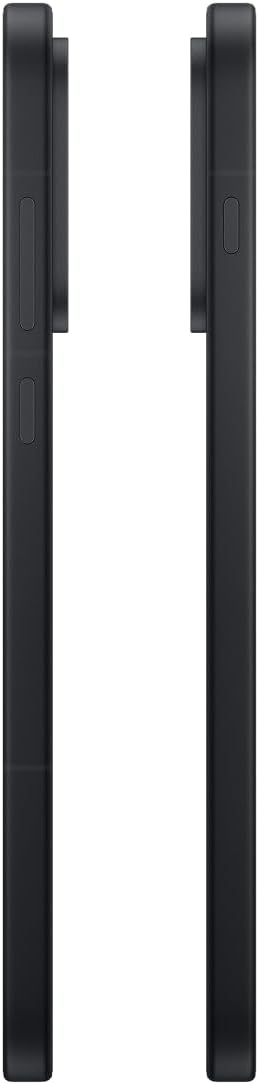
Сүрөт: каптал view of the OnePlus 15, showing the placement of the power and volume buttons.
4.3 Камераны колдонуу
The OnePlus 15 features a versatile triple 50 MP camera system. To open the camera app, tap the camera icon on your home screen or lock screen.
- Которуу режимдери: Swipe left or right on the screen to switch between Photo, Video, Portrait, and other modes.
- Чоңойтуу: Pinch in or out on the viewfinder, or tap the zoom icons (e.g., 0.6x, 1x, 2x) to adjust magnification.
- Тартуу: Сүрөткө тартуу же видео жазууну баштоо/токтоо үчүн жапкычты таптаңыз.
- Орнотуулар: Access camera settings for features like flash, timer, aspect ratio, and more.

Сүрөт: Артка view of the OnePlus 15, highlighting the triple 50 MP camera system.
4.4 Батареяны башкаруу
Your OnePlus 15 is equipped with a 7,300 mAh battery. To optimize battery life:
- Экран жарыктыгын жөндөп, экрандын таймаутун кыскараак коюңуз.
- Колдонулбаган учурда Wi-Fi, Bluetooth жана GPSти өчүрүңүз.
- Close background apps that are consuming power.
- Utilize Battery Saver mode when your battery is low.
- Use the provided charger and USB cable for optimal fast charging.
5. Техникалык тейлөө
5.1 Аппаратыңызды тазалоо
To clean your OnePlus 15:
- Экранды жана арткы панелди сүртүү үчүн жумшак, түксүз чүпүрөктү колдонуңуз.
- өжөр тактар үчүн, бир аз гampчүпүрөккө суу же экран тазалоочу каражат.
- Катуу химиялык заттарды, абразивдүү материалдарды же кысылган абаны колдонуудан алыс болуңуз.
5.2 Программалык камсыздоо жаңыртуулары
Программанын үзгүлтүксүз жаңыртуулары жаңы функцияларды, коопсуздукту жакшыртууну жана мүчүлүштүктөрдү оңдоону камсыз кылат. Жаңыртууларды текшерүү үчүн:
- барыңыз Орнотуулар > Түзмөк жөнүндө > OxygenOS version.
- таптаңыз Жаңыртууларды текшериңиз.
- If an update is available, follow the on-screen instructions to download and install it. Ensure your device has sufficient battery and is connected to Wi-Fi before updating.
6. Кыйынчылыктарды
If you encounter issues with your OnePlus 15, try the following common troubleshooting steps:
- Түзмөк жооп бербей жатат: Кайра иштетүүгө мажбурлоо үчүн кубат баскычын 10 секунддай басып туруңуз.
- Колдонмолор бузулуп жатат: Көйгөйлүү колдонмонун кэшин жана дайындарын тазалаңыз Орнотуулар > Колдонмолор > [Колдонмонун аты] > Сактоо жана кэш.
- Батареянын бат түгөнүп калышы: Review батареянын колдонулушу Орнотуулар > Батарея to identify power-hungry apps. Adjust settings as described in Section 4.4.
- Тармакка туташуу көйгөйлөрү: Toggle Airplane Mode on and off, restart your device, or reset network settings in Орнотуулар > Система орнотуулары > Камдык көчүрмөнү сактоо жана баштапкы абалга келтирүү > Телефонду баштапкы абалга келтирүү > Wi-Fi, мобилдик жана Bluetooth.
- Screen protector installation: For assistance with screen protector installation, refer to the following video guide:
Video: Installation guide for a screen protector on the OnePlus 15 5G. This video demonstrates the steps to correctly apply a screen protector to your device.
7. Техникалык шарттар
| Модель аты | OnePlus 15 |
| Элемент моделинин номери | CPH2749 |
| Продукциянын өлчөмдөрү | 6.36 x 3.02 x 0.33 дюйм |
| Элемент Салмагы | 1.29 фунт |
| Операция системасы | Android 16 |
| CPU модели | Snapdragon 8 Elite Gen 5 |
| CPU ылдамдыгы | 4.61 ГГц |
| RAM эстутум орнотулган өлчөмү | 12 ГБ |
| Эстутум сактоо сыйымдуулугу | 256 ГБ |
| Screen Size | 6.78 дюйм |
| Резолюция | 2772*1272 |
| Жаңыртуу ылдамдыгы | 165 Гц |
| Батарея сыйымдуулугу | 7300 миллионamp Саат |
| Телефон менен сүйлөшүү убактысы | 68.7 саат |
| Connectivity Technologies | Bluetooth, Infrared, NFC, USB, Wi-Fi |
| Өзгөчөлүктөр | Dual SIM, Wireless Charging |
| Өндүрүүчү | OnePlus |
8. Коопсуздук боюнча маанилүү маалымат
Please read all safety information before using your device to ensure safe and proper use. Improper use may cause damage to the device or personal injury.
- Түзмөктү узак убакыт бою өтө жогорку температурага же түз күн нуруна дуушар кылбаңыз.
- Бекитилген кубаттагычтарды, батарейкаларды жана аксессуарларды гана колдонуңуз.
- Аппаратты түшүрүүдөн же катуу соккудан сактаныңыз.
- Keep the device away from water and liquids, despite its water resistance ratings, to prevent potential damage.
- Аппаратты ажыратууга же өзгөртүүгө аракет кылбаңыз.
9. Кепилдик жана колдоо
Your OnePlus 15 is covered by a manufacturer's warranty. For detailed warranty information, technical support, or service inquiries, please visit the official OnePlus webсайтка же кардарларды тейлөөгө кайрылыңыз.
Кошумча колдоо жана продукт жөнүндө маалыматты төмөнкү жерден таба аласыз OnePlus Store.